Description
Design and produce copy (and get all required approvals) for a fallback WNP. Use prior art wherever possible (e.g. prior WNPs, experiment outcomes, and design systems). Work with websites dev team to understand the implications of any components outside the bounds of prior art.
:yellow_heart: Success Criteria :yellow_heart:
- [ ] Designs and copy are approved and attached to this issue
- [x] Dev team has reviewed and agreed to direction
 hoosteeno
All 19 comments
In meeting last week, accountable stakeholders agreed to a general content strategy for this page.
Use the same content as on v7 of the WNP test, which is also going to WNP71.
Include a link to upgrade instructions.
Trim the secondary content, which is less "evergreen".
@antlam is working on the layout/designs for this.
hoosteeno
on 19 Nov 2019
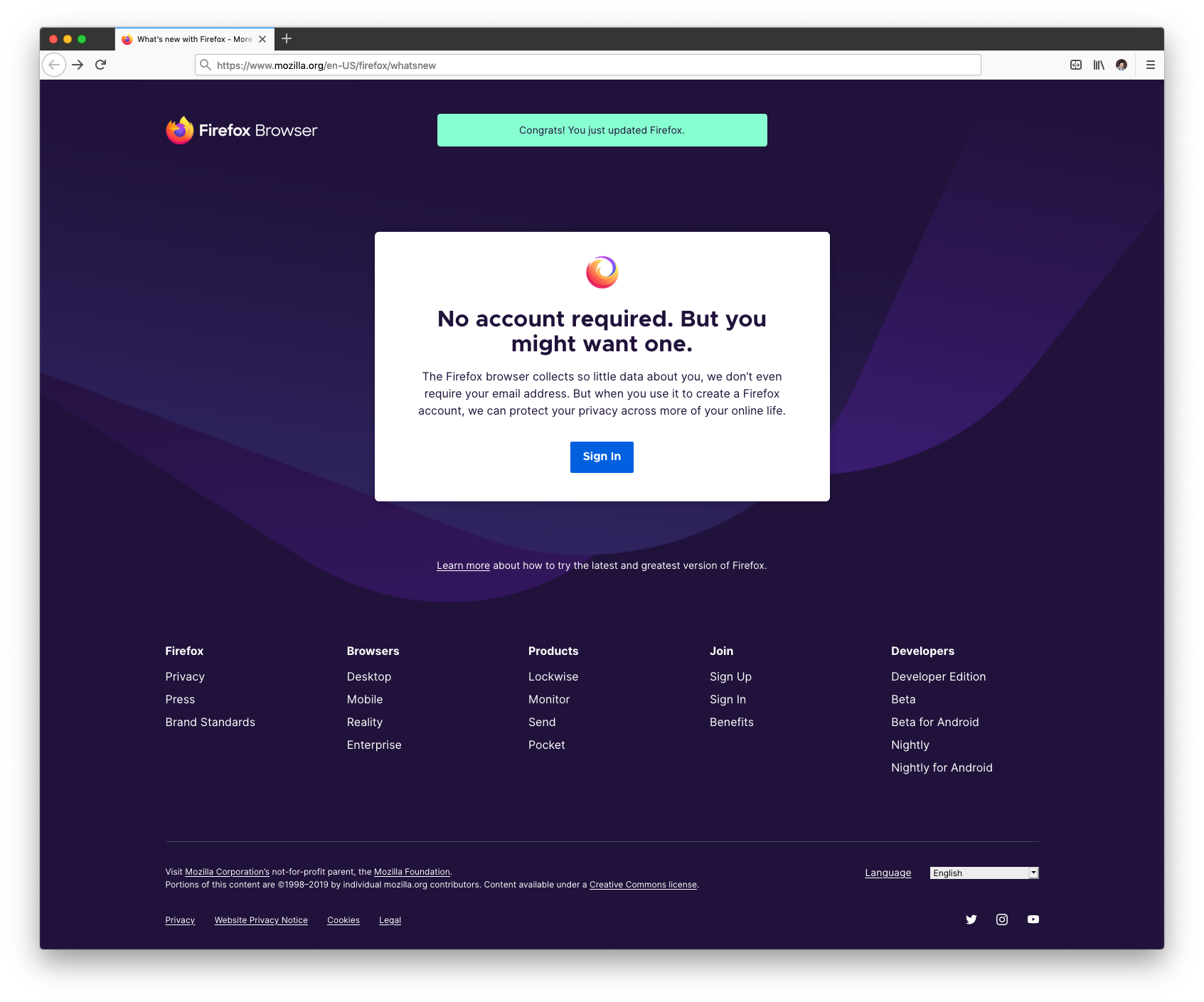
Disclaimer: Green notification copy may not align with content guidelines, just placeholder text. Will need to update this to align with the boilerplate language/ guidelines
I mocked this up quickly using existing UI and the Inspector so hopefully I've repurposed enough to keep this moving along.
 antlam
on 19 Nov 2019
antlam
on 19 Nov 2019
Let's try the grey notification from here https://protocol.mozilla.org/patterns/molecules/notification-bar.html
with the text:
An even newer Firefox is available. Restart to update.
antlam
on 19 Nov 2019
@antlam not sure if you're the right person to ask here, but I notice the page is currently lacking a meta description. We we have an up to date piece of copy we could use here?
 alexgibson
on 25 Nov 2019
alexgibson
on 25 Nov 2019
@alexgibson interesting... yeah I'm not sure who wrote the meta descriptions. Let me have an ask around. But is there a general one that would make sense for our use case here that you could share?
antlam
on 25 Nov 2019
@antlam how about we use the existing meta description from the /firefox/accounts/ page?
Take your stand against an industry that’s selling your data to third parties. Stay smart and safe online with technology that fights for you.
Please note I've also adjusted the following line to use the "Firefox Browser" product name, as opposed to just "Firefox".
An even newer Firefox Browser is available. Restart to update.
This is now up on demo for stakeholder review:
https://www-demo2.allizom.org/en-US/firefox/whatsnew/all/
One open question: what is the earliest FF version that supports this accounts sign-in flow? Do we need to think about a fallback conditional CTA for really old versions?
alexgibson
on 26 Nov 2019
One open question: what is the earliest FF version that supports this accounts sign-in flow? Do we need to think about a fallback conditional CTA for really old versions?
Alternatively, we could only show this template for a specific FF version number and upward.
alexgibson
on 26 Nov 2019
Alternatively, we could only show this template for a specific FF version number and upward.
hmm... I have to admit my brain is a bit fuzzy here with the specific version numbers. @hoosteeno do you know?
Looking good! to double check, the "Release notes" links to the ones for this specific update (as opposed to the latest)?
antlam
on 26 Nov 2019
Looking good! to double check, the "Release notes" links to the ones for this specific update (as opposed to the latest)?
I just updated to make this happen. Note you'll need to include a version number in the URL, like so:
https://www-demo2.allizom.org/en-US/firefox/60.0/whatsnew/all/
alexgibson
on 27 Nov 2019
@alexgibson when I visit the URLs above, I still see the mobile CTA. Are you planning to update to the Accounts CTA in the design?
hoosteeno
on 3 Dec 2019
@hoosteeno appologies I had to switch demo servers. I'll update the link shortly.
alexgibson
on 3 Dec 2019
@hoosteeno demo is updated https://www-demo2.allizom.org/en-US/firefox/60.0/whatsnew/all/
alexgibson
on 3 Dec 2019
One open question: what is the earliest FF version that supports this accounts sign-in flow? Do we need to think about a fallback conditional CTA for really old versions?
We definitely need this. @antlam , can you consider the fact that at least some upgraders can't use accounts, and specify what they should see instead? Suggestions:
- A much stronger "get upgraded" message.
- The mobile CTA we've always shown, with the new upgrade notification.
hoosteeno
on 3 Dec 2019
Good point. I'd say just switch the CTA (White box content) to the "Get firefox on your other device" one that we've always said.
As for the notification or stronger "get upgraded" message, I'll need to think about that!
antlam
on 4 Dec 2019
Good point. I'd say just switch the CTA (White box content) to the "Get firefox on your other device" one that we've always said.
Ok, in order to do this then we'll only show this new template for say Firefox version (X) and upward. The question is, what should that version number be?
alexgibson
on 4 Dec 2019
All browsers < 60 should get the older page.
https://mozilla.github.io/ecosystem-platform/docs/fxa-engineering/fxa-dev-process#browser-support
hoosteeno
on 4 Dec 2019
This page will be one of the first pages to be localized by our new localization system, so it's waiting for some final work on that system before it can land.
hoosteeno
on 10 Dec 2019
Design here is done, so I think we can close this issue.
alexgibson
on 11 Dec 2019
Related issues
hoosteeno
·
9Comments
hoosteeno
·
9Comments
 ejregithub
·
10Comments
ejregithub
·
10Comments
 rraue
·
9Comments
alexgibson
·
7Comments
rraue
·
9Comments
alexgibson
·
7Comments
Most helpful comment
All browsers < 60 should get the older page.
https://mozilla.github.io/ecosystem-platform/docs/fxa-engineering/fxa-dev-process#browser-support