Beaker: The mv command fails when target file contains spaces
Describe the bug
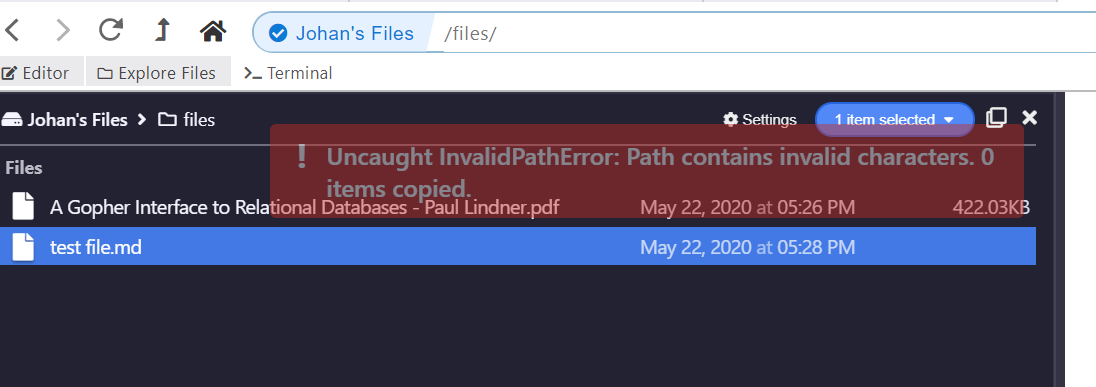
When using the command mv or cp with a target file name containing spaces, the process fails with the error message:
Error: Uncaught InvalidPathError: Path contains invalid characters
To Reproduce
Steps to reproduce the behavior:
- Find a file in a hyperdrive
- Drag and drop or execute the
mvorcpwith a target path containing spaces; use quotes to encapsulate the file name - The process will fail with the above mentioned error message
Expected behavior
The mv and cp commands should accept target paths with - escaped - spaces within the file name / folder
Screenshots
Desktop (please complete the following information):
- OS: Windows 10
- Beaker: Version: 1.0.0-prerelease.2
Electron: 9.0.0
Chromium: 83.0.4103.64
Node: 12.14.1
Hyperdrive: 10.11.0
API: 0
Daemon: 1.13.12
Client: 1.15.1
Schema: 1.10.0
Fuse Native:
Fuse:
Additional context
Not tested on other platforms.
bug
 johanbove
>All comments
Thanks for filing! I'll check into it.
 pfrazee
on 22 May 2020
pfrazee
on 22 May 2020
👍2
Was this page helpful?
0 / 5 - 0 ratings
Related issues
 pmario
·
4Comments
pmario
·
4Comments
 aaronshaf
·
3Comments
pfrazee
·
3Comments
aaronshaf
·
3Comments
pfrazee
·
3Comments
 monteslu
·
3Comments
monteslu
·
3Comments
 dasanchez
·
3Comments
dasanchez
·
3Comments
Most helpful comment
Thanks for filing! I'll check into it.