Beaker: In HTML files: no javascript syntax highlighting for module scripts
Describe the bug
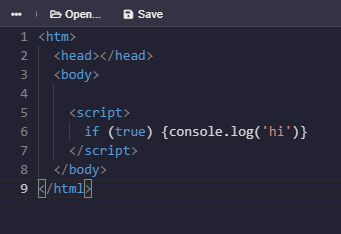
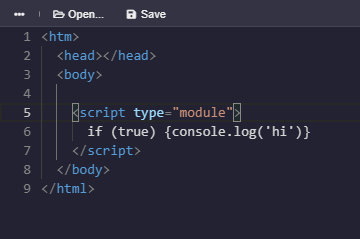
In HTML files, syntax highlighting for javascript is gone when adding type="module" to the script tag.
To Reproduce
Steps to reproduce the behavior:
- Create a new html file in any hyperdrive.
- Add
<script>if (true) {console.log('hi')}('hi')</script>somewhere in the file. - You'll see there's syntax highlighting for the javascript.
- Add
type="module". I.e., edit the code to be<script type="module">if (true) {console.log('hi')}</script>. - Syntax highlighting for the javascript is gone.
Expected behavior
For the javascript syntax highlighting to work for module scripts.
Screenshots
Javascript syntax highlighting working in non-module scripts: (no problem here)
Javascript syntax highlighting not working in module scripts:
Desktop:
- OS: Windows 10
- Browser: Beaker Browser
- Version: v1.0.0-prerelease.1
Additional context
None.
bug
 hossameldeen
All 2 comments
May be fixable by updating our version of Monaco. I'll check into it.
 pfrazee
on 20 May 2020
pfrazee
on 20 May 2020
👍1
It took some fancy maneuvering (aka literally anything with Monaco) but I got this one!
pfrazee
on 1 Jun 2020
🚀2
Was this page helpful?
0 / 5 - 0 ratings
Related issues
 flpvsk
·
4Comments
flpvsk
·
4Comments
 dasanchez
·
3Comments
dasanchez
·
3Comments
 mundusnine
·
3Comments
mundusnine
·
3Comments
 aaronshaf
·
4Comments
hossameldeen
·
4Comments
aaronshaf
·
4Comments
hossameldeen
·
4Comments
Most helpful comment
It took some fancy maneuvering (aka literally anything with Monaco) but I got this one!