Beaker: The files explorer HTTPS site leads to some confusing UX
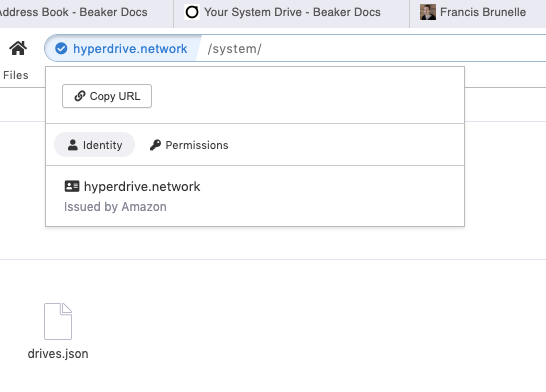
This doesn't look right at all - some label not being updated from the previous state?
 mikehearn
All 4 comments
@mikehearn That's the SSL certificate for the hyperdrive.network domain, which is indeed issued by Amazon CA.
 programmarchy
on 15 May 2020
programmarchy
on 15 May 2020
I think we should considering changing how we do this.
We made the files explorer an HTTPS app with the idea that we wanted the URLs to be copy-pasteable across browsers. It also opened the possibility that the explorer could use a gateway service at some point to share files with non-hyper browsers.
There are a couple of downsides to doing this though:
- The files explorer is integrated into the browser's tooling (it wasnt in the sidebar when we made this decision) and it feels weird to hit a server in that context.
- Loading from https is a little slow (you may notice the sidebar explorer is slower to start than other tools)
- Loading from https doesnt work offline (unless we get some serviceworker arrangement going)
- This kind of confusion
We might just move it to beaker://explorer/. Any thoughts on this?
 pfrazee
on 15 May 2020
pfrazee
on 15 May 2020
Wow, I didn't realise it's an actual website. From everything I read in the docs and surmised from the UI, I had believed the "system drive" was purely local and no remote server had any access to it. The file browser I had expected to be internal to Beaker itself. Rather surprised to discover it's not. What happens if hyperdrive.network gets compromised?
Absolutely would agree with moving it to beaker://explorer/ - that would match my mental model for what was happening far better.
mikehearn
on 15 May 2020
@mikehearn the "System Drive" is an actual hyperdrive located at hyper://system/, but Beaker automatically redirects from hyper://system/ to https://hyperdrive.network/system -- aka, the files explorer looking at the system drive. It does that because I was struggling with preventing fetch() calls from reading, say, hyper://system/drives.json.
pfrazee
on 15 May 2020
Related issues
 johanbove
·
3Comments
johanbove
·
3Comments
 msfeldstein
·
3Comments
msfeldstein
·
3Comments
 ShalokShalom
·
4Comments
ShalokShalom
·
4Comments
 monteslu
·
3Comments
pfrazee
·
4Comments
monteslu
·
3Comments
pfrazee
·
4Comments
Most helpful comment
I think we should considering changing how we do this.
We made the files explorer an HTTPS app with the idea that we wanted the URLs to be copy-pasteable across browsers. It also opened the possibility that the explorer could use a gateway service at some point to share files with non-hyper browsers.
There are a couple of downsides to doing this though:
We might just move it to
beaker://explorer/. Any thoughts on this?