Beaker: Spec Discussion: User identity, filesystem, object-store folders
👋 Hey everyone. I wanted a discussion thread for recent spec work. This will primarily cover:
I'm going to give an overview of recent specs and explain how I see these specs fitting into the future plans. You can head to https://github.com/beakerbrowser/specs to find all of the specs.
Overview
The core of these specs is a "user identity" system which ties to a user filesystem.
The filesystem is the user's primary storage. It's split into two different dats: the "private" dat (which is the root of the user's filesystem) and the "public" dat (which represents the user's identity).
Identity
The public dat URL is the user's ID. The files in the public dat represent the user's profile. You can also implement a website on your public dat.
Privacy
The private dat is never exposed to other users. Beaker keeps the private dat off the network, for now.
Security
The public dat is the basis for authentication. Users will publish encryption pubkeys on their public dats which are then used to encrypt files and connections. This is explored to some extent with the DatPubkeyFile proposal but isn't a spec yet. We'll need to build a Web of Trust with the public dats.
Data models
For application data, there are two models in these specs:
- General file storage
- Object-store folders
The object-store folders are based on our experience building Fritter. They are extremely light-weight from an API perspective — they are simply folders that contain .json files and which have validation and permissions enforced by the browser.
Permissions
These specs evolve the permissions model for dats. The new mechanisms include:
- The user's private dat requires per-file read and write permissions.
- The user's public dat is free to read but requires per-file write permissions.
- "protected" folders can not be modified by apps.
- "objectstore" and "keystore" folders can only be modified using special permission flows.
To gain read or write access to individual files and folders, there is now the navigator.showFileDialog() API.
To gain read or write access to the object stores, there is now the navigator.session API.
I recommend taking a look at the navigator.session API because it's the primary way that applications will interact with the user's data and identity.
Notes
Improving privacy models
The current privacy model is binary — you can either store data privately or publish it publicly. This will need to become more sophisticated in the future so that you can share with individuals or groups. We'll be able to do that using:
- Authenticated connections so that apps can open message channels directly to recipients (
PeerSockets). - Network access control so you can share dats only with intended recipients.
- At-rest encryption so that you can publicly publish files which are only readable by intended recipients.
Custom hypercore data structures
The specs keep the door open to custom data structures built directly on hypercore, which is important for introducing new CRDTs. This will be accomplished by mounting the custom datastructures as special "files" in the private or public dat.
Deciding against DNS
In an earlier proposal, I toyed with using DNS as part of identity. I liked the simplicity of using domain names as user shortnames. However, I decided against this because I feel the UX of DNS is not good enough to be a core part of user setup. Instead, I want to explore using search and a Web-of-Trust to discover and authenticate users. DNS will still be a part of the system, but mainly for orgs and services, and not as a requirement for all users or content.
Integrating with the host filesystem
A few folks suggested we drop the private dat in favor of using the host filesystem directly. This would have the advantage of a nicer integration with the host OS, but it would lose the ability to network the private dat (which is useful for backup and inter-device sync). My current thinking is that we can explore local filesystem access in addition to the private and public dats.
Closing
Thanks in advance for your feedback. My hope is that PeerSockets, custom hypercore mounts, and some more general-purpose APIs like Block Storage will give developers a lot of flexibility, while the private/public dats, objectstores, and keystores will give a good base structure.
Let me know what tweaks you think would improve these specs, and if you think I've missed anything. This issue is good for general discussion, but you can open individual issues on https://github.com/beakerbrowser/specs.
 pfrazee
All 10 comments
Here's an example from the main API for "signing in" as a user:
// Request read access to the private contacts and full access to the public fritter posts
await navigator.session.request({
  resources: [{
    // Private contacts
    type: 'private:objects',
    schema: 'dat://walled.garden/contact.schema.json',
    permissions: ['read']
  }, {
    // Public fritter posts
    type: 'public:objects',
    schema: 'dat://fritter.hashbase.io/schemas/post.json',
    permissions: ['create', 'read', 'update', 'delete']
  }]
})

// Log the private contact filenames
var privContacts = navigator.session.getUrl('private:objects', 'dat://walled.garden/contact.schema.json')
var privdat = new DatArchive(privContacts.host)
console.log(await privdat.readdir(privContacts.pathname))

// Publish a new post
var pubPosts = navigator.session.getUrl('public:objects', 'dat://fritter.hashbase.io/schemas/post.json')
var pubdat = new DatArchive(pubPosts.host)
await pubdat.writeFile(`${pubPosts.pathname}/${Date.now()}.json`, JSON.stringify({
  type: 'text',
  text: 'Hello, world!'
}))
Basically what this is doing is, requesting to "login" to the user's account, and asking for access to the user's private contacts folder and public posts folder. The folders are identified by their schemas, and this example is using the hypothetical dat://walled.garden/contact.schema.json for the contacts and dat://fritter.hashbase.io/schemas/post.json for the posts.
pfrazee
on 3 Nov 2018
Requesting a signin triggers this UI:
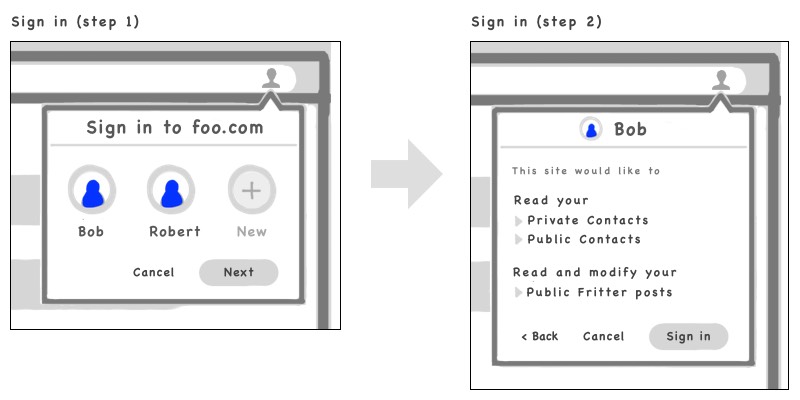
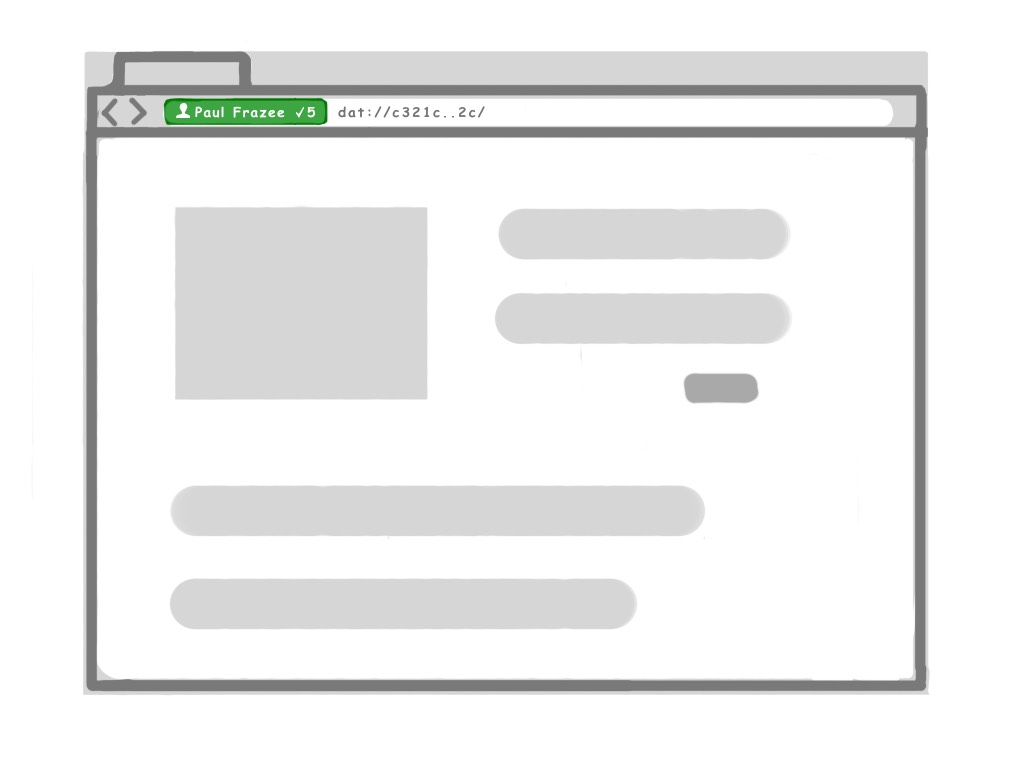
And the current signin is shown in the top right of the url bar for the given site:
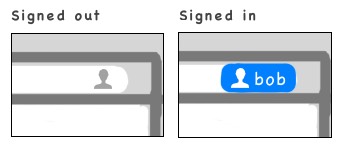
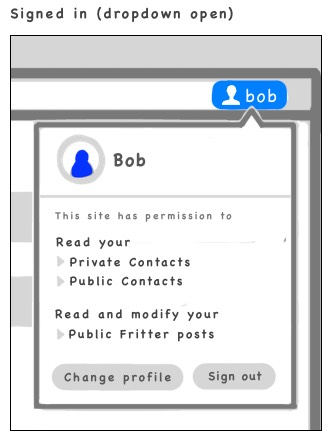
pfrazee
on 3 Nov 2018
I already opened issues for these, but I'll repost them here:
- Concerns w/ Index.json – Index.json feels like the next
.DS_Store - Consider folder extensions over Index.json types – Another way we could help distinguish between these special folders and normal folders
- An Applications folder – A familiar alternative to the
app://scheme
 webdesserts
on 4 Nov 2018
webdesserts
on 4 Nov 2018
It seems to me that the user identities are per site right now. I think I talked about this the last time we discussed profiles, but I think that it would be more intuitive if you had one user "signed-in" per window. I think it could be confusing to change users per tab. In the same way that modern browsers open a "guest window" or an "incognito window", I think you should open a "user window" as well. It's less to keep in your memory and less state churn while moving through the browser.
webdesserts
on 4 Nov 2018
@webdesserts There's definitely an upside to that, but would it mean you're automatically "logged in" as that user when you visit other sites?
pfrazee
on 4 Nov 2018
@pfrazee I would imagine that the site would still need to request permission to access your profile... so it might still act the same from the site's point of view, but the browser just wouldn't ask the user repeatedly which account they want to be signed in as. The user won't be aware of their "sign-in" status for any given site. They can just view which sites they've given profile permissions to and will occasionally see sites prompting to access their profile.
This may be something that is handled differently per browser. One browser could implement it per tab as you're suggesting, another browser could implement it per window, and something like chrome OS could have one user "signed in" for the entire computer.
webdesserts
on 4 Nov 2018
Hmm, yeah that actually makes a lot of sense. You might be right about this.
pfrazee
on 4 Nov 2018
Okay so here are some mockups for "window-wide" login rather than "side-wide". I had two different ideas on how the permissions-requests would work, so I mocked up both ideas.
Start page
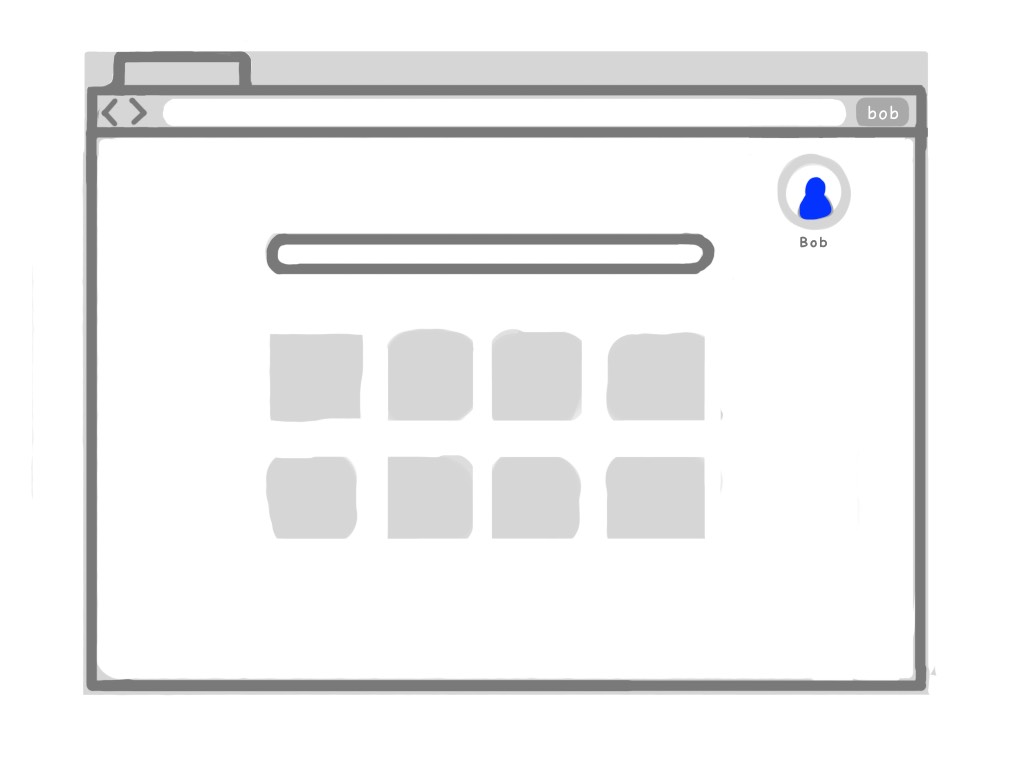
There's a "current user" badge in the browsing chrome to the right of the URL bar.
Current user dropdown
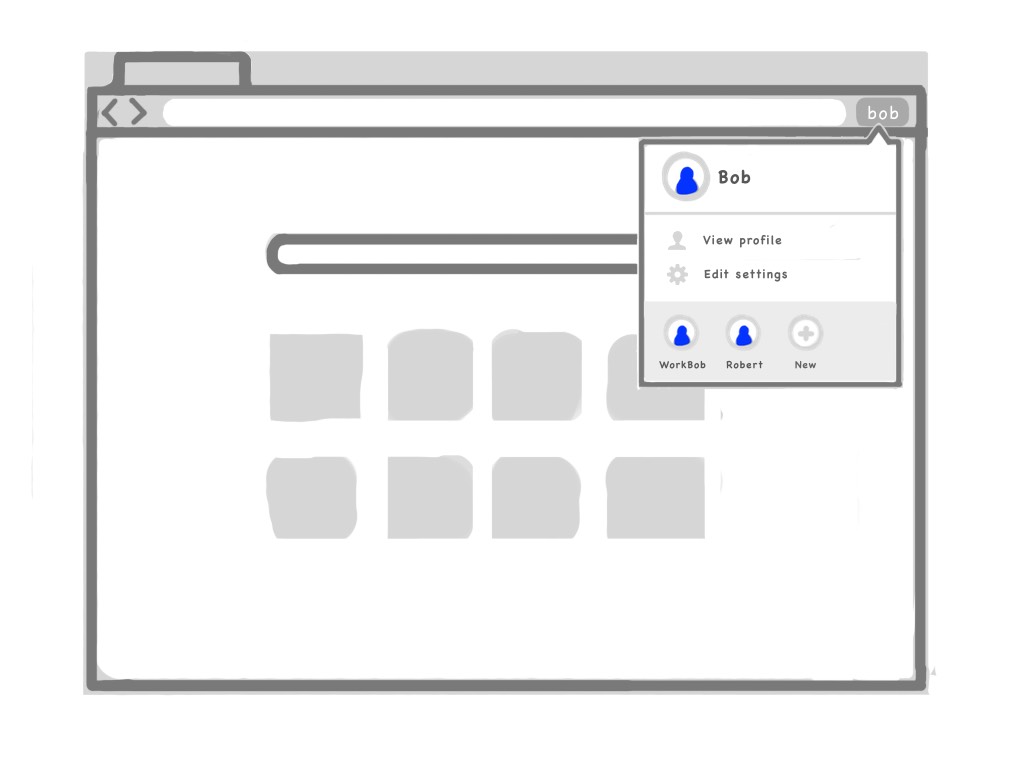
Clicking on the badge (or on the start page's profile indicator) opens this dropdown. The two menu items ("View profile" and "Edit settings") will open those targets in new tabs, while the profile items across the bottom will create new windows logged in under those identities. The "new" item will put you into a new window with the new-user creation flow.
Site request permissions (v1)
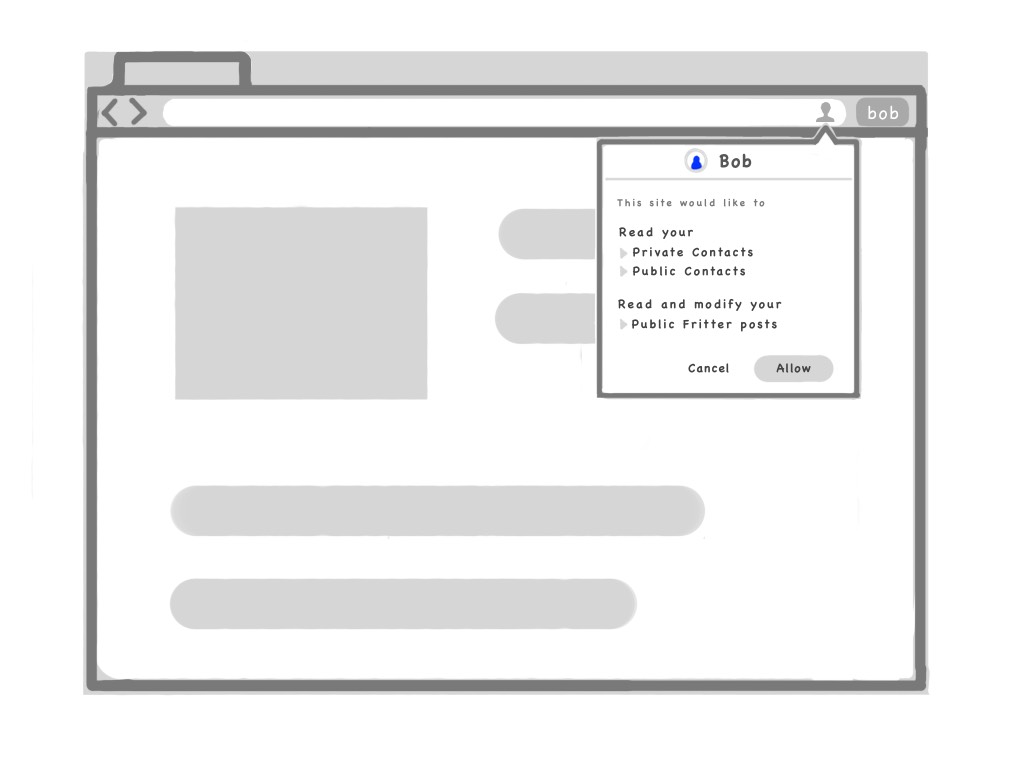
A site that requests permissions via navigator.session.request() would get this dropdown.
The "v1" approach creates a little profile icon on the right of the URL bar. That icon persists, and lets you review the granted permissions when you click it. The icon would be a bright blue if you granted perms, and grayed out if you did not.
Site request permissions (v2)
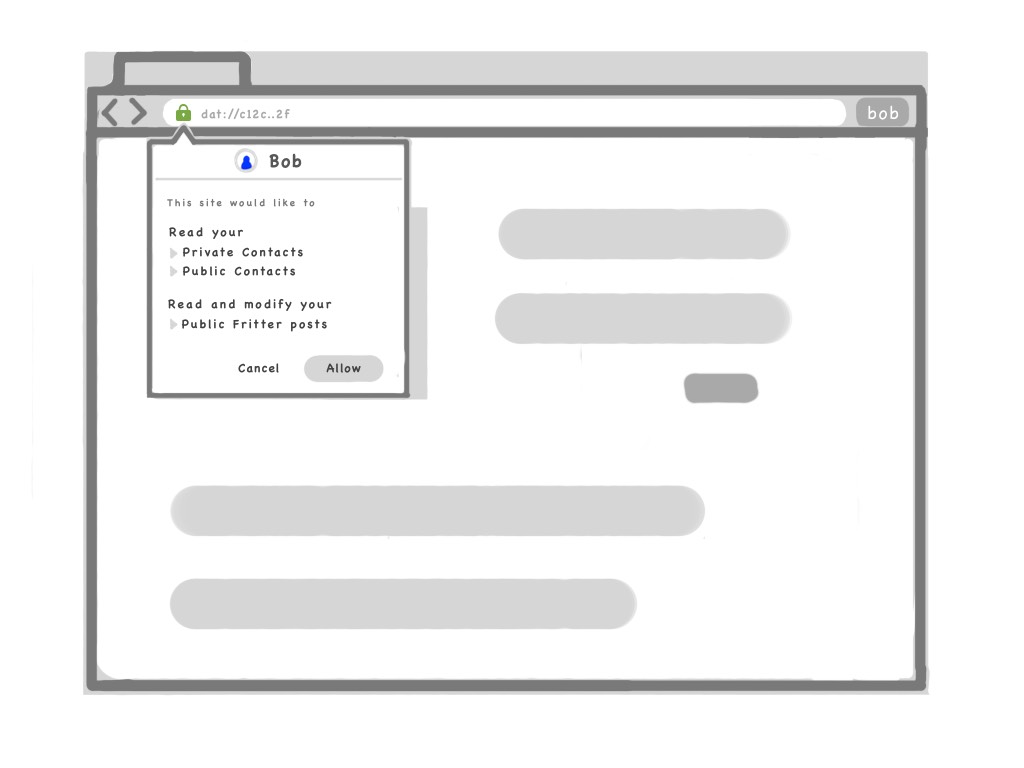
A site that requests permissions via navigator.session.request() would get this dropdown.
The "v2" approach makes the permissions request part of the typical permissions-request flow, and attaches it to the site's "certificate icon" rather than creating a new icon in the right of the URL bar. This may fit more naturally since it's where all other permissions are requested, but it may not make the "logged in" state as obvious.
It's worth noting that the future "Web of Trust" ideas will add more detail to the "certificate," as per this mockup:
Right approach?
So, how does this overall concept feel, and how do we feel about the perms requests v1 or v2?
pfrazee
on 5 Nov 2018
I like V2 best. It feels more natural and will pair well with the future "Web of Trust". Keeping everything relevant to privacy and permission in one location.
 Septimus
on 5 Nov 2018
Septimus
on 5 Nov 2018
I’m with @Septimus in that I prefer V2, We already have peer count, local folder, http->dat swap, and general settings on the right side of the url bar. Probably best not to add too many actions over there.
webdesserts
on 7 Nov 2018
Related issues
 NicholasGWK
·
4Comments
NicholasGWK
·
4Comments
 pmario
·
4Comments
pmario
·
3Comments
pmario
·
4Comments
pmario
·
3Comments
 flpvsk
·
4Comments
flpvsk
·
4Comments
 monteslu
·
3Comments
monteslu
·
3Comments
Most helpful comment
Requesting a signin triggers this UI:
And the current signin is shown in the top right of the url bar for the given site: