Beaker: Ctrl+F not working. Find from menu does, though.
Operation System: Ubuntu 16.04
Beaker version: Source-latest (7bac87ca9de26289e042b4bd382027dac6ceab4e)
Problem
Ctrl+F not working. "Find in page" from menu works, though.
Relevant
- This happened after #1189's fix.
- This also happened when we tried to upgrade electron-localshortcut to 3.x.
- The shortcuts in the UI menu read stuff like "^F". Not sure if this has always been the case; just mentioning it in case it helps.
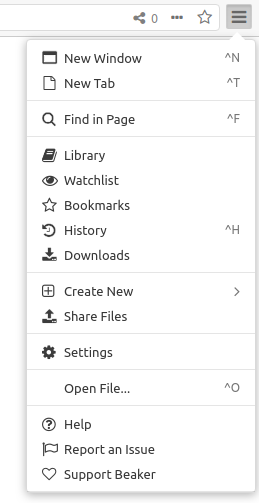
Opened it as a separate issue from #1189 as it's a different problem.
And really, it's no big deal for me and not urgent at all :). And thanks again for fixing #1189, that was awesome! and it eliminated a pain point indeed.
 hossameldeen
All 13 comments
Thanks for reporting, I'll check into it.
 pfrazee
on 21 Oct 2018
pfrazee
on 21 Oct 2018
Huh, I'm not able to reproduce this on Ubuntu 18.04
pfrazee
on 22 Oct 2018
I'm not intending to spend time debugging it for now, it's not that much of an issue for me currently. When I have time, will see how to extract useful Ubuntu logs to debug this problem (event listeners on Ubuntu level, .. etc).
For now, to anyone reading this:
1) If you're experiencing the problem as well, please tell us to make sure it's not a fault at my side.
2) If you know how to get useful Ubuntu logs to debug this issue, please tell us.
hossameldeen
on 24 Oct 2018
I would be really interested in the outcome of this issue! Sadly, no idea what could cause this yet.
 puf17640
on 24 Oct 2018
puf17640
on 24 Oct 2018
@hossameldeen are there any other shortcuts that dont work, by chance?
pfrazee
on 24 Oct 2018
@pfrazee Does beaker internally log out errors? If so, where could one find them?
puf17640
on 24 Oct 2018
beaker://debug-log/
pfrazee
on 24 Oct 2018
Thanks! Since you didn't mention it, I guess, you won't find any errors related to this issue in the log? That was my first thought, but ubuntu's error logs might be more helpful.
puf17640
on 24 Oct 2018
Probably not. The debug-log is really noisy right now and I might remove some of the dat events because we now have the swarm debugger.
pfrazee
on 24 Oct 2018
@pfrazee You're right, some other shortcuts don't work. For the menu shortcuts:
- Ctrl+N, T work.
- Ctrl+F, H, O don't.
I don't know what other shortcuts there are, but Ctrl+number and Ctrl+W work.
hossameldeen
on 25 Oct 2018
The ones that work seem to be the ones registered using our localshortcut module. The ones that fail are the keyboard accelerators. I'd bet a nickle it's related to https://github.com/electron/electron/pull/15094.
pfrazee
on 25 Oct 2018
Your work on localshortcut wasn't in vain indeed, @pfrazee :-)
hossameldeen
on 26 Oct 2018
I am also encountering this issue. Using the keyboard shortcut ctrl+F on Windows 10-Pro (1903) 64-bit.
My logs are below:
beaker Uncaught exception: Error: Must provide a non-empty search content
at WebContents.findInPage (C:UsersuserAppDataLocalProgramsbeaker-browserresourceselectron.asarbrowserapiweb-contents.js:321:15)
at View.moveInpageFind (C:UsersuserAppDataLocalProgramsbeaker-browserresourcesapp.asarbackground-process.build.js:2494:22)
at View.showInpageFind (C:UsersuserAppDataLocalProgramsbeaker-browserresourcesapp.asarbackground-process.build.js:2471:12)
at click (C:UsersuserAppDataLocalProgramsbeaker-browserresourcesapp.asarbackground-process.build.js:1847:26)
at MenuItem.click (C:UsersuserAppDataLocalProgramsbeaker-browserresourceselectron.asarbrowserapimenu-item.js:56:9)
at Function.executeCommand (C:UsersuserAppDataLocalProgramsbeaker-browserresourceselectron.asarbrowserapimenu.js:31:13)
 gabefair
on 21 Oct 2019
gabefair
on 21 Oct 2019
Related issues
 johanbove
·
3Comments
johanbove
·
3Comments
 mundusnine
·
3Comments
mundusnine
·
3Comments
 monteslu
·
3Comments
monteslu
·
3Comments
 aaronshaf
·
4Comments
aaronshaf
·
3Comments
aaronshaf
·
4Comments
aaronshaf
·
3Comments
Most helpful comment
Huh, I'm not able to reproduce this on Ubuntu 18.04