I've added a pager to my command. So is there any option to search any string case-insensitive?
 rajeshisnepali
All 11 comments
Then it really depends on your pager. See -i and -I options in man 1 less for less (also mind that less in turn depends on your system regex library - use ldd $(which less) to check - usually should be pcre standard perl regex). Otherwise you should search the docs of your pager.
 cedric-sun
on 10 Aug 2020
cedric-sun
on 10 Aug 2020
I think what @rajeshisnepali wanted is more like less -i. For exmaple, cat somefile.txt | less -i.
bat can't do this trick.
-- update --
But you can bat somefile.txt and type -i to enable ignore case.

 archongum
on 12 Aug 2020
archongum
on 12 Aug 2020
@archongum bat somefile.txt and typing -i didn't work for me.
Here's a quick screencast.
https://www.dropbox.com/s/8jqgwbbe9fow84y/bat_case_insensitive_not_working.webm?dl=0
rajeshisnepali
on 12 Aug 2020
Here's a quick screencast.
https://www.dropbox.com/s/8jqgwbbe9fow84y/bat_case_insensitive_not_working.webm?dl=0
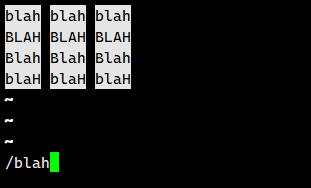
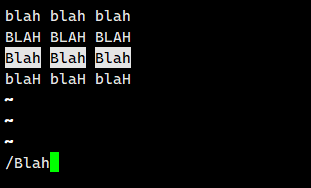
@rajeshisnepali I think ignore case mode only effected when searching with pure lower case string. If the searching string contains A single uppercase character, ignore case mode won't work anymore.
These two pictures below are searching in ignore case mode.
archongum
on 13 Aug 2020
You can also use the --pager option in the config file to always pass -i to less (see README for details).
 sharkdp
on 13 Aug 2020
sharkdp
on 13 Aug 2020
Oh yes, for bat 0.15.4 and newer I believe the default pager is set as of less. I've aliased both cat & less to bat to perform accordingly.
rajeshisnepali
on 13 Aug 2020
I'm just trying this now (on Arch); with export PAGER="/usr/bin/less -RFI" then bat /some/file, it doesn't work, but if I do bat --pager "less -RFI" /some/file it does work. I'm quite confused by this.
 mxmilkiib
on 19 Sep 2020
mxmilkiib
on 19 Sep 2020
PAGER will be overwritten by BAT_PAGER (have you set this?), which will be overwritten by --pager=… settings in the config file or the command line.
sharkdp
on 20 Sep 2020
I don't have a bat config nor BAT_PAGER set, but setting BAT_PAGER resolved this, thanks :)
mxmilkiib
on 20 Sep 2020
I don't have a
batconfig norBAT_PAGERset, but settingBAT_PAGERresolved this, thanks :)
Oh - right. If we detect less in PAGER, we actually overwrite the command line options (to make sure -R is included). So using BAT_PAGER or the config file is the only option here.
sharkdp
on 20 Sep 2020
It would be great if someone could add this to the README.
sharkdp
on 20 Sep 2020
Related issues
 LunarLambda
·
23Comments
LunarLambda
·
23Comments
 sumanthratna
·
20Comments
sumanthratna
·
20Comments
 hoffa
·
18Comments
hoffa
·
18Comments
 davidarmstronglewis
·
30Comments
davidarmstronglewis
·
30Comments
 joeycozza
·
20Comments
joeycozza
·
20Comments
Most helpful comment
@rajeshisnepali I think ignore case mode only effected when searching with pure lower case string. If the searching string contains A single uppercase character, ignore case mode won't work anymore.


These two pictures below are searching in ignore case mode.