Babylon.js: Node Material Editor - vNext
We will capture here all new features we could consider to add to NME for 4.2 and future release:
- [ ] Add a preview per node (when it makes sense) using a plane rendering
- [ ] Add a recent textures list to the texture block
- [ ] Signed Distance Function
- [ ] SLERP?
- [ ] Noise Sine Wave Block
- [ ] Community repository of custom nodes
- [ ] Brainstorm on a mechanism to allow multiple passes in the generated shader
- [ ] Variable nodes: One node that has an input and a field to name the variable, another node with an output and a dropdown to select user made variable. This allows the user to clean up his node graph by accessing other nodes across the graph without needing a wire stretching end to end. This is a UI optimization only and these variables should not take up uniforms in the shader. They should act merely as an abstraction of a connection to cut down on some of the spaghetti in the graph. See comment below for sketch of how this should work.
- [x] Refraction node
- [x] Reuse uniforms pointing to the same system value
- [x] Add Swizzle Node
- [x] Expand upon the collapse frame functionality to export the frame as a stand-alone json that can be imported into another graph. This is essentially a custom node functionality so we would need to add some logic around adding them to the node list under a custom header. Also consider some way to allow users to auto-load their preferred custom nodes or some easy way to import a library of custom nodes saved by the user.
- [x] Ability to resize frame with a window resize icon in the lower right (standard behavior)
- [x] Option to pack/unpack a group into a super-node
- [x] Option to save a portion of a graph (and an option to import it as well)
- [x] Comment field for frames. The comment could live right under the header of the frame as a way to summerize the whole function of that frame.
- [x] Option to pop out the preview window like is done with the inspector
- [x] UI in tNME to display all the updatable inputs (ala Inspector)
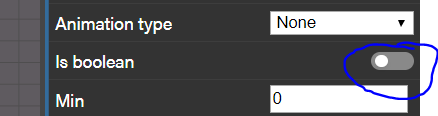
- [x] Add an option to flag a float value as boolean (UI only)
- [x] Add an new output for LightNode: Shadow (between 0 and 1)
- [x] Center horizontally on collapse
- [x] copy/paste with links
- [x] Expose non connected ports on collapsed frames
- [x] Option to collapse/expand a portion of a graph
- [x] Frames for blocks of nodes
- [x] Comment field + floating above the node
- [x] NLERP Block
- [x] NME PBR
- [x] Allow Frames to become NME Nodes
- [x] String Ref refractor
UI:
- [ ] Design exploration for accessibility
- [ ] Add icons to node header for exposed in inspector and constant data types
- [ ] Usability testing and audit of nodes for UX optimization
- [x] When making NME nodes "visible in the inspector," it would be awesome if there was a way for us to make a custom order in the inspector...instead of listing them alphabetically.
- [ ] Is there a way to kick an error when you don’t build a node material?
 deltakosh
All 23 comments
What would be really nice to help readability by reducing the number of intersecting lines would be to have the possibility to flip (mirror) the left/right sides of a node. So, after flipping, the inputs would be on the right and the outputs on the left.
For this to work, it must be obvious what are the inputs/outputs just by looking at the node and not having to refer to its definition to see if it has been flipped or not. So, current bullets would not work well because some input/outputs have the exact same graphical display. For eg:
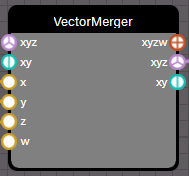

It's not necessarily obvious to everyone what are the input / output sides of these nodes if they can be flipped.
So, maybe something like (programmer art...):
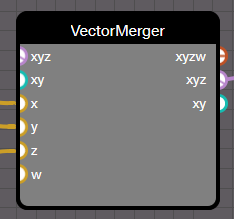
The inputs have the semi circle inside the frame (they are "in"puts) and the output have the semi circle outside the frame (they are "out"puts)... This way, it can be flipped and it's still obvious what are the inputs/outputs:
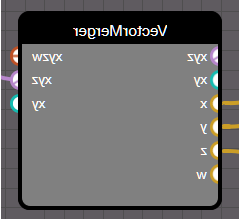
Of course the writings should be in the right direction, but you get the point.
 Popov72
on 31 Dec 2019
Popov72
on 31 Dec 2019
I'm not sure @PatrickRyanMS will agree (Me neither as I do not feel it easy to read)
deltakosh
on 31 Dec 2019
@Popov72, I'm not entirely sure I am following your design intent for being able to "flip" the inputs of a node. Node graphs typically have a strong "flow" or "direction" for their graph design. Some like Unity, Unreal, Maya, 3ds Max, and Substance Designer use a horizontal flow (primarily left to right but some like the old Unity plug-in Shader Forge actually changed their horizontal direction during its life cycle which can cause a usability issue while users remap their minds and muscle memory). Others like Houdini use a vertical flow, in their case it is top to bottom.
Right now if I have to backtrack in a graph for any reason, I will see a wire traversing the wrong way and working against the flow. This can be a simple layout issue (reorganizing your nodes may correct it), it can be for optimization purposes (using one world mesh normal node to drive many other nodes which can cause long or winding wires), or it can be a visual indication that you have some complexity in your graph that could be reduced (seeing a spaghetti of wires for a simple effect can indicate that you are doing more than you need). But the core issue here is that I know, as a user, that my graph is executed from left to right in every case. If I have a wire that runs against the flow temporarily, I still know that I will execute from left to right at the end of that wire.
From what you are describing, and please correct me if I am not understanding your design, you will effectively be giving the user discretion over the flow of execution of the nodes. This means that some parts of the graph might execute left to right and others right to left in the same graph.
- This design will largely generate more switchbacks in wires (a right facing node and left facing node wired into a left facing node)
- It will add complexity to the user's decision making process when laying out their nodes (do I want a left or right facing node here)
- It will add a lot of extra steps for iteration (I created a left facing group of nodes that I need to change which requires them to now be right facing).
The other issue to think about is the next person to use the node graph. Right now every user can approach any node material with the expectation that we execute left to right. If we allow users to change that flow, "ground truth" of the node graph will change based on the author of the graph. Every node graph will need deciphering to understand the execution path before being able to fix, extend, or reuse parts of the graph.
I'd love to hear if you have a deeper design in mind that would necessitate or make an indeterminate flow a logical design choice. Right now, we have a way to simplify some of the spaghetti in a graph by making use of collapsible frames. This can simplify the view of a graph by turning this:
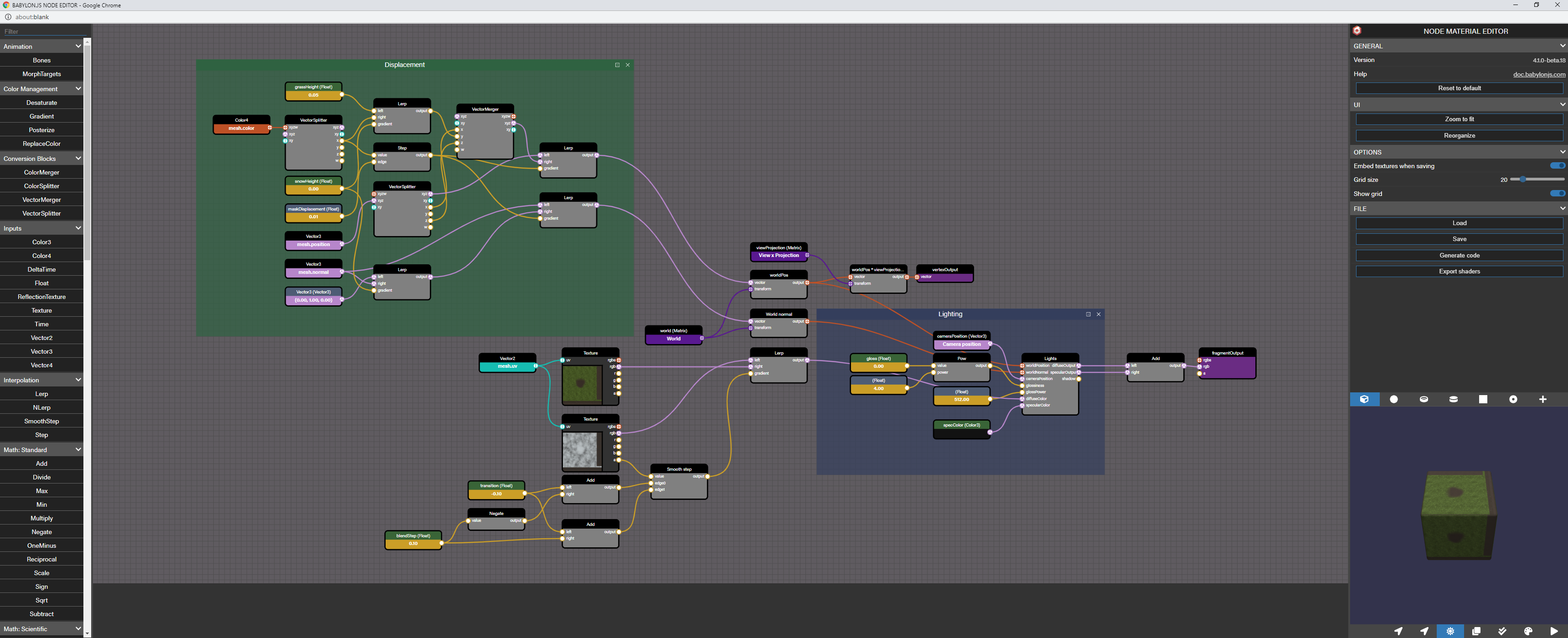
into this:

I have more ideas around frames that we need to explore before v2 of the node editor, but this is a good first step for the premiere of the entire editor. Please let me know if you have questions or other thoughts around why we should add an indeterminate flow to our graphs, but at this point, the added complexity of an indeterminate flow does not seem to be a good trade off to reduce overlapping in wiring.
 PatrickRyanMS
on 3 Jan 2020
PatrickRyanMS
on 3 Jan 2020
Thank you for the detail explanation.
In fact, when doing this material:

https://nme.babylonjs.com/#ZBGPQ9#7
I recall saying to myself that in the building blocks (the blue / grey frames), I could have avoided some crossing of the lines had I been able to flip some nodes vertically - and so made those blocks clearer (imo). The general flow of reading is still left to right, but inside the blocks you could have some nodes flipped to help readability.
But it's a minor thing, I understand very well your concern to keep a single direction of reading for all elements in the material.
Popov72
on 3 Jan 2020
Another one :)
Do you plan to support the "bool" type? I understand it could be complicated because having bool and float types would make things harder when doing math operations.
However, supporting a bool as being internally a float with only the 0/1 values should be easier. It would make the intent of some variables clearer and also would allow to have a switch in the inspector for such variables, instead of a slider that can take any value between 0 and 1.
Or maybe a more generalized "discretized float", that would allow the user to fill it with a list of numbers, and when there are only two numbers with 0 and 1 values, it can be shown as a switch in the inspector...
Popov72
on 13 Jan 2020
+1 for node previews! it makes debugging your shaders so much easier!

 Drigax
on 13 Jan 2020
Drigax
on 13 Jan 2020
@Popov72, are you just looking to have ab easy toggle in the inspector for your bool? Right now you can set float to have a min of 0 and max of 1 to get a slider, but I understand that this isn't quite as quick as a toggle. From a UX perspective, we would likely need to add a boolean option to floats to keep the math working correctly which would basically be a UI switch to input a 0 or 1 in the float in the inspector. The reason I am asking is that this would likely be something built into the inspector and editor rather than changing or adding a node for bool. Is this what you are thinking of?
As an aside, you can use the step node (which outputs 1 or 0 based on the input and the edge value) to give you a bool-type output. I like step because I can push an input into the node and then change either the edge value or the input to control the output between 0 and 1.
PatrickRyanMS
on 13 Jan 2020
@PatrickRyanMS Yes, I was asking both for an easy toggle in the inspector and to make it clear the only allowed values are 0 and 1 and nothing in-between. Doing step(1, myVar) only to get a 0 or 1 value when myVar can range from 0 to 1 is a bit wasteful imo, better to be sure beforehand (by some provided mean) that myVar will ever be 0 or 1.
Maybe it could be an option on the float node: a checkbox "use as boolean", that would only allow the 0 and 1 values (?)
My use cases are really boolean (I'm recreating the standard material in the nme): https://nme.babylonjs.com/#6E8GQ2
The 3 floats "DIFFUSE", "ALPHATEST" and "ALPHAFROMDIFFUSE" in the Diffuse pane corresponds to some #define in the fragment shader and are really yes/no values and I wouldn't like to add 3 step() just to be sure to have 0 or 1 values.
Popov72
on 13 Jan 2020
Yet another one!
How about reusing multiple times the same node without creating a new uniform each time?
For eg, I could create several "view matrix" nodes but I would like to have a single uniform view; in my shader and not as many as the number of "view matrix" nodes.
It's again for a visual clarity matter: in a complex shader, I can use a lot of times "mesh uv" or a standard matrix (view, world, ...). With a single node, I could have very long lines crossing the graph, it would be better to recreate the same node nearer the locations where it is used.
This "ghosting" system would only be for nodes with system values, as I don't think there's a point to create multiple uniforms for the same value (multiple view matrices or camera position, for eg).
However, allowing this would make less obvious which node(s) a given system variable is used by, as the variable would appear multiple times in the graph...
Popov72
on 13 Jan 2020
How about reusing multiple times the same node without creating a new uniform each time?
and
Maybe it could be an option on the float node: a checkbox "use as boolean", that would only allow the 0 and 1 values (?)
@Popov72, let's summon the mighty @deltakosh to get his reactions to these questions from your last two posts as he will likely have the answers as to feasibility and complexity behind the scenes.
PatrickRyanMS
on 14 Jan 2020
I'm not for the second one. If you have two nodes they should mean something from the code and not just be syntax sugar. What I would prefer is a system optimization that reuse uniform if they are pointing to the same system value (added to the list of features for vnext)
I also added the option to flag a float as boolean (from the UI standpoint only)
deltakosh
on 14 Jan 2020
Thanks!
Popov72
on 14 Jan 2020
Will be in next nightly:
deltakosh
on 14 Jan 2020
What could be nice would be to have a place where all parameters of the material that can be modified by the user would be listed. That would be like the "Visible in the inspector" property type but inside the node material editor itself.
That way, it would be easier to modify the output of the material, one would not have to click on different nodes in the graph to change the values: all values would be listed in a single location.
I think that would mean adding a "Visible in the material property page" (or any other suitable name) check/option in some of the node types (float / vector / ...). Note that it would not be an additional option in the "Type" list, because depending on the case, for a given type (Constant for eg), the variable could either be "Visible in the material property page" or not.
It would be for example a lot easier to work with the standard material that has been recreated in the material editor (https://nme.babylonjs.com/?#AT7YY5#1), as there are a number of const floats (~20) that can be changed but that aren't "Visible in the inspector" to avoid raising the number of uniforms used.
Popov72
on 19 Jan 2020
So we could have a list like in the inspector with all changeable properties (not just the visibile one)
I like it!
Added to the list
deltakosh
on 20 Jan 2020
@Popov72 I published the new version with the list of inputs to control in the default nme property page (after the load/save buttons)
deltakosh
on 24 Jan 2020
@deltakosh Cool, thanks a lot!
Note however that the boolean floats don't work, when we click on them their values don't change => going to fill an issue as there is another bug.
I can see that variables without name are not listed in the page, which is great as it allows to have building variables not meant to be changed by the user (I was going to ask for a mean for doing this when I noticed it!).
Popov72
on 25 Jan 2020
Thanks!
deltakosh
on 25 Jan 2020
Example of the variables nodes for abstraction of connections across the graph to eliminate some of the long lines running through the graph.
Variable nodes: One node that has an input and a field to name the variable, another node with an output and a dropdown to select user made variable. This allows the user to clean up his node graph by accessing other nodes across the graph without needing a wire stretching end to end. This is a UI optimization only and these variables should not take up uniforms in the shader. They should act merely as an abstraction of a connection to cut down on some of the spaghetti in the graph.

PatrickRyanMS
on 29 Jan 2020
I love this!
However, I don't think the first variable node has a lot of value regarding the graph itself, as it only serves to give a name to an output.
When clicking on a node, couldn't we have instead a section named "Variables" that would list all the outputs of this node with the possibility to give a name here?
Popov72
on 29 Jan 2020
That could be a lot. having a node to represent what you want to "export" could help for readability
deltakosh
on 29 Jan 2020
I agree with @deltakosh in that if you see a variable node wired to an input and need to find where that variable stems from if there's no visible node setting the variable you will need to just start clicking nodes looking for the variable set in node parameters.
We would definitely need some sort of trace back to the original node and it can't just be a name of the node that set the variable because that could be one of several. Think of setting a variable from the output of an add node but the user did not change the name of the node. If we had some sort of reference in the variable output node, it might say something like "input: add" which is not descriptive enough.
I agree that the variable input node does seem a bit redundant as a node, but I also see a world where we are able to save a render of the node graph for future reference. I often take screen captures of node graphs for future reference and anything hidden in node parameters does not get represented. This is to help me remember how I wire effects I make every once in a while without needing to go back and reinvent each time. Keeping as much representation on the graph as possible is super helpful for this.
PatrickRyanMS
on 29 Jan 2020
Added 3 tasks "NME PBR, Allow Frames to become NME Nodes, String Ref refractor"
 thomlucc
on 14 Mar 2020
thomlucc
on 14 Mar 2020
Related issues
deltakosh
·
61Comments
 maxime1992
·
17Comments
maxime1992
·
17Comments
 projectSHAI
·
38Comments
projectSHAI
·
38Comments
 Vinc3r
·
18Comments
thomlucc
·
61Comments
Vinc3r
·
18Comments
thomlucc
·
61Comments
Most helpful comment
+1 for node previews! it makes debugging your shaders so much easier!
