Babylon.js: Skeleton Viewer Updates
Looking to improve the skeleton viewer: Update the skeleton viewer with the new bone visualizer (where we can see bones size and rotation. Do all the testing you can to make it ubber robust. Integrate into inspector so when we are in debug mode we can move and rotate the bones with the inspector gizmos. Add an option to see bone weight and influences.
- [x] Skeleton Widget
- [x] Inspector Interactions
- [ ] Weight Shader
- [ ] Finalization and Demos
 thomlucc
All 61 comments
Time to roll them bones! ^_^ Ill post updates on here as I have them.
 Pryme8
on 15 Jul 2020
Pryme8
on 15 Jul 2020
So am i restricted to just the current constructor of the SkeletonViewer class or can I reorder it as long as all the system features that use it get updated as well?
I basically want to get it set to constructor(iSkeletonViwerOptions, scene) instead. I just don't know how that fits into backwards compatibility.
Pryme8
on 19 Jul 2020
I guess it does not fit with backward compatibility :)
You probably need to do something like:
export interface ISkeletonViewerOptions {
    ...
}

export class SkeletonViewer {

    constructor(
        /** defines the skeleton to render */
        public skeleton: Skeleton,
        /** defines the mesh attached to the skeleton */
        public mesh: AbstractMesh,
        scene: Scene,
        /** defines a boolean indicating if bones matrices must be forced to update before rendering (true by default)  */
        public autoUpdateBonesMatrices = true,
        /** defines the rendering group id to use with the viewer */
        public renderingGroupId = 1,
        /** defines an optional utility layer to render the helper on */
        public options?: ISkeletonViewerOptions
    ) { ... }
    ...
}
 Popov72
on 19 Jul 2020
Popov72
on 19 Jul 2020
ew, but ok.
Pryme8
on 20 Jul 2020
I am scared I am not going to be able to resolve the problem that is referenced here:
https://forum.babylonjs.com/t/return-to-rest-not-behaving-as-expected/12570/15?u=pryme8
If that is the case what is my path to take as far as upgrading this? Just have a fallback for the lines render? I could also have an argument for the Viewer not to be a single mesh and just parent each sphere and spur to the specific bone for cases when the weights are making things go crazy; but that would not be ideal as thats a ton of draw calls.
Pryme8
on 21 Jul 2020
I've been digging more into the problems with binding the SkeletonViewer to the skeleton where there are odd setups.
I really think the fact that we are not able to return the skeleton to a T-Pose (even though in blender the same glb can) which I have been trying to get solutions for in the above mentioned thread, is going to be a huge hindrance on my successful deployment of this element.
At this point Im not sure which direction to go other then assuming to keep the line rendering as a fallback for now till this restPose issue gets resolved. I can start getting the other aspects done for now but I just wanted to be really clear that I am blocked on producing a final product for now.
Pryme8
on 21 Jul 2020
@Popov72 / @Drigax : Can you guys have a look to help ?
 deltakosh
on 21 Jul 2020
deltakosh
on 21 Jul 2020
Having a look but can't give a timing...
Popov72
on 21 Jul 2020
I appreciate it dude a whole lot especially sense this is not your expertise. If you need more data from me let me know, I have a bunch of GLBs we can go over.
Pryme8
on 21 Jul 2020
no rush
deltakosh
on 21 Jul 2020
https://playground.babylonjs.com/#LS8CPQ#13
Maybe this will help narrow things down. On this one I commented out lines 415 & 416. If you uncomment either one the widget flips.
Does this behavior help us home in on the problem at all? Might be unrelated, but then Im not to sure.
Pryme8
on 21 Jul 2020
With the Inspector Interactions, what is the list of tasks you think are associated with this?
- Enabled Widget
- Change View/Render Type (lines, spheres, spheres&spurs)
- Size parameters for the second two view types
- Clicking a bone in the Inspector behaves the same as a transformNode when rotation,transform,scale widgets are enabled regardless if its a linkedTransform bone.
Anything else?
Pryme8
on 3 Aug 2020
Nope, that would be great!
deltakosh
on 3 Aug 2020
Next milestone I was thinking it might be smarter to just enhance the StandardMaterial to render out the weights and stuff?
So for that a Bone Map mode where it has a color assigned to every bone and it shows all of them on the mesh. Then also a weight one that shows a specific bones influence?
Also I need to update the gizmo placement on the bones as it does not seem to like going to the correct spot on skeletons not at origin.
Pryme8
on 8 Aug 2020
Im would prefer a custom material (like a simple shadermaterial) so we can replace it like here:
https://github.com/BabylonJS/Babylon.js/blob/master/inspector/src/components/actionTabs/tabs/propertyGrids/meshes/meshPropertyGridComponent.tsx#L168
deltakosh
on 8 Aug 2020
Ok! So don't worry about supporting lighting or anything like that? Makes my job easier honestly~!
Pryme8
on 8 Aug 2020
Nope it is for debugging purposes ':)
deltakosh
on 8 Aug 2020
Sounds good, you will have that very quickly then. CustomShaders are way easier for me then a StandardMaterial extension!
Pryme8
on 8 Aug 2020
Why not a node material? That way it may be easier to update it later on.
Popov72
on 8 Aug 2020
I suck at the NME.
Pryme8
on 9 Aug 2020
This one should be fairly easy :)
deltakosh
on 9 Aug 2020
https://nme.babylonjs.com/#5UAGTY (need to load a mesh with skeleton of course)
Pinging @PatrickRyanMS to check how Unity or Maya display the weights when building a skeleton
deltakosh
on 9 Aug 2020
Did I just talk myself out of work on accident?
I could do it in the NME, but would prefer to just do a custom material over that. I believe Unity does more then just render the weights like in the nme example and actually maps out a set of colors on a gradient and then assigns each index a color for the map weights. Then for singular bones it has a color range from like red to blue for the bones influence. Not 100% on what Unity does but I know that is what C4D does.
Pryme8
on 9 Aug 2020
You could try something like that:
https://playground.babylonjs.com/#BCU1XR#1460

For a given bone, if a vertex is influenced by that bone:
- weight 1 => color=red
- weight 0.5 => color=yellow
- weight 0 => color=green
If the vertex is not influenced by the bone, color = blue
@deltakosh We may have a problem to do this in the nme because for it to work, we must be sure some code will be created in the vertex shader and not in the fragment (the code using matricesIndices and matricesWeights - we don't want those vectors to be passed to the fragment and perform the computation there because those vectors will be interpolated accross vertices).
Is there a way to make sure some code will be created in the vertex shader and not in the fragment when both cases are possible?
Popov72
on 9 Aug 2020
@Popov72 That is exactly what I was planning on doing but with a customShader instead of a customMaterial ^_^. Perfect mockup thank you.
I was also planning on an entire bone map too where like we generate a smooth gradient 3 Color Gradient from like Orange to Blue to Pink or something and then assign each index a color so you can see all the bone assignments at on the map at once, its not as used of a view but is something that like cinema4d provides so you can see your entire mapping at once.
That moment when you realize "The Dude" has crap weights painted to him ^_^
Pryme8
on 9 Aug 2020
@Popov72 Unfortunately this is not supported and if @Pryme8 wants to do it with shaderMaterial this is not a big deal. I don't want to over complicate NME for this specific use case
deltakosh
on 10 Aug 2020
actually now looking at it, why don't I do it just like the vertex weight does it like in your example Delta and have the StandardMaterial have a new parameters for displayBoneWeight and boneMap. That way there is support for instances and all the other good animation stuff that is on the StandardMaterial.
If I do a CustomShader then wouldn't it be more appropriate for a Static method that returns a CustomShader and it would be a lot of extra now that I think about it in comparison to just adding a bit to the StandardMaterial and its shader includes.
I can do which ever, but some quick insight to at least the static method thing would be nice?
To me its six of one hand, half dozen in the other so just confirm 100% which and Ill knock it out before I leave town Wednesday.
Pryme8
on 10 Aug 2020
Those properties are very specific and would not be of much use for a regular user / usage, so I feel they should not be added to the StandardMaterial.
You should not create a CustomMaterial because we don't want the core library to depend on the material library. So a ShaderMaterial is the way to go.
Creating a ShaderMaterial that supports skeleton and morph is easy, it's only a couple of includes to add in the shader. The only thing you won't have in a ShaderMaterial compared to a StandardMaterial is light support, but that's not a problem because in your use case you don't need lights.
Popov72
on 10 Aug 2020
Yeah I have done it before in the past no problem! I'll get it rolling today.
Pryme8
on 10 Aug 2020
Everything that @Popov72 said :)
deltakosh
on 10 Aug 2020
Late to the discussion, but this is how Maya displays skin weights:
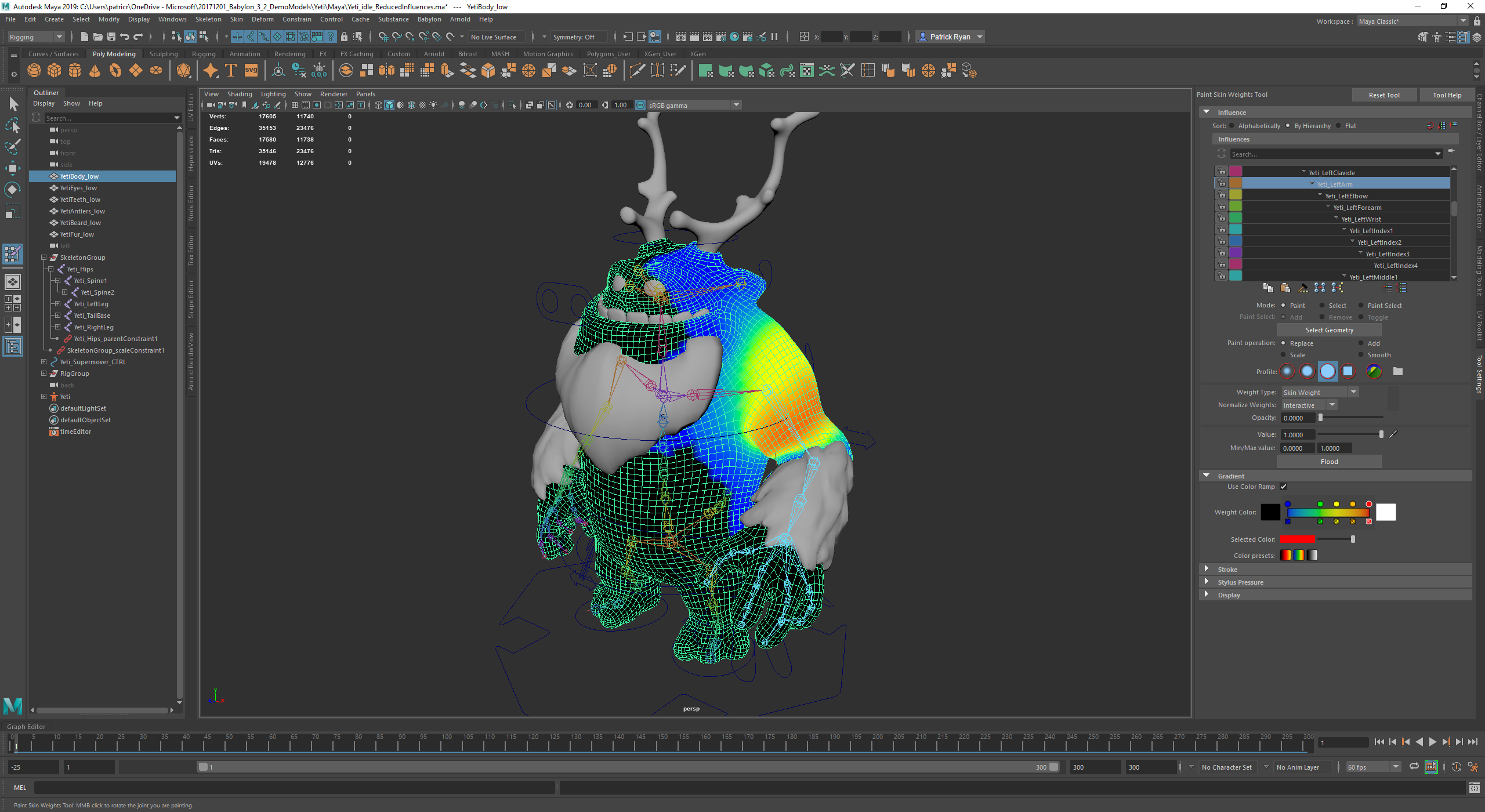
The important part of the display is that I can easily see the blend of the weights across the mesh. If there are only a couple of color levels corresponding to weights, it's hard for me to visually understand the deformation. So In this display, there are several color steps that I can control, and I get the benefit of smooth blending between the colors corresponding to the weights on each vertex. In this image the arm is the selected bone, and you can see that the arm does have miniscule influence on the mesh in the chest and in this character in the side of the head (though the blue color is near-0 influence) to help smooth deformation.
I think this is the challenge of displaying skin weights, showing the full range of influence possible on vertices, while accurately representing how smooth a deformation will be. This is very similar to what @Popov72 showed above, but with more transitions to display subtle weight changes. which may need to be resolved in several lerps between colors representing specific break points (like 100, 0.75, 0.5, 0.25, and 0) to accurately show the falloff of the influences. So an influence of 0.53125 would be one-eight of the way in a lerp between the color at 0.5 and the color at 0.75. Hope this makes sense.
 PatrickRyanMS
on 10 Aug 2020
PatrickRyanMS
on 10 Aug 2020
@PatrickRyanMS, yessir I am right on page with you. I should have a prototype for us to play with by tonight.
Pryme8
on 10 Aug 2020
@Popov72 https://playground.babylonjs.com/#35XDRU#2
think you could help me wire this up so the bones work here and the model appears where it should in all white?
Things seem to have changed sense I did the underwater shader where I included the bone animations or Im just not connecting the dots for some reason.
Im pretty sure this setup worked in the past:
https://www.babylonjs-playground.com/#BLNIDI#38
so maybe something has changed, or Im a goober? Either way could you help me out really quick cause I dont see what I am doing wrong here and wanna just get to coding not setup.
UPDATE
https://playground.babylonjs.com/#0Y7E4K
Weird my old stuff works but the new stuff does not... hmm Ill figure this out.
Ok I am stumped why this works:
https://playground.babylonjs.com/#0Y7E4K#2
but this does not:
https://playground.babylonjs.com/#35XDRU#3
They are the same thing!?
Pryme8
on 10 Aug 2020
This is what I'm seeing in your PG:

deltakosh
on 10 Aug 2020
That should be unrelated, see the last two PGs I posted.
0Y7E4K#2 <- works while dropping the BoneNumber error so I assume it goes to a fallback
while #35XDRU#3 <- just says no.
Then on the first one of those two, if I add defines:['#define BonesPerMesh '+skeleton.bones.length ] to the shader the mesh disappears.
So I am for sure doing something wrong.
Pryme8
on 10 Aug 2020
never mind I got it!
https://playground.babylonjs.com/#35XDRU#7
Pryme8
on 10 Aug 2020
Do we want to eventually render the barycentric lines as well?
https://playground.babylonjs.com/#35XDRU#8
Here is a recreation of what @Popov72 was doing.
Im gonna try another method to see if I cant get those transitions smoother.
Pryme8
on 10 Aug 2020
Nice!
Note that you don't need:
#include<bonesDeclaration>
#include<instancesDeclaration>
in the fragment shader.
Popov72
on 11 Aug 2020
https://playground.babylonjs.com/#35XDRU#11
https://playground.babylonjs.com/#35XDRU#14
Is more what I was thinking, but I'm not sure why there are gaps in the weights when I calculate it on the FX
Here is the one with the colors being calculated on the VX
https://playground.babylonjs.com/#35XDRU#13
Pryme8
on 11 Aug 2020
Nice!
Note that you don't need:
#include<bonesDeclaration>
#include<instancesDeclaration>
in the fragment shader.
was a copy and paste error thanks for pointing that out, I might have overlooked it.
Pryme8
on 11 Aug 2020
You can't do the computation in the fragment shader because of the automatic interpolation done by the GPU:
- assume first vertex is linked to bone 1, second vertex is linked to bone 15 and 3rd vertex is linked to bone 58
- for eg (depending on the triangle), the GPU is going to interpolate between 1-15 and 1-58, then on the results of both computations
So, in the fragment shader you can end up with values for boneIdx = 45.3, which has no meaning and can't be used in the way we want.
Bone indices can't be interpolated but colors can (and must as it is what we want to achieve - a gradient of colors), that's why we setup the colors in the vertex shader and pass them to the fragment shader but not the bone indices.
Popov72
on 11 Aug 2020
Then how do we make it smoother without increasing the facet count?
https://playground.babylonjs.com/#35XDRU#13
Here is the one then for us to run with?
Pryme8
on 11 Aug 2020
https://playground.babylonjs.com/#35XDRU#17
https://playground.babylonjs.com/#35XDRU#20
And here is a mock up of the SkeletonMap Shader, I know my logic is off which is why its not all rainbow colored right this second. But this is at least a good base.
Any insight on why it does not look like this:

Pryme8
on 11 Aug 2020
Your colors should be between 0 and 1, not 0 and 255:
https://playground.babylonjs.com/#35XDRU#21
Also, you should not always start with the color of bone 0 (see the start boolean in the code above to assign the color the first time the bone is found).
Popov72
on 11 Aug 2020
Whoops I assumed setColor3 brought them down to a 0-1 range.
Why does that not do that?
And thanks for the fixes, I was messing around with that stuff because for the life of me I could not figure out why the colors were washing out to white but the 255 values makes total sense now. I usually dont use color3s at all and just use vec3s in a 0-1 range when talking to a shader so I never really came into that situation before.
Im dumb and should have realized that when I constructed my buffer and set it to the float array, it was looking me right in the face but I must have been to tired to comprehend.
Pryme8
on 11 Aug 2020
So I came up with this colorSet to try to keep the boneMap with higher contrast per bone.
Its two triadicts that alternate between every step, so that should ensure at least some color contrast perbone.

Im thinking maybe the yellow needs to be dropped as its hard to distinguish between the different yellow bones.
https://playground.babylonjs.com/#35XDRU#23
Pryme8
on 11 Aug 2020
Asking @PatrickRyanMS:)
deltakosh
on 11 Aug 2020
Thanks for the new sample, @Pryme8! I think the transitions in this version look much better. But I am not sure if I am understanding the whole context of what you are showing in this PG. When looking at this in terms of the feature we want to build, however, coloring vertex weights for the whole skeleton at once isn't quite what we are looking for. There is context in the display that shows parts of the mesh that are influenced by the leg, for example, but a user would need to know what color corresponds to a particular joint chain. What happens if the skeleton is not a biped or has a lot of extra attachments? That could likely change the color mapping which would require building context with each new rig.
Ideally, we would select a bone in the inspector and be able to switch to a debug view like we do with materials and see a heat map of weights that the bone influences. From the image below (which was earlier in the thread) you can see that one bone is selected in the skin weights dialog on the right. About half way down the panel you see a color scale that is customizable to the weight of the influence.
What would be great to see is if your shader can handle a color scale mapping from color A (near 1.0 influence) through color B, C, and D, to color E (near 0 influence) displayed for one bone like the arm. I am not being specific about the color because we may want to either allow users to choose colors that are meaningful or maybe we allow the user to select more than one bone and we may need to have a couple of color palettes so you can see the mixing of weights across the selected bones. I'm not sure if that's the UX we are aiming at, but being able to have the ability to set the colors for the heat map would allow any of these scenarios. Let me know if this makes sense to you, if you have any questions, or if I completely missed something about your latest prototype. Thanks!

PatrickRyanMS
on 11 Aug 2020

I provided both.
There is the Bone Weight Shader and Skeleton Map Shader in that prototype ^_^.
The more multiColored one is for when you are displaying all bone assignments, the blue/yellow/red one is for individual (or group of bones) weight influence, and we will be limited on how "smooth" they can by by the number of facets the model has.
Pryme8
on 11 Aug 2020
Do we want to display the barycentric data as well so they can still sill their mesh flow?
I can add that but wont be able to do that till next week when I am back in town.
I will also update the heat map to use 5 colors instead of the 4 it currently is using.
https://github.com/BabylonJS/Babylon.js/pull/8729
Till then here is the first PR.
Pryme8
on 12 Aug 2020
coloring vertex weights for the whole skeleton at once isn't quite what we are looking for
I was also wondering the benefit of this representation.
@Pryme8 What usage do you forsee for the skeleton map shader?
Popov72
on 12 Aug 2020
@PatrickRyanMS Is the monster you are showing in the screenshot a model we can use to test the heat map display?
I would like to know if the better shading you have is simply because the weights are more uniformely dispatched than in our test model or if it is the color scale we are using that is not right.
Popov72
on 12 Aug 2020
They use it in C4D and you can even see the color assignments for that view in Patrick Ryans screenshot.

It helps you see the interactions between bones and if you have your entire mesh weighted. Its a really similar to sketchfabs way of displaying weights as well. As seen in this image below

Its just an extra tool that some people use and I have seen in several CAD programs, so figured if we are gonna have a weightmap per-bone might as well have a entire mapping view.
Could also add a uniform for on the mapping view to only display select bones.
Pryme8
on 12 Aug 2020

The Zero to just over Zero transition could be cleaned up a little, but I figured that will look better when I change it from 4 colors to 5 here.
I also need to add what ever depth argument is needed in the customShader to keep the mesh sorting correctly it looks like. I forget what that is off the top of my head.
Pryme8
on 12 Aug 2020
You should not need to do specific things to get the mesh sorted correctly, as long as you don't set needAlphaBlending to true...
Popov72
on 12 Aug 2020
Weird, it was seeming like there was some sorting issues with this.

https://playground.babylonjs.com/#35XDRU#24
Pryme8
on 12 Aug 2020


Here is the 5 Color update.
With a new blending technique.
Pryme8
on 12 Aug 2020
The sorting stuff seems to be isolated to the YETI model
Pryme8
on 12 Aug 2020
The problem with the rendering of the Yeti comes from the fact that transparencyMode is not handled the same way in PBR and in ShaderMaterial, because in the latter case it is set to null, meaning it is not used to determine if alpha blending must be used. As the mesh has hasVertexAlpha set to true, the material is considered to be transparent and must be alpha blended.
The easiest fix is to simply set shader.transparencyMode = BABYLON.Material.MATERIAL_OPAQUE; for both shaders.
Popov72
on 12 Aug 2020
<3 You da man, thanks for always knowing what to do.
Pryme8
on 12 Aug 2020


Update cause there has not been one in a while... sorry about that this will be done this week I hope.
All I need to do is the bone map exposed in the inspector as well and docs.
Already got the PGs done.
Pryme8
on 30 Aug 2020
Related issues
 maxime1992
·
17Comments
maxime1992
·
17Comments
 individ2016
·
39Comments
individ2016
·
39Comments
 yvele
·
18Comments
yvele
·
18Comments
 fmmoret
·
28Comments
fmmoret
·
28Comments
 nbduke
·
21Comments
nbduke
·
21Comments
Most helpful comment
Here is the 5 Color update.
With a new blending technique.