Azurestorageexplorer: Unable to expand a subscription (module not found)
Storage Explorer Version:1.14.2
Platform/OS: Windows 10 x64
Regression From:
I don't know, this is the first time I've used the app
Bug Description
Unable to view containers in a subscription
Steps to Reproduce
Open storage explorer
Pick a subscription
expand it
Unable to retrieve child resources.
Details:
["Error:Cannot find module 'tslib'\nRequire stack:\n- I:\apps\storageexplorer\resources\app\node_modules\se-managed-disks-extension\dist\src\index.js\n- i:\apps\storageexplorer\resources\app\out\app\providers\Provider.js\n- i:\apps\storageexplorer\resources\app\out\app\node\NodeProcessHostProxy.js"]
 shueybubbles
All 13 comments
I tried using both "just for me" and machine-wide install options. Same result for both.
shueybubbles
on 30 Jul 2020
This means a library named "tslib" is not found. Could you go to directory "I:\apps\storageexplorer\resources\appnode_modules" to see if there is a folder named "tslib" in it? If it is there, there might be some corner case bugs in our path resolution logic. By the way, the location you are installing Storage Explorer is not the default location (e.g. machine wide C:\Program Files (x86)\Microsoft Azure Storage Explorer). Could you please try installing it at the default location and see if the issue still reproduces?
 JasonYeMSFT
on 3 Aug 2020
JasonYeMSFT
on 3 Aug 2020
I:\apps\storageexplorer\resources\app\node_modules>dir tslib
 Volume in drive I is NewBins
 Volume Serial Number is 7EDE-F233

 Directory of I:\apps\storageexplorer\resources\app\node_modules\tslib

07/30/2020  01:49 PM    <DIR>          .
07/30/2020  01:49 PM    <DIR>          ..
07/15/2020  09:17 PM               824 CopyrightNotice.txt
07/15/2020  09:17 PM               655 LICENSE.txt
07/15/2020  09:17 PM             2,242 package.json
07/15/2020  09:17 PM             3,454 README.md
07/15/2020  09:17 PM             2,714 tslib.d.ts
07/15/2020  09:17 PM                36 tslib.es6.html
07/15/2020  09:17 PM            10,274 tslib.es6.js
07/15/2020  09:17 PM                32 tslib.html
07/15/2020  09:17 PM            13,204 tslib.js
               9 File(s)         33,435 bytes
               2 Dir(s)  392,727,842,816 bytes free
I can try the default location. I usually avoid using the default because my C drive is a smallish SSD and it's nearly full.
shueybubbles
on 3 Aug 2020
Works fine with the default location
shueybubbles
on 3 Aug 2020
@shueybubbles are you ok with having Storage Explorer installed on your C: drive or do you want us to keep investigating this?
If you'd like us to figure out what's going wrong, then I'd ask you to reinstall on your I: drive by uninstalling, re-downloading the installer, and then rerunning the installer.
Couple of extra questions as well:
- When you install on your I: drive, are you doing that by changing the install path in the installer or by copy and pasting from C: -> I:?
- Is I: a local drive or a network drive?
 MRayermannMSFT
on 3 Aug 2020
MRayermannMSFT
on 3 Aug 2020
I: is a local drive. I try to install apps on it because my C drive is small.
I just type the path into the edit control and click Next.
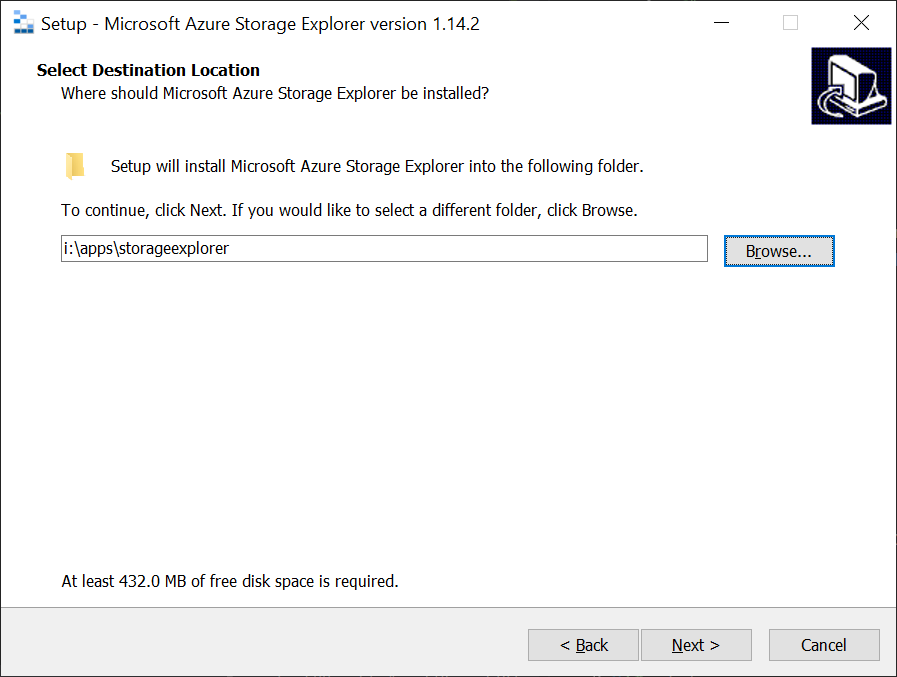
uninstall/download/reinstall led to the same error.
For now I can live with the default location but I imagine I'm not the only person who installs to other folders.
shueybubbles
on 4 Aug 2020
I have been long time user of the storage explorer and started getting this error after updating to 1.14.2.
Storage Explorer Version:1.14.2
Platform/OS: Windows 10 x64
Regression From: After I updated the storage explorer to the above version.
Install location: Default (C:\Program Files (x86)\Microsoft Azure Storage Explorer)
Proxy: No
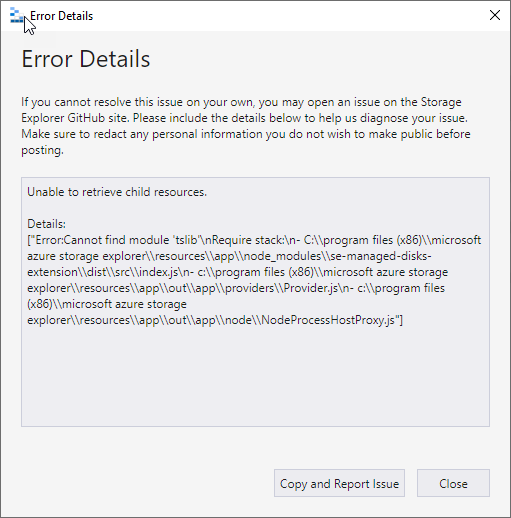
I have been working around this by uninstalling and re-installing the storage explorer every time I get this error.
 krishjag
on 7 Aug 2020
krishjag
on 7 Aug 2020
@krishjag when you say:
I have been working around this by uninstalling and re-installing the storage explorer every time I get this error.
Are you implying that after some period of time an install of 1.14.2 that was working, stops working?
MRayermannMSFT
on 17 Aug 2020
I have additional troubleshooting steps to help out. These are intended to be used with Storage Explorer 1.14.2.
Try patching Storage Explorer to fix what we think is the problem
First, we have a theory to what the issue is. I have a patch for you to try applying to the product:
- Close Storage Explorer
- Download this file: NodeProcessHostProxy.txt
- After downloading, change the extension to
.js. - Move the file to
<Storage Explorer install location>\resources\app\out\app\node. You should be prompted to overwrite an existing file. Say yes. - Try using Storage Explorer
Get us values from process explorer
If the above doesn't work, then please:
- Install Process Explorer: https://docs.microsoft.com/en-us/sysinternals/downloads/process-explorer
- Open Process Explorer
- Open Storage Explorer
- Open notepad
- Get to the point of the error message
- Switch over to Process Explorer
- Sort by names and look for all of the Storage Explorer processes
For each process:
- Right click -> properties
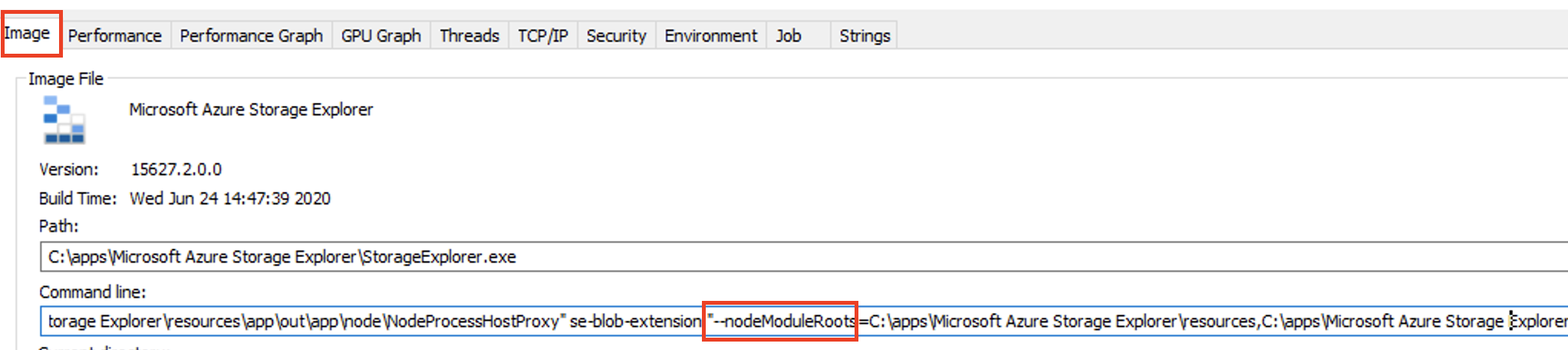
- Look under image for the "Command line" field (see below picture)
- If in the command line field there is "nodeModuleRoots=", then copy and paste the value of command line field into a new line in notepad (feel free to redact any personal info in the file paths)
- Attach that file to a reply here
MRayermannMSFT
on 18 Aug 2020
- Close Storage Explorer
- Download this file: NodeProcessHostProxy.txt
- After downloading, change the extension to
.js.- Move the file to
<Storage Explorer install location>\resources\app\out\app\node. You should be prompted to overwrite an existing file. Say yes.- Try using Storage Explorer
I had exactly the same issue after installing storage explorer into the custom path.
The solution above has worked fine for me.
 anmmok
on 18 Aug 2020
anmmok
on 18 Aug 2020
@krishjag when you say:
I have been working around this by uninstalling and re-installing the storage explorer every time I get this error.
Are you implying that after some period of time an install of 1.14.2 that was working, stops working?
Yes, that's correct.
krishjag
on 18 Aug 2020
@MRayermannMSFT
I applied the suggested patch and the storage explorer is working now. Thanks!
krishjag
on 18 Aug 2020
Closed several issues as duplicates and linked them to this one. If you're coming from those and have tried the patch or any of the other steps we've recommended, let us know how it went! Right now we plan on shipping that patch in 1.15.
MRayermannMSFT
on 19 Aug 2020
Related issues
 alaendle
·
5Comments
alaendle
·
5Comments
 amtsha09
·
6Comments
amtsha09
·
6Comments
 olgakorichkovskaya
·
4Comments
olgakorichkovskaya
·
4Comments
 eosho
·
3Comments
eosho
·
3Comments
 timoklimmer
·
6Comments
timoklimmer
·
6Comments
Most helpful comment
I had exactly the same issue after installing storage explorer into the custom path.
The solution above has worked fine for me.