Azurestorageexplorer: Link "Load more" doesn´t work with the last release to the 1.8.0
Storage Explorer Version: 1.8.0
Platform/OS Version: Windows 10
Architecture: ia32
Build: 20190501.8
Regression From: N/A
Steps to Reproduce:
Expand a classic storage account with 3 containers
Click load more.
Expected Experience:
More containers are loaded.
Actual Experience:
Message loading... is shown and any container appear
 pasStiga
All 32 comments
Hi @pasStiga , I'm a little confused. You say the account has 3 containers. Shouldn't there not be a load more? We initially retreive 25 containers when you expand "Blob Containers", so if there's only 3 we should get all at once. Can you share some screenshots with me with what you're seeing?
 MRayermannMSFT
on 8 May 2019
MRayermannMSFT
on 8 May 2019
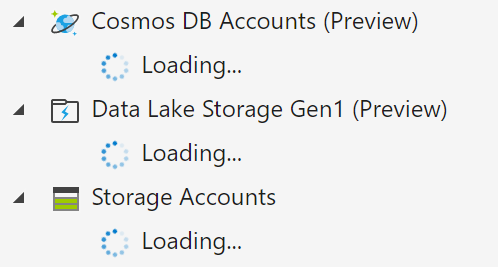
I'm having the same issue. "Load more" isn't working. CosmosDB spins forever without loading anything. And loading Blob from the Azure Portal also causes anything not listed in the first 4-5 items to never show up. I'm seeing this issue cause lag with Azure itself as well. The Blob interface in the portal starts acting strangely while Storage Explorer is doing this infinite load.
 datascinerd
on 8 May 2019
datascinerd
on 8 May 2019
@jccantre are you saying that you're seeing issues in tools other than Storage Explorer? Or are you saying you start seeing issues in other tools after Storage Explorer starts acting weird?
MRayermannMSFT
on 8 May 2019
Yes. It seems to be affecting the Azure Portal itself. When Storage Explorer is doing the infinite load the Blob portal stops working. Edit: And when I shut down Storage Explorer the portal goes back to normal.
datascinerd
on 8 May 2019
Interesting. Are you also trying to load more blob containers from a classic storage account, or is it a standard storage account? If you're unsure then you can look in the properties panel after selecting your account:

MRayermannMSFT
on 8 May 2019
Microsoft.Storage/storageAccounts
datascinerd
on 8 May 2019
This is very odd. Does your company have some sort of screen sharing software we could use with each other? I'd like to debug your machine, because so far we haven't been able to repro this at all. If you don't, then we could use TeamViewer....
I can also give you debugging instructions for you to try on your own:
- Close and then reopen Storage Explorer
- Open Dev Tools (F12, or help -> toggle developer tools)
- Use ctrl+p to open CommonStorageManager.js
- Go expand your blob containers node the first time
- Go to line 165 in the debugger and click on the line number, should see it turn blue:

- Click load more
- When the breakpoint is hit, hover over current token and let me know what it says

MRayermannMSFT
on 8 May 2019
Unfortunately I'm working for a client and can't screen share. I've opened the dev tools and hit ctrl+p and do not see CommonStorageManager.js.
I have the following:
LocalStorageManager.js
BrowserStorageManager.js
SessionStorageManager.js
datascinerd
on 8 May 2019
Ah ok, that's possible. Can you expand the Blob Containers node for the first time and then look for the file? I have some containers in Quick Access, so for me the file is loaded on startup. And nbd about not being able to screenshare. I'll do my best to talk back and forth with you here. Very interested to figure out what's giving y'all issues.
MRayermannMSFT
on 8 May 2019
You can also set breakpoints in BlobService.js, at lines 68 and 71:

You can set them after the initial expansion of Blob Containers, click Load More, and then we can see if either get hit? If neither ever get hit, then we're looking at a server issue maybe. For that we'll need to break out fiddler...
MRayermannMSFT
on 8 May 2019
I have containers in Quick Access as well and it doesn't pop up. When I open the resource group, Cosmos DB Accounts, ADLS Gen1, and Storage Accounts are already expanded and there's no CommonStorageManager.js that I can see.
datascinerd
on 8 May 2019
And the Cosmos DB load never stops spinning.

datascinerd
on 8 May 2019
So you see blob containers in the tree but you don't see the file? Because it should definitely be there:

That's really strange, but ok, guess we'll go with Fiddler then. Here are the instructions for getting Fiddler setup (unfortunately they're really long, also it assumes you've installed Fiddler, so make sure you have that installed):

MRayermannMSFT
on 8 May 2019
Ok. Now I know why I'm not seeing that js file. I'm not having an issue with Blob Containers. I'm having an issue with Storage Accounts. That js file pops up when I click Blob Containers. My issue is loading Storage Accounts, i.e. the Blob resource not the containers in the resource.
datascinerd
on 8 May 2019
Ok, I guess I'm back to being confused about which load more is failing.
Is it for "Blob Containers":

Or is it for "Storage Accounts:"

For @pasStiga, I believe they are having issues with the 1st one.
MRayermannMSFT
on 8 May 2019
Storage Accounts
datascinerd
on 8 May 2019
Ok so if you could do the following:
- Launch storage explorer
- Get the debug tools to NodeQueryHandler.js (this one should definitely be there right at the beginning)
- Expand your tree all the way up to before you expand "Storage Accounts"
- Set a breakpoint on line 105
- Expand "Storage Accounts"
- When the break point is hit, hover over queryResult and let me know how many results there are, and if there's a continuationToken

- Click "Load more", if the breakpoint is eventually hit, let me know what is inside of queryResult, if the breakpoint is never hit, then we'll have to look somewhere else next
Also, do you know how many Storage Accounts are in this subscription?
MRayermannMSFT
on 8 May 2019
I can't get to the Storage Accounts expansion. It keeps hitting the break point after expanding the Resource.
continuationToken
:
"https://management.azure.com/subscriptions/1824bc1e-b99a-4dab-9a84-b0d5f05f83c7/resources?api-version=2014-04-01&%24filter=substringof(%27%27%2cname)+and+(resourceType+eq+%27Microsoft.DocumentDb%2fdatabaseAccounts%27)&%24skiptoken=eyJuZXh0UGFydGl0aW9uS2V5IjoiMSE4IU0wUTNOamstIiwibmV4dFJvd0tleSI6IjEhMjI0IU1UZ3lORUpETVVWQ09UbEJORVJCUWpsQk9EUkNNRVExUmpBMVJqZ3pRemRmUjFKTUxVRmFWVG95UkVWVlV6STZNa1JFUlZZNk1rUlNSem95UkVsT1IwVlRWRkpGVkVGSlRFeEpUa3RFVnpveVJFVlZReTFOU1VOU1QxTlBSbFE2TWtWWFJVSTZNa1pUUlZKV1JWSkdRVkpOVXpveVJrRmFWVG95UkVWVlV6STZNa1JFUlZZNk1rUkJVMUE2TWtSSlVreEZWVU5EVDA1V1JWSlRTVTlPTFVWQlUxUlZVekktIn0%3d"
datascinerd
on 9 May 2019
Ok. I have a path I think I can investigate. Will work on this diligently. This seems like an urgent issue. Thank your for your patience today.
MRayermannMSFT
on 9 May 2019
Thank you!
 jcantrell1
on 9 May 2019
jcantrell1
on 9 May 2019
Ok, I have something I'd like you to try.
- Close Storage Explorer
- Open a text editor as admin (if you use VS Code, you can open it normally, it'll instead prompt you at Save time)
- Open "C:Program Files (x86)Microsoft Azure Storage ExplorerresourcesappoutCloudHubjsProvidersAzureProducersAzureResourceTypeProducer.js" (path may differ depending on your install location)
- On line 52, make it look like this (at the end,
continuationToken): 
- Save
- Reopen Storage Explorer and try to repro the issue
MRayermannMSFT
on 9 May 2019
Also, @pasStiga, please reply to my questions when you can. I don't think you have the same issue as jcantrell, but we didn't make any changes at that level of "loading", only at the level where jcantrell is seeing issues.
MRayermannMSFT
on 9 May 2019
Here's the code after the change above:
queryBindingManager.addProducerBinding(AzureResourceTypeProducer.getResourcesByTypeNamespace, function (args) { return _this.getResourcesByType(args,continuationToken); });
And it caused Storage Explorer to not load anything:
jcantrell1
on 9 May 2019
The line should be:
queryBindingManager.addProducerBinding(AzureResourceTypeProducer.getResourcesByTypeNamespace, function (args, continuationToken) { return _this.getResourcesByType(args,continuationToken); });
MRayermannMSFT
on 9 May 2019
That fixed it!
jcantrell1
on 9 May 2019
Hi @MRayermannMSFT , sorry for the delay. I can try the same that @jcantrell1 but I dont know if it is the same issue
pasStiga
on 10 May 2019
I have the same issue. It was working fine in 1.7.0. Will try the steps above and see if it resolves the issue.
 garygsscott
on 10 May 2019
garygsscott
on 10 May 2019
Yes, please let us know ASAP. The plan is to ship 1.8.1 today, with the fix for this included. So if y'all are having a different problem, it'd be great to know before shipping! Thanks. 😊
MRayermannMSFT
on 10 May 2019
I have tried the same as @jcantrell1 and can confirm it fixes the issue for me also so we should be good to go when v1.8.1 is made available. Thanks for your help,
garygsscott
on 11 May 2019
I have just downloaded v1.8.1 from chocolatey and can confirm that issue is definitely fixed for me now in that version. Many thanks for your help on this.
garygsscott
on 13 May 2019
Wohoo good stuff! I'll assume paastiga was under the same umbrella issue wise. Closing this issue.
MRayermannMSFT
on 14 May 2019
Hi,
It was fixed with the new release.
Thanks!
pasStiga
on 14 May 2019
Related issues
 olgakorichkovskaya
·
4Comments
olgakorichkovskaya
·
4Comments
 kjoshi-rubikloud
·
3Comments
kjoshi-rubikloud
·
3Comments
 sholman
·
3Comments
sholman
·
3Comments
 OffColour
·
4Comments
OffColour
·
4Comments
 ziesemer
·
3Comments
ziesemer
·
3Comments