Azurestorageexplorer: Storage Explorer Subscription cannot be loaded
Storage Explorer Version: Version 1.6.0
Platform/OS: Windows
Bug description
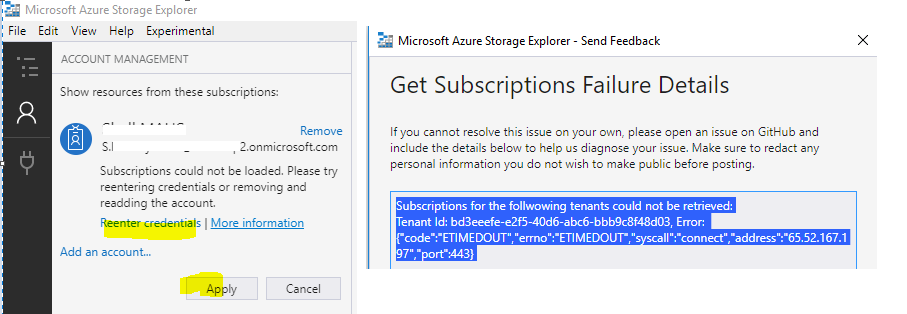
Unable to connect to subscription
Subscriptions for the following tenants could not be retrieved:
Tenant Id: bd3eeefe-e2f5-40d6-abc6-bbb9c8f48d03, Error: {"code":"ETIMEDOUT","errno":"ETIMEDOUT","syscall":"connect","address":"65.52.167.197","port":443}
Steps to Reproduce
Expected Experience
I want to connect to azure storage explore
Actual Experience
getting error on connection with my azure account
Additional Context
 nShanmugaraj
All 10 comments
The error code indicated that the attempt to connect was timed out. Were you able to sign-in to Azure portal with this subscription at the time when this happened? Also, are you going through any proxy? Need a bit more info to ping point the problem.
 jinglouMSFT
on 12 Dec 2018
jinglouMSFT
on 12 Dec 2018
I am using the same for connecting Azure storage on cloud.
But still I am not getting connected
Will it be because of policy in company
On 13-Dec-2018 1:01 AM, "jinglouMSFT" notifications@github.com wrote:
The error code indicated that the attempt to connect was timed out. Were
you able to sign-in to Azure portal with this subscription at the time when
this happened? Also, are you going through any proxy? Need a bit more info
to ping point the problem.—
You are receiving this because you authored the thread.
Reply to this email directly, view it on GitHub
https://github.com/Microsoft/AzureStorageExplorer/issues/996#issuecomment-446714410,
or mute the thread
https://github.com/notifications/unsubscribe-auth/AjNMmTbxuOIR_mzizfX1k_bfbfgdcq4gks5u4VmcgaJpZM4ZO5X6
.
nShanmugaraj
on 13 Dec 2018
I had the same experience, although I got ECONNRESET as the error with no details about where it was trying to connect.
version: confirmed on 1.6.2 and 1.7.0
Issue was I happen to have a HTTP_PROXY environment variable in my machine I setup sometime ago. Removing that and restarting Storage Explorer fixed it. (This did not appear in proxy settings in Edit > Configure Proxy window. My guess is the underlying tools are using at the proxy variable and not the storage explorer UI)
Can get more information about the error by doing the following.
- Press F12 (opens "chrome" dev tools)
- reproduce the error
- you will likely see an error in the console.
- click the line with the link to source and put a breakpoint there
- reproduce the error again and see the error details when your breakpoint is hit.
- hopefully you're in a handler which has more info about the error.
- Putting the error details here can likely help someone help you troubleshoot it better.
 madushans
on 12 Mar 2019
madushans
on 12 Mar 2019
Subscriptions for the follwowing tenants could not be retrieved:
Tenant Id: xxxxxxxxxxxxxxxxxxxxxxxxxxxxx, Error: {"code":"ETIMEDOUT","errno":"ETIMEDOUT","syscall":"connect","address":"52.136.136.32","port":443}
Hi @jinglouMSFT , i am facing the same error as well.
I uninstalled the older version and installed the latest version available 1.7. , and then tried to connect my account , Two factor authentication working well, after that it keeps on Loading subscriptions and then still there is a message : Subscriptions could not be loaded. Please try reentering credentials or removing and readding the account.
I already tried both, still the problem persists.
 LavMehta
on 13 Mar 2019
LavMehta
on 13 Mar 2019
@LavMehta can you try to use the Device Code Flow to sign into Azure to see if you can signin?
jinglouMSFT
on 13 Mar 2019
@jinglouMSFT Unfortunaetly i have no access to Azure Active Directory. :-( , what should i do now ?
LavMehta
on 27 Mar 2019
@MRayermannMSFT may be you could help us as well!!
LavMehta
on 27 Mar 2019
@LavMehta , it sounds like you might be behind a proxy or have some other network issue:
- Are you behind a proxy?
- Have you tried connecting from another network?
 MRayermannMSFT
on 15 Apr 2019
MRayermannMSFT
on 15 Apr 2019
had the same issue, yes it is a proxy issue, just added my proxy IP and port, and it working , cheers
 djouallah
on 25 Jun 2019
djouallah
on 25 Jun 2019
Closing due to lack of response.
MRayermannMSFT
on 5 Aug 2019
Related issues
 thomassantosh
·
5Comments
thomassantosh
·
5Comments
 jorgklein
·
4Comments
jorgklein
·
4Comments
 cbailiss
·
6Comments
cbailiss
·
6Comments
 olgakorichkovskaya
·
4Comments
olgakorichkovskaya
·
4Comments
 riazjahangir
·
4Comments
riazjahangir
·
4Comments