Azurestorageexplorer: The query window is unreadable in Dark theme
Storage Explorer Version: 1.4.1
Platform: Windows
Architecture: ia32
Build Number: 20180822.1
Commit: 14ea2643
Steps to Reproduce:
- View -> Themes -> Dark
- Navigate to a cosmos DB account and open any collection view
- Click on filter and try to type in any filter string.
Expected Experience:
I expect the color combination to display a readable text
Actual Experience:
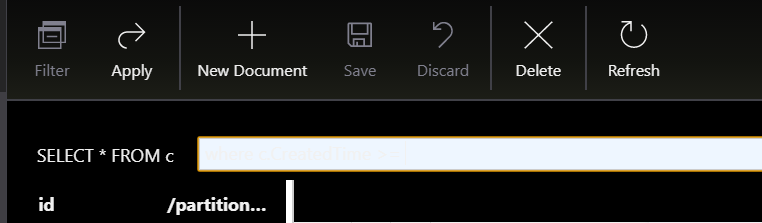
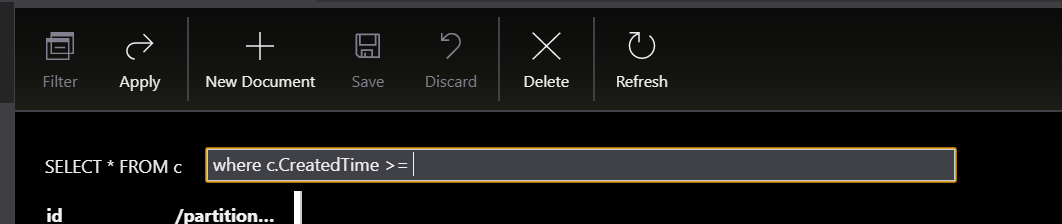
Unreadable text due to color mismatch, text shows up only when highlighted
 theelderwand
All 10 comments
Just reported this same issue here by mistake since this issue didn't show up for me when searching for existing issues. Sorry about the duplicate, and please get this fixed.
 LarsKemmann
on 10 Sep 2018
LarsKemmann
on 10 Sep 2018
Still an issue with latest version. Very irritating as I prefer dark mode. Please fix soon if possible :-)
I'm guessing just a simple change to the theme. When mouse over the filter input box either change the text colour to black/grey or change the background colour to black/grey.
Storage Explorer Version: 1.8.0
Platform: Windows
Architecture: ia32
Build Number: 20190501.8
Commit: 891a4c34
Thank you
 szq-trd
on 7 May 2019
szq-trd
on 7 May 2019
This is also rather frustrating for me. I thiink @szq-trd has the simplest solution.
 MendelBak
on 17 Jun 2019
MendelBak
on 17 Jun 2019
676 Cosmos DB query string syntax highlighting uses Light theme colors when Dark theme is selected, unless Dark theme is selected when the Query tab is already open
379 The background color is inconsistent between the editor and other panels under 'Dark' theme.
518 The 'X' button is hard to see when searching by prefix in dark theme
MendelBak
on 24 Jun 2019
Any update? This should be a quick fix...
 vincez
on 4 Nov 2019
vincez
on 4 Nov 2019
In v1.10.1, I can't see the text when it the query predicate text is selected & focused, rather than is not selected.
 marshallr12
on 6 Nov 2019
marshallr12
on 6 Nov 2019
@southpolesteve this really needs to be fixed. it's impacting everyone using the dark theme, and the bug has been there since 2018. Thanks.,
 jinglouMSFT
on 6 Nov 2019
jinglouMSFT
on 6 Nov 2019
I'm having the same issue. Any update?
Thanks though for all other stuff.
 soheilfarahani
on 17 Dec 2019
soheilfarahani
on 17 Dec 2019
the query predicate text box looks like this when the cursor is not over it:

but as soon as you mouse over, it looks like this and the text isn't visible:

even though if you highlight the text, it's definitely there:

any update on a fix?
 chriscardwell-iq
on 5 Feb 2020
chriscardwell-iq
on 5 Feb 2020
any update on this one? I can't imagine it's a ton of effort and it renders the dark theme almost unusable because you can't see what you're typing a majority of the time.
chriscardwell-iq
on 26 May 2020
Related issues
 riazjahangir
·
4Comments
riazjahangir
·
4Comments
 thomassantosh
·
5Comments
thomassantosh
·
5Comments
 ziesemer
·
3Comments
ziesemer
·
3Comments
 cbailiss
·
6Comments
cbailiss
·
6Comments
 ayon1911
·
5Comments
ayon1911
·
5Comments