Azurestorageexplorer: Issue Loading Organization Sign-In Page
Storage Explorer Version: 1.4
Platform/OS Version: MacOS 10.13.6
Architecture: x64
Regression From: This has never worked for me
Steps to Reproduce:
- Attempt add a new Azure Account
- Type in company email address
- Select Work Account
- Be redirected to Organization login page to finish authentication
Expected Experience:
The user is successfully directed to their organization login page and are able to authenticate
Actual Experience:
The sign in windows loads a blank page

 martygriffin
All 13 comments
Hey @martygriffin , do you happen to use VS for Mac?
 MRayermannMSFT
on 10 Aug 2018
MRayermannMSFT
on 10 Aug 2018
I am have it install and have not used it for awhile.
martygriffin
on 10 Aug 2018
Hi @MRayermannMSFT and @martygriffin ,
I am having the exact same issue in a fresh install of MASE. I am running Ubuntu 16.04, all dependencies installed. The steps to reproduce @martygriffin's error are the same. I launch the explorer in the terminal and get the following output:
Gkr-Message: couldn't connect to dbus session bus: Could not parse server address: Unknown address type (examples of valid types are "tcp" and on UNIX "unix")
Gkr-Message: couldn't connect to dbus session bus: Could not parse server address: Unknown address type (examples of valid types are "tcp" and on UNIX "unix")
Received message 'get-dialog-result'
Gkr-Message: couldn't connect to dbus session bus: Could not parse server address: Unknown address type (examples of valid types are "tcp" and on UNIX "unix")
Received message 'dialog-ready'
Received message 'dialog-execute-operation'
Received message 'did-execute-operation'
Received message 'dialog-execute-operation'
Received message 'did-execute-operation'
Received message 'dialog-execute-operation'
Received message 'did-execute-operation'
Received message 'dialog-execute-operation'
Received message 'did-execute-operation'
Received message 'dialog-execute-operation'
Received message 'did-execute-operation'
Received message 'dialog-execute-operation'
Received message 'did-execute-operation'
Received message 'dialog-did-init'
Received message 'dialog-execute-operation'
Received message 'did-execute-operation'
Received message 'dialog-execute-operation'
Received message 'did-execute-operation'
Received message 'dialog-execute-operation'
Received message 'did-execute-operation'
Received message 'dialog-execute-operation'
Received message 'did-get-dialog-result'
Received message 'closed'
Any clue on what's going on?
Cheers,
Arturo
 arturOA
on 14 Aug 2018
arturOA
on 14 Aug 2018
@martygriffin , can you try signing in with VS for Mac? If you're able to successfully, then leave the accounts signed in, reopen Storage Explorer and you should see them there.
MRayermannMSFT
on 14 Aug 2018
@MRayermannMSFT That worked! This is a good work around for now but will it work from Storage explorer in the future?
martygriffin
on 14 Aug 2018
We do not have any plans to get rid of this workaround. Electron has some odd quirks when it comes to redirecting, so we very much value sharing the same account store as VS/VS for Mac, as it lets users such as yourself become unblocked. In the future, we'll also be adding code flow sign in as an additional fallback.
MRayermannMSFT
on 14 Aug 2018
@arturOA , as for your issue, I'm definitely concerned by that Gkr-Message: couldn't connect to dbus session bus: Could not parse server address: Unknown address type (examples of valid types are "tcp" and on UNIX "unix"). Do you have any idea what that is about? I'm not a Linux expert and searching for that error message isn't revealing anything obvious.
MRayermannMSFT
on 14 Aug 2018
@MRayermannMSFT , I got rid of that message by running StorageExplorer with the "--disable-gpu" option. Still after trying to sign in I get the same blank page. The output when running StorageExplorer is the same except without the watning messages:
Received message 'get-dialog-result'
Received message 'dialog-ready'
Received message 'dialog-execute-operation'
Received message 'did-execute-operation'
Received message 'dialog-execute-operation'
Received message 'did-execute-operation'
Received message 'dialog-execute-operation'
Received message 'did-execute-operation'
Received message 'dialog-execute-operation'
Received message 'did-execute-operation'
Received message 'dialog-execute-operation'
Received message 'did-execute-operation'
Received message 'dialog-execute-operation'
Received message 'did-execute-operation'
Received message 'dialog-did-init'
Received message 'dialog-execute-operation'
Received message 'did-execute-operation'
Received message 'dialog-execute-operation'
Received message 'did-execute-operation'
arturOA
on 15 Aug 2018
Are you behind any proxies @arturOA ?
MRayermannMSFT
on 15 Aug 2018
Hi @MRayermannMSFT ,
I am not sure if I was. I am trying to connect from home now. I do get my company's sign-in page and I am able to type in my password. However now the "Waiting for authentication ..." window seems to work for a while. Then it disappears without me being able to sign-in ...
arturOA
on 17 Aug 2018
@martygriffin , can you try signing in with VS for Mac? If you're able to successfully, then leave the accounts signed in, reopen Storage Explorer and you should see them there.
This solution worked for me, when I was having the same issue on windows. Thanks!
 MFry
on 11 Oct 2018
MFry
on 11 Oct 2018
Hello to anyone watching this issue! In 1.7.0 we're introducing the ability to optionally sign-in via device code flow, or as you may be more familiar with, copying a code from Storage Explorer into a page in your browser, and then signing in via your browser.
We're currently previewing that feature in our insiders channel. If y'all are intereseted in trying it early, simply go to Help -> Opt-in To Insider Builds.
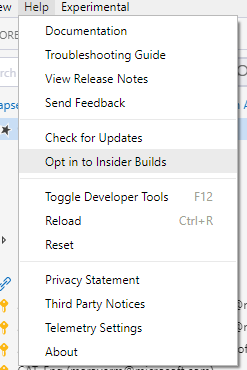
Then, go to Help -> Check for updates, wait for 1.7.0 to appear, and install it. Then once you install it, you can enable device code flow by going to Experimental -> Use Device Code Flow Sign In.
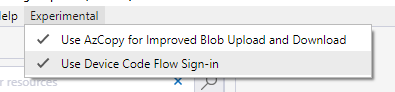
And then let us know if things work out for y'all! This issue of blank sign in dialog is one we've been fighting for the longest time, and we're hoping this method of sign-in will unblock y'all. 😄
MRayermannMSFT
on 11 Feb 2019
Closing. If anyone is still having issues, we now recommend trying out MSAL. MSAL is a newer auth library we'll be switching to in the future. Today though, you can opt into it by going to Settings -> Application -> Sign in -> Use Microsoft Authentication Library (MSAL)
Please open a new issue if you have any problems with MSAL.
MRayermannMSFT
on 16 Mar 2020
Related issues
 ziesemer
·
3Comments
ziesemer
·
3Comments
 CurtMiller66
·
6Comments
CurtMiller66
·
6Comments
 alaendle
·
5Comments
alaendle
·
5Comments
 olgakorichkovskaya
·
4Comments
olgakorichkovskaya
·
4Comments
 OffColour
·
4Comments
OffColour
·
4Comments
Most helpful comment
@martygriffin , can you try signing in with VS for Mac? If you're able to successfully, then leave the accounts signed in, reopen Storage Explorer and you should see them there.