Azuredatastudio: Navigating the found keywords in Notebook Find is hard to follow
Is your feature request related to a problem? Please describe.
When a "paragraph" finds a number of instances of the found keyword (using Notebook find), it's hard to know which one the arrow / navigation is up to.

Describe the solution or feature you'd like
Perhaps the current keyword that is activated by the arrow has a darker color or a different color to make it easier to distinguish.
Describe alternatives you've considered
none.
Additional context
Found this as a usability issue during Livesite discussion.
 MsSQLGirl
All 3 comments
@MsSQLGirl I think we can follow what we have for MD files:
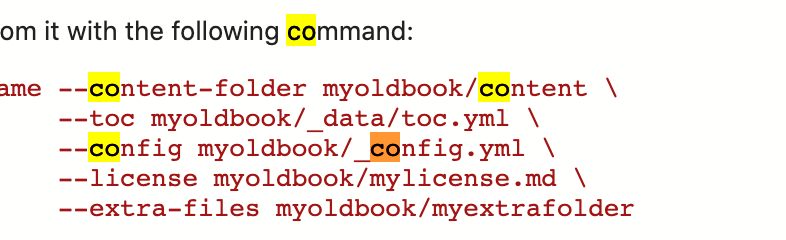
- Current match is highlighted in orange
- All other matches are highlighted in yellow
 radentonev
on 22 Jan 2021
radentonev
on 22 Jan 2021
👍2
This is a good one. Hopefully a quick fix on our side.
 chlafreniere
on 22 Jan 2021
chlafreniere
on 22 Jan 2021
👍1
Agreed. Thank you!
MsSQLGirl
on 22 Jan 2021
Was this page helpful?
0 / 5 - 0 ratings
Related issues
 stevenreddie
·
3Comments
stevenreddie
·
3Comments
 kburtram
·
3Comments
kburtram
·
3Comments
 CubsRep
·
3Comments
CubsRep
·
3Comments
 erickangMSFT
·
3Comments
erickangMSFT
·
3Comments
 blackTay
·
3Comments
blackTay
·
3Comments
Most helpful comment
@MsSQLGirl I think we can follow what we have for MD files: