Azuredatastudio: Refresh SQL project when github branch change
Is your feature request related to a problem? Please describe.
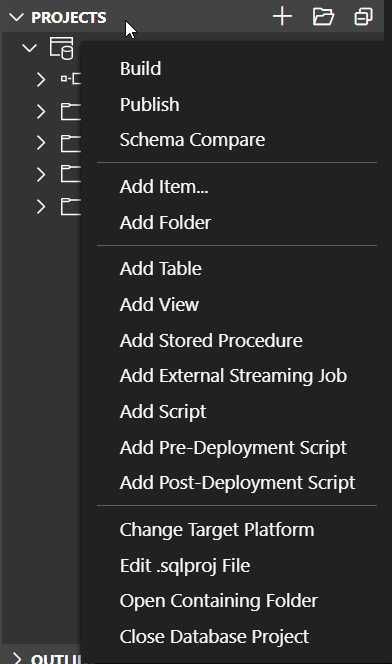
Project section in explorer doesn't update when I checkout a branch. There is not an option to refresh.
Describe the solution or feature you'd like
This should happen automatically when a new branch is checkout and the sqlproj file is different.
Describe alternatives you've considered
There should be an icon to refresh and in the right click menu.
Additional context
Currently I have to close the Database project and open the file again.
 virtualdvid
All 2 comments
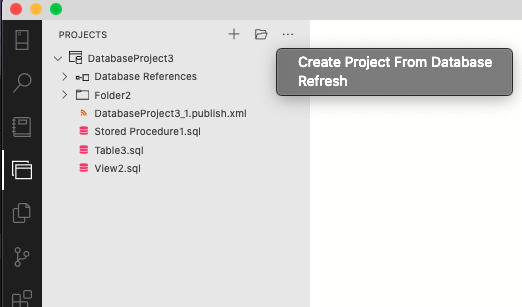
@virtualdvid in the December release, we moved projects to its own separate viewlet and there is now a "Refresh" option in the overflow '...' menu that refreshes all the projects
 kisantia
on 9 Dec 2020
kisantia
on 9 Dec 2020
Awesome! I just got the update and it is there. I'll test all the new features!
virtualdvid
on 9 Dec 2020
Related issues
 kburtram
·
3Comments
kburtram
·
3Comments
kburtram
·
3Comments
kburtram
·
3Comments
 mayurrumal1
·
3Comments
mayurrumal1
·
3Comments
 Ungerfall
·
3Comments
Ungerfall
·
3Comments
 jsmith8858
·
3Comments
jsmith8858
·
3Comments
Most helpful comment
Awesome! I just got the update and it is there. I'll test all the new features!