Azuredatastudio: WYSIWYG Notebook - Updating a cell with relative path causes removal of the paths
- Azure Data Studio Version:
Version: 1.23.0-rc1 (user setup)
Commit: 05615c796db46a766f62ffd90b4d78553b75e2d9
Date: 2020-10-12T18:54:16.767Z
VS Code: 1.49.0
Electron: 9.2.1
Chrome: 83.0.4103.122
Node.js: 12.14.1
V8: 8.3.110.13-electron.0
OS: Windows_NT x64 10.0.19042
Steps to Reproduce:
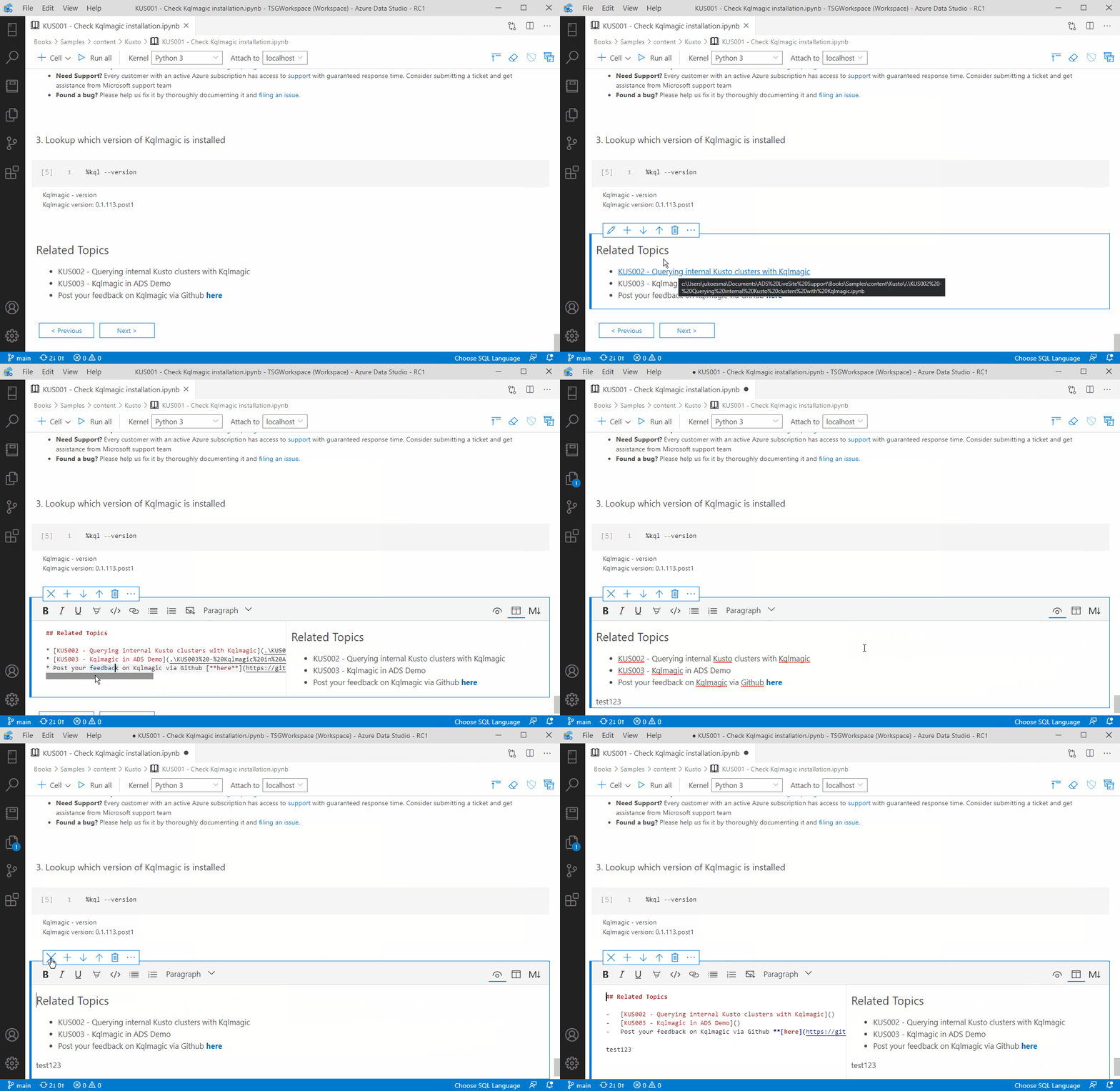
- Open an existing notebook with a relative path. See attached file (last cell).
- Click edit on the text cell with a relative path.
- Switch to markdown Split view mode. You'll see the actual relative path value.
- Switch back to Rich Text mode. Type in a new text in a new line.
- Exit out of edit mode in the text cell.
You'll now see that the relative paths are removed. i.e. no hover on links.
When you edit, you'll also see that the link has been removed both on the Rich Text and the Split view modes.
File for testing:
KUS001 - Check Kqlmagic installation.txt
The workaround is for users to always remember to use Split View or Markdown mode. But because the default mode is Rich Text view, this will significantly impact users with files where text cells have relative paths.
 MsSQLGirl
All 8 comments
@barbaravaldez - Not sure if this is related to https://github.com/microsoft/azuredatastudio/pull/12802. Could you take a look at this?
 Charles-Gagnon
on 13 Oct 2020
Charles-Gagnon
on 13 Oct 2020
Note: I see this behavior in RC1. Also, it seems that it's affecting those paths with "%20" as show on the sample file.
Exhibit 1 - For paths with "%20"
* [KUS002 - Querying internal Kusto clusters with Kqlmagic](.\KUS002%20-%20Querying%20internal%20Kusto%20clusters%20with%20Kqlmagic.ipynb) will become [KUS002 - Querying internal Kusto clusters with Kqlmagic]()
Exhibit 2 - For paths without "%20" (this is not on the sample file... I just modified to remove %20 to see what happened)
[KUS003 - Kqlmagic in ADS Demo](.\KUS003-Kqlmagic-in-ADS-Demo.ipynb) will become [KUS003 - Kqlmagic in ADS Demo](KUS003-Kqlmagic-in-ADS-Demo.ipynb) where .\ is removed.
MsSQLGirl
on 13 Oct 2020
I can help look into this as well as it seems to be a high priority WYSIWYG bug.
 VasuBhog
on 13 Oct 2020
VasuBhog
on 13 Oct 2020
@VasuBhog Thanks - could you and @barbaravaldez sync up and work on this?
Charles-Gagnon
on 13 Oct 2020
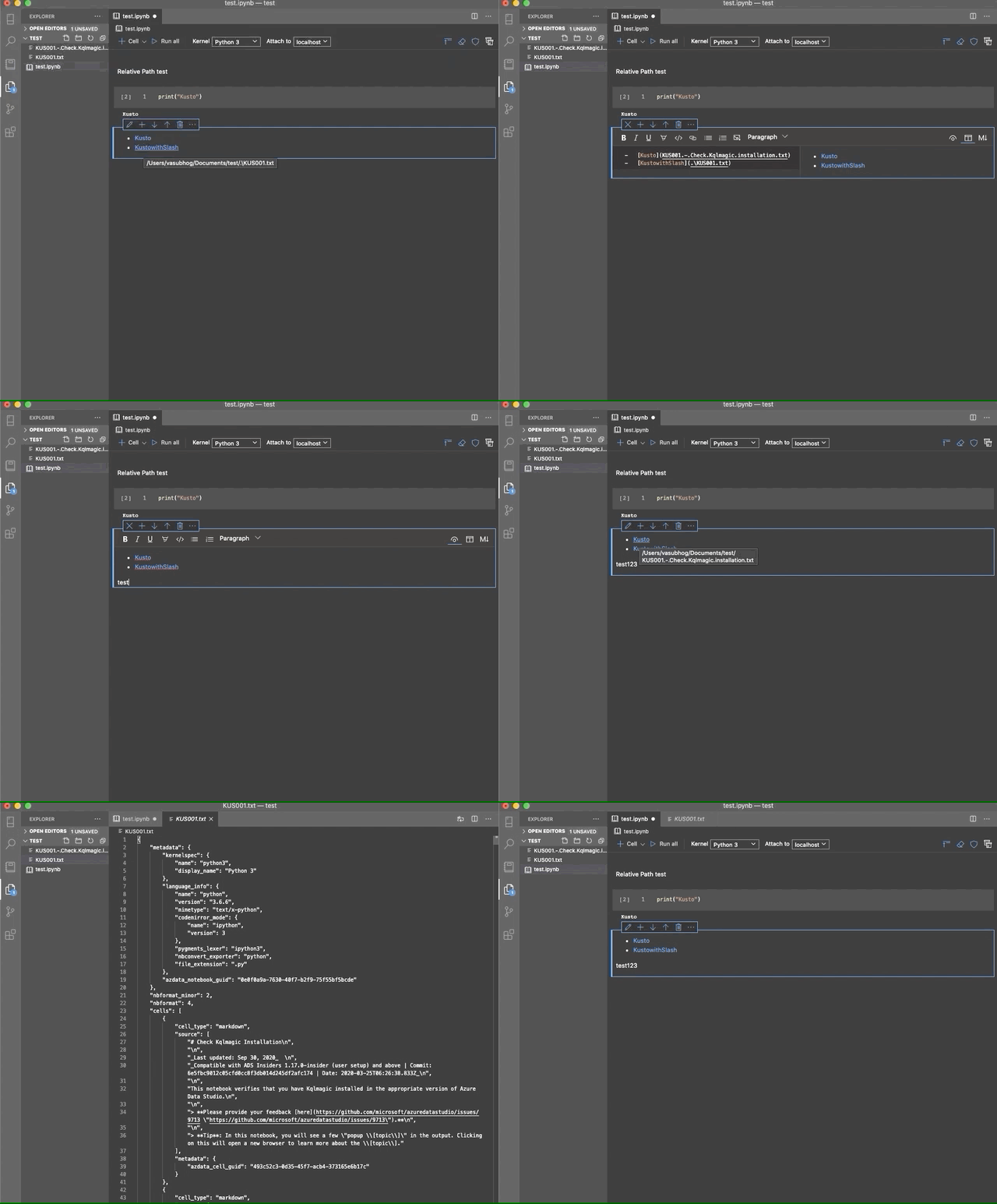
Hi, @MsSQLGirl I am only seeing the behavior when the .\ is removed after following the same steps (I am using a Mac). I do believe that this issue is focused on the windows path and the .\. I will continue to investigate with @barbaravaldez.
VasuBhog
on 13 Oct 2020
This is not a regression, as it also happens in the current stable version of ADS (September release).
VasuBhog
on 13 Oct 2020
Is there a setting to disable the rich text editing or make it not the default? I keep scrogging my files by editing them and not noticing that I'm in rich text mode.
 sredman
on 13 Oct 2020
sredman
on 13 Oct 2020
Hi @sredman, yes you are able to uncheck the setting "Set Rich Text View By Default" in the settings. Therefore making your default for text cells be Markdown viewer instead.

VasuBhog
on 13 Oct 2020
Related issues
 sandermvanvliet
·
3Comments
sandermvanvliet
·
3Comments
 RobLW
·
3Comments
RobLW
·
3Comments
 mayurrumal1
·
3Comments
mayurrumal1
·
3Comments
 CubsRep
·
3Comments
CubsRep
·
3Comments
 squillace
·
3Comments
squillace
·
3Comments
Most helpful comment
Hi @sredman, yes you are able to uncheck the setting "Set Rich Text View By Default" in the settings. Therefore making your default for text cells be Markdown viewer instead.