Azuredatastudio: No Way to Recover from MFA Login Token Retrieval Failure
- Azure Data Studio Version: 1.22.0
Steps to Reproduce:
- I'm not really sure how to reproduce this, but I have a bunch of saved connections in my settings.json, which I added by using the UI. They are all Azure SQL Managed Instance databases, although I just added them by entering the server names, I didn't go through the Azure panel. They look like this:
"datasource.connections": [
    {
        "options": {
            "connectionName": "Dev",
            "server": "<servername>.database.windows.net",
            "database": "",
            "authenticationType": "AzureMFA",
            "user": "<my MSA email>",
            "password": "",
            "connectTimeout": 30,
            "applicationName": "azdata",
            "azureAccount": "<my MSA email>",
            "groupId": "<a guid>",
            "databaseDisplayName": ""
        },
        "groupId": "<a guid>",
        "providerName": "MSSQL",
        "savePassword": true,
        "id": "<a guid>"
    },
    ...
They are authenticated using the Azure AD account associated with my corporate MSA. I can still authenticate and log in using SSMS and that all works fine.
As soon as Azure Data Studio opens, I get an error like this:

If I look in the console, I see an error that says:
Response error! - {"error":"invalid_grant","error_description":"AADSTS50173: The provided grant has expired due to it being revoked, a fresh auth token is needed. The user might have changed or reset their password. The grant was issued on '2020-03-24T15:16:55.9202886Z' and the TokensValidFrom date (before which tokens are not valid) for this user is '2020-09-04T15:03:30.0000000Z'.\r\nTrace ID: <a guid>\r\nCorrelation ID: <a guid>\r\nTimestamp: 2020-09-25 19:44:52Z","error_codes":[50173],"timestamp":"2020-09-25 19:44:52Z","trace_id":"<a guid>","correlation_id":"<a guid>","error_uri":"https://login.microsoftonline.com/error?code=50173"}
My domain password did expire and I had to change it earlier this month so it seems like that's probably related. However, the real issue is that there doesn't seem to be any way to get out of this state in Azure Data Studio.

If I click the link to refresh my credentials (which, incidentally, is very hard to read on the default theme), it opens the Microsoft Account login page and then redirects me to a page that looks like this:

However when I close the window, Azure Data Studio just shows an error about being unable to retrieve a token:

If I look in the developer tools then, I see this:

If I click "Add an account" in the Account drop-down, the same thing happens. There's no way to remove the existing account that I can find.
 bradwestness
All 16 comments
if you click the "person" icon in the lower left, are you able to add/remove any Azure AD accounts from that pane? I have previously been stuck in a loop where removing and adding the account from that pane cleared it up.
edit: "person" icon opens the "Accounts pane"
 dzsquared
on 25 Sep 2020
dzsquared
on 25 Sep 2020
Ah, yep that did it. I never thought to look there because I didn't add the account that way, just added the server via the Connections pane.
bradwestness
on 26 Sep 2020
I've seen this a few times - perhaps we should consider opening the pane under certain AAD connection failure conditions? Or otherwise improve the discoverability of it? 🤔
dzsquared
on 26 Sep 2020
Yeah, I'm glad it's working again, but there's definitely some improvements that could be made around showing meaningful/actionable errors and suggesting this as the fix. The notification that's just an empty set of curly braces and the "Token retrieval failed with error" message don't really drive you in the direction of resolving the issue at all, in addition to the "Refresh your credentials" link being almost impossible to read in the default theme and evidently not being sufficient to actually resolve the issue.
bradwestness
on 26 Sep 2020
Thank you so much @dzsquared and @bradwestness - Just faced this exact experience myself, removing and readding via the

Accounts worked like a charm (added link because I like pictures and it may help others
Interestingly I could access the instance from the Azure connections in the Serve Connection pane but couldn't do the compare which was what I needed!
 SQLDBAWithABeard
on 5 Oct 2020
SQLDBAWithABeard
on 5 Oct 2020
This should definitely be improved. Suggestions
- Get the token from a single place?? Enable readding in the server connection to refresh that token?
- A better error message than open Dev Tools? (This puts off generic users)
- Opening the Azure Accounts pane but will also need some instructions
- Add to the documentation
SQLDBAWithABeard
on 5 Oct 2020
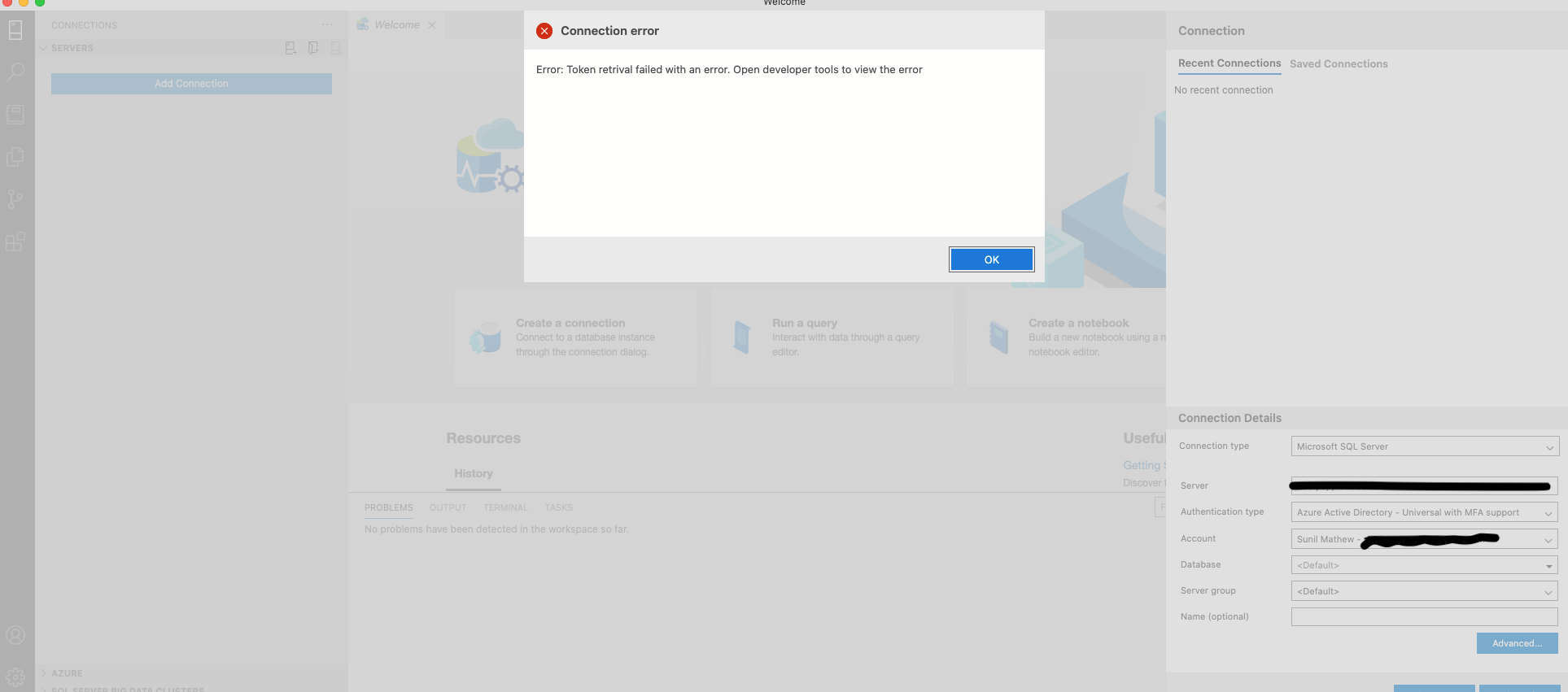
Hey all, I'm stuck in this loop today after resetting my AD password last week. I removed the Microsoft account, closed the application, reopened and tried to reconnect, but no luck. Still getting this error
 smathew-relativity
on 11 Nov 2020
smathew-relativity
on 11 Nov 2020
@smathew-relativity if you open developer tools (ctrl+shift+i), can you share the error message from there?
dzsquared
on 11 Nov 2020
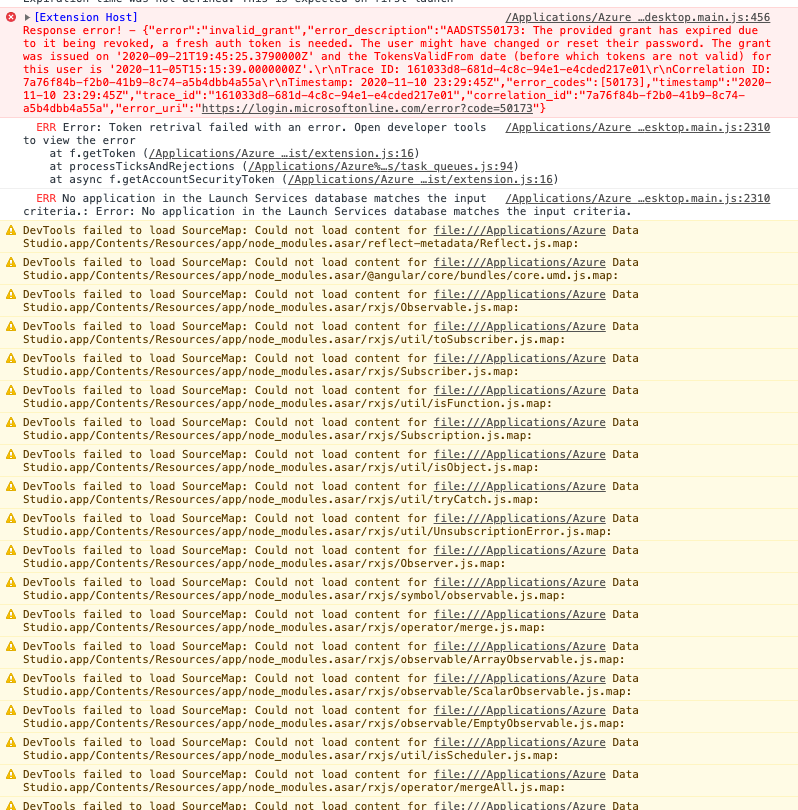
I'm on a Mac, fwiw.
smathew-relativity
on 11 Nov 2020
same thing happened to me but deleting the account and adding it back fixed it
 bijeebuss
on 30 Nov 2020
bijeebuss
on 30 Nov 2020
deleting the account and adding it back didn't help. i ended up removing the app and reinstalling it, that did the trick
smathew-relativity
on 1 Dec 2020
Expecting the user to remove the account and add it back is just plain silly. Why not just tell the user you need to refresh the token (so they're not surprised by the browser opening up) and then run that process?
 ShaneCourtrille
on 16 Dec 2020
ShaneCourtrille
on 16 Dec 2020
A company policy password reset also caused this to trigger. Removing and adding the account again did not resolve it in my case either.
Response error! - {"error":"invalid_grant","error_description":"AADSTS50173: The provided grant has expired due to it being revoked, a fresh auth token is needed. The user might have changed or reset their password. The grant was issued on '2020-09-18T09:34:42.3391599Z' and the TokensValidFrom date (before which tokens are not valid) for this user is '2020-12-16T10:03:16.0000000Z'.\r\nTrace ID: 1b46f4c8-1912-405c-911e-2ed9b2ca0d00\r\nCorrelation ID: 313defce-3c84-47fd-b831-cec1bb1efdd2\r\nTimestamp: 2020-12-20 12:29:53Z","error_codes":[50173],"timestamp":"2020-12-20 12:29:53Z","trace_id":"1b46f4c8-1912-405c-911e-2ed9b2ca0d00","correlation_id":"313defce-3c84-47fd-b831-cec1bb1efdd2","error_uri":"https://login.microsoftonline.com/error?code=50173"}
 janpieterz
on 20 Dec 2020
janpieterz
on 20 Dec 2020
I have Azure Data Studio v1.25.1 and have not used it to logon to Azure SQL Database for over 90 days. I am getting the same error as @smathew-relativity.
 Dlutchy
on 27 Dec 2020
Dlutchy
on 27 Dec 2020
Some users have mentioned that removing and re-adding their account from the accounts pane does not work. Please try this:
Remove your account from the accounts pane. However, once you have deleted the account do not re-add it through the accounts pane. Instead, select the "New Connection" icon  and then in the "New Connection" screen select "Add an Account" and re-add your Azure account there.
 cssuh
on 4 Jan 2021
cssuh
on 4 Jan 2021
I think this is a caching issue.
Like others above, I changed my password and was then unable to access azure hosted databases nor their information. I attempted to reauthenticate to no success, and I tried re-adding the account which also did not solve the problem. However, Removing the account, running the "clear azure account token cache" command, then re-adding the account resolved this issue.
 robjackstewart
on 8 Jan 2021
robjackstewart
on 8 Jan 2021
Related issues
 kburtram
·
3Comments
kburtram
·
3Comments
 Ungerfall
·
3Comments
Ungerfall
·
3Comments
 stevenreddie
·
3Comments
stevenreddie
·
3Comments
 mayurrumal1
·
3Comments
mayurrumal1
·
3Comments
 ottadvantage
·
3Comments
ottadvantage
·
3Comments
Most helpful comment
if you click the "person" icon in the lower left, are you able to add/remove any Azure AD accounts from that pane? I have previously been stuck in a loop where removing and adding the account from that pane cleared it up.
edit: "person" icon opens the "Accounts pane"