Azuredatastudio: Close all tabs without saving
Is your feature request related to a problem? Please describe.
When I need to close to many tabs, Azure Data Studio ask me to save for every tab. If I have 20 tabs, I have to click 20 times in "No" button.
Describe the solution or feature you'd like
A button "Not to all"
Describe alternatives you've considered
A list of opened tabs like Visual Studio does
Additional context

 brunossn
All 2 comments
Thanks for submitting this issue. Please also check if it is already covered by an existing one, like:
![adsbot[bot] picture](https://avatars.githubusercontent.com/in/25741?v=4&s=40) adsbot[bot]
on 28 Apr 2020
adsbot[bot]
on 28 Apr 2020
@brunossn thanks for the suggestion. We've had this request a few times. For some reason, this is the save behavior we picked up from our upstream vscode dependency. Ideally, we'd get this fixed there and then it would come to us in a future merge.
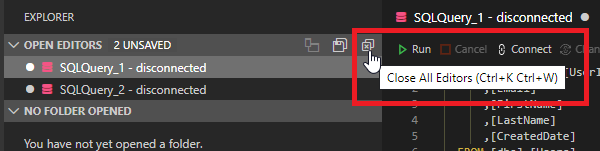
You can close and not save all editors using the Close All Editors button in the File Explorer viewlet (screenshot below). But I agree, not sure why it doesn't do this when closing all editors from document tab menu.
 kburtram
on 29 Apr 2020
kburtram
on 29 Apr 2020
Related issues
kburtram
·
3Comments
kburtram
·
3Comments
 RobLW
·
3Comments
RobLW
·
3Comments
 stevenreddie
·
3Comments
kburtram
·
3Comments
stevenreddie
·
3Comments
kburtram
·
3Comments
Most helpful comment
@brunossn thanks for the suggestion. We've had this request a few times. For some reason, this is the save behavior we picked up from our upstream vscode dependency. Ideally, we'd get this fixed there and then it would come to us in a future merge.
You can close and not save all editors using the
Close All Editorsbutton in the File Explorer viewlet (screenshot below). But I agree, not sure why it doesn't do this when closing all editors from document tab menu.