Azuredatastudio: Cannot connect with "Windows Authentication", user/password fields disabled
- Azure Data Studio Version: Version: 1.16.1
Commit: 16801c522df68e63218b39ccb5b4a7431f9bf667
Date: 2020-03-23T22:06:16.901Z
VS Code: 1.42.0
Electron: 7.1.11
Chrome: 78.0.3904.130
Node.js: 12.8.1
V8: 7.8.279.23-electron.0
OS: Darwin x64 17.7.0
Steps to Reproduce:
- Configured krb5.conf, on macOS 10.13.6
kinitgives me a ticketklisttells me it is valid for 10 hours- Enter the server's IP (I can log onto it w/ a different commercial tool)
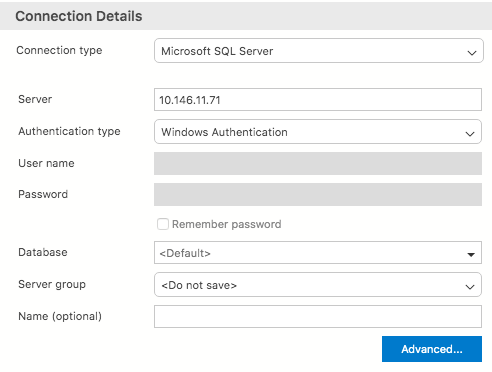
- The fields "User name" and "Password" are greyed out
- Specifying a "Database" does not change it.
- Clicking on "Connect" gives me a dialog, stating that I have to properly configure kerberos.
I followed the instructions from Use Active Directory Authentication.
 catull
All 5 comments
I followed all steps that were suggested in #10079.
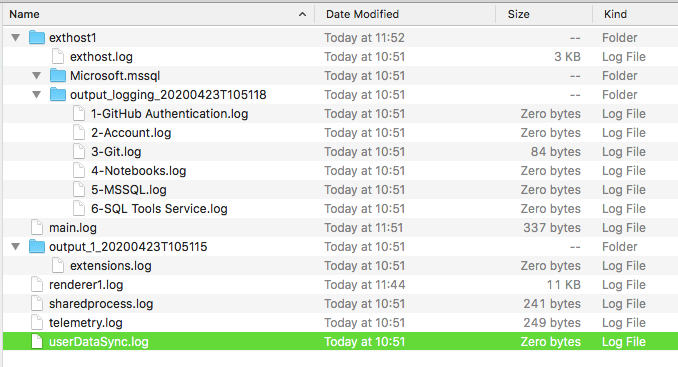
There are no indications in any of the logs.
UI dialog
~/Library/Application Support/azuredatastudio/SOMELONGDATETIMESTAMP:
exthost
[2020-04-23 10:51:17.978] [exthost] [info] extension host started
[2020-04-23 10:51:18.022] [exthost] [info] ExtensionService#_doActivateExtension Microsoft.azurecore {"startup":true,"extensionId":{"value":"Microsoft.azurecore","_lower":"microsoft.azurecore"},"activationEvent":"*"}
[2020-04-23 10:51:18.022] [exthost] [info] ExtensionService#loadCommonJSModule file:///Users/catull/Applications/Azure Data Studio.app/Contents/Resources/app/extensions/azurecore/dist/extension
[2020-04-23 10:51:18.224] [exthost] [info] ExtensionService#_doActivateExtension vscode.git {"startup":true,"extensionId":{"value":"vscode.git","_lower":"vscode.git"},"activationEvent":"*"}
[2020-04-23 10:51:18.224] [exthost] [info] ExtensionService#loadCommonJSModule file:///Users/catull/Applications/Azure Data Studio.app/Contents/Resources/app/extensions/git/dist/main
[2020-04-23 10:51:18.287] [exthost] [info] ExtensionService#_doActivateExtension vscode.github-authentication {"startup":true,"extensionId":{"value":"vscode.github-authentication","_lower":"vscode.github-authentication"},"activationEvent":"*"}
[2020-04-23 10:51:18.288] [exthost] [info] ExtensionService#loadCommonJSModule file:///Users/catull/Applications/Azure Data Studio.app/Contents/Resources/app/extensions/github-authentication/dist/extension.js
[2020-04-23 10:51:18.293] [exthost] [info] ExtensionService#_doActivateExtension vscode.merge-conflict {"startup":true,"extensionId":{"value":"vscode.merge-conflict","_lower":"vscode.merge-conflict"},"activationEvent":"*"}
[2020-04-23 10:51:18.293] [exthost] [info] ExtensionService#loadCommonJSModule file:///Users/catull/Applications/Azure Data Studio.app/Contents/Resources/app/extensions/merge-conflict/dist/extension
[2020-04-23 10:51:18.300] [exthost] [info] ExtensionService#_doActivateExtension Microsoft.notebook {"startup":true,"extensionId":{"value":"Microsoft.notebook","_lower":"microsoft.notebook"},"activationEvent":"*"}
[2020-04-23 10:51:18.300] [exthost] [info] ExtensionService#loadCommonJSModule file:///Users/catull/Applications/Azure Data Studio.app/Contents/Resources/app/extensions/notebook/dist/extension
[2020-04-23 10:51:18.497] [exthost] [info] ExtensionService#_doActivateExtension vscode.search-result {"startup":true,"extensionId":{"value":"vscode.search-result","_lower":"vscode.search-result"},"activationEvent":"*"}
[2020-04-23 10:51:18.497] [exthost] [info] ExtensionService#loadCommonJSModule file:///Users/catull/Applications/Azure Data Studio.app/Contents/Resources/app/extensions/search-result/dist/extension.js
[2020-04-23 10:51:18.500] [exthost] [info] ExtensionService#_doActivateExtension vscode.vscode-account {"startup":true,"extensionId":{"value":"vscode.vscode-account","_lower":"vscode.vscode-account"},"activationEvent":"*"}
[2020-04-23 10:51:18.500] [exthost] [info] ExtensionService#loadCommonJSModule file:///Users/catull/Applications/Azure Data Studio.app/Contents/Resources/app/extensions/vscode-account/dist/extension.js
[2020-04-23 10:51:18.507] [exthost] [info] eager extensions activated
[2020-04-23 10:51:18.683] [exthost] [info] ExtensionService#_doActivateExtension Microsoft.mssql {"startup":true,"extensionId":{"value":"Microsoft.mssql","_lower":"microsoft.mssql"},"activationEvent":"*"}
[2020-04-23 10:51:18.683] [exthost] [info] ExtensionService#loadCommonJSModule file:///Users/catull/Applications/Azure Data Studio.app/Contents/Resources/app/extensions/mssql/dist/main
main.log
[2020-04-23 10:51:12.011] [main] [info] update#setState idle
[2020-04-23 10:51:42.017] [main] [info] update#setState checking for updates
[2020-04-23 10:51:42.708] [main] [info] update#setState idle
[2020-04-23 11:51:42.113] [main] [info] update#setState checking for updates
[2020-04-23 11:51:42.911] [main] [info] update#setState idle
renderer1.log
Replaced my credentials with CATULL@MYDOMAIN, I use them on other logins, where they work.
[2020-04-23 10:52:33.259] [renderer1] [info] Creating new connection connection:providerName:MSSQL|applicationName:azdata|authenticationType:SqlLogin|database:|server:10.146.11.71|user:CATULL@MYDOMAIN|group:C777F06B-202E-4480-B475-FA416154D458
[2020-04-23 10:52:33.259] [renderer1] [info] Adding connection connection:providerName:MSSQL|applicationName:azdata|authenticationType:SqlLogin|database:|server:10.146.11.71|user:CATULL@MYDOMAIN|group:C777F06B-202E-4480-B475-FA416154D458
[2020-04-23 10:52:33.260] [renderer1] [info] Successfully added connection connection:providerName:MSSQL|applicationName:azdata|authenticationType:SqlLogin|database:|server:10.146.11.71|user:CATULL@MYDOMAIN|group:C777F06B-202E-4480-B475-FA416154D458
[2020-04-23 10:52:34.729] [renderer1] [info] Deleting connection connection:providerName:MSSQL|applicationName:azdata|authenticationType:SqlLogin|database:|server:10.146.11.71|user:CATULL@MYDOMAIN|group:C777F06B-202E-4480-B475-FA416154D458
[2020-04-23 10:52:45.528] [renderer1] [info] Creating new connection connection:providerName:MSSQL|applicationName:azdata|authenticationType:SqlLogin|database:|server:10.146.11.71|user:CATULL@MYDOMAIN|group:C777F06B-202E-4480-B475-FA416154D458
[2020-04-23 10:52:45.529] [renderer1] [info] Adding connection connection:providerName:MSSQL|applicationName:azdata|authenticationType:SqlLogin|database:|server:10.146.11.71|user:CATULL@MYDOMAIN|group:C777F06B-202E-4480-B475-FA416154D458
[2020-04-23 10:52:45.529] [renderer1] [info] Successfully added connection connection:providerName:MSSQL|applicationName:azdata|authenticationType:SqlLogin|database:|server:10.146.11.71|user:CATULL@MYDOMAIN|group:C777F06B-202E-4480-B475-FA416154D458
[2020-04-23 10:52:45.635] [renderer1] [info] Deleting connection connection:providerName:MSSQL|applicationName:azdata|authenticationType:SqlLogin|database:|server:10.146.11.71|user:CATULL@MYDOMAIN|group:C777F06B-202E-4480-B475-FA416154D458
[2020-04-23 10:52:54.540] [renderer1] [info] Creating new connection connection:providerName:MSSQL|applicationName:azdata|authenticationType:Integrated|database:|server:10.146.11.71|user:|group:C777F06B-202E-4480-B475-FA416154D458
[2020-04-23 10:52:54.540] [renderer1] [info] Adding connection connection:providerName:MSSQL|applicationName:azdata|authenticationType:Integrated|database:|server:10.146.11.71|user:|group:C777F06B-202E-4480-B475-FA416154D458
[2020-04-23 10:52:54.540] [renderer1] [info] Successfully added connection connection:providerName:MSSQL|applicationName:azdata|authenticationType:Integrated|database:|server:10.146.11.71|user:|group:C777F06B-202E-4480-B475-FA416154D458
[2020-04-23 10:52:54.922] [renderer1] [info] Deleting connection connection:providerName:MSSQL|applicationName:azdata|authenticationType:Integrated|database:|server:10.146.11.71|user:|group:C777F06B-202E-4480-B475-FA416154D458
[2020-04-23 10:52:54.926] [renderer1] [error] Kerberos connection failure. Message : Cannot authenticate using Kerberos. Ensure Kerberos has been initialized on the client with 'kinit' and a Service Principal Name has been registered for the SQL Server to allow Kerberos authentication.
ErrorCode=InternalError, Exception=Interop+NetSecurityNative+GssApiException: GSSAPI operation failed with error -  An unsupported mechanism was requested (unknown mech-code 0 for mech unknown).
   at System.Net.Security.NegotiateStreamPal.GssInitSecurityContext(SafeGssContextHandle& context, SafeGssCredHandle credential, Boolean isNtlm, SafeGssNameHandle targetName, GssFlags inFlags, Byte[] buffer, Byte[]& outputBuffer, UInt32& outFlags, Int32& isNtlmUsed)
   at System.Net.Security.NegotiateStreamPal.EstablishSecurityContext(SafeFreeNegoCredentials credential, SafeDeleteContext& context, String targetName, ContextFlagsPal inFlags, SecurityBuffer inputBuffer, SecurityBuffer outputBuffer, ContextFlagsPal& outFlags)
   at Microsoft.Data.SqlClient.SNI.SNIProxy.GenSspiClientContext(SspiClientContextStatus sspiClientContextStatus, Byte[] receivedBuff, Byte[]& sendBuff, Byte[] serverName)
   at Microsoft.Data.SqlClient.SNI.TdsParserStateObjectManaged.GenerateSspiClientContext(Byte[] receivedBuff, UInt32 receivedLength, Byte[]& sendBuff, UInt32& sendLength, Byte[] _sniSpnBuffer)
   at Microsoft.Data.SqlClient.TdsParser.SNISSPIData(Byte[] receivedBuff, UInt32 receivedLength, Byte[]& sendBuff, UInt32& sendLength) Message Details : Microsoft.Data.SqlClient.SqlException (0x80131904): Cannot authenticate using Kerberos. Ensure Kerberos has been initialized on the client with 'kinit' and a Service Principal Name has been registered for the SQL Server to allow Kerberos authentication.
ErrorCode=InternalError, Exception=Interop+NetSecurityNative+GssApiException: GSSAPI operation failed with error -  An unsupported mechanism was requested (unknown mech-code 0 for mech unknown).
   at System.Net.Security.NegotiateStreamPal.GssInitSecurityContext(SafeGssContextHandle& context, SafeGssCredHandle credential, Boolean isNtlm, SafeGssNameHandle targetName, GssFlags inFlags, Byte[] buffer, Byte[]& outputBuffer, UInt32& outFlags, Int32& isNtlmUsed)
   at System.Net.Security.NegotiateStreamPal.EstablishSecurityContext(SafeFreeNegoCredentials credential, SafeDeleteContext& context, String targetName, ContextFlagsPal inFlags, SecurityBuffer inputBuffer, SecurityBuffer outputBuffer, ContextFlagsPal& outFlags)
   at Microsoft.Data.SqlClient.SNI.SNIProxy.GenSspiClientContext(SspiClientContextStatus sspiClientContextStatus, Byte[] receivedBuff, Byte[]& sendBuff, Byte[] serverName)
   at Microsoft.Data.SqlClient.SNI.TdsParserStateObjectManaged.GenerateSspiClientContext(Byte[] receivedBuff, UInt32 receivedLength, Byte[]& sendBuff, UInt32& sendLength, Byte[] _sniSpnBuffer)
   at Microsoft.Data.SqlClient.TdsParser.SNISSPIData(Byte[] receivedBuff, UInt32 receivedLength, Byte[]& sendBuff, UInt32& sendLength)
   at Microsoft.Data.SqlClient.SqlInternalConnection.OnError(SqlException exception, Boolean breakConnection, Action`1 wrapCloseInAction)
   at Microsoft.Data.SqlClient.TdsParser.ThrowExceptionAndWarning(TdsParserStateObject stateObj, Boolean callerHasConnectionLock, Boolean asyncClose)
   at Microsoft.Data.SqlClient.TdsParser.SNISSPIData(Byte[] receivedBuff, UInt32 receivedLength, Byte[]& sendBuff, UInt32& sendLength)
   at Microsoft.Data.SqlClient.TdsParser.TdsLogin(SqlLogin rec, FeatureExtension requestedFeatures, SessionData recoverySessionData, Nullable`1 fedAuthFeatureExtensionData)
   at Microsoft.Data.SqlClient.SqlInternalConnectionTds.Login(ServerInfo server, TimeoutTimer timeout, String newPassword, SecureString newSecurePassword)
   at Microsoft.Data.SqlClient.SqlInternalConnectionTds.AttemptOneLogin(ServerInfo serverInfo, String newPassword, SecureString newSecurePassword, Boolean ignoreSniOpenTimeout, TimeoutTimer timeout, Boolean withFailover)
   at Microsoft.Data.SqlClient.SqlInternalConnectionTds.LoginNoFailover(ServerInfo serverInfo, String newPassword, SecureString newSecurePassword, Boolean redirectedUserInstance, SqlConnectionString connectionOptions, SqlCredential credential, TimeoutTimer timeout)
   at Microsoft.Data.SqlClient.SqlInternalConnectionTds.OpenLoginEnlist(TimeoutTimer timeout, SqlConnectionString connectionOptions, SqlCredential credential, String newPassword, SecureString newSecurePassword, Boolean redirectedUserInstance)
   at Microsoft.Data.SqlClient.SqlInternalConnectionTds..ctor(DbConnectionPoolIdentity identity, SqlConnectionString connectionOptions, SqlCredential credential, Object providerInfo, String newPassword, SecureString newSecurePassword, Boolean redirectedUserInstance, SqlConnectionString userConnectionOptions, SessionData reconnectSessionData, Boolean applyTransientFaultHandling, String accessToken, DbConnectionPool pool, SqlAuthenticationProviderManager sqlAuthProviderManager)
   at Microsoft.Data.SqlClient.SqlConnectionFactory.CreateConnection(DbConnectionOptions options, DbConnectionPoolKey poolKey, Object poolGroupProviderInfo, DbConnectionPool pool, DbConnection owningConnection, DbConnectionOptions userOptions)
   at Microsoft.Data.ProviderBase.DbConnectionFactory.CreateNonPooledConnection(DbConnection owningConnection, DbConnectionPoolGroup poolGroup, DbConnectionOptions userOptions)
   at Microsoft.Data.ProviderBase.DbConnectionFactory.<>c__DisplayClass40_0.<TryGetConnection>b__1(Task`1 _)
   at System.Threading.Tasks.ContinuationResultTaskFromResultTask`2.InnerInvoke()
   at System.Threading.ExecutionContext.RunInternal(ExecutionContext executionContext, ContextCallback callback, Object state)
--- End of stack trace from previous location where exception was thrown ---
   at System.Threading.Tasks.Task.ExecuteWithThreadLocal(Task& currentTaskSlot)
--- End of stack trace from previous location where exception was thrown ---
   at Microsoft.SqlTools.ServiceLayer.Connection.ReliableConnection.ReliableSqlConnection.<>c__DisplayClass30_0.<<OpenAsync>b__0>d.MoveNext() in D:\a\1\s\src\Microsoft.SqlTools.ManagedBatchParser\ReliableConnection\ReliableSqlConnection.cs:line 314
--- End of stack trace from previous location where exception was thrown ---
   at Microsoft.SqlTools.ServiceLayer.Connection.ConnectionService.TryOpenConnection(ConnectionInfo connectionInfo, ConnectParams connectionParams) in D:\a\1\s\src\Microsoft.SqlTools.ServiceLayer\Connection\ConnectionService.cs:line 524
ClientConnectionId:8cc8d04b-d42b-4c5a-906b-9de4c3915ce7
[2020-04-23 10:53:27.520] [renderer1] [info] Creating new connection connection:providerName:MSSQL|applicationName:azdata|authenticationType:Integrated|database:|server:10.146.11.71|user:|group:C777F06B-202E-4480-B475-FA416154D458
[2020-04-23 10:53:27.520] [renderer1] [info] Adding connection connection:providerName:MSSQL|applicationName:azdata|authenticationType:Integrated|database:|server:10.146.11.71|user:|group:C777F06B-202E-4480-B475-FA416154D458
[2020-04-23 10:53:27.521] [renderer1] [info] Successfully added connection connection:providerName:MSSQL|applicationName:azdata|authenticationType:Integrated|database:|server:10.146.11.71|user:|group:C777F06B-202E-4480-B475-FA416154D458
[2020-04-23 10:53:27.662] [renderer1] [info] Deleting connection connection:providerName:MSSQL|applicationName:azdata|authenticationType:Integrated|database:|server:10.146.11.71|user:|group:C777F06B-202E-4480-B475-FA416154D458
[2020-04-23 11:44:30.408] [renderer1] [info] Creating new connection connection:providerName:MSSQL|applicationName:azdata|authenticationType:Integrated|database:|server:10.146.11.71|user:|group:C777F06B-202E-4480-B475-FA416154D458
[2020-04-23 11:44:30.408] [renderer1] [info] Adding connection connection:providerName:MSSQL|applicationName:azdata|authenticationType:Integrated|database:|server:10.146.11.71|user:|group:C777F06B-202E-4480-B475-FA416154D458
[2020-04-23 11:44:30.422] [renderer1] [info] Successfully added connection connection:providerName:MSSQL|applicationName:azdata|authenticationType:Integrated|database:|server:10.146.11.71|user:|group:C777F06B-202E-4480-B475-FA416154D458
[2020-04-23 11:44:31.383] [renderer1] [info] Deleting connection connection:providerName:MSSQL|applicationName:azdata|authenticationType:Integrated|database:|server:10.146.11.71|user:|group:C777F06B-202E-4480-B475-FA416154D458
This puzzles me.
You got
- Azure Data Studio developed in C#, distributed with .DLLs etc.
- Microsoft SQL Server DB
- Active Directory authentication
all of them are 100% Microsoft technologies.
(Yes, Electron and macOS are not close to Microsoft, I am aware of that)
On the other hand, I can take
- DBeaver Community Edition, developed in Java
- have it fetch the latest JDBC driver
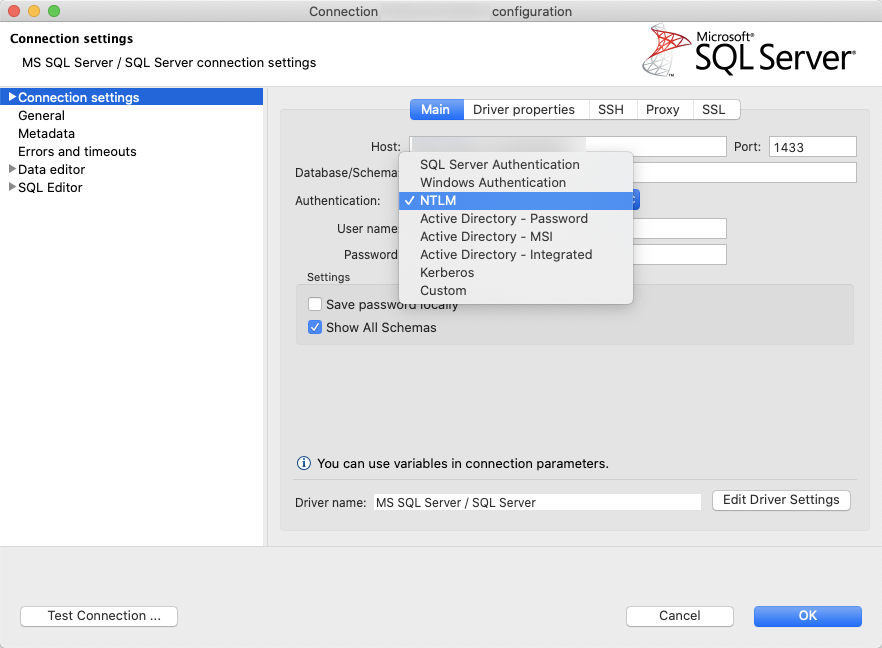
- choose NTLM as authentication
- access the same MS SQL Server DB
and it works, only SQL Server and NTLM are MS tech.
In NO WAY do I want to disrespect your application.
You guys spend a lot of time and effort producing a tool, which you make available for free.
You have my respect.
I wish you all the best, I am confident you will resolve this issue.
Regards,
Catull
catull
on 23 Apr 2020
@aaomidi do you have any tips to troubleshoot this? If kinit is giving a valid ticket shouldn't SqlClient pick that up and try to use it?
 kburtram
on 23 Apr 2020
kburtram
on 23 Apr 2020
Am I missing something or is this error spelled out here?
[2020-04-23 10:52:54.926] [renderer1] [error] Kerberos connection failure. Message : Cannot authenticate using Kerberos. Ensure Kerberos has been initialized on the client with 'kinit' and a Service Principal Name has been registered for the SQL Server to allow Kerberos authentication.
We're also in the process of making some more changes to the way kinit works, so this group of issues is under our radar as a whole.
 aaomidi
on 23 Apr 2020
aaomidi
on 23 Apr 2020
Am I missing something or is this error spelled out here?
@aaomidi, this problem presents itself in the environment I work as well, where the issue appears to be caused by the SQL instance being configured with NTLM Authentication and not Kerberos.
Microsoft documents the role of SPN's within SQL Authentication here: https://docs.microsoft.com/en-us/sql/database-engine/configure-windows/register-a-service-principal-name-for-kerberos-connections?view=sql-server-ver15#Role
This excerpt from the _Permissions_ paragraph is relevant:
Suppose the account starting SQL Server doesn't have permission to register an SPN in Active Directory Domain Services. In that case, this call fails, and a warning message is logged in the Application event log as well as the SQL Server error log. To register the SPN, the Database Engine must be running under a built-in account, such as Local System (not recommended), or NETWORK SERVICE, or an account that has permission to register an SPN.
Working around this issue might be possible if we could use the Microsoft-provided JDBC driver set to NTLM authentication, however currently the Mac version only provides options for a _SQL Login_ (which works) or _Windows Authentication_, which fails in the scenario described.
Connectivity succeeds for me as well, using DBeaver with NTLM set as the authentication mode:
Hope this helps, and thanks for your efforts.
 j-e-n-k-s-y
on 3 Nov 2020
j-e-n-k-s-y
on 3 Nov 2020
Related issues
 borgdylan
·
30Comments
borgdylan
·
30Comments
 capnsue
·
48Comments
capnsue
·
48Comments
 nnnax
·
29Comments
nnnax
·
29Comments
 anand348
·
24Comments
anand348
·
24Comments
 SteveDMurphy
·
26Comments
SteveDMurphy
·
26Comments
Most helpful comment
This puzzles me.
You got
all of them are 100% Microsoft technologies.
(Yes, Electron and macOS are not close to Microsoft, I am aware of that)
On the other hand, I can take
and it works, only SQL Server and NTLM are MS tech.
In NO WAY do I want to disrespect your application.
You guys spend a lot of time and effort producing a tool, which you make available for free.
You have my respect.
I wish you all the best, I am confident you will resolve this issue.
Regards,
Catull