Azuredatastudio: Authentication falls back to SQL Auth by default and prevents "Script As" commands from working
Issue Type: Bug
- Connect to SQL Azure database using SQL Login.
- Sign in to Azure using your Azure account
- Try to connect to the database that's already in your azure subscription
- Connection defaults to cached SQL Login
The effect of this is that whenever I refresh the database object, it always goes for SQL Login first and more importantly I cannot script a stored procedure or a table because the auth interrupts the script flow and does not resume. Of course I get an auth failure message first.
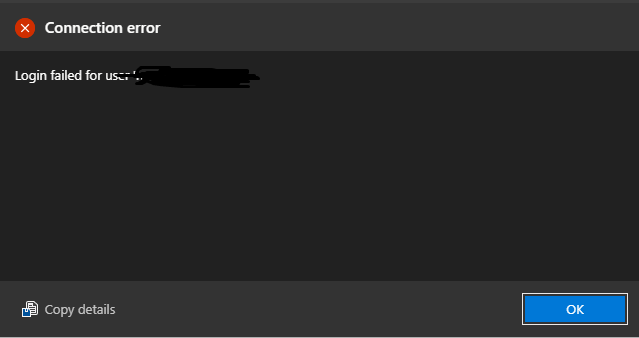
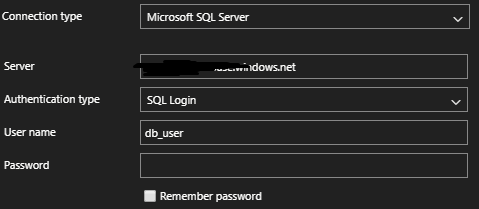
The SQL Login is persisted somewhere and no amount of uninstall/reinstall could get rid of the cached credential (minus password).
Azure Data Studio version: azuredatastudio 1.15.1 (83544eba2504f564d785534cc780d2073feec2cc, 2020-02-15T05:03:16.545Z)
OS version: Windows_NT x64 10.0.18363
System Info
|Item|Value|
|---|---|
|CPUs|Intel(R) Core(TM) i7-4790K CPU @ 4.00GHz (8 x 3998)|
|GPU Status|2d_canvas: enabled
flash_3d: enabled
flash_stage3d: enabled
flash_stage3d_baseline: enabled
gpu_compositing: enabled
metal: disabled_off
multiple_raster_threads: enabled_on
oop_rasterization: disabled_off
protected_video_decode: unavailable_off
rasterization: enabled
skia_renderer: disabled_off
surface_control: disabled_off
surface_synchronization: enabled_on
video_decode: enabled
viz_display_compositor: enabled_on
viz_hit_test_surface_layer: disabled_off
webgl: enabled
webgl2: enabled|
|Load (avg)|undefined|
|Memory (System)|31.94GB (9.92GB free)|
|Process Argv||
|Screen Reader|no|
|VM|0%|
Extensions: none
 rhythmnewt
All 19 comments
@rhythmnewt I'm not sure I'm understanding your issue here. Is this what you're doing?
- Create connection to an Azure server and specify SQL login credentials (username/password)
- Log in to Azure in ADS
- Using the connection created in 1 attempt to connect
- Get the
login failedmessage
If your intention is to use your Azure account to log in to the server then you would need to specify the Azure Active Directory - Universal with MFA support option for the Authentication Type and then choose the Azure account you wish to use to authenticate.

Just logging in to your Azure account in ADS does not mean that will be used to log in to an Azure server (since Azure servers also support other types of logins such as SQL login)
I'm going to close this for now given that I believe this is what the case is - if I'm misunderstanding something let me know and I can help investigate what the issue is!
 Charles-Gagnon
on 3 Apr 2020
Charles-Gagnon
on 3 Apr 2020
@Charles-Gagnon The problem is that even if I switch authentication type to Azure Active Directory - Universal and login successfully. The next time I'm trying to connect (right click + new query on the same database) by default ADS will attempt to use the cached sql auth credentials first to authenticate but because the password is not cached, the login will fail with the connection error I already provided.
The context menus such as "Script as Create" on tables are prevented from being executed because of this behavior and I had to go back to SSMS instead.
It's a very jarring experience, and at the very least I would like to know how to clear these cached SQL Auth credentials. I've tried uninstalling ADS, removing any local files but after reinstalling the SQL auth credentials are still there.
rhythmnewt
on 10 Apr 2020
Here's a screen capture exhibiting this behavior. Sorry for the quality.
I'm clicking "Script as Create" from the context menu on each table.
rhythmnewt
on 10 Apr 2020
What do you mean "switch authentication"? At what point are you trying to switch and how are you going about doing this?
Currently connections don't support being modified. You will need to make two separate connections for each type of connection type if you want to switch between them.
Charles-Gagnon
on 10 Apr 2020
@Charles-Gagnon look at the screen capture I attached. I'm logged in to Azure with my org credentials and when I try to use "Script as Create" on a table, I get a login failed error and no matter what credentials (doesn't matter if sql auth or AAD universal) I use I cannot use this functionality (it always pops up the error and stops the query window with the script from opening).
rhythmnewt
on 12 Apr 2020
@rhythmnewt The video you captured doesn't have the server connection on screen so I can't see any information about that connection. If you're referring to your first screenshot attached - that clearly shows SQL login being used which implies the connection itself is set up to use SQL Auth.
If you look at the server connection node you're working with is the name listed in the parentheses at the end? Is it your AAD account or the SQL login name?

And to clarify - when you say you're "logged in to Azure", what do you mean by that? Because adding your account in the Accounts tab doesn't automatically make your server connections start to use that - you have to still specifically choose AAD as the authentication type as I showed in the screenshot above.
Charles-Gagnon
on 13 Apr 2020
@Charles-Gagnon Yes, I did mean that my account is added to the accounts tab. I also do understand that I have to select the connection type and provide credentials before connecting.
What I'm trying to explain is that after the connection is setup (regardless whether I set the connection to AAD) it always falls back to SQL Auth on any database refresh, new query, or "script as" command. I am clicking the table from the Azure->Subscription->Sql Database->Database->Tables list. Is there a secure way that I can send you a screen capture or we can do a screen share somehow?
rhythmnewt
on 13 Apr 2020
Ahhh, alright sorry I was missing the context that this was from the Azure view (I was using the Servers view)
I'm able to repro this issue so I'll look into this.
But for the time being as a workaround - if you go to "Add Connection" in the Servers view

and then add a connection with :
- The database set to the database you're trying to connect to (you can also just connect to the server and leave the DB as default if you have access and have multiple DBs on the server you want to manage)
- Authentication type set to Azure Active Directory - Universal with MFA support and your account selected from the dropdown
That should let you connect and run the commands as expected.
Charles-Gagnon
on 13 Apr 2020
@Charles-Gagnon Success! :) The workaround works for me, no problem with scripting objects, etc.
Thank you for being patient, and working with me to understand the issue.
rhythmnewt
on 13 Apr 2020
@rhythmnewt If you get a chance could you try out the latest insiders build? We've been doing some fixes in the area and it looks like it's correctly using the account credentials for the underlying nodes there (which would be included in the next stable release then)
Charles-Gagnon
on 13 Apr 2020
@Charles-Gagnon I tried the insider's build, and cannot add my Azure account to re-test
Click "Sign In" on the Azure view
Click "Add an account" button to add a linked account
In browser window click on my Org account to sign in.
An error shows up in ADS:
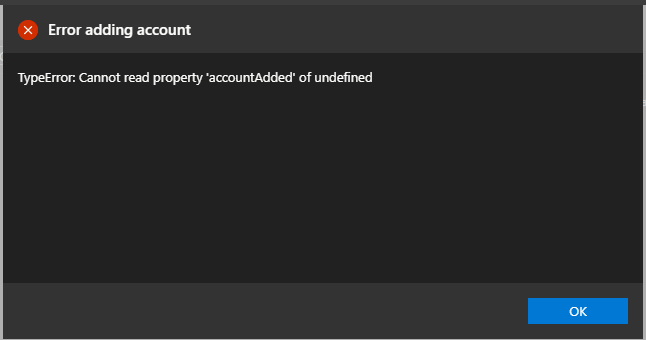
An error displayed in browser:
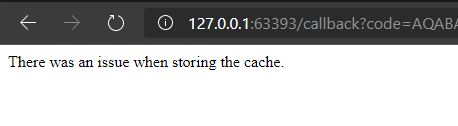
Using Microsoft Edge Version 80.0.361.111 (Official build) (64-bit)
rhythmnewt
on 13 Apr 2020
@aaomidi Any ideas here?
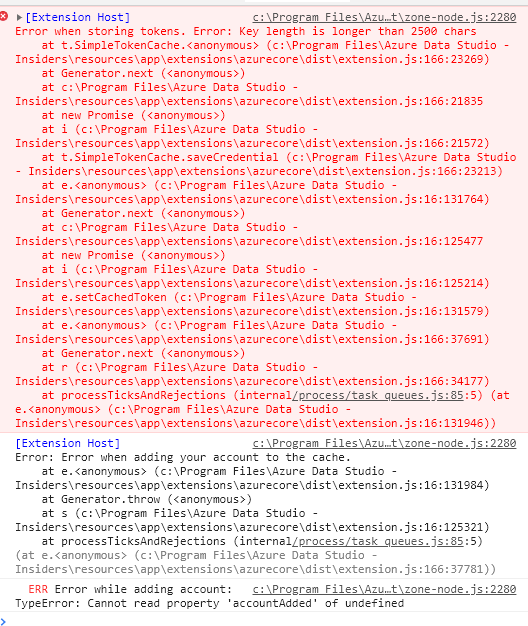
@rhythmnewt If you open the developer console (Help -> Toggle Developer Console) and then go to the Console tab are there any errors displayed there after attempting to add your account?
Charles-Gagnon
on 13 Apr 2020
@Charles-Gagnon this is what the console is showing
rhythmnewt
on 13 Apr 2020
Thanks @rhythmnewt - I'm going to close this out since I think your original issue should be resolved with the latest changes. But I just opened another one for the key length issue so keep an eye on that for any other updates
Charles-Gagnon
on 14 Apr 2020
Partial success. The below insider version lets me add Azure Account with a workaround for the key-length issue, however the issue is only partially resolved.
If I connect to the my database by right clicking on it in the Azure view and logging in via SQL Auth, I get a blade/tab with a list of tables from which I can execute the context menus successfully. However in the Azure view, the database itself does not refresh and or opens the tree view to view database objects.
However if I try to connect to my database (same steps as above) but choose the Azure Active Directory - Universal as authentication method, enter credentials and click connect the spinner appears but no authentication occurs - connection window just sits there open.
Version: 1.17.0-insider (system setup)
Commit: 30607ec61b9eb47ad55d931e528b5ecab4bdf4eb
Date: 2020-04-15T05:57:54.355Z
VS Code: 1.42.0
Electron: 7.1.11
Chrome: 78.0.3904.130
Node.js: 12.8.1
V8: 7.8.279.23-electron.0
OS: Windows_NT x64 10.0.18363
rhythmnewt
on 15 Apr 2020
@Charles-Gagnon just updated to the latest release and am still having the same issue with the Azure blade.
Version: 1.17.1 (user setup)
Commit: 814ce88c41e0daaca89afed8b184e795057a6f9d
Date: 2020-04-30T00:16:35.943Z
VS Code: 1.42.0
Electron: 7.1.11
Chrome: 78.0.3904.130
Node.js: 12.8.1
V8: 7.8.279.23-electron.0
OS: Windows_NT x64 10.0.18363
rhythmnewt
on 4 May 2020
Ah so the problem is you have a cached password for a database that's incorrect.
These credentials are stored by the operating system credential manager. For windows, if you press the start button and search Credential Manager you should see a control panel utility come up.
If you click Windows Credentials you'll see all the credentials stored by various applications. You're going to be looking for items that look like this:
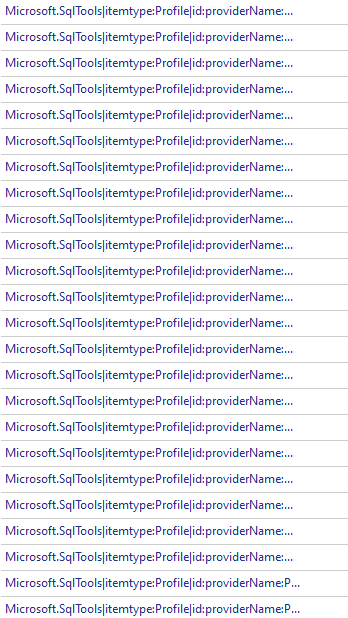
You need to start deleting the ones that are specific to your account. (You can also delete all of the ones that look like that to get a "fresh start").
I'll look into adding a command into ADS that cleans these up if the user wants it to.
 aaomidi
on 4 May 2020
aaomidi
on 4 May 2020
@aaomidi Do we need to keep this one open now that we have https://github.com/microsoft/azuredatastudio/issues/10268? Seems like they're both for the same issue. Or are you using this to track allowing clearing out saved passwords?
Charles-Gagnon
on 5 May 2020
@aaomidi Issue #10268 is really the problem that I'm having, it's a much clearer explanation. I did try removing these credentials, but the effect is still the same.
rhythmnewt
on 5 May 2020
Related issues
 ottadvantage
·
3Comments
ottadvantage
·
3Comments
 RobLW
·
3Comments
RobLW
·
3Comments
 haydnlj
·
3Comments
haydnlj
·
3Comments
 erickangMSFT
·
3Comments
erickangMSFT
·
3Comments
 CubsRep
·
3Comments
CubsRep
·
3Comments