Azuredatastudio: Azure > Sign in to Azure.. > Add Account - [Not Working]
- Azure Data Studio Version:
Steps to Reproduce:
Click on Azure > Sign in to Azure.. > Add Account

Gets redirected to Local host with below Error

Version Info:
Version: 1.15.0 (user setup)
Commit: e57eb999fc5f1e000477da8fe0b8679ff0bfd57b
Date: 2020-02-12T20:48:43.389Z
VS Code: 1.42.0
Electron: 6.1.6
Chrome: 76.0.3809.146
Node.js: 12.4.0
V8: 7.6.303.31-electron.0
OS: Windows_NT x64 10.0.18363
 Git-BT-Hub
All 9 comments
Thanks for submitting this issue. Please also check if it is already covered by an existing one, like:
![adsbot[bot] picture](https://avatars.githubusercontent.com/in/25741?v=4&s=40) adsbot[bot]
on 14 Feb 2020
adsbot[bot]
on 14 Feb 2020
I got exactly the same problem with the same version info.
 jjusiak
on 14 Feb 2020
jjusiak
on 14 Feb 2020
@aaomidi Can you look into this?
Moving into February Recovery milestone for hotfix consideration
 Charles-Gagnon
on 14 Feb 2020
Charles-Gagnon
on 14 Feb 2020
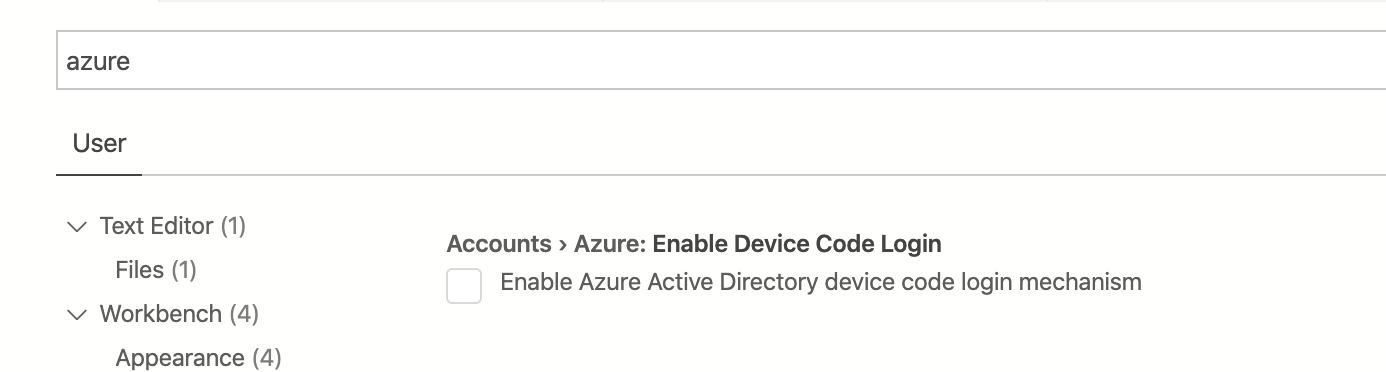
@Git-BT-Hub thanks for reporting this issue! We have updated the auth mechanism in the Feb release to no longer use Device Code mechanism. While we troubleshoot this issue could you please try to reenable the Device Code mechanism to see if that helps mitigate the issue. You can enable the previous auth mechanism with the below setting.
 kburtram
on 14 Feb 2020
kburtram
on 14 Feb 2020
@Git-BT-Hub @jjusiak
Do you by any chance have an extension that is forcing https on localhost?
That error means you're trying to load localhost with https - which shouldn't happen.
Do you regularly do local development on localhost with https enabled? I can see the browser using a previous "upgrade" to https to think this website should also be https.
 aaomidi
on 14 Feb 2020
aaomidi
on 14 Feb 2020
A way to mitigate this is:
- Let your browser load the broken page.
- Copy the URL from the address bar.
- Paste it into another browser, remove the
https://and change it tohttp://. - Load that page.
I'll look into seeing if we can create alternative login mechanisms for when users are in this situation.
aaomidi
on 14 Feb 2020
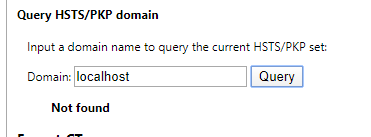
You can also see if you have HSTS enabled on localhost here:
(Assuming you're using chrome):
chrome://net-internals/#hsts
Query: localhost
It should look like this:
aaomidi
on 14 Feb 2020
You can also see if you have HSTS enabled on localhost here:
(Assuming you're using chrome):
chrome://net-internals/#hstsQuery:
localhostIt should look like this:
@aaomidi - Thanks for responding
- I do local dev. regularly , also see the screenshot below from my chrome
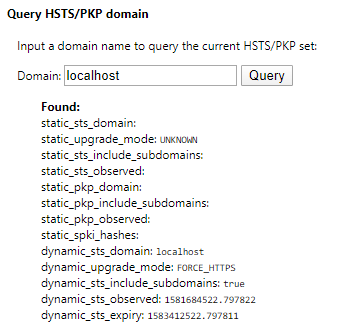
- If copy paste the broken localhost url into another browser window and use http:// it works..
Git-BT-Hub
on 17 Feb 2020
I've added the knowledge label to this because it contains information that would be interesting to reference in the future. However since this is a local environment problem, I'm going to close this issue.
The next release will also include device code login for people who have problems using the regular code grant method.
aaomidi
on 2 Apr 2020
Related issues
 jsmith8858
·
3Comments
jsmith8858
·
3Comments
 sandermvanvliet
·
3Comments
sandermvanvliet
·
3Comments
 squillace
·
3Comments
squillace
·
3Comments
 kfrajtak
·
3Comments
kfrajtak
·
3Comments
 Ungerfall
·
3Comments
Ungerfall
·
3Comments
Most helpful comment
@aaomidi - Thanks for responding