Azuredatastudio: Double results grids
Issue Type: Bug
Sometimes when executing a query the result grid shows twice. Executing the query again fixes this. Two grid are confusing when you execute one select statement and expect only one grid.
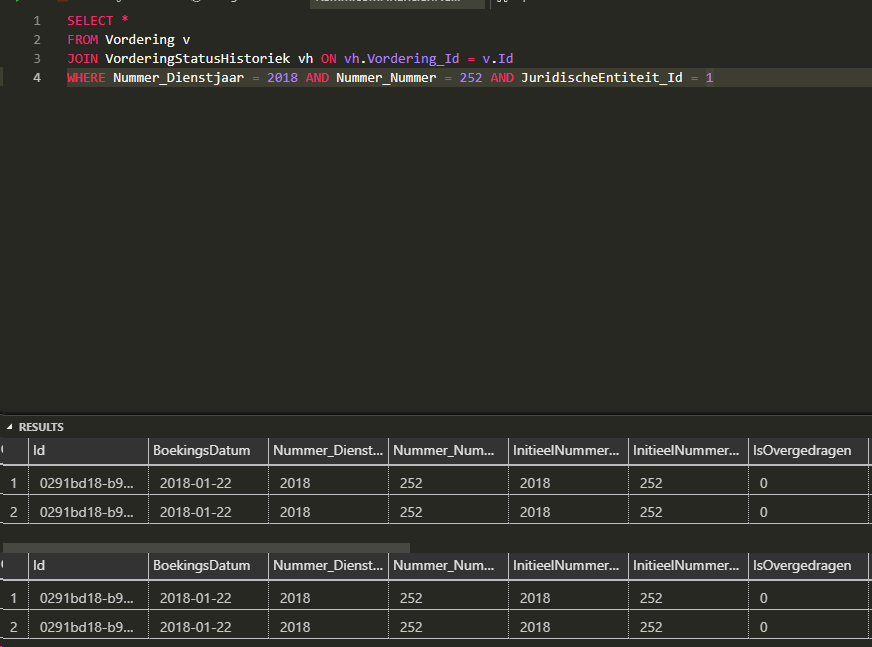
Azure Data Studio version: azuredatastudio 1.3.9 (cacf0777c747046af6839de3688d709b10ef9fca, 2019-01-14T23:30:09.442Z)
OS version: Windows_NT x64 10.0.17763
System Info
|Item|Value|
|---|---|
|CPUs|Intel(R) Core(TM) i7-8650U CPU @ 1.90GHz (8 x 2112)|
|GPU Status|2d_canvas: unavailable_software
checker_imaging: disabled_off
flash_3d: unavailable_software
flash_stage3d: unavailable_software
flash_stage3d_baseline: unavailable_software
gpu_compositing: unavailable_software
multiple_raster_threads: enabled_on
native_gpu_memory_buffers: disabled_software
rasterization: unavailable_software
video_decode: unavailable_software
video_encode: unavailable_software
webgl: enabled_readback
webgl2: unavailable_off|
|Memory (System)|11.37GB (2.87GB free)|
|Process Argv|C:\Users\tim.xxxx\AppData\Local\Programs\Azure Data Studio\azuredatastudio.exe|
|Screen Reader|no|
|VM|0%|
Extensions: none
 timg83
All 5 comments
I have seen this many times too. I have not been able to figure out a reproducible test case.
Unlike the original poster, once this happens it seems the only way to get everything stable is to close this query tab and start again with a fresh query.
 gregveres
on 14 Feb 2019
gregveres
on 14 Feb 2019
Have you tried updating to the latest version. I'm running 1.4.5, and the latest release notes state that this was resolved. I was running into this issue as well previously.
 jsh121988
on 14 Feb 2019
jsh121988
on 14 Feb 2019
Ah, I am still on 1.3.9. I will update right now. Thanks!
gregveres
on 14 Feb 2019
As @jsh121988 mentioned, we think this issue should be resolved in 1.4.5. Sorry for the inconvenience.
I'll close as a duplicate of https://github.com/Microsoft/azuredatastudio/issues/3759. Please let me know if the issue still occurs after upgrade. Thanks!
 kburtram
on 14 Feb 2019
kburtram
on 14 Feb 2019
Update resolved the issue 👍
timg83
on 19 Feb 2019
Related issues
 atrauzzi
·
67Comments
atrauzzi
·
67Comments
 waldyd
·
30Comments
waldyd
·
30Comments
 mrdenny
·
27Comments
mrdenny
·
27Comments
 orofino
·
58Comments
orofino
·
58Comments
 anand348
·
24Comments
anand348
·
24Comments