Azuredatastudio: Error adding account
Error: Entry not found in cache when adding azure account after successful MFA authentication
- Azure Data Studio Version:1.3.8
Steps to Reproduce:
- Select Azure
- Add Account
3.Obtain token
4.Copy and Redirect to Page
5.Add Token
6.Token Successful and redirects to MFA auth for tenant.
7.Tenant Auth Successful but get error in ADS stipulating no cache.
 donovanwhite
All 20 comments
Getting the same error. Device Code workflow completes successfully, but UI gives "Entry not found" and no selection.
Also tried deleting %appdata%\azuredatastudio to reset the app, but that did not help. Still can't add/select an account.
 Jabe
on 10 Jan 2019
Jabe
on 10 Jan 2019
@donovanwhite @Jabe do you know if this functionality was previously working for you in the previous release?
 kburtram
on 10 Jan 2019
kburtram
on 10 Jan 2019
@kburtram Sorry, don't know! First time trying AzureAD MFA auth.
Jabe
on 14 Jan 2019
Hi Jan,
I get the same error in previous versions as well.
Regards
Donovan Alan White
Cloud Solution Architect – Data Platform
Specialist Technical Unit
South Africa
' +27 (11) 361 8693 | È+27 (83) 402 7844 | 3012 William Nicol Ave, Bryanston, South Africa
[cid:[email protected]]http://www.microsoft.com/
From: Jan Berdel notifications@github.com
Sent: Monday, 14 January 2019 14:18
To: Microsoft/azuredatastudio azuredatastudio@noreply.github.com
Cc: Donovan White dowhite@microsoft.com; Mention mention@noreply.github.com
Subject: Re: [Microsoft/azuredatastudio] Error adding account (#3700)
@kburtramhttps://nam06.safelinks.protection.outlook.com/?url=https%3A%2F%2Fgithub.com%2Fkburtram&data=02%7C01%7Cdowhite%40microsoft.com%7Ceb9e55aa87c440db256908d67a1a52a9%7C72f988bf86f141af91ab2d7cd011db47%7C1%7C0%7C636830650806260691&sdata=3W4uA4eNXv8iTkKOOOqdAFiU3E%2F4umYOSe4jDPfX%2BG8%3D&reserved=0 Sorry, don't know! First time trying AzureAD MFA auth.
—
You are receiving this because you were mentioned.
Reply to this email directly, view it on GitHubhttps://nam06.safelinks.protection.outlook.com/?url=https%3A%2F%2Fgithub.com%2FMicrosoft%2Fazuredatastudio%2Fissues%2F3700%23issuecomment-453985960&data=02%7C01%7Cdowhite%40microsoft.com%7Ceb9e55aa87c440db256908d67a1a52a9%7C72f988bf86f141af91ab2d7cd011db47%7C1%7C0%7C636830650806260691&sdata=zzTZSPJlk9BPCisJhoAZNU9AUnJbsTO%2F9EazIYJz%2FQ0%3D&reserved=0, or mute the threadhttps://nam06.safelinks.protection.outlook.com/?url=https%3A%2F%2Fgithub.com%2Fnotifications%2Funsubscribe-auth%2FAQWnF9kWUFzCkj_jxmJJkLGD-M1sR5G9ks5vDHV2gaJpZM4Z46hV&data=02%7C01%7Cdowhite%40microsoft.com%7Ceb9e55aa87c440db256908d67a1a52a9%7C72f988bf86f141af91ab2d7cd011db47%7C1%7C0%7C636830650806270703&sdata=PfX9p%2FPzpL3EGWDE3U6n8XPMxCC8ExwqV%2FRD2SrazbE%3D&reserved=0.
donovanwhite
on 18 Jan 2019
@donovanwhite thanks, I am just trying to determine if this was a regression related to a change in the Azure token cache in the Jan release. Since you've hit on previous releases it sounds like an existing bug unrelated to that change.
kburtram
on 23 Jan 2019
I'm getting this error on the brand new Feb release. Exact same steps to recreate it. I'd really like this solved soon as I'm working on a SQL DW project and I'd love to keep using the tool.
 IkeEllis
on 14 Feb 2019
IkeEllis
on 14 Feb 2019
Too bad this was pushed to April. MFA should have a higher priority.
Jabe
on 19 Mar 2019
Same issue: Entry not found in cache.
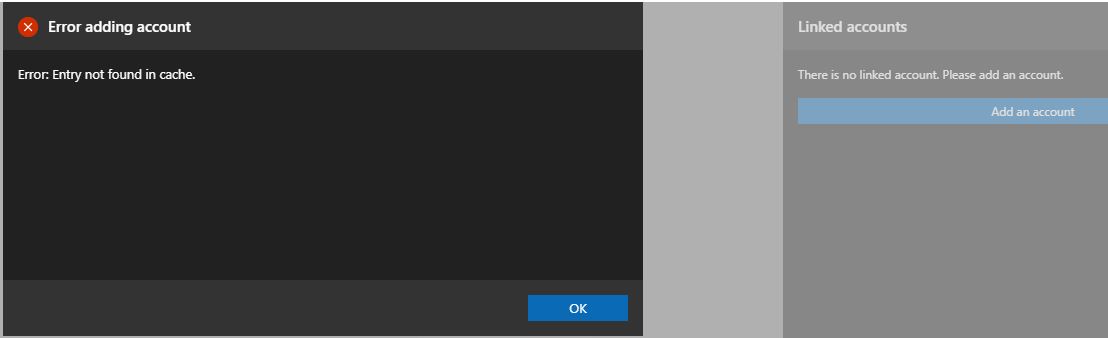
Version: 1.5.2 (user setup)
Commit: f74080c96310354bc92211f1826c0fdce78ca2f6
Date: 2019-03-22T06:25:26.627Z
VS Code 1.30.1
Electron: 2.0.12
Chrome: 61.0.3163.100
Node.js: 8.9.3
V8: 6.1.534.41
OS: Windows_NT x64 10.0.17134
 jaymegordo
on 9 Apr 2019
jaymegordo
on 9 Apr 2019
Got this on Mac. More info from console log
[Extension Host] Failed to read token cache: Error: error:06065064:digital envelope routines:EVP_DecryptFinal_ex:bad decrypt (at readCache.getOrCreateEncryptionParams.then.then.e (/private/var/folders/7x/s5zmdf9j2ns4zzmlb51hy05c0000gn/T/AppTranslocation/952F72AB-929C-49C1-BC6B-ABD49C8129CA/d/Azure Data Studio - Insiders.app/Contents/Resources/app/extensions/azurecore/dist/extension.js:1:176148))
 udeeshagautam
on 31 May 2019
udeeshagautam
on 31 May 2019
I have just run into this problem on an account that previously worked fine.
I had a Microsoft account that was connected, and I received the message that I needed to refresh my account. I did the authorization and then it came back to the user list and immediately went back to the refresh required status. So I thought I would completely remove it and re-add - now I'm receiving the "Entry not found in cache." message.
For giggles, I also removed my other account, an AAD company account, and re-added it, that works fine.
Version: 1.8.0 (system setup)
Commit: 96e214593190071f0b520439929b218f9fa673de
Date: 2019-06-06T01:59:30.203Z
VS Code 1.34.0
Electron: 3.1.8
Chrome: 66.0.3359.181
Node.js: 10.2.0
V8: 6.6.346.32
OS: Windows_NT x64 10.0.18362
 dsghi
on 3 Jul 2019
dsghi
on 3 Jul 2019
Same experience remains on v1.9.0 using MacOS Mojave 10.14.5.
Sad times.
 Lodzilla
on 20 Jul 2019
Lodzilla
on 20 Jul 2019
I have also the same problem on my Mac. I've also tried on windows and that works fine. There version I've installed on my Mac is:
Version: 1.10.0
Commit: 5fdb967ffcea41df0335ec17cfa396a694bb174e
Date: 2019-08-14T18:12:56.165Z
VS Code 1.37.0
Electron: 4.2.7
Chrome: 69.0.3497.128
Node.js: 10.11.0
V8: 6.9.427.31-electron.0
OS: Darwin x64 18.7.0
MacOs: 10.14.6
I get the error by reading the token. Can this problem be fixed asap.
 bartjanboer
on 5 Sep 2019
bartjanboer
on 5 Sep 2019
I'm still having the issue:
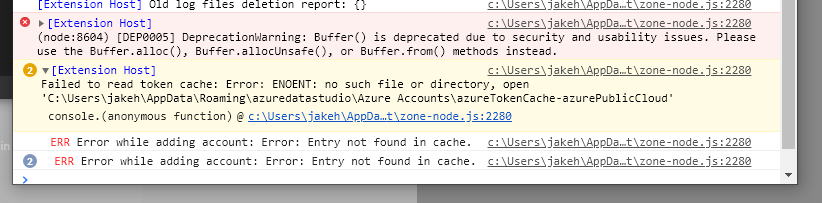
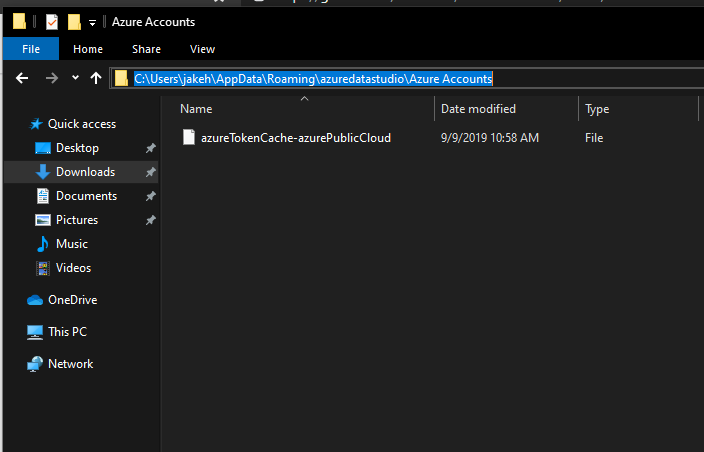
The console says a file does not exist. But it certainly does.
 jakehockey10
on 9 Sep 2019
jakehockey10
on 9 Sep 2019
As mentioned in issue #6408, I get the error "Error adding account", without further details. The browser returns "You have signed in to the Azure Data Studio application on your device. You may now close this window.".
I'm attempting to log in using my account that is linked to Windows when using the browser.
Using the console, I can see that the error comes from: c:\Users\
The error message in the console is "ERR Error while adding account: null"
There is also an other error message in the console, originating from the same source file, same code line. That error message reads "(node:10984) [DEP0005] DeprecationWarning: Buffer() is deprecated due to security and usability issues. Please use the Buffer.alloc(), Buffer.allocUnsafe(), or Buffer.from() methods instead."
When trying to add an account in the connection dialogue, I get the following error:
c:\Users\
at resolvePromise (c:\Users\
at c:\Users\
at rejected (workbench.desktop.main.js:5803)
at ZoneDelegate.invoke (c:\Users\
at Zone.run (c:\Users\
at c:\Users\
at ZoneDelegate.invokeTask (c:\Users\
at Zone.runTask (c:\Users\
at drainMicroTaskQueue (c:\Users\
at ZoneTask.invokeTask (c:\Users\
at Socket.ZoneTask.invoke (c:\Users\
at Socket.emit (events.js:182)
at addChunk (_stream_readable.js:283)
at readableAddChunk (_stream_readable.js:264)
at Socket.Readable.push (_stream_readable.js:219)
at Pipe.onStreamRead [as onread] (internal/stream_base_commons.js:94)
Version: 1.11.0 (user setup)
Commit: 460c739a8d90bdbbde39e01abfb8ecdc278ea787
Date: 2019-09-06T18:08:50.974Z
VS Code 1.37.0
Electron: 4.2.9
Chrome: 69.0.3497.128
Node.js: 10.11.0
V8: 6.9.427.31-electron.0
OS: Windows_NT x64 10.0.17134
 mochr
on 19 Sep 2019
mochr
on 19 Sep 2019
Following on from my post on July 20th:
Despite trying multiple times over multiple days and having no luck, when I tried again with the same version a week later it installed fine. I'm on a Mac, but my system had done no obvious updates, OS cleanups, settings changes, nothing. So it suggests something cache-related on a system-by-system basis, as the errors suggest, but seemingly Microsoft are taking an "It works on my machine" approach to fixing this more broadly so you might be on your own.
Keep persisting and you may get lucky like I did.
Lodzilla
on 19 Sep 2019
I have also the same problem on my Mac. I've also tried on windows and that works fine. There version I've installed on my Mac is:
Version: 1.10.0
Commit: 5fdb967
Date: 2019-08-14T18:12:56.165Z
VS Code 1.37.0
Electron: 4.2.7
Chrome: 69.0.3497.128
Node.js: 10.11.0
V8: 6.9.427.31-electron.0
OS: Darwin x64 18.7.0
MacOs: 10.14.6I get the error by reading the token. Can this problem be fixed asap.
I've resolved the problem. My account was connected to multiple tenants in Azure. When I leave the other organizations (where I'm an external person) and connect again, the token is read and my account is connected to Azure.
Maybe this can help to resolve to problems for others.
bartjanboer
on 8 Oct 2019
I am having the same problem. My account is in multiple tenants in Azure as well (one of them as guest). That might be the issue.
 tomas-gottwald
on 9 Oct 2019
tomas-gottwald
on 9 Oct 2019
+1
I am having the same issues, although my case is bit strange. When I login with admin account everything works fine, but when I login with regular user, I get following exception:
Unhandled Promise rejection: Entry not found in cache. ; Zone:
at a.createError (c:\Program Files\Azure Data Studio\resources\app\extensions\azurecore\dist\extension.js:1:20134)
at w.
at c:\Program Files\Azure Data Studio\resources\app\extensions\azurecore\dist\extension.js:1:195601
at c:\Program Files\Azure Data Studio\resources\app\extensions\azurecore\dist\extension.js:1:205552
at c:\Program Files\Azure Data Studio\resources\app\extensions\azurecore\dist\extension.js:1:204740
at Request._callback (c:\Program Files\Azure Data Studio\resources\app\extensions\azurecore\dist\extension.js:1:48830)
at Request.self.callback (c:\Program Files\Azure Data Studio\resources\app\extensions\azurecore\node_modules\request\request.js:185:22)
at Request.emit (events.js:182:13)
at Request.
at Request.emit (events.js:182:13)
at IncomingMessage.
at Object.onceWrapper (events.js:273:13)
at IncomingMessage.emit (events.js:187:15)
at endReadableNT (_stream_readable.js:1092:12)
at process._tickCallback (internal/process/next_tick.js:63:19) Error: Entry not found in cache.
at a.createError (c:\Program Files\Azure Data Studio\resources\app\extensions\azurecore\dist\extension.js:1:20134)
at w.
at c:\Program Files\Azure Data Studio\resources\app\extensions\azurecore\dist\extension.js:1:195601
at c:\Program Files\Azure Data Studio\resources\app\extensions\azurecore\dist\extension.js:1:205552
at c:\Program Files\Azure Data Studio\resources\app\extensions\azurecore\dist\extension.js:1:204740
at Request._callback (c:\Program Files\Azure Data Studio\resources\app\extensions\azurecore\dist\extension.js:1:48830)
at Request.self.callback (c:\Program Files\Azure Data Studio\resources\app\extensions\azurecore\node_modules\request\request.js:185:22)
at Request.emit (events.js:182:13)
at Request.
at Request.emit (events.js:182:13)
at IncomingMessage.
at Object.onceWrapper (events.js:273:13)
at IncomingMessage.emit (events.js:187:15)
at endReadableNT (_stream_readable.js:1092:12)
at process._tickCallback (internal/process/next_tick.js:63:19)
Version: 1.12.2 (system setup)
Commit: c9bef82ace6c67190d0e83820011a2bbd1f793c1
Date: 2019-10-11T04:56:40.634Z
VS Code 1.37.0
Electron: 4.2.9
Chrome: 69.0.3497.128
Node.js: 10.11.0
V8: 6.9.427.31-electron.0
OS: Windows_NT x64 10.0.17763`
 Lukasz994
on 15 Oct 2019
Lukasz994
on 15 Oct 2019
I'm having the same issue as tomas-gottwald above. My AAD account is admin on one account and guest on another. Trying to login with MFA enabled into Azure Data Studio, I complete the MFA with the Authenticator app, and then I get the "Error: Entry not found in cache." message. Not sure what log files are required, but I can provide what's necessary.
Version: 1.13.1 (user setup)
Commit: d08d07fe39c7fe74f9265db02cb963c38d048299
Date: 2019-11-14T23:08:09.800Z
VS Code: 1.38.0
Electron: 4.2.10
Chrome: 69.0.3497.128
Node.js: 10.11.0
V8: 6.9.427.31-electron.0
OS: Windows_NT x64 10.0.18363
 dhirensham
on 22 Nov 2019
dhirensham
on 22 Nov 2019
Closing in favor of #7619. There are instructions to try a workaround in that issue.
 aaomidi
on 16 Dec 2019
aaomidi
on 16 Dec 2019
Related issues
 stevenreddie
·
3Comments
stevenreddie
·
3Comments
 jsmith8858
·
3Comments
jsmith8858
·
3Comments
 kfrajtak
·
3Comments
kfrajtak
·
3Comments
 carloscfcortez
·
3Comments
carloscfcortez
·
3Comments
 IObsequious
·
3Comments
IObsequious
·
3Comments
Most helpful comment
Same issue: Entry not found in cache.

Version: 1.5.2 (user setup)
Commit: f74080c96310354bc92211f1826c0fdce78ca2f6
Date: 2019-03-22T06:25:26.627Z
VS Code 1.30.1
Electron: 2.0.12
Chrome: 61.0.3163.100
Node.js: 8.9.3
V8: 6.1.534.41
OS: Windows_NT x64 10.0.17134