Azuredatastudio: Import Flat File Wizard Fails on Single Column File
When I try to import a csv with only a single column of data, the "Import flat file wizard" hangs interminably at the "Preview Data" screen. Adding a second column to the file allowed me to continue the process.
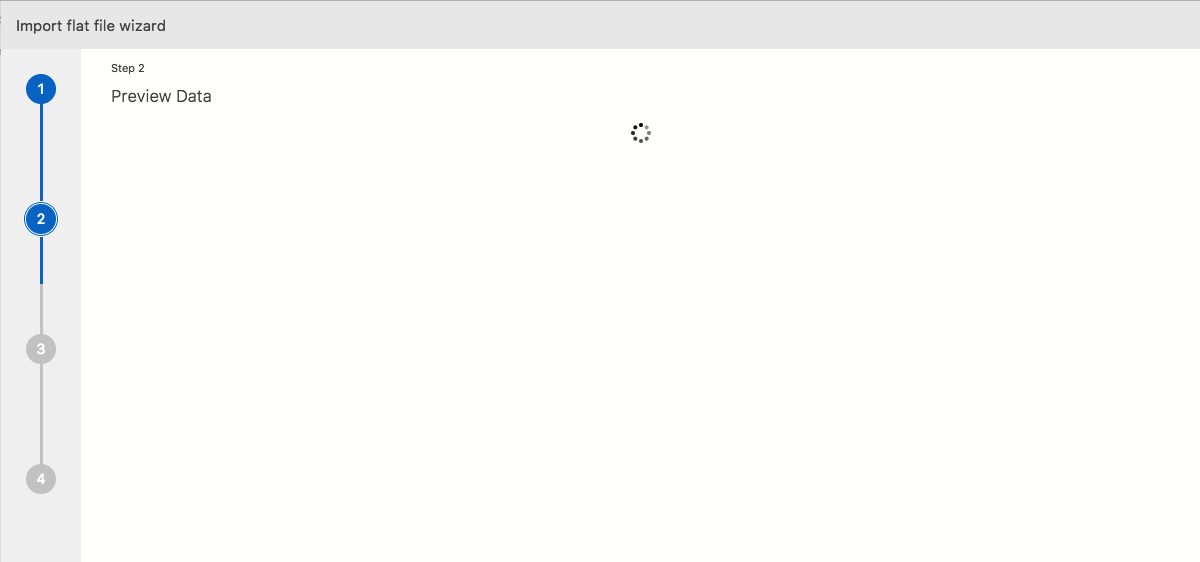
- Azure Data Studio Version: 1.0.0 (OS X 10.13.6) and 1.1.3 (OS X 10.14)
Steps to Reproduce:
- Launch "Import flat file wizard"
- Select a csv with only a single column
- Click "next"
 ghost
ghost
All 12 comments
This is a due to Microsoft.SqlServer.Prose.ImportBcpTextSynthesis.LearnWithProse() being unable to identify the delimiter for the file and returning an error. I am pretty sure this library isn't open source, so no easy way to work around this until a fix is made available there. The difficulty arises from the fact that the remainder of the BCP operations for importing rely on the first one succeeding.
 rdaniels6813
on 29 Oct 2018
rdaniels6813
on 29 Oct 2018
I will check with the team, but there should be a fix when we next update PROSE in the import wizard. Will follow-up
 yualan
on 30 Oct 2018
yualan
on 30 Oct 2018
We have a fix for this issue on the back-end, committer will need to pick up this update.
yualan
on 12 Mar 2019
@aaomidi has this since been fixed?
 chlafreniere
on 17 Sep 2019
chlafreniere
on 17 Sep 2019
This issue is fixed.
 aaomidi
on 8 Jan 2020
aaomidi
on 8 Jan 2020
I am still experiencing this issue. My csv had 1 col but I added a dummy second col and it still will not get past Preview Data.
"About Azure Data Studio"
Version: 1.14.1 (user setup)
Commit: f9b968c1ae514a0d1210788629e1c69125857279
Date: 2019-12-24T02:42:26.303Z
VS Code: 1.38.0
Electron: 6.1.5
Chrome: 76.0.3809.146
Node.js: 12.4.0
V8: 7.6.303.31-electron.0
OS: Windows_NT x64 10.0.17763
 cchowgule
on 15 Jan 2020
cchowgule
on 15 Jan 2020
If your CSV doesn't contain sensitive data, could you share it with me? Or create one that fails and share that?
aaomidi
on 15 Jan 2020
Attached is 2 CSVs, test.csv with 1 col and test2.csv with 2 cols. Both stick at Preview Data. They both have the same number of rows as the original CSV I was trying to import. I made that CSV by copying a column in an existing spreadsheet and pasting only the values in a new spreadsheet so I don't think there should be any formatting specific issues with the original.
If it helps here is some more details.
The server I am connected to:
Version: 10.50.4042.0
Edition: Express Edition with Advanced Services
OS Version: Windows NT 6.2
Excel used to export the CSVs:
Microsoft Excel 2019 MSO (16.0.10325.20024) 32-bit
Azure Data Studio:
Version: 1.14.1 (user setup)
Commit: f9b968c
Date: 2019-12-24T02:42:26.303Z
VS Code: 1.38.0
Electron: 6.1.5
Chrome: 76.0.3809.146
Node.js: 12.4.0
V8: 7.6.303.31-electron.0
OS: Windows_NT x64 10.0.17763
cchowgule
on 15 Jan 2020
.......... I am very sorry. I had the spreadsheet open while I was trying to import it. Both 1 col and 2 col versions work as long as I close the spreadsheet first......
This can now be closed as I am at fault.
cchowgule
on 15 Jan 2020
I saw that on my side too. I think this is a valid issue as the UX should tell the user what's going on.
Thanks for reporting this!
aaomidi
on 15 Jan 2020
I'll create another issue about this.
aaomidi
on 15 Jan 2020
Even if it does not tell the user the specific issue it might be good if the Preview Data screen timed out at some point as I imagine if the csv is really large it may be unclear if the delay is due to the file size or some error.
cchowgule
on 15 Jan 2020
Related issues
 marcwied
·
24Comments
marcwied
·
24Comments
 joelvega
·
26Comments
joelvega
·
26Comments
 waldyd
·
30Comments
waldyd
·
30Comments
 Shawson
·
35Comments
Shawson
·
35Comments
 samirbehara
·
34Comments
samirbehara
·
34Comments