Azuredatastudio: Seeking community feedback on SQL Agent UX prototype
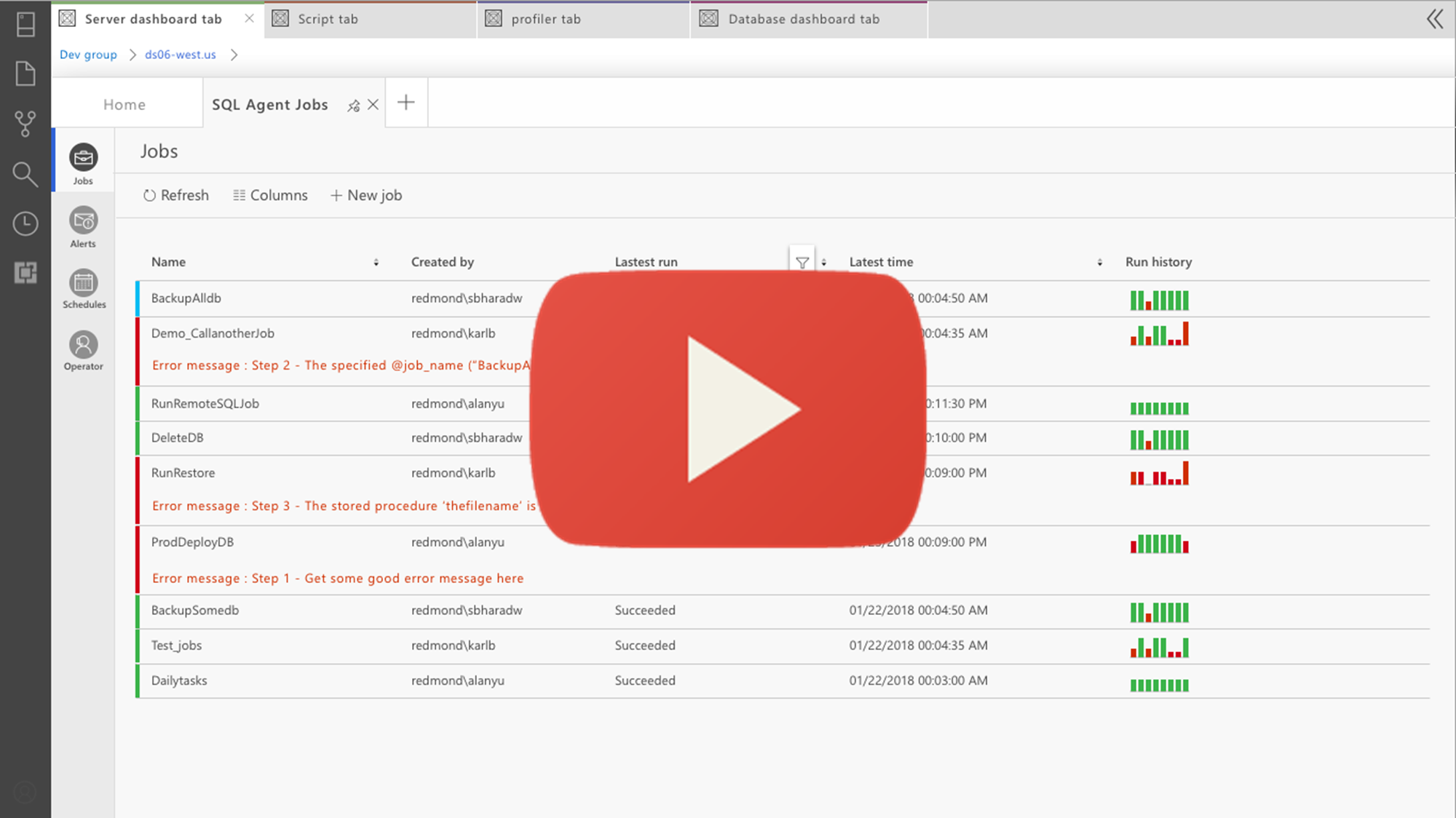
The SQL Operations Studio engineering team is working on an initial design for the SQL Agent extension. We would appreciate your feedback or any questions you may have with the direction we are going.
Please view the video and comment on this issue. Thank you.
 yualan
All 18 comments
I think it has a nice clean look. A couple comments, all of which of course would need to be borne out with more feedback:
Column Defaults:
- The "created by" column on the main screen does not seem very important. I expect you can hide it but I would want to verify that this is something that users want to see more than more dynamic information
- I would like to see duration information in the default layout. Most recent duration and average duration probably. Jobs that run significantly longer or shorter than average can be as bad as a job failure.
- Some users rely on categories, not shown here. This may be handled fine by the column picker though
Usability:
- Job names often run WELL longer than this prototype and they can be a nightmare to visually parse. When you have really long gnarly names, possibly with GUIDs, you may need lookups to their human-readable names, or the ability to alias
- This does not seem to be color-blind sensitive. Using colors is probably ok but there should be a secondary indicator like shape, or if not, it should be easy and intuitive to add status as an additional column.
- I'm finding myself wanting to see a group by functionality - group by last run status, group by category, etc - in addition to the filter
 vickyharp
on 21 Feb 2018
vickyharp
on 21 Feb 2018
I got a little lost at the point where you said, install the extension then also add it to the dashboard. I understand the idea of having to install the extension but once installed it should be available to all servers.
In the jobs list, need an indicator for disabled jobs.
How do you enable/disable/delete a job?
I agree with @vickyharp duration is more important than who created it. Also, need a Next Run Date column.
Overall, great job on the UI.
 Code-DJ
on 22 Feb 2018
Code-DJ
on 22 Feb 2018
Need support for job categories, the ability to create and recall filters and columns in the job list and the ability to script out the job definition to tsql. It would also be nice if you could add support for starting a job at a given step. It also looks like there is no support for setting up on fail and on success steps
 jasonhorner
on 22 Feb 2018
jasonhorner
on 22 Feb 2018
A good beginning, but I agree with @Code-DJ I shouldn't have to both install and add the extension for use.
It's not clear when you initially edit the job step to make sure the job runs, that it is only for that run. My assumption would have been that I am editing the actual job step.
Requirements for the advanced tab would be to see where the log file is being output to.
The job view shows the target server, but it actually is displaying the schedule.
 dalehhirt
on 22 Feb 2018
dalehhirt
on 22 Feb 2018
Nice job! I like using tabs and dashboards instead of popup windows like in SSMS.
It would be nice if the Agent extension would come with additional home dashboard widgets. This way you can see the job 'health' status at one glance.
 SebastianPfliegel
on 22 Feb 2018
SebastianPfliegel
on 22 Feb 2018
How does this work when you have a master (MSX) server and one or multiple target servers?
Do I see differences within the extension?
 reharmsen
on 26 Feb 2018
reharmsen
on 26 Feb 2018
Is the _Error message_ the same as what we would currently see in the _Message_ field when looking at the job history in the log viewer or msdb..sysjobhistory? Assuming it is, is the field displayed being limited to a certain number of characters or is it collapsible? Having 4000 characters of output message shoved right under a "failed" status, but above the other info pertaining to the job run will be unwieldy (and annoying) without a way to control it.
Additionally, for those of us with large output going to a table or file, the standard _Message_ won't necessarily contain the actual point of failure. It probably shouldn't specifically be called "Error message" on the dashboard unless you've got some way of presenting just the actual error message.
Also, having an option to pull the full log from the table or get the filepath to the output file would be nice.
 GreyOrGray
on 7 Mar 2018
GreyOrGray
on 7 Mar 2018
Love the new UI. Agree with the feedback given above. I would also love to be able to group jobs based on categories or even databases. Would love to keep the managing job history option as we have in SSMS.
 ndwivedi
on 10 Mar 2018
ndwivedi
on 10 Mar 2018
Nice. Please add search box, to filter the Jobs by name.
 cirinocarvalho
on 26 Mar 2018
cirinocarvalho
on 26 Mar 2018
On macOS (0.27.0-insider), I'm only seeing the Jobs tab on the left, no Alerts, Schedules, or Operator tabs. On the Jobs tab, there's no Refresh, Columns, or New job options. The columns displayed are also very different from the ones in the video.
 mrlife
on 28 Mar 2018
mrlife
on 28 Mar 2018
It would be great to see a visual glyph or indicator to show if a job is disabled on the home tab.
Does the job edit function show when you have different 'next step' for success and failure?
 Houndin
on 29 Mar 2018
Houndin
on 29 Mar 2018
How can I get this version? I got no "add job" or "edit job" in my sql agent extension?
Btw running on linux.
Thanks
 dabasys
on 14 Jun 2018
dabasys
on 14 Jun 2018
Anybody in here knows how to get the version in the video on a linux machine?
Much appreciated..
dabasys
on 20 Jun 2018
Which version of sqlops are you running (0.30.6 being the current one)? The latest agent extionsion build is 0.29.0 and can be obtained via the extension market place within sqlops.
SebastianPfliegel
on 20 Jun 2018
Thats the one I am using? So the build in the video havent been released yet?
dabasys
on 21 Jun 2018
Let's just say it's a different build.
SebastianPfliegel
on 22 Jun 2018
Well why not say where I can get that build in the video instead?;)
dabasys
on 22 Jun 2018
Thanks for all the feedback in this feature area. Please checkout the latest Agent extension and open issues for any remaining gaps. We'll continue to integrate your feedback into the product in subsequent releases.
 kburtram
on 19 Jul 2018
kburtram
on 19 Jul 2018
Related issues
 Ungerfall
·
3Comments
Ungerfall
·
3Comments
 sandermvanvliet
·
3Comments
sandermvanvliet
·
3Comments
 jsmith8858
·
3Comments
kburtram
·
3Comments
jsmith8858
·
3Comments
kburtram
·
3Comments
 kfrajtak
·
3Comments
kfrajtak
·
3Comments
Most helpful comment
I think it has a nice clean look. A couple comments, all of which of course would need to be borne out with more feedback:
Column Defaults:
Usability: