Azuredatastudio: Colorize query editor tab based on group color
- SQL Operations Studio Version:
Steps to Reproduce:
Colorize query editor tab based on group color.If i have a group called REMOTE-SERVERS which has red color,if i open the query editor ,the editor header should be read to.SQL Prompt has this feature.
 talley
All 10 comments
there is another issue opened here also complains about the lack of ease to see which server you are connected to. This would be nice, for example when you have server groups for Dev, Staging, Prod. Right now if i have two query windows open its hard to tell which server the tab is connected to. Maybe put a border around the tab with the same color as the server group. I know if its got a Red border, im in prod, green border means Dev etc
 psimoneau22
on 14 Dec 2017
psimoneau22
on 14 Dec 2017
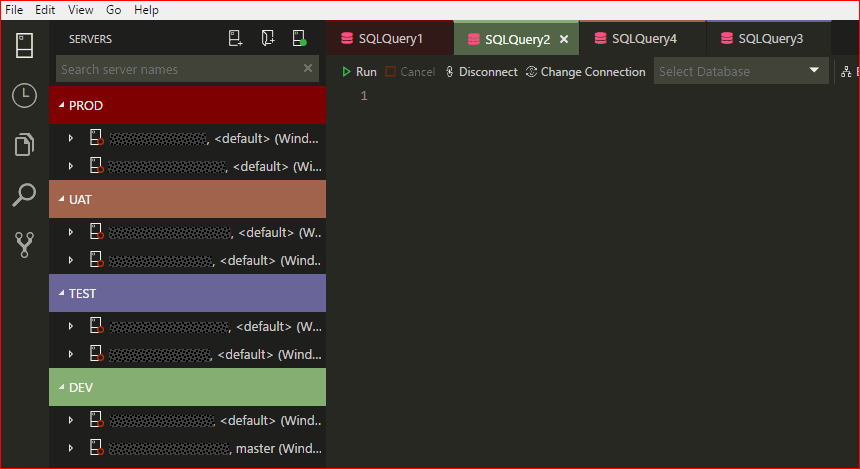
Have just setup SQLOps using v0.25.4 with the Monokai theme.
The tab coloring is very different from the server group. Almost to the point of not being able to see the difference. See the attached screen snippet
Cheers
Phil
 philcart
on 16 Jan 2018
philcart
on 16 Jan 2018
@philcart we set the opacity of the fill color to something like ~25% based on feedback from our UX designer . This was actually one reason we added the "border" mode which should match the server group color exactly.
@MattIrv I wonder if we should make the "fill" color opacity configurable as a setting. Obviously if most users want the color to match exactly we should make 100% opacity the default.
 kburtram
on 18 Jan 2018
kburtram
on 18 Jan 2018
Here's another comment we got about tab coloring, specifically the lack of it in high contrast mode: https://github.com/Microsoft/sqlopsstudio/pull/452#issuecomment-360153244
 MattIrv
on 24 Jan 2018
MattIrv
on 24 Jan 2018
I'll close this now based on the Tab Coloring work we did a couple releases ago. Please open specific issues for any problems in the current feature implementation.
kburtram
on 16 Jul 2018
I'm not getting any tab coloring at all.
Version 0.31.4
Commit e026ab85a72c190cc4ccc834503aa9fe36dd6407
Date 2018-07-18T02:14:21.826Z
Shell 1.7.12
Renderer 58.0.3029.110
Node 7.9.0
Architecture x64
And of course I've organized my servers into server groups.
 gh0st
on 17 Aug 2018
gh0st
on 17 Aug 2018
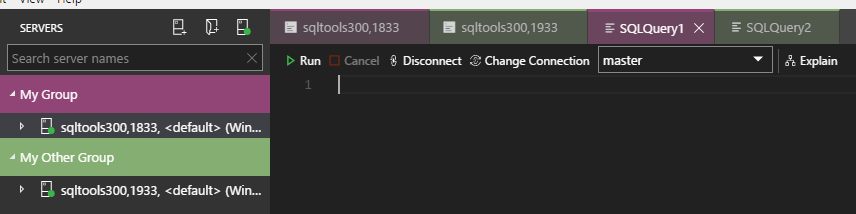
@gh0st have you tried setting "sql.tabColorMode": "fill"? It looks like the feature's working as expected on the latest insiders build, as far as I can tell.
kburtram
on 17 Aug 2018
Cool.I will try it out,
talley
on 18 Aug 2018
@kburtram that was it, thank you!
gh0st
on 18 Aug 2018
@kburtram do you know if this is available "out of the box" for Azure Data studio? Set a group and the tabColorMode to both fill and border, but no luck
 DanielSSilva
on 25 Sep 2018
DanielSSilva
on 25 Sep 2018
Related issues
 jacobzed
·
3Comments
jacobzed
·
3Comments
 jsmith8858
·
3Comments
jsmith8858
·
3Comments
 blackTay
·
3Comments
blackTay
·
3Comments
 RobLW
·
3Comments
RobLW
·
3Comments
 mayurrumal1
·
3Comments
mayurrumal1
·
3Comments
Most helpful comment
@gh0st have you tried setting
"sql.tabColorMode": "fill"? It looks like the feature's working as expected on the latest insiders build, as far as I can tell.