Azuredatastudio: Feature Request: Filter in "object explorer"
Like in SSMS have the ability to apply a filter/search in the object explorer, to find tables/SPs or functions
 sroyvs
All 13 comments
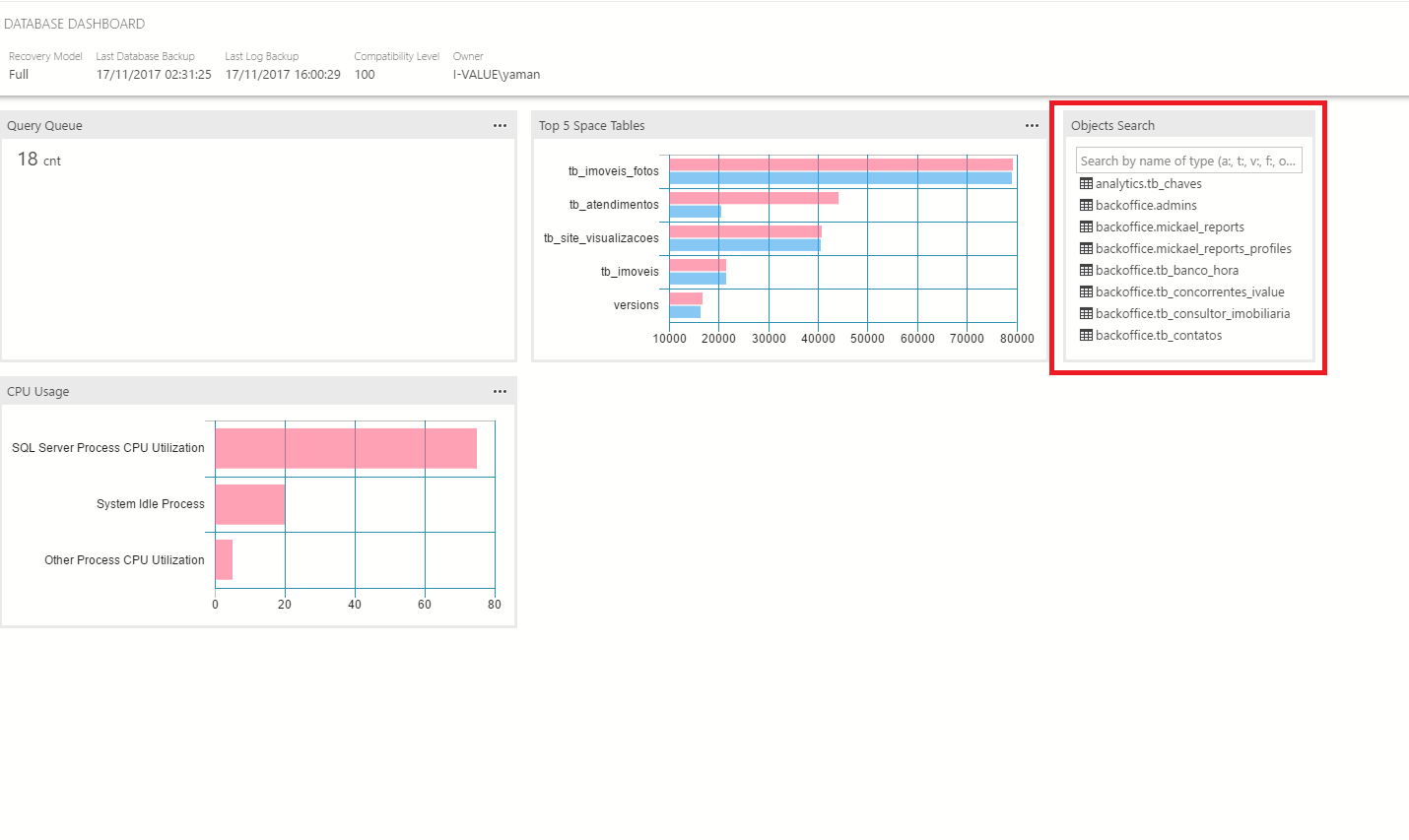
Unfortunately doesn't have the filter feature in the object explorer yet. However, you can display the explorer-widget and use it to search the objects. It is really usefull because allow you to search many kinds of objects like tables, views and Stored Procedures.
 luiznovaesneto
on 17 Nov 2017
luiznovaesneto
on 17 Nov 2017
It is one of my favorite features in ssms, I will really appreciate it
 jakodev
on 15 Mar 2018
jakodev
on 15 Mar 2018
Filter Table Name, Colume Name, Procedure Name....
its very important feature
 sgf
on 6 Sep 2018
sgf
on 6 Sep 2018
Filter or other features which provide same usability like SSMS would be necessary.
 qwefgh90
on 10 Sep 2018
qwefgh90
on 10 Sep 2018
Please consider making this an inline filter. So just a simple input box at the top of Object Explorer that I can type stuff into. I have always found the dialog in SSMS a pain to work with. Especially if you need to do a bunch of quick searches one after the other.
And it should be smart. So if I type dbo.MySproc it knows to break it up into schema and routine name. You can go even further and allow expressions (think Wireshark) .. e.g. schema != 'dbo' AND name like '%abc%' AND type='proc' to filter on all sprocs that have a name containing 'abc' that are not in the dbo schema.
 pietie
on 19 Sep 2018
pietie
on 19 Sep 2018
Yes, would be really nice to have a smart search box instead of the old way of doing things in SSMS.
There are a lot of issues open about searching/filtering now. Seems like a lot of people would really appreciate such a feature.
 elonmallin
on 6 Feb 2019
elonmallin
on 6 Feb 2019
This ability has been in VS Code Insiders for some time but it is for file view, not sure how you could port it over to the server explorer window....
 wsmelton
on 22 Mar 2019
wsmelton
on 22 Mar 2019
@wsmelton This was deployed to stable in VS Code 1.31 and is actually part of the new tree widget which is not exclusive to the workspace file view. For example, the Outline and Breadcrumbs trees are also using the new widget and it should be usable for any existing tree.
 KamasamaK
on 6 Apr 2019
KamasamaK
on 6 Apr 2019
The server explorer doesn't support filtering object list by typing like the file list does.
wsmelton
on 6 Apr 2019
@wsmelton Yes, that is clear. I was making a clarification that the feature you mentioned is not exclusive to Insiders and is not specific to the workspace file view, but is a new tree widget that should be able to be used for an existing tree like the Servers view and is already merged from the vscode master.
KamasamaK
on 6 Apr 2019
Starting with VS Code v1.37, all trees have the highlight and filter capability.
KamasamaK
on 8 Aug 2019
I would definetely want this feature as well. I am sometimes going to SSMS just because I want to have better filtering.
Also, maybe I am missing something here but is there a way to resize the Search pane? Most of the time our names are longer than the pane and what I am searching for has multiple matches. I have to hover over each one of those to select what I am looking for.
Thank you
 bbeda
on 28 Nov 2019
bbeda
on 28 Nov 2019
Closing this as a duplicate of https://github.com/microsoft/azuredatastudio/issues/8052 as cleanup
 Charles-Gagnon
on 23 Jul 2020
Charles-Gagnon
on 23 Jul 2020
Related issues
 squillace
·
3Comments
squillace
·
3Comments
 kfrajtak
·
3Comments
kfrajtak
·
3Comments
 Ungerfall
·
3Comments
Ungerfall
·
3Comments
 CubsRep
·
3Comments
CubsRep
·
3Comments
 carloscfcortez
·
3Comments
carloscfcortez
·
3Comments
Most helpful comment
Unfortunately doesn't have the filter feature in the object explorer yet. However, you can display the explorer-widget and use it to search the objects. It is really usefull because allow you to search many kinds of objects like tables, views and Stored Procedures.