Azuredatastudio: Feature Request: Add shortcut to sp_help
- SQL Operations Studio Version: 0.23.6
Steps to Reproduce:
On a SQLQuery pane, type an object name (table, view, sp, ...), place the cursor over typed object name and press (default, could be configurable) ALT+F1. It shoud call exec sp_help <object_name> and return the result to user.
 eduronqui
All 11 comments
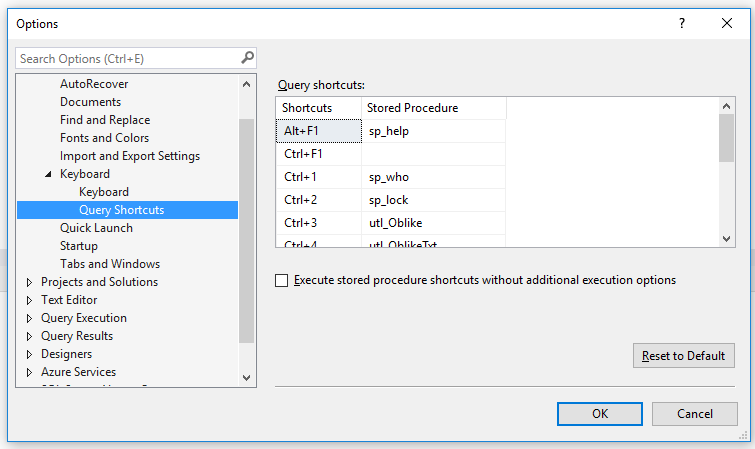
Please include complete support for this SSMS feature.
 GrzegorzLyp
on 3 Dec 2017
GrzegorzLyp
on 3 Dec 2017
Why was this issue closed?
 rafaatsouza
on 3 Jan 2018
rafaatsouza
on 3 Jan 2018
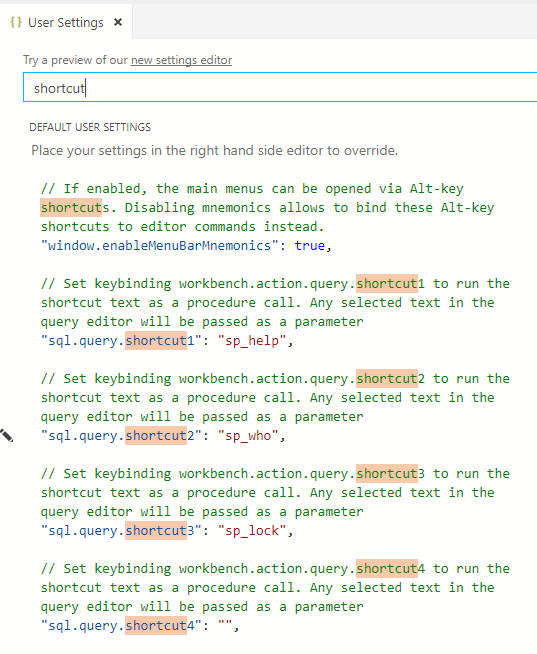
This feature is supported in the December release. Look for “query shortcut” in the user settings to see the defaults and how to add your own shortcuts.
 kevcunnane
on 3 Jan 2018
kevcunnane
on 3 Jan 2018
So how to add my own. Nothing in description about how to add Ctrl+0 ?
GrzegorzLyp
on 3 Jan 2018
No question. It works fine.
GrzegorzLyp
on 3 Jan 2018
@GrzegorzLyp in user settings there are 10 shortcut values listed. Above each is a text comment showing how to set up the keybinding as needed.
kevcunnane
on 3 Jan 2018
Yes it works. I have already blogged it for community.
http://www.lyp.pl/blog/sql-operations-studio-december-2017-shortcuts-like-in-ssms/
GrzegorzLyp
on 3 Jan 2018
Hi!!! I am looking for an SP of the SQL system that executes what the shortcut CTRL + F5 executes.
Just as ALT + F1 executes sp_help
I would like to know what is running CTRL + F5.
You know? or where could I ask?
Graciassss!! :)
 EugeniaMoya
on 22 Feb 2018
EugeniaMoya
on 22 Feb 2018
I'm still waiting for this function, someone know how to setup ALT+f1 for sp_help ?
 Jeankininho
on 19 Oct 2018
Jeankininho
on 19 Oct 2018
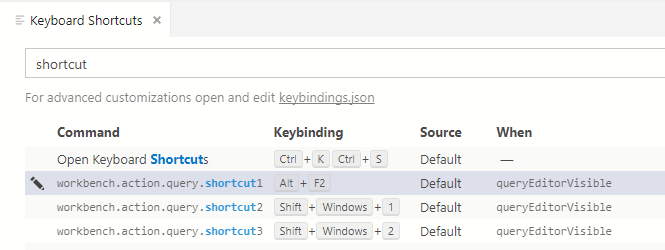
@Jeankininho you can change the keybinding for shortcut1 in the Keyboard Shortcuts page.
kevcunnane
on 19 Oct 2018
@Jeankininho you can change the keybinding for
shortcut1in the Keyboard Shortcuts page.
Awesome ! Sorry ask in a closed issue.
Jeankininho
on 22 Oct 2018
Related issues
 SvenAelterman
·
52Comments
SvenAelterman
·
52Comments
 vnachimu
·
24Comments
vnachimu
·
24Comments
 samirbehara
·
34Comments
samirbehara
·
34Comments
 ben-moore
·
31Comments
ben-moore
·
31Comments
 yualan
·
28Comments
yualan
·
28Comments