Azure-webjobs-sdk: Breaking change in ExtensionConfigContext
As noted here a lot of dependency injection stuff is build that relies on getting the JobHostConfiguration from the ExtensionConfigContext. With the new beta8 package the Config is gone. This is the old beta5 code:
public class ExtensionConfigContext : FluentConverterRules<Attribute, ExtensionConfigContext>
{
    public ExtensionConfigContext();

    public JobHostConfiguration Config { get; set; }

    public FluentBindingRule<TAttribute> AddBindingRule<TAttribute>() where TAttribute : Attribute;
    [Obsolete("preview")]
    public Uri GetWebhookHandler();
    }
Now we are not able to build an Inject binding to inject certain dependencies into our functions. Like we did before:
public class InjectConfiguration : IExtensionConfigProvider
{
    public void Initialize(ExtensionConfigContext context)
    {
        var rule = context
                    .AddBindingRule<InjectAttribute>()
                    .Bind(new InjectBindingProvider());

        var registry = context.Config.GetService<IExtensionRegistry>();

        var filter = new ScopeCleanupFilter();
        registry.RegisterExtension(typeof(IFunctionInvocationFilter), filter);
        registry.RegisterExtension(typeof(IFunctionExceptionFilter), filter);
    }
}
Do you have any alternatives for dependency injection? And if so please show an example.
 DibranMulder
All 36 comments
@DibranMulder I think you have seen the new extension model, and the DI changes.
With those changes to create a extension now you first need to create a startup class, using [assembly:WebJobsStartup] and implementing IWebJobsStartup interface, there you can add your own services to the builder via builder.Services and register your extensions config provider:
```c#
[assembly: WebJobsStartup(typeof(WebJobsExtensionStartup ), "A Web Jobs Extension Sample")]
namespace ExtensionSample
{
public class WebJobsExtensionStartup : IWebJobsStartup
{
public void Configure(IWebJobsBuilder builder)
{
builder.Services.AddSingleton
//Registering an extension
builder.AddExtension
}
}
}
Then in your IExtensionConfigProvider you can inject any dependencies via constructor injections, for example, binding, bindingproviders, or any custom dependency.
However you can't request an IExtensionRegistry inside an IExtensionConfigProvider due to a circular dependency issue, breaking the host with a StackOverflowException #1872.
Looking at the [latest Filter tests](https://github.com/Azure/azure-webjobs-sdk/blob/b798412ad74ba97cf2d85487ae8479f277bdd85c/test/Microsoft.Azure.WebJobs.Host.UnitTests/Filters/FunctionFilterTests.cs#L181) you can register your filter with DI in the Configure method of the Startup class, as an IFunctionFilter with the Singleton lifetime and the Web Jobs framework will figure out if it is a Pre, Post or Exception filter:
```c#
public class WebJobsExtensionStartup : IWebJobsStartup
{
public void Configure(IWebJobsBuilder builder)
{
builder.Services.AddSingleton<InjectBindingProvider>();
//Registering a filter
builder.Services.AddSingleton<IFunctionFilter, ScopeCleanupFilter>();
//Registering an extension
builder.AddExtension<InjectConfiguration>(); //AddExtension returns a builder that allows extending the configuration model
}
}
To get the host to load the extension, it must be registered in bin/extensions.json file, in JavaScript or Java via func extensions command, and in C# the SDK 1.0.19 does it automatically at build time for the current function project or any dependency (ProjectReference or PackageReference) in the current project.
I have adapted your samples to use the built-in IServiceProvider, also configuring the services into the framework's own container instance, and creating scopes before function calls.
 ielcoro
on 2 Sep 2018
ielcoro
on 2 Sep 2018
@ielcoro Will this work for function apps?
 chris31389
on 4 Sep 2018
chris31389
on 4 Sep 2018
@chris31389 I also had issues with DI and implement simple DI base on @ielcoro answer : https://github.com/ArtemTereshkovich/DependencyInjectionAzureFunction
 artsiomtserashkovich
on 4 Sep 2018
artsiomtserashkovich
on 4 Sep 2018
@ArtemTereshkovich did you get it working?
chris31389
on 4 Sep 2018
Yes it works with AzFunc
Here is my webjobs DI extension
https://github.com/espray/azure-webjobs-sdk-extensions
 espray
on 4 Sep 2018
espray
on 4 Sep 2018
@chris31389 yeah, but it isn't provide scope lifetime (only singleton and transient lifetimes).
artsiomtserashkovich
on 4 Sep 2018
Thanks got it to work! The code below might be interesting for people reading this thread.
Do you see any bad practices or things you should do different?
[assembly: WebJobsStartup(typeof(WebJobsExtensionStartup), "A Web Jobs Extension Sample")]
namespace Company.Bla
{
public class WebJobsExtensionStartup : IWebJobsStartup
{
public void Configure(IWebJobsBuilder builder)
{
IConfigurationRoot config = new ConfigurationBuilder()
.SetBasePath(Environment.CurrentDirectory)
.AddJsonFile("local.settings.json", optional: true, reloadOnChange: true)
.AddEnvironmentVariables()
.Build();
var connectionString = config.GetConnectionString("SqlConnectionString");
builder.Services.AddDbContext<EfContext>(options => options.UseSqlServer(connectionString));
ServiceProvider serviceProvider = builder.Services.BuildServiceProvider(true);
builder.Services.AddSingleton(new InjectBindingProvider(serviceProvider));
builder.AddExtension<InjectConfiguration>();
}
}
}
@DibranMulder could you please post your InjectBinding and InjectConfiguration? I'm assuming the only difference you have in the InjectBindingProvider is that you are passing in the ServiceProvider instead of creating it???
 cResults
on 5 Sep 2018
cResults
on 5 Sep 2018
public class InjectBindingProvider : IBindingProvider
{
public static readonly ConcurrentDictionary<Guid, IServiceScope> Scopes =
new ConcurrentDictionary<Guid, IServiceScope>();
private IServiceProvider _serviceProvider;
public InjectBindingProvider(IServiceProvider serviceProvider)
{
_serviceProvider = serviceProvider;
}
public Task<IBinding> TryCreateAsync(BindingProviderContext context)
{
IBinding binding = new InjectBinding(_serviceProvider, context.Parameter.ParameterType);
return Task.FromResult(binding);
}
}
internal class InjectBinding : IBinding
{
private readonly Type _type;
private readonly IServiceProvider _serviceProvider;
internal InjectBinding(IServiceProvider serviceProvider, Type type)
{
_type = type;
_serviceProvider = serviceProvider;
}
public bool FromAttribute => true;
public Task<IValueProvider> BindAsync(object value, ValueBindingContext context) =>
Task.FromResult((IValueProvider)new InjectValueProvider(value));
public async Task<IValueProvider> BindAsync(BindingContext context)
{
await Task.Yield();
var scope = InjectBindingProvider.Scopes.GetOrAdd(context.FunctionInstanceId, (_) => _serviceProvider.CreateScope());
var value = scope.ServiceProvider.GetRequiredService(_type);
return await BindAsync(value, context.ValueContext);
}
public ParameterDescriptor ToParameterDescriptor() => new ParameterDescriptor();
private class InjectValueProvider : IValueProvider
{
private readonly object _value;
public InjectValueProvider(object value) => _value = value;
public Type Type => _value.GetType();
public Task<object> GetValueAsync() => Task.FromResult(_value);
public string ToInvokeString() => _value.ToString();
}
}
@DibranMulder Thank you for sharing. The last piece that i still cant figure out is how to bind InjectBindingProvider to the InjectAttribute. The original code is
public class InjectConfiguration : IExtensionConfigProvider
{
public void Initialize(ExtensionConfigContext context)
{
context
.AddBindingRule<InjectAttribute>()
.Bind(new InjectBindingProvider());
}
}
I see that you register it to the services collection in the start up class as a singleton. How do you access it in the InjectionConfiguration?
Thank you again for all of your help.
cResults
on 5 Sep 2018
@cResults right or wrong, I avoided using the IWebJobsBuilder.Services to register my application services
https://github.com/espray/azure-webjobs-sdk-extensions
espray
on 5 Sep 2018
@espray I also had to only use the IWebJobsBuilder.Services as the injection point to add the extension for the binding -- adding my services in to that didn't work as it's only called once in the startup class and then disposed and the services registered there are not present later for the binding to grab. My updated code is based on @BorisWilHems ' post https://blog.wille-zone.de/post/azure-functions-proper-dependency-injection/ -- let me see if I can get some sample code up later today...
 ryanspletzer
on 5 Sep 2018
ryanspletzer
on 5 Sep 2018
@DibranMulder like @cResults I too am curious what your InjectConfiguration looks like / how you get a ServiceProvider / InjectBindingProvider to it because I'm still using the ServiceProviderBuilder and ServiceProviderBuilderHelper approach from Boris' post. Your approach seems like it would be simpler though. :)
ryanspletzer
on 5 Sep 2018
@ryanspletzer mine is based on @BorisWilHems as well. Then followed the File/Folder layout from https://github.com/Azure/azure-webjobs-sdk-extensions
espray
on 5 Sep 2018
This appears to be working. I say appears because my test requires an ILogger, which I'm still tyring how to create in the current environment. Anyway, when InjectConfiguration.Initialize is called, _InjectBindingProvider was populated with the instance registered in the start up.
public class InjectConfiguration : IExtensionConfigProvider
{
private readonly InjectBindingProvider _InjectBindingProvider;
public InjectConfiguration(InjectBindingProvider injectBindingProvider)
{
_InjectBindingProvider = injectBindingProvider;
}
public void Initialize(ExtensionConfigContext context)
{
context
.AddBindingRule<InjectAttribute>()
.Bind(_InjectBindingProvider);
}
}
@DibranMulder you don't need to build the service collection, you can add your services, then they will be injected in your extension config provider, including the current IServiceProvider:
```C#
[assembly: WebJobsStartup(typeof(WebJobsExtensionStartup), "A Web Jobs Extension Sample")]
namespace Company.Bla
{
public class WebJobsExtensionStartup : IWebJobsStartup
{
public void Configure(IWebJobsBuilder builder)
{
IConfigurationRoot config = new ConfigurationBuilder()
.SetBasePath(Environment.CurrentDirectory)
.AddJsonFile("local.settings.json", optional: true, reloadOnChange: true)
.AddEnvironmentVariables()
.Build();
var connectionString = config.GetConnectionString("SqlConnectionString");
builder.Services.AddDbContext<EfContext>(options => options.UseSqlServer(connectionString));
builder.Services.AddSingleton<InjectBindingProvider>();
builder.AddExtension<InjectConfiguration>();
}
}
}
public class InjectConfiguration : IExtensionConfigProvider
{
private readonly InjectBindingProvider _InjectBindingProvider;
public InjectConfiguration(InjectBindingProvider injectBindingProvider)
{
_InjectBindingProvider = injectBindingProvider;
}
public void Initialize(ExtensionConfigContext context)
{
context
.AddBindingRule<InjectAttribute>()
.Bind(_InjectBindingProvider);
}
}
```
That way you can mix and match your app services with those coming from the framework. The azure function host controls now the lifetime of the root service provider, and builds it before calling any IExtensionConfigProvider.
I also had to only use the IWebJobsBuilder.Services as the injection point to add the extension for the binding -- adding my services in to that didn't work
@ryanspletzer I didn't notice that behavior, maybe it was caused by the early building of ServiceProvider. however I did saw some subtle differences in behavior between the Webjobs SDK, the ASP.NET Service Provider and the current DI implementation in WebJobs.WebScript (aka functions), I suspect that what is causing the differences is the extraneus choice of using DryIOC behind the scenes in the functions hosts. Those differences forced me to rollback to a separate service collection for application services and only use the built in one for framework things (like filters), I will open a new issue soon. Issue opened: https://github.com/Azure/azure-functions-host/issues/3399
Update: I see that @cResults already published how to inject dependencies into IExtensiongConfigProvider.
ielcoro
on 5 Sep 2018
@cResults I, too, am working through how to inject an ILogger. I know that the WebJobs host has its own LoggerFactory that it maintains and that it doles out a category-named ILogger instances to functions with a certain naming convention. I would like to control that as well. I had this working pre-breaking changing. It's possible that given some of the explanations above I may devise a way for the framework provided ILogger / ILoggerFactory to supply that via the inject binding.
@DibranMulder / @ielcoro Thanks for the great explanation. :) Still trying to find time to play around with it on my end. Was taking a look at @espray 's approach, too.
ryanspletzer
on 5 Sep 2018
@ielcoro Works like a charm, thanks!
DibranMulder
on 6 Sep 2018
I have published an example in this repository: https://github.com/DibranMulder/azure-functions-v2-dependency-injection
DibranMulder
on 6 Sep 2018
@ryanspletzer I was able to get a logger into the servicecollection. i had a number of iterations that LOOKED a lot better, but this one works for now.
cResults
on 6 Sep 2018
@DibranMulder Have you had your demo successfully running on Azure? I updated my code referencing code in your repo and got it to work locally, but can't get the injections working on Azure. I then tested your repo locally and got it to work, but unfortunately that also failed when uploaded to Azure.
The error I saw from your repo (similar to what I see in my project) on Azure is:
Error indexing method 'DemoFunction.Run' <--- Cannot bind parameter 'demoService' to type IDemoService. Make sure the parameter Type is supported by the binding. If you're using binding extensions (e.g. ServiceBus, Timers, etc.) make sure you've called the registration method for the extension(s) in your startup code (e.g. config.UseServiceBus(), config.UseTimers(), etc.).
 refractivSteve
on 12 Sep 2018
refractivSteve
on 12 Sep 2018
Are your extensions (IWebJobsStartup implementations) in the same assembly as the functions themselves?
If so - there is a bug in the extension metadata generator when run in publish (deploy) mode such that it will not scan the function assembly itself for extensions.
 jnevins-gcm
on 12 Sep 2018
jnevins-gcm
on 12 Sep 2018
In my project everything is in the same assembly, which was working pre 1.0.19 (again based on BorisWilHems' posts. DibranMulder's splits into two projects, but the Startup class is in the same project as the function.
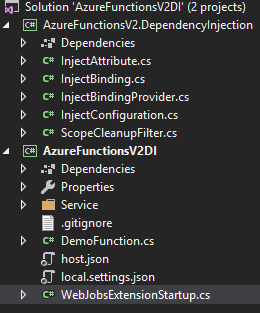
Is the answer to further split them or is there another workaround?
refractivSteve
on 12 Sep 2018
Yeah that’s broken functionality in the metadata generator. You can split it or you can hack the build target to make sure the functions assembly itself is included in scanning
jnevins-gcm
on 12 Sep 2018
@jnevins-gcm how would one hack the build target?
ryanspletzer
on 12 Sep 2018
<!--
  When doing a Pack, MS extensions metadata generator calls  _GenerateFunctionsExtensionsMetadataPostPublish...
  but _GenerateFunctionsExtensionsMetadataPostPublish actually executes before the function dll itself (i.e. AzureFunctionApp.dll) has been copied
  to the publish dir by _FunctionsPostPublish. This target copies the AzureFunctionApp.dll to the publish dir much earlier so that the extensions metadata
  generator finds it when it searches dlls for extensions (i.e. IWebJobsStartup implementations).
  -->
  <Target Name="CopyTargetPathToEarlyPublish" BeforeTargets="Publish">
    <Copy SourceFiles="$(TargetPath)" DestinationFiles="$(FunctionsTargetPath)" />
  </Target>
I added that to the build of DibranMulder's and published to Azure and his function now works as expected! I also added it to mine and I seem to have skipped past that issue, but now have another, which I don't think it's related to this. Definitely on the right path though. Thanks for your help @jnevins-gcm.
Update: My functions are now working on Azure as they were pre-1.0.19, using DibranMulder's solution and jnevins-gcm's build hack,
refractivSteve
on 13 Sep 2018
Glad to hear that you've got it working!
DibranMulder
on 18 Sep 2018
I submitted a PR to @DibranMulder 's project with an Autofac integration. I would be open to any feedback, my solution feels a little wonky.
 mrcunninghamz
on 21 Sep 2018
mrcunninghamz
on 21 Sep 2018
@jnevins-gcm does your build hack just need adding to the functions .csproj file?
 andyce1010
on 26 Sep 2018
andyce1010
on 26 Sep 2018
Yes - the edit to the csproj is what I posted above
jnevins-gcm
on 26 Sep 2018
@DibranMulder the problem with this approach is that all created scopes will never get disposed and Scopes dictionary will become a memory hog. Without IFunctionInvocationFilter we don't seem to have a good way of detecting when functions exit in order to clean up scopes.
public class InjectBindingProvider : IBindingProvider
{
    public static readonly ConcurrentDictionary<Guid, IServiceScope> Scopes =
        new ConcurrentDictionary<Guid, IServiceScope>();

    private IServiceProvider _serviceProvider;

    public InjectBindingProvider(IServiceProvider serviceProvider)
    {
        _serviceProvider = serviceProvider;
    }

    public Task<IBinding> TryCreateAsync(BindingProviderContext context)
    {
        IBinding binding = new InjectBinding(_serviceProvider, context.Parameter.ParameterType);
        return Task.FromResult(binding);
    }
}

internal class InjectBinding : IBinding
{
    private readonly Type _type;
    private readonly IServiceProvider _serviceProvider;

    internal InjectBinding(IServiceProvider serviceProvider, Type type)
    {
        _type = type;
        _serviceProvider = serviceProvider;
    }

    public bool FromAttribute => true;

    public Task<IValueProvider> BindAsync(object value, ValueBindingContext context) =>
        Task.FromResult((IValueProvider)new InjectValueProvider(value));

    public async Task<IValueProvider> BindAsync(BindingContext context)
    {
        await Task.Yield();
        var scope = InjectBindingProvider.Scopes.GetOrAdd(context.FunctionInstanceId, (_) => _serviceProvider.CreateScope());
        var value = scope.ServiceProvider.GetRequiredService(_type);
        return await BindAsync(value, context.ValueContext);
    }

    public ParameterDescriptor ToParameterDescriptor() => new ParameterDescriptor();

    private class InjectValueProvider : IValueProvider
    {
        private readonly object _value;

        public InjectValueProvider(object value) => _value = value;

        public Type Type => _value.GetType();

        public Task<object> GetValueAsync() => Task.FromResult(_value);

        public string ToInvokeString() => _value.ToString();
    }
}
 daulet
on 30 Sep 2018
daulet
on 30 Sep 2018
FYI
I found this reference in case somebody is interested, organic DI still work in progress.
Azure Functions Live Stream from 27th September 2018 (from 27th minute - till around 37th minute) https://youtu.be/7mAzMYOP9NY?t=27m19s
Example from the video (Note again, organic DI not yet available).
No static methods :smile:.

 VaclavElias
on 3 Oct 2018
VaclavElias
on 3 Oct 2018
Just for guys visiting this threat, I updated my repo with the fix from @jnevins-gcm tested it locally and on Azure.
DibranMulder
on 18 Oct 2018
Make sure you try adding ExecutionContext context as the first parameter. :|
Weird...
 electricessence
on 18 Oct 2018
electricessence
on 18 Oct 2018
Hello.
This is not working anymore with the new template netcoreapp2.1
 michaeltg17
on 8 Nov 2018
michaeltg17
on 8 Nov 2018
Related issues
 hajekj
·
3Comments
hajekj
·
3Comments
 Rafaelki
·
3Comments
Rafaelki
·
3Comments
 kamranayub
·
4Comments
kamranayub
·
4Comments
 nibras85
·
3Comments
nibras85
·
3Comments
 lopezbertoni
·
4Comments
lopezbertoni
·
4Comments
Most helpful comment