Azure-sdk-for-python: Not able to log in parent run when using hyperdrive
- Package Name: azureml-core
- Package Version: 1.0.72
- Operating System: Windows
- Python Version: 3.7.2
Describe the bug
I'm using HyperDriveConfig and BayesianParameterSampling to tune my hyperparamenters. When I submit my experiment, the system creates a run (parent run) which then creates several child runs. Each child run executes my script with the different parameters from BayesianParameterSampling. Inside my script, I have the following instructions to log the score and all the parameters in the parent run:
run_context.parent.log_row(
    name=run_context.id,
    metric=np.mean(scores),
    learning_rate=learning_rate,
    batch_size=batch_size,
    epochs=epochs,
    num_hidden_layers=len(layer_sizes),
    first_layer_num_nodes=first_layer_num_nodes,
    last_layer_num_nodes=last_layer_num_nodes
)
But when I look at the parent run in the Azure Machine Learning Studio, nothing is being logged. Logs in the child runs are recorded fine.
To Reproduce
Steps to reproduce the behavior:
- Create a script that tries to log something in the parent run:
run.parent.log('test', 1) - Create experiment
- Create an estimator
- Create a hyperparameter sampling object
BayesianParameterSampling,RandomParameterSampling, orGridParameterSampling - Create HyperDriveConfig
- Submit experiment with all the above
- Go to Azure Machine Learning Studio and look for the run you just submitted and wait until some child runs are finished
- Logs recorded from the child runs should appear in the Metrics tab, but they don't (and for me the metrics tab doesn't even appear for the parent runs)
Expected behavior
Show logs recorded in the parent run. If not, show me where I can see and download all my parameters and scores data in one central place instead of having to go into each child run
 jorgeso
All 15 comments
Thanks for the feedback! We are routing this to the appropriate team for follow-up. cc @azureml-github.
![msftbot[bot] picture](https://avatars2.githubusercontent.com/in/26612?v=4&s=40) msftbot[bot]
on 20 Mar 2020
msftbot[bot]
on 20 Mar 2020
@Swati Gharseswatig@microsoft.com
Get Outlook for iOShttps://aka.ms/o0ukef
From: msftbot[bot] notifications@github.com
Sent: Friday, March 20, 2020 9:30:44 AM
To: Azure/azure-sdk-for-python azure-sdk-for-python@noreply.github.com
Cc: azureml-github azureml-github@microsoft.com; Mention mention@noreply.github.com
Subject: Re: [Azure/azure-sdk-for-python] Not able to log in parent run when using hyperdrive (#10403)
Thanks for the feedback! We are routing this to the appropriate team for follow-up. cc @azureml-githubhttps://nam06.safelinks.protection.outlook.com/?url=https%3A%2F%2Fgithub.com%2Fazureml-github&data=02%7C01%7CJordane%40microsoft.com%7Cf6e7732e6294423db35e08d7ccec0ab5%7C72f988bf86f141af91ab2d7cd011db47%7C1%7C0%7C637203186491503086&sdata=F%2FzqTQavIZz1bcJGoVN5D16Og2gA8QOkSwbKy9mU0bA%3D&reserved=0.
—
You are receiving this because you were mentioned.
Reply to this email directly, view it on GitHubhttps://nam06.safelinks.protection.outlook.com/?url=https%3A%2F%2Fgithub.com%2FAzure%2Fazure-sdk-for-python%2Fissues%2F10403%23issuecomment-601793018&data=02%7C01%7CJordane%40microsoft.com%7Cf6e7732e6294423db35e08d7ccec0ab5%7C72f988bf86f141af91ab2d7cd011db47%7C1%7C0%7C637203186491503086&sdata=w3tNumuNAUbmARf15x4WpqDG6RXGpyeEFbq8Q4RihYE%3D&reserved=0, or unsubscribehttps://nam06.safelinks.protection.outlook.com/?url=https%3A%2F%2Fgithub.com%2Fnotifications%2Funsubscribe-auth%2FAOVYYXRQCY3TKVXM7DZYNFTRIOK3JANCNFSM4LQMORLA&data=02%7C01%7CJordane%40microsoft.com%7Cf6e7732e6294423db35e08d7ccec0ab5%7C72f988bf86f141af91ab2d7cd011db47%7C1%7C0%7C637203186491513048&sdata=xmYLSBSWetS064cyyrCcJx%2BRbydtxkT0wiu0FqQx9pg%3D&reserved=0.
 azureml-github
on 23 Mar 2020
azureml-github
on 23 Mar 2020
Thanks for the feedback @jorgeso - we are looking into this.
In the meanwhile, are you able to use the Child Runs tab to get the metrics logged to all child runs in a single place? Or is there a specific reason you need to log the metrics of all child runs to the parent run?
 swatig007
on 23 Mar 2020
swatig007
on 23 Mar 2020
@swatig007
I’m able to see the child runs, but the graphs and analysis I can do there is very limited (almost useless I would say). So essentially, I want to able to download the data from all my child runs (scores and hyperparameters), so I can do my own analysis and graphs. The data in the Raw JSON tab is almost there, but I would also need the score for each child run (right now it only includes hyperparameter). So I thought that by logging all the data in the parent run, then I can just access it all in one place and download it.
Right now, if I want to make this work, I would have to go into each child run, and then copy and paste the data into some local document. That’s not practical if I have tens of runs and multiple hyperdrive drive runs. Ideally, there would be a button that says “download data” where I can download all my data, or just include the score in the Raw JSON.
The plugin that you guys have created for Jupiter notebooks (picture below) is kind of what I want to accomplish, but it almost never works (only once has it worked for me after months of using this), and it disappears after the parent run is finished. Maybe having that in the studio would be ideal.
Does this answer your question?

jorgeso
on 23 Mar 2020
@jorgeso got it.
Re: the parallel co-ordinates chart, we do plan to add it to the ui in the future, but for now the only place to access this visual is in the notebook widget.
can you try to reload the run once it completes, to load the parallel coordinates visual? here is a sample snippet of code you can execute in the notebook, once the parent run completes -
hd_run_2=HyperDriveRun(experiment,
from azureml.widgets import RunDetails
RunDetails(hd_run_2).show()
swatig007
on 23 Mar 2020
@jorgeso also, if you are looking to access the hyperparameter values and metric of each child run, that can be done using the following SDK method -
https://docs.microsoft.com/en-us/python/api/azureml-train-core/azureml.train.hyperdrive.hyperdriverun?view=azure-ml-py#get-children-sorted-by-primary-metric-top-0--reverse-false--discard-no-metric-false-
we are also looking into how we can provide these details in the UI, but I wanted to send you info on how you can directly access the data in the meanwhile
swatig007
on 23 Mar 2020
@swatig007 those are good solutions! thanks!
jorgeso
on 23 Mar 2020
@swatig007 is it OK to ask you another question?
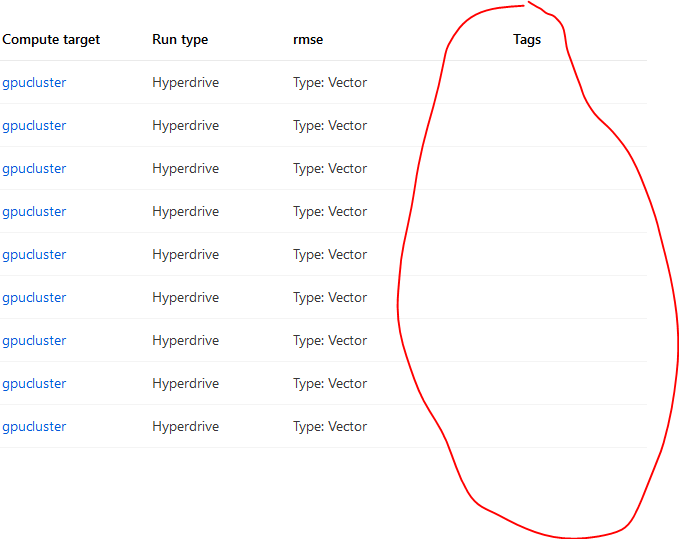
Is it possible to tag hyperparameter experiments/runs? I'm creating several runs under one experiment name - one run for a different seeded split. When I go back to the studio, I want to be able to see which run belongs what split, but I can't see it. I've tried two different ways:
hdr = exp.submit(config=hdc, tags={"split": str(split)})
and
hdr = exp.submit(config=hdc)
hdr.tag('split', str(split))
But when I look at the studio, I can't see the tags:
jorgeso
on 8 Apr 2020
@jorgeso thanks for bringing this up. we'll look at the issue on our end and get back to you
swatig007
on 8 Apr 2020
Thanks for the feedback! We are routing this to the appropriate team for follow-up. cc @azureml-github.
msftbot[bot]
on 5 May 2020
Hi @jorgeso the issue with the tagging has been fixed, and you should be able to see your tags in the studio.
swatig007
on 15 Sep 2020
i'm unable to close this issue for some reason, but it has been fixed
swatig007
on 15 Sep 2020
@kaerm i'm unable to close this issue, but it's been fixed. can you pls go ahead and close it
swatig007
on 15 Sep 2020
@swatig007 I noticed it! Thank you very much!
jorgeso
on 15 Sep 2020
@swatig007 I see you guys added the parallel coordinates chart the studio. It's great!! Thanks!
jorgeso
on 16 Oct 2020
Related issues
 Korijn
·
3Comments
Korijn
·
3Comments
 dmurnane
·
3Comments
dmurnane
·
3Comments
 ntzhong
·
3Comments
ntzhong
·
3Comments
 jmlero
·
3Comments
jmlero
·
3Comments
 yunhaoling
·
3Comments
yunhaoling
·
3Comments
Most helpful comment
@jorgeso also, if you are looking to access the hyperparameter values and metric of each child run, that can be done using the following SDK method -
https://docs.microsoft.com/en-us/python/api/azureml-train-core/azureml.train.hyperdrive.hyperdriverun?view=azure-ml-py#get-children-sorted-by-primary-metric-top-0--reverse-false--discard-no-metric-false-
we are also looking into how we can provide these details in the UI, but I wanted to send you info on how you can directly access the data in the meanwhile