Azure-sdk-for-python: Application properties not being added to batch EventHub message
@sahPraveen commented on Thu Feb 21 2019
I am referring to this article "https://docs.microsoft.com/en-us/azure/event-hubs/event-hubs-python-get-started-send" related to sending messages to EventHub using Python.
A Message has following components: offset, body, systemProperties, properties.
_offset is auto-generated but we can provide the remaining._
For my project - apart from message body I also need to send "Properties" which is not part of Body, How to do that? I checked the class EventData(object): and looks like application_properties can be used to do this but i'm not sure how to implement this.
Is application_properties right analogy to obtain "Properties" in message?
Could you please add more details to the article with example displaying how to use the python EventData class for sending detailed information apart from message body like Properties and SystemProperties. As of now Properties is being sent as empty list.
Sample message format that i need to send to EventHub using Python:
Sender.send(EventData('{"offset":"2415248","body":"TESTone:100, Temperature:553.0","systemProperties":[{"key":{"string":"x-opt-sequence-number"},"value":{"string":"23512"}},{"key":{"string":"x-opt-offset"},"value":{"string":"2415248"}},{"key":{"string":"x-opt-enqueued-time"},"value":{"string":"Fri Feb 22 02:14:23 UTC 2019"}}],"properties":[]}'))
And I want to send this dict values in properties: {"key":{"string":"Type"},"value":{"string":"iPhone"}}
@annatisch commented on Fri Feb 22 2019
Thanks @sahPraveen - you are correct that you can use the application_properties member for this.
You would declare the properties as you have written them above:
event = EventData(body="TESTone:100, Temperature:553.0")
event.application_properties =  {"key":{"string":"Type"},"value":{"string":"iPhone"}}

# Depending on the formatting you need, this dictionary could also look like this:
event.application_properties = {"Type": "iPhone"}
sender.send(event)
@annatisch commented on Fri Feb 22 2019
I just re-read your post, and to answer some of your other questions:
- Yes, I will look at updating the samples to demonstrate the various properties.
- For system properties, these are exposed on the EventData object directly rather than collectively:
print("Offset: ", event_data.offset)
print("Sequence Number: ", event_data.sequence_number)
However these are currently exposed as read-only properties, as we expect them to be set by the service. @JamesBirdsall - should sequence_number be a user-definable property on an outgoing message? Or is this only set by the service?
Currently we only allow partition_key to be set, but not offset, enueued_time or sequence_number.
@sahPraveen commented on Sun Feb 24 2019
Thanks @annatisch , this worked - using "application_properties" i am able to send data related to "properties" of message.
Here is my sample code that worked, in case anyone wants to use it:
from azure.eventhub import EventHubClient, Receiver, Offset, Sender, EventData
from uamqp import Message
ADDRESS = "amqps://<>.windows.net/<>"
USER = "RootManageSharedAccessKey"
KEY = "<>"
client = EventHubClient(ADDRESS, debug=True, username=USER, password=KEY)
Sender = client.add_sender(partition="0")
client.run()
event = EventData(body="TESTTWO:100, Temperature:-127.0")
event.application_properties = {"Type": "iPhone"}
Sender.send(event)
@sahPraveen commented on Sun Feb 24 2019
@annatisch Just to add regarding if you want to print the offset or sequence_number or similar values to console, below can be used as directly printing will print the property object address itself like
print(list(event.body)) #this gives actual value
@annatisch commented on Mon Feb 25 2019
Thanks @sahPraveen - great to hear it's working okay and thanks for posting your sample code for others!
@sahPraveen commented on Sun Mar 03 2019
@annatisch I found that this method of sending message is very slow as it sends message one by one.
And wanted to check the "batch" mode of sending message.
I'm able to send the messages much faster now but unable to specify the "body" and "properties" of message. Could you please help how to send them, Below are the changes i made in above code:
def batch_datagen():
for i in range(100):
print("Sent Event - {}".format(i))
yield b"TESTTWO:100, Temperature:-127.0"
client.run()
data = EventData(batch=batch_datagen())
sender.send(data)
@sahPraveen commented on Mon Mar 04 2019
I found your codebase @annatisch : https://github.com/Azure/azure-event-hubs-python/blob/master/examples/batch_send.py
Just need to know how we can send "body" and "properties" in this batch approach?
@annatisch commented on Tue Mar 05 2019
Hi @sahPraveen,
When you use the batch= argument, the Event is actually encoding multiple events into a single message body. This means that all the events in the batch will have the same properties applied to them. If this is your intention, then you should be able to set the properties of the batched events in the same way as a normal message:
event = EventData(batch=data_gen())
event.application_properties = {"Type": "iPhone"}
However if you want to set application properties separately on each message, a good middle ground would be to use the transfer() operation rather than send(). This will queue events locally then you can send them all at once, so through-put will be much higher than calling send() individually on each event.
client = EventHubClient(ADDRESS, debug=True, username=USER, password=KEY)
sender = client.add_sender(partition="0")
client.run()

for i in range(5000):
    event = EventData(body="TESTTWO:100, Temperature:-127.0")
    event.application_properties = {"Type": "iPhone"}
    sender.transfer(event)
sender.wait()
@sahPraveen commented on Thu Mar 07 2019
Hello @annatisch Thank you for letting me know about the transfer() method, with this the throughput has increased significantly.
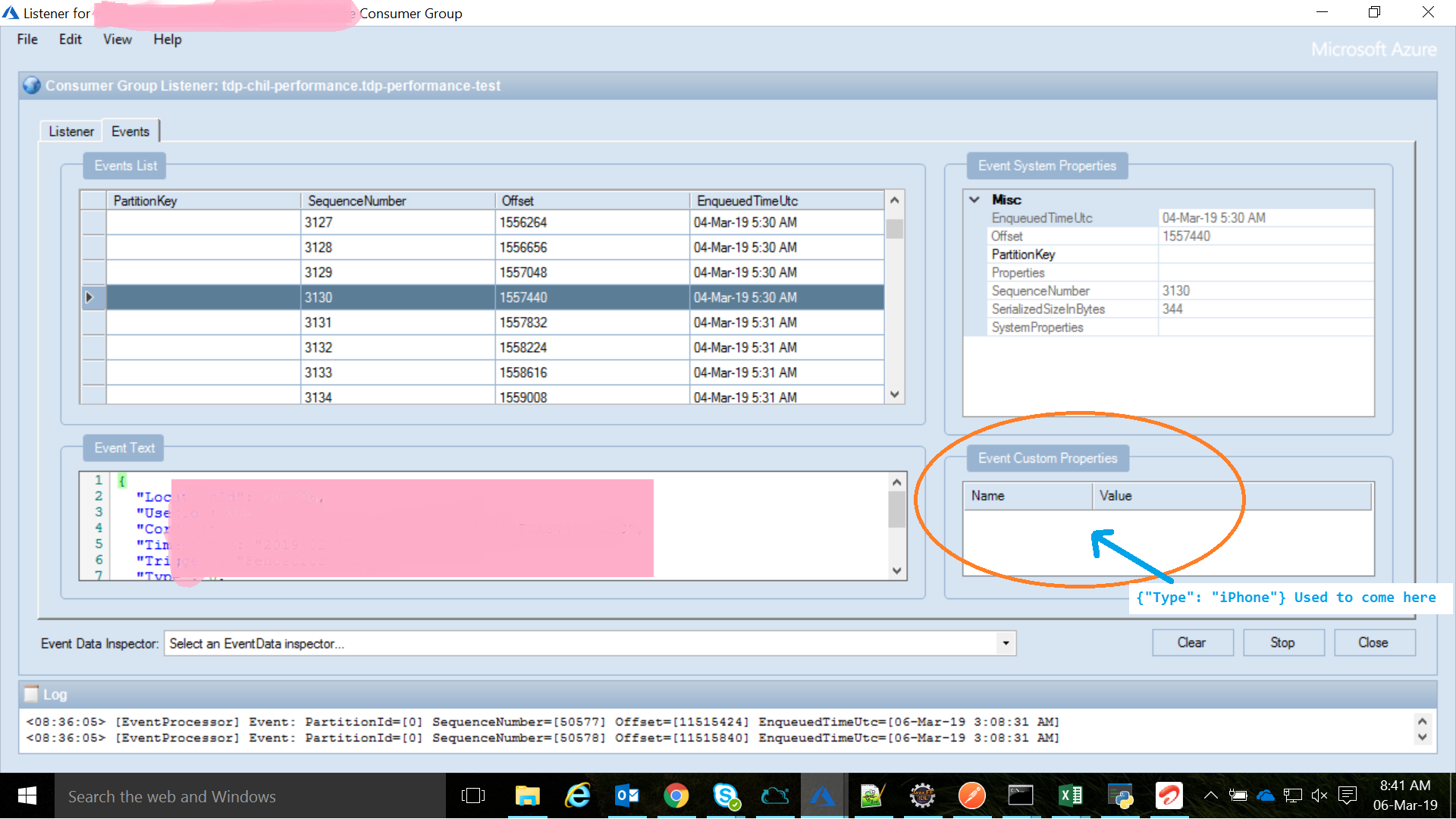
But I tried the "batch=" method as well and I can notice that the properties are not getting applied to any message as it was earlier working for the normal/send() messages.
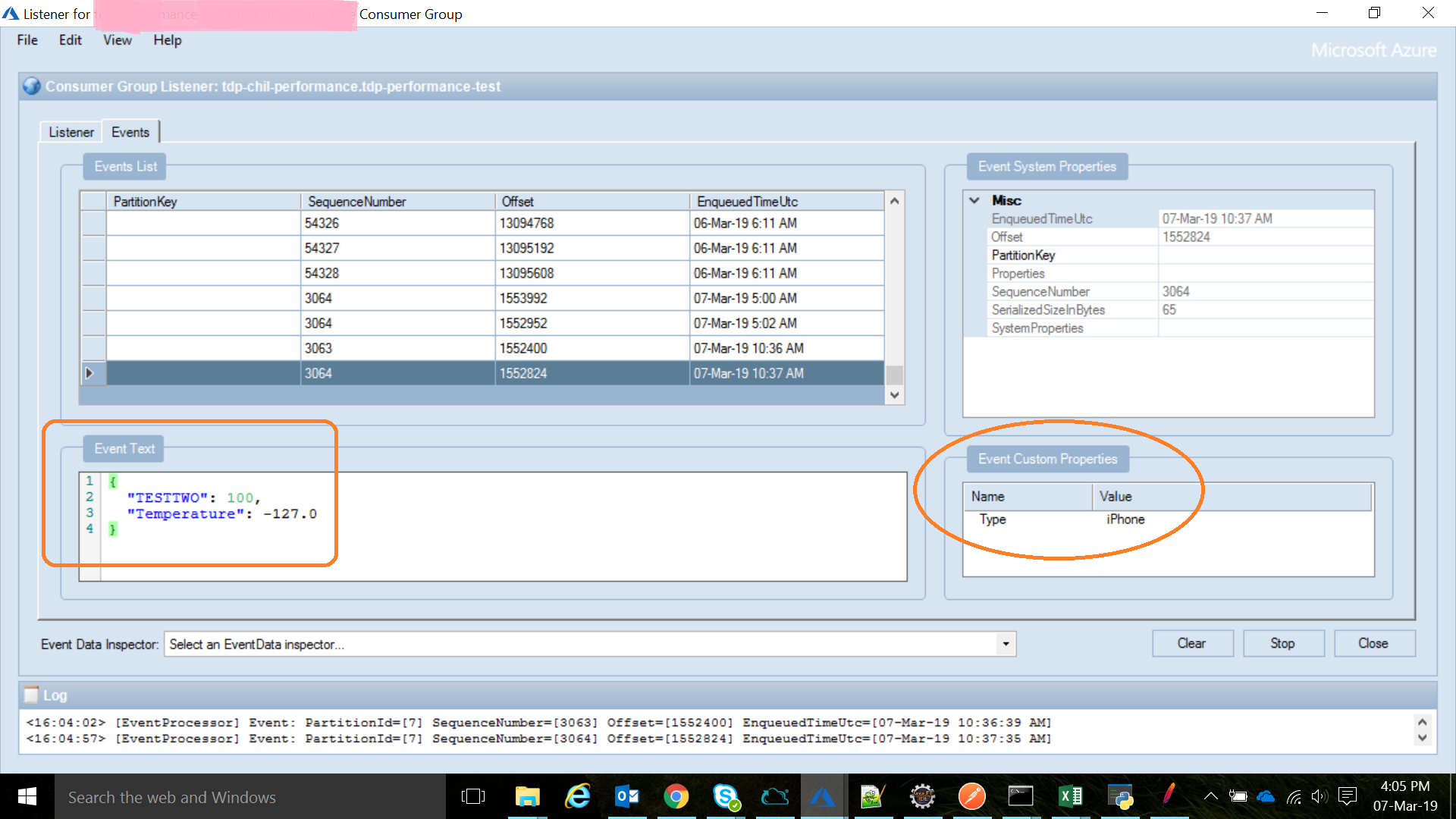
I am checking the messages in Service Bus Explorer -> Event Hub Listener, For the send() and transfer() messages i can see the 'Event Custom Properties' but for the "batch=" it's empty, Please let me know if I can provide more information for further investigation.
Screenshot of not working "batch=":
Screenshot of working "send() and transfer()":
Kindly suggest further.
@annatisch commented on Mon Mar 11 2019
Hi @sahPraveen - that's very interesting and sounds like a bug...
I will update this issue to reflect that!
Thanks so much for providing these details - I will try to dig deeper.
In the meantime, the transfer() method will hopefully provide the functionality you need.
 yunhaoling
All 3 comments
Seems like a problem with uamqp.message.BatchMessage:
def _create_batch_message(self):
        """Create a ~uamqp.message.Message for a value supplied by the data
        generator. Applies all properties and annotations to the message.

        :rtype: ~uamqp.message.Message
        """
        return Message(body=[],
                       properties=self.properties,
                       annotations=self.annotations,
                       msg_format=self.batch_format,
                       header=self.header,
                       encoding=self._encoding)
as you can see the application properties are not being passed down from a batch message to a message being created from a batch input. Not sure how we go about this?
 piotr-napadlek
on 24 May 2019
piotr-napadlek
on 24 May 2019
@sahPraveen
This turns out to be a bug in the uamqp library and we've fixed it in uamqp 1.2: https://github.com/Azure/azure-uamqp-python/pull/62.
Please try updating to the latest uamqp library.
yunhaoling
on 4 Jan 2020
Hi @sahPraveen,
I'm closing this issue, feel free to reopen this if the problem still exists.
yunhaoling
on 16 Jan 2020
Related issues
 shreyasmoolya09
·
3Comments
shreyasmoolya09
·
3Comments
 jmlero
·
3Comments
jmlero
·
3Comments
 riazjahangir
·
3Comments
riazjahangir
·
3Comments
 Koppens
·
4Comments
Koppens
·
4Comments
 christonog
·
4Comments
christonog
·
4Comments
Most helpful comment
@sahPraveen
This turns out to be a bug in the uamqp library and we've fixed it in uamqp 1.2: https://github.com/Azure/azure-uamqp-python/pull/62.
Please try updating to the latest uamqp library.