Azure-sdk-for-python: [Encryption] CloudError: Unwrap of secret <Key Vault Secret URI> value using key <Key Vault Key URI> failed.
OS trying to encrypt on build: Ubuntu 16.04
Python API: v2018_10_01
Azure RBAC:
SPN Account: Contributor Role
Key Vault Info:
Access Policies:
SPN Account:
Key Permissions: Get, List, Decrypt, Encrypt, Unwrap, Wrap, Verify, Sign
Secret Permissions: Get, List
Certificate Permissions: Get, List, Update, Create, Get Certificate Authorities, List Certificate Authorities
Certificate: Self-Signed
Secret: Auto-generated from cert upload
Key: Auto-generated form cert upload
Certificate tags:
DiskEncryptionKeyFileName : LinuxPassPhraseFileName
DiskEncryptionKeyEncryptionAlgorithm : RSA-OAEP
Python snippet:
    vm_parameters = {
        'location': data["location"],
        'os_profile': {
            'computer_name': data["server_hostname"],
            'admin_username': self.USERNAME,
            'linux_configuration': {
             "disable_password_authentication": True,
             "ssh": {
                 "public_keys": [{
                     "path": "/home/{}/.ssh/authorized_keys".format(self.USERNAME),
                 "key_data": self.PUBLIC_KEY
                     }]
                }
            }
        },
        'hardware_profile': {
            'vm_size': profile_data.DISK_PROFILES[data["os_profile"]]
        },
        'storage_profile': {
            'image_reference': {
                'publisher': vm_reference['publisher'],
                'offer': vm_reference['offer'],
                'sku': vm_reference['sku'],
                'version': vm_reference['version']
            }
        },
        'network_profile': {
            'network_interfaces': [{
                 'id': nic_id,
            }]
        },
    }

    if 'encrypt' in data:
        if data['encrypt'] == u"on":
            vault_secret_url = profile_data.VAULT_SECRET_URL
            vault_source = profile_data.VAULT_SOURCE
            key_encryption_key_url = profile_data.KEY_ENCRYPTION_KEY_URL

            disk_encryption_key = {'secret_url': vault_secret_url, 'source_vault': vault_source}
            key_encryption_key = {'key_url': key_encryption_key_url, 'source_vault': vault_source}
            enabled = {'enabled': True}

            vm_parameters['storage_profile']['os_disk'] = {
                "encryption_settings": {
                    "disk_encryption_key": {
                        "secret_url": vault_secret_url,
                        "source_vault": {
                            "id": vault_source
                            }
                        },
                    "key_encryption_key": {
                        "key_url": key_encryption_key_url,
                        "source_vault": {
                            "id": vault_source
                            }
                        }
                    },
                "create_option": 'FromImage',
                }

    async_vm_creation = self.compute_client.virtual_machines.create_or_update(self.GROUP_NAME, data["server_name"], vm_params)

    async_vm_creation.wait()
Seems to be an API related issue. Any insight into building an encrypted VM on build. Builds / deletes with no issues if encryption is not enabled. It's the same query as the example in the following link:
https://docs.microsoft.com/en-us/python/api/overview/azure/virtualmachines?view=azure-python
Except the added in portion of strorage_profile. Uncertain if I am doing it correctly.
Thank you.
 l0nedigit
All 28 comments
Hi @l0nedigit can you share the complete stacktrace?
@yugangw-msft @williexu thoughts?
 lmazuel
on 11 Mar 2019
lmazuel
on 11 Mar 2019
A lot of the traceback includes custom files, but the last 3 lines should be pertinent. Included the poller.py source code as well.
[2019-03-11 19:44:33,936: ERROR/ForkPoolWorker-1] Task create_server[dcb58338-ac87-47e0-ac44-2409a4fa9244] raised unexpected: ClientException(u'Unwrap of secret
Traceback (most recent call last):
File ".local/lib/python2.7/site-packages/celery/app/trace.py", line 382, in trace_task
R = retval = fun(args, *kwargs)
File "celery_application.py", line 16, in __call__
return TaskBase.__call__(self, args, *kwargs)
File ".local/lib/python2.7/site-packages/celery/app/trace.py", line 641, in __protected_call__
return self.run(args, *kwargs)
File "tasks.py", line 177, in create_server
remote_provider_id, ip_address, supplementary_info = getattr(provider, "create_server")(data)
File "Azure.py", line 228, in create_server
server_id, ip_address = self.create_vm(data, nic_id)
File "Azure.py", line 198, in create_vm
async_vm_creation.wait()
File "~/.local/lib/python2.7/site-packages/msrest/polling/poller.py", line 201, in wait
raise self._exception # type: ignore
CloudError: Unwrap of secret
Function contained in poller.py (lines 186-203):
def wait(self, timeout=None):
# type: (Optional[int]) -> None
"""Wait on the long running operation for a specified length
of time. You can check if this call as ended with timeout with the
"done()" method.
:param int timeout: Period of time to wait for the long running
operation to complete (in seconds).
:raises CloudError: Server problem with the query.
"""
if self._thread is None:
return
self._thread.join(timeout=timeout)
try:
# Let's handle possible None in forgiveness here
raise self._exception # type: ignore
except TypeError: # Was None
pass
@schaabs I know it's VM, but it's KV related, maybe you know?
lmazuel
on 12 Mar 2019
Imazuel, thanks for staying on top of this.
l0nedigit
on 12 Mar 2019
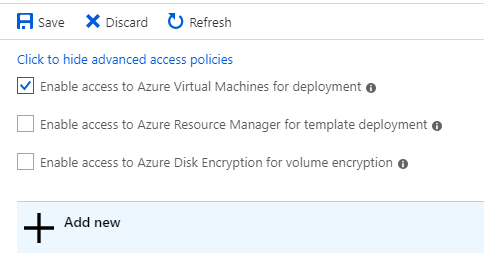
@lmazuel @l0nedigit My guess would it be that it's permission related, but unfortunately I'm not familiar with how the compute service authenticates to the vault. One thing you might check is that the vault has enabledForDeployment and enabledForDiskEncryption set to true.
You can check and update these settings in the cli:
~~~
$ az keyvault show -n
$ az keyvault update -n
~~~
Or you can update them in the portal under the vault's 'Access policies' tab.
 schaabs
on 12 Mar 2019
schaabs
on 12 Mar 2019
Thanks Scott, for the quick response. I can confirm that the vault is
enabled for deployment and encryption. Also, if encrypt is not set, the
script builds and deletes vm's with no issue. Only when adding in the
encryption does it fail.
The SPN account does have contributor role and proper permissions set
within the key vault.
I'm wondering if the request is formatted properly within vm_params?
I've noticed that with the Set-AzureDiskEncryptionExtension for powershell,
that it creates a secret each time it's ran against a running VM. Does a
new secret need to be created within Python at build, each time? Hoping
this makes sense.
On Tue, Mar 12, 2019, 10:07 AM Scott Schaab notifications@github.com
wrote:
@lmazuel https://github.com/lmazuel @l0nedigit
https://github.com/l0nedigit My guess would it be that it's permission
related, but unfortunately I'm not familiar with how the compute service
authenticates to the vault. One thing you might check is that the vault has
enabledForDeployment and enabledForDiskEncryption set to true.You can check and update these settings in the cli:
$ az keyvault show -n
$ az keyvault update -n
--enabled-for-deployment --enabled-for-disk-encryption Or you can update them in the portal under the vault's 'Access policies'
tab.[image: image]
https://user-images.githubusercontent.com/11322348/54206184-08cd5100-4495-11e9-96bc-cdc89973f5b2.png—
You are receiving this because you were mentioned.
Reply to this email directly, view it on GitHub
https://github.com/Azure/azure-sdk-for-python/issues/4520#issuecomment-472015585,
or mute the thread
https://github.com/notifications/unsubscribe-auth/AXpgE9xqMBNaZ2X2wPBhCfnvdVSyjIP9ks5vV7S-gaJpZM4bmNSf
.
l0nedigit
on 12 Mar 2019
"objectId": "",
"permissions": {
"certificates": [
"Get",
"List",
"Update",
"Create",
"Import",
"Delete",
"Recover",
"Backup",
"Restore",
"ManageContacts",
"ManageIssuers",
"GetIssuers",
"ListIssuers",
"SetIssuers",
"DeleteIssuers"
],
"keys": [
"Get",
"List",
"Update",
"Create",
"Import",
"Delete",
"Recover",
"Backup",
"Restore",
"Decrypt",
"Encrypt",
"UnwrapKey",
"WrapKey",
"Verify",
"Sign",
"Purge"
],
"secrets": [
"Get",
"List",
"Set",
"Delete",
"Recover",
"Backup",
"Restore",
"Purge"
],
"storage": []
},
"tenantId": ""
}
],
"createMode": null,
"enablePurgeProtection": null,
"enableSoftDelete": null,
"enabledForDeployment": true,
"enabledForDiskEncryption": true,
"enabledForTemplateDeployment": true,
"networkAcls": null,
"provisioningState": "Succeeded",
"sku": {
"name": "standard"
},

l0nedigit
on 12 Mar 2019
Adding @adewaleo to the discussion
lmazuel
on 12 Mar 2019
Disk encryption is a bit complex with a few uncertainties which surfaces as broken VM.
I suggest you try out how CLI does it, inspect the payload on the wire and do the same thing through SDKs.
One thing, which is definitely missing, is you didn't provision the VM Azure Disk Encryption extension
 yugangw-msft
on 12 Mar 2019
yugangw-msft
on 12 Mar 2019
That may be what's missing, the extension. Any way you could point me to an
example of that? Can try it out tomorrow.
On Tue, Mar 12, 2019, 5:33 PM Yugang Wang notifications@github.com wrote:
Disk encryption is a bit complex with a few uncertainties which surfaces
as broken VM.
I suggest you try out how CLI does it
https://github.com/Azure/azure-cli/issues/4318#issuecomment-344404234,
inspect the payload on the wire and do the same thing through SDKs.
One thing, which is definitely missing, is you didn't provision the VM
Azure Disk Encryption extension—
You are receiving this because you were mentioned.
Reply to this email directly, view it on GitHub
https://github.com/Azure/azure-sdk-for-python/issues/4520#issuecomment-472190125,
or mute the thread
https://github.com/notifications/unsubscribe-auth/AXpgE3HPrVh0YCBAkIZWZH85H5YCRgkOks5vWB08gaJpZM4bmNSf
.
l0nedigit
on 12 Mar 2019
@l0nedigit the link @yugangw-msft sent has an example of how to setup vm encryption with a service principal. You might need to use slightly different parameters for some of the commands (some commands have slightly changed in the almost 1.5 years since that issue was created).
You might also find https://github.com/Azure/azure-cli/issues/8636 helpful. There I point out that you no longer need a service principal to encrypt a VM's disks. This was required previously with azure disk encryption but is no longer required. This greatly simplifies the steps needed to encrypt a disk.
 adewaleo
on 12 Mar 2019
adewaleo
on 12 Mar 2019
The access policies on the vault seem right @lmazuel is there someone from the compute team that could look at the request to make sure it's well formed?
schaabs
on 13 Mar 2019
@schaabs Thanks for looking at the permissions, @lmazuel any other avenues to troubleshoot that I could look at on my end?
l0nedigit
on 14 Mar 2019
@yugangw-msft Do you have an example of how to provision the vm disk encryption extension? It seems that when os_disk.py creates the DiskEncryptionSettings object, that is where the failure is happening. But, perhaps it would work if the VM is created and then provisioned with the extension, like you had suggested. https://gist.github.com/Walter-Shui/ab5f72e33aac22f2dae93fbafcd67c6c has an example of how to provision a vm with a custom extension, but I am unsure how to interact with the AzureDiskEncryptionForLinux to pass in the resource group, vm name, etc.
l0nedigit
on 20 Mar 2019
@l0nedigit here is the extension schema for AzureDiskEncryptionForLinux.
Your settings dict should be based on the schema when creating the VirtualMachineExtension object.
See here for an example. That is the implementation of the azure cli's vm encryption command.
adewaleo
on 20 Mar 2019
@adewaleo Thank you!
l0nedigit
on 21 Mar 2019
Closing, since I believe it's solved by @adewaleo , feel free to open a new issue if necessary. Thanks!
lmazuel
on 21 Mar 2019
@adewaleo thanks so much for sharing that schmema and cli example. I was able to piece it together today and encrypt a VM.
If anyone else comes across this situation, the answer was to provision the VM with the extension as @yugangw-msft pointed out earlier.
@adewaleo One last question. Line 205/206 of the code you provided the link to, it basically calls client.virtual_machines.create_or_update with the usual parameters except with raw=True. Is that necessary? I was getting an error (User encryption settings in the VM model are not supported. Please upgrade Azure Disk Encryption extension version and clear encryption settings in the VM model.) when including that portion, but if I took it out, the provisioning still completed successfully and was retained after reboot.
Curious to what that is for?
l0nedigit
on 21 Mar 2019
@lmazuel You're correct, issue can be closed. Thanks.
l0nedigit
on 21 Mar 2019
@l0nedigit, no p. Happy to help. Hmm those lines in the link do not have raw=True set. Are we looking at the same things?
adewaleo
on 21 Mar 2019
@adewaleo sorry I should have explained more. set_vm(cmd, vm) runs azure-cli/src/command_modules/azure-cli-vm/azure/cli/command_modules/vm/custom.py (line 892). Which runs the function sdk_no_wait() in azure-cli/src/azure-cli-core/azure/cli/core/util.py (line 335) and adds raw: True to the kwargs and returns func(args, *kwargs)...essentially being client.virtual_machines.create_or_update(resource_group, vm_name, parameters, raw=True, polling=False)
When running that, I was receiving the error.
Code snippet:
`
volume_type = 'OS'
sequence_version = uuid.uuid4()
public_config = {
'KeyVaultURL': profile_data.VAULT_SOURCE,
'VolumeType': volume_type,
'EncryptionOperation': 'EnableEncryption',
'KeyEncryptionKeyURL': profile_data.KEY_ENCRYPTION_KEY_URL,
'KeyEncryptionAlgorithm': 'RSA-OAEP',
'SequenceVersion': sequence_version,
'KeyVaultResourceId': profile_data.VAULT_ID,
'KekVaultResourceId': profile_data.VAULT_ID,
}
legacy_config = {
'AADClientSecret': self.CLIENT_SECRET
}
extension = vm_extension_info['Linux' if is_linux == True else 'Windows']
ext = VirtualMachineExtension(
location = data['instance_locations'],
publisher = extension['publisher'],
virtual_machine_extension_type = extension['name'],
protected_settings = legacy_config,
type_handler_version = extension['version'],
settings = public_config,
auto_upgrade_minor_version=True)
extension_creation = self.compute_client.virtual_machine_extensions.create_or_update(self.GROUP_NAME, data['server_name'], extension['name'], ext)
extension_creation.result()
extension_result = self.compute_client.virtual_machine_extensions.get(self.GROUP_NAME, data['server_name'], extension['name'], 'instanceView')
if extension_result.provisioning_state != 'Succeeded':
raise CloudError('Extension needed for disk encryption was not provisioned correctly')
if not (extension_result.instance_view.statuses and extension_result.instance_view.statuses[0].message):
raise CloudError('Could not find url pointing to the secret for disk encryption')
vm = self.compute_client.virtual_machines.get(self.GROUP_NAME, data['server_name'])
secret_ref = KeyVaultSecretReference(secret_url=profile_data.VAULT_SECRET_URL, source_vault=SubResource(id=profile_data.VAULT_ID))
key_encryption_key_obj = KeyVaultKeyReference(key_url=profile_data.KEY_ENCRYPTION_KEY_URL, source_vault=SubResource(id=profile_data.VAULT_ID))
disk_encryption_settings = DiskEncryptionSettings(disk_encryption_key=secret_ref, key_encryption_key=key_encryption_key_obj, enabled=True)
vm.storage_profile.os_disk.encryption_settings = disk_encryption_settings
async_vm_update = compute_client.virtual_machines.create_or_update(self.GROUP_NAME, data["server_name"], vm, raw=True, polling=False)
async_vm_update.wait()
`
The async_vm_update is what is returning the error User encryption settings in the VM model are not supported. Please upgrade Azure Disk Encryption extension version and clear encryption settings in the VM model.
l0nedigit
on 21 Mar 2019
@l0nedigit, we use this to support our--no-wait flag, where we do not wait for the long running operation.
However two lines later you call wait on the response object. Somehow you waiting for the raw response and the fact that the request has some secrets might be interacting poorly. Without seeing the stack trace, it is hard for me to even know where the error is coming from or what is going on.
adewaleo
on 22 Mar 2019
Thanks @adewaleo, I'll look into it more in the morning.
On Thu, Mar 21, 2019, 8:36 PM adewaleo notifications@github.com wrote:
@l0nedigit https://github.com/l0nedigit, we use this to support our
--no-wait flag, where we do not wait for the long running operation.However two lines later you call wait on the response object. Somehow you
waiting for the raw response and the fact that the request has some secrets
might be interacting poorly. Without seeing the stack trace, it is hard for
me to even know where the error is coming from or what is going on.—
You are receiving this because you were mentioned.
Reply to this email directly, view it on GitHub
https://github.com/Azure/azure-sdk-for-python/issues/4520#issuecomment-475453389,
or mute the thread
https://github.com/notifications/unsubscribe-auth/AXpgE9-5Hoe3RfpHhaC612CQpuQF6mdPks5vZCV9gaJpZM4bmNSf
.
l0nedigit
on 22 Mar 2019
@adewaleo is there a way to pass in a parameter similar to the powershell version of -SkipVmBackup to the extension? I've straightened out the issue with the code using AAD creds and is fully using the new ade method. I can post the code tomorrow if you need to see it. Still not able to fully encrypt a vm yet...but so close.
The VM is booting into run level 1 and has an error unknown filesystem. Since this is a Linux host, was thinking maybe I need to supply skipvmbackup or perhaps a passphrase?
l0nedigit
on 25 Mar 2019
@adewaleo is there a way to pass in a parameter similar to the powershell version of -SkipVmBackup to the extension? I've straightened out the issue with the code using AAD creds and is fully using the new ade method. I can post the code tomorrow if you need to see it. Still not able to fully encrypt a vm yet...but so close.
The VM is booting into run level 1 and has an error unknown filesystem. Since this is a Linux host, was thinking maybe I need to supply skipvmbackup or perhaps a passphrase?
I am not familiar with -SkipVmBackup. Does the extension schema or related docs on the link help?
adewaleo
on 27 Mar 2019
I realized that it wasn't relevant anyway. I have said this a million times
now, but I believe it's working. Because I was building the vm with a
standard hdd, the encryption is probably taking a bit longer than a VM with
premium SSD. The reason it's probably in run level 1 is, I assume, so that
it can encrypt the os partition? At any rate, I've built a VM and leaving
it overnight. The progress said Encryption in progress when running the
show command.
Thanks for the help on this.
On Tue, Mar 26, 2019, 7:38 PM adewaleo notifications@github.com wrote:
@adewaleo https://github.com/adewaleo is there a way to pass in a
parameter similar to the powershell version of -SkipVmBackup to the
extension? I've straightened out the issue with the code using AAD creds
and is fully using the new ade method. I can post the code tomorrow if you
need to see it. Still not able to fully encrypt a vm yet...but so close.The VM is booting into run level 1 and has an error unknown filesystem.
Since this is a Linux host, was thinking maybe I need to supply
skipvmbackup or perhaps a passphrase?I am not familiar with -SkipVmBackup. Does the extension schema or related
docs on the link help?—
You are receiving this because you were mentioned.
Reply to this email directly, view it on GitHub
https://github.com/Azure/azure-sdk-for-python/issues/4520#issuecomment-476896529,
or mute the thread
https://github.com/notifications/unsubscribe-auth/AXpgEzpbCxSp-iNTl_RjF9_KDCHnE4MXks5vaq-EgaJpZM4bmNSf
.
l0nedigit
on 27 Mar 2019
@adewaleo @lmazuel @schaabs @yugangw-msft Thank you all for your input and guidance. Checked the encryption progress and it was successfully encrypted. Below is a portion of the code used for anyone struggling with this in the future.
       ` vm = compute_client.virtual_machines.get(group_name, vm_name)
        is_linux = True if host_os  != 'Windows' else False

        vm_extension_info = {
            'Linux': {
                'publisher': 'Microsoft.Azure.Security',
                'name': 'AzureDiskEncryptionForLinux',
                'version': '1.1',
                'legacy_version': '0.1'
                },
            'windows': {
                'publisher': 'Microsoft.Azure.Security',
                'name': 'AzureDiskEncryption',
                'version': '2.2',
                'legacy_version': '1.1'
                }
            }

        if "data_disks" in data:
            volume_type = 'All'
        else:
            volume_type = 'OS'

        sequence_version = uuid.uuid4()

        public_config = {
            'KeyVaultURL': vault_uri,
            'KeyVaultResourceId': vault_id,
            'VolumeType': volume_type,
            'EncryptionOperation': 'EnableEncryption',
            'KeyEncryptionAlgorithm': 'RSA-OAEP',
            'SequenceVersion': sequence_version,
        }

        extension = vm_extension_info['Linux' if is_linux == True else 'Windows']

        ext = VirtualMachineExtension(
            location = vm_region,
            publisher = extension['publisher'],
            virtual_machine_extension_type = extension['name'],
            protected_settings = None,
            type_handler_version = extension['version'],
            settings = public_config,
            auto_upgrade_minor_version=True)

        extension_creation =compute_client.virtual_machine_extensions.create_or_update(group_name, data['server_name'], extension['name'], ext, polling=True)

        extension_creation.result()

        extension_result = compute_client.virtual_machine_extensions.get(group_name, vm_name, extension['name'], 'instanceView')

        if extension_result.provisioning_state != 'Succeeded':
            raise 'Extension needed for disk encryption was not provisioned correctly'`
@l0nedigit I am happy you were able to figure this out! Thanks for sharing your code snippet. :)
adewaleo
on 28 Mar 2019
Related issues
 Koppens
·
4Comments
Koppens
·
4Comments
 jmlero
·
3Comments
jmlero
·
3Comments
 riazjahangir
·
3Comments
riazjahangir
·
3Comments
 christonog
·
4Comments
christonog
·
4Comments
 yunhaoling
·
3Comments
yunhaoling
·
3Comments
Most helpful comment
@adewaleo @lmazuel @schaabs @yugangw-msft Thank you all for your input and guidance. Checked the encryption progress and it was successfully encrypted. Below is a portion of the code used for anyone struggling with this in the future.