Azure-sdk-for-js: Cannot find name 'URL'
- azure/keyvault-secrets:
- ^4.0.4:
- linux:
- [x] nodejs
- 10:
- [x] typescript
- ^3.9.7:
Describe the bug
node_modules/@azure/keyvault-secrets/types/keyvault-secrets.d.ts:477:22 - error TS2304: Cannot find name 'URL'.

477     readonly keyId?: URL;
To Reproduce
Steps to reproduce the behavior:
- build the project using typescript
Expected behavior
should build without any error
 krisalay
All 15 comments
@krisalay Hello Mr Kisalay!
Do you mind sharing with us more on how you're building this project?
To build our projects we currently use https://rushjs.io/ . Once installed, you can build keyvault-secrets as follows:
rush install && rush build -t keyvault-secrets
Please let me know if that makes sense! Any further information or question is appreciated.
 sadasant
on 17 Aug 2020
sadasant
on 17 Aug 2020
@sadasant
I am using the npm package:
"@azure/identity": "^1.0.3",
"@azure/keyvault-secrets": "^4.0.4"
code for reference:
import { DefaultAzureCredential } from "@azure/identity";
import { SecretClient } from "@azure/keyvault-secrets";

const credential: DefaultAzureCredential = new DefaultAzureCredential();

async checkKeysInEnv(): Promise<void> {
    if (!process.env.KEY1 || !process.env.KEY2) {
      const [key1, key2] = await Promise.all([client.getSecret("key1"), client.getSecret("key2")]);
      process.env.KEY1 = key1.value;
      process.env.KEY2 = key2.value;
    }
}
and I am using typescript so I use tsc command to build the project using tsconfig.json file
krisalay
on 19 Aug 2020
Hello @krisalay , I believe we still have some miscommunication! Here's something I just tried.
I made a new folder, called 10498, in which I added the following package.json:
{
  "name": "10498",
  "version": "1.0.0",
  "description": "",
  "main": "index.js",
  "scripts": {
    "test": "echo \"Error: no test specified\" && exit 1"
  },
  "author": "",
  "license": "ISC",
  "dependencies": {
    "@azure/identity": "^1.0.3",
    "@azure/keyvault-secrets": "^4.0.4"
  },
  "devDependencies": {
    "@types/node": "^14.6.0",
    "typescript": "^3.9.7"
  }
}
After that, I created an index.ts file, with the following content:
import { DefaultAzureCredential } from "@azure/identity";
import { SecretClient } from "@azure/keyvault-secrets";

const credential: DefaultAzureCredential = new DefaultAzureCredential();

async function checkKeysInEnv(): Promise<void> {
  const credential = new DefaultAzureCredential();
  const client = new SecretClient(
    "https://mykeyvault.vault.azure.net",
    credential
  );
  if (!process.env.KEY1 || !process.env.KEY2) {
    const [key1, key2] = await Promise.all([
      client.getSecret("key1"),
      client.getSecret("key2"),
    ]);
    process.env.KEY1 = key1.value;
    process.env.KEY2 = key2.value;
  }
}
Then I installed the dependencies with npm install. Then I ran tsc index.ts, and the generated file was produced, named index.js.
With this approach, I'm unable to see the error you're describing. Am I missing something?
Thank you for your time.
sadasant
on 20 Aug 2020
@sadasant
I am facing the same issue, so I checked the keyvault-secrets.d.ts file and there is no reference for URL type but it is being used. I have attached the screenshot for few lines in the file
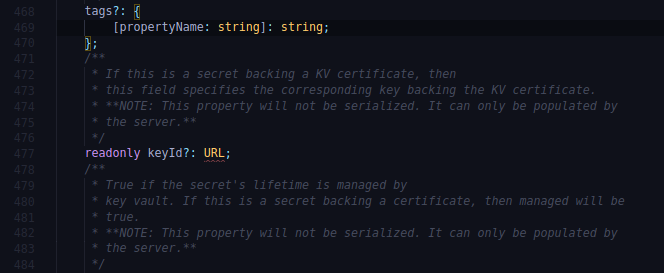
The error is being thrown from the mentioned file.
Also, I have the following dev dependencies:
{
    "@types/node": "^14.0.27",
    "@typescript-eslint/eslint-plugin": "^3.8.0",
    "@typescript-eslint/parser": "^3.8.0",
    "eslint": "^7.6.0",
    "eslint-config-prettier": "^6.11.0",
    "eslint-plugin-prettier": "^3.1.4",
    "prettier": "^2.0.5",
    "typescript": "^3.9.7"
  }
Can there be issue with bcz of any version mismatch for dev dependencies
krisalay
on 21 Aug 2020
@krisalay Hi again! Thank you for your reply.
I wanted to get a more concrete path for reproduction, but right out of your screenshot I have a concrete idea of what's going on. I appreciate your reply!
Key Vault Secrets currently has a bug with this keyId: URL property that you're spotting.
While we reach to an agreement about the solution, I believe the following will help you:
Add "lib": ["dom"] to your tsconfig.json, or simply add dom to an existing array in the lib property, as how we're currently doing here: https://github.com/Azure/azure-sdk-for-js/blob/master/sdk/keyvault/keyvault-secrets/tsconfig.json
That should fix it for you. Please help us by trying this and reporting back. Thank you for your time!
sadasant
on 21 Aug 2020
@sadasant I will try by adding the dom in the tsconfig file as a temporary solution until this bug is fixed.
And, I appreciate your help. Thank you.
krisalay
on 21 Aug 2020
@krisalay Mr Kisalay, did that approach work for you? If so, please feel free to close this issue.
sadasant
on 24 Aug 2020
Hi, we're sending this friendly reminder because we haven't heard back from you in a while. We need more information about this issue to help address it. Please be sure to give us your input within the next 7 days. If we don't hear back from you within 14 days of this comment the issue will be automatically closed. Thank you!
![msftbot[bot] picture](https://avatars.githubusercontent.com/in/26612?v=4&s=40) msftbot[bot]
on 1 Sep 2020
msftbot[bot]
on 1 Sep 2020
Hi all,
I'm facing the same issue when building my project.
node_modules/@azure/keyvault-secrets/types/keyvault-secrets.d.ts:488:22 - error TS2304: Cannot find name 'URL'.
488 readonly keyId?: URL;
~~~
Found 1 error.
 mavr1982
on 1 Sep 2020
mavr1982
on 1 Sep 2020
@mavr1982
Add "lib": ["dom"] to your tsconfig.json, or simply add dom to an existing array in the lib property, as how we're currently doing here: https://github.com/Azure/azure-sdk-for-js/blob/master/sdk/keyvault/keyvault-secrets/tsconfig.json
That should fix it for you. Please help us by trying this and reporting back. Thank you for your time!
sadasant
on 3 Sep 2020
@krisalay @mavr1982
Do you mind sharing what was your tsconfig.json when this error appeared? I was able to reproduce this when my tsconfig had specific lib values, like "lib": ["ESNext"]. We would like to know more about your specific scenarios.
sadasant
on 8 Sep 2020
Hi, we're sending this friendly reminder because we haven't heard back from you in a while. We need more information about this issue to help address it. Please be sure to give us your input within the next 7 days. If we don't hear back from you within 14 days of this comment the issue will be automatically closed. Thank you!
msftbot[bot]
on 16 Sep 2020
I've removed some tags since we're still actively talking about this internally.
sadasant
on 18 Sep 2020
If the solution posted above works: https://github.com/Azure/azure-sdk-for-js/issues/10498#issuecomment-678236271
Then let this issue roll and we'll automatically close it. We'll be cleaning this up through this issue: https://github.com/Azure/azure-sdk-for-js/issues/10726
Thank you for helping us make the SDKs better!
sadasant
on 24 Sep 2020
Hi, we're sending this friendly reminder because we haven't heard back from you in a while. We need more information about this issue to help address it. Please be sure to give us your input within the next 7 days. If we don't hear back from you within 14 days of this comment the issue will be automatically closed. Thank you!
msftbot[bot]
on 1 Oct 2020
Related issues
 epomatti
·
4Comments
epomatti
·
4Comments
 AElharouny
·
4Comments
AElharouny
·
4Comments
 nguerrera
·
3Comments
nguerrera
·
3Comments
 DerKobe
·
3Comments
DerKobe
·
3Comments
 et13
·
3Comments
et13
·
3Comments
Most helpful comment
@sadasant I will try by adding the
domin the tsconfig file as a temporary solution until this bug is fixed.And, I appreciate your help. Thank you.