Azure-sdk-for-js: Error "missing_environment_variables" for user account authentication
- Package Name: @azure/identity
- Package Version: 1.0.3
- Operating system: Ubuntu 20.04
- [x] nodejs
- version: v12.18.0
- [ ] browser
- name/version:
- [ ] typescript
- version:
- Is the bug related to documentation in
- [ ] README.md
- [ ] source code documentation
- [ ] SDK API docs on https://docs.microsoft.com
Describe the bug
I'm trying to connect to an Azure Key Vault using username and password, but I get the following error message:
EnvironmentCredential cannot return a token because one or more of the following environment variables is missing:

AZURE_CLIENT_ID
AZURE_CLIENT_SECRET
AZURE_CLIENT_CERTIFICATE_PATH

To authenticate with a service principal AZURE_TENANT_ID, AZURE_CLIENT_ID, and either AZURE_CLIENT_SECRET or AZURE_CLIENT_CERTIFICATE_PATH must be set.  To authenticate with a user account AZURE_TENANT_ID, AZURE_USERNAME, and AZURE_PASSWORD must be set.
The message says that environment variables AZURE_TENANT_ID, AZURE_USERNAME and AZURE_PASSWORD must be set for user account auth.
Problem is that I have those set up, yet I still get the error message:
require('dotenv').config()

const { DefaultAzureCredential } = require("@azure/identity");
const { SecretClient } = require("@azure/keyvault-secrets");

const credential = new DefaultAzureCredential();

const vaultName = "my-keyvault";
const url = `https://${vaultName}.vault.azure.net`;

const client = new SecretClient(url, credential);
const secretName = "my-secret-name";

async function main() {

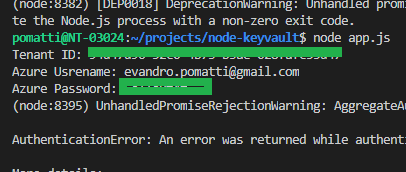
    console.log("Tenant ID: " + process.env.AZURE_TENANT_ID)
    console.log("Azure Usrename: " + process.env.AZURE_USERNAME)
    console.log("Azure Password: " + process.env.AZURE_PASSWORD)

    const latestSecret = await client.getSecret(secretName);
}

main();
Here is the program execution log, I'm printing the variables to be sure:
To Reproduce
Steps to reproduce the behavior:
- Build a client to authenticate to an Azure Key Vault with user account credentials (tenant, username and password)
- Set the credentials as environment variables
AZURE_TENANT_ID,AZURE_USERNAMEandAZURE_PASSWORDso that the library can pick them up. - Try to authenticate and get a secret from a Key Vault.
Expected behavior
The identity library should read the credentials from the environment variables and authenticate.
Additional context
Full stack trace:
$ node app.js
(node:8395) UnhandledPromiseRejectionWarning: AggregateAuthenticationError: Authentication failed to complete due to the following errors:

AuthenticationError: An error was returned while authenticating to Azure Active Directory (status code 400).

More details:

{
  "error": "missing_environment_variables",
  "errorDescription": "EnvironmentCredential cannot return a token because one or more of the following environment variables is missing:\n\nAZURE_CLIENT_ID\nAZURE_CLIENT_SECRET\nAZURE_CLIENT_CERTIFICATE_PATH\n\nTo authenticate with a service principal AZURE_TENANT_ID, AZURE_CLIENT_ID, and either AZURE_CLIENT_SECRET or AZURE_CLIENT_CERTIFICATE_PATH must be set.  To authenticate with a user account AZURE_TENANT_ID, AZURE_USERNAME, and AZURE_PASSWORD must be set.\n"
}
    at DefaultAzureCredential.<anonymous> (/home/pomatti/projects/node-keyvault/node_modules/@azure/identity/dist/index.js:173:29)
    at Generator.next (<anonymous>)
    at fulfilled (/home/pomatti/projects/node-keyvault/node_modules/tslib/tslib.js:112:62)
    at processTicksAndRejections (internal/process/task_queues.js:97:5)
(node:8395) UnhandledPromiseRejectionWarning: Unhandled promise rejection. This error originated either by throwing inside of an async function without a catch block, or by rejecting a promise which was not handled with .catch(). To terminate the node process on unhandled promise rejection, use the CLI flag `--unhandled-rejections=strict` (see https://nodejs.org/api/cli.html#cli_unhandled_rejections_mode). (rejection id: 5)
(node:8395) [DEP0018] DeprecationWarning: Unhandled promise rejections are deprecated. In the future, promise rejections that are not handled will terminate the Node.js process with a non-zero exit code.
 epomatti
All 4 comments
I'm having the same problem as well, using Windows 10 and trying with client id and secret. It seems the package isn't reading in properly from process.env.
 kurtfurbush
on 5 Jul 2020
kurtfurbush
on 5 Jul 2020
Hello, @epomatti !! Good day to you.
So, as far as I'm able to understand at the moment, the error is saying that at least one of the following environment variables is missing:
AZURE_CLIENT_ID
AZURE_CLIENT_SECRET
AZURE_CLIENT_CERTIFICATE_PATH
And, as you mentioned, you're providing the following environment variables:
AZURE_TENANT_ID
AZURE_USERNAME
AZURE_PASSWORD
For the authentication method you're trying to use, you must at least additionally provide the AZURE_CLIENT_ID environment variable.
Just in case it might be helpful: The Client ID is usually the ID of an Azure Active Directory application, one that you might create by following this guide: https://docs.microsoft.com/en-us/azure/active-directory/develop/quickstart-register-app
Please let me know if that worked! And have a nice day.
@kurtfurbush Hello, Mr Furbush,
In case the above is not useful for your case, we would like to request you more information about your issue! Thank you for your time.
 sadasant
on 17 Jul 2020
sadasant
on 17 Jul 2020
tx @sadasant how did I miss that. I must have automatically assumed user & pass only.
Anyways, we ended up building it in Python, creating an App registration and using a Service Principal with CLIENT_SECRET which is way better than anyone's password.
epomatti
on 18 Jul 2020
@epomatti I'm really happy that this worked for you! Thank you for answering so fast! Have a great weekend 🙌
sadasant
on 18 Jul 2020
Related issues
 IDONTSUDO
·
4Comments
IDONTSUDO
·
4Comments
 ahmedspiir
·
3Comments
ahmedspiir
·
3Comments
 kaerm
·
4Comments
kaerm
·
4Comments
 HarshaNalluru
·
4Comments
HarshaNalluru
·
4Comments
 avieru
·
4Comments
avieru
·
4Comments