Azure-sdk-for-js: [App-configuration] Usage on the browser
- Is the bug related to documentation in
- [ ] README.md
- [x] source code documentation
- [ ] SDK API docs on https://docs.microsoft.com
Sorry, it's just a quick question. From the App-configuration readme, there is a requirement for Node 8.x.x+
I want to know if its possible/any security implications using the package on the browser, especially with a read-only connection string
 ashinzekene
All 14 comments
I run into a couple of errors after importing AppConfigurationClient on a browser project.
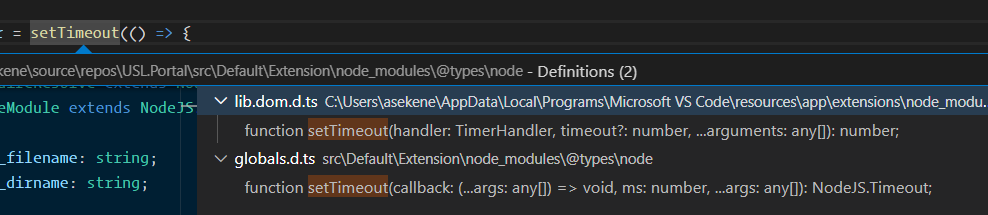
setTimeout()returnsNode.Timeoutinstead ofnumber- Subsequent variable declarations must have the same type. Variable 'require' must be of type '
LocalRequire', but here has type 'NodeRequire'. - Duplicate identifier 'Module'
- Subsequent variable declarations must have the same type. Variable 'require' must be of type '
LocalRequire', but here has type 'NodeRequire'
ashinzekene
on 16 Jul 2020
@ashinzekene, Can you provide a gist showing an example of how you have used AppConfigurationClient in the browser project so that we can try and replicate the issue?
 ramya-rao-a
on 16 Jul 2020
ramya-rao-a
on 16 Jul 2020
Also, @ashinzekene, can you share which bundler you're using?
 richardpark-msft
on 16 Jul 2020
richardpark-msft
on 16 Jul 2020
I'm using MSBuild
ashinzekene
on 16 Jul 2020
@ashinzekene - (just to mention, my question was in addition to what @ramya-rao-a was asking).
If you can post a gist that replicates your issue we'll be able to help you faster.
richardpark-msft
on 16 Jul 2020
I'm trying to reproduce it on a simple project but I haven't been able to. The error just comes up once the library is imported
ashinzekene
on 17 Jul 2020
@ramya-rao-a @richardpark-msft Here's a link to the public gist
https://gist.github.com/ashinzekene/da87b8ce3a26fd6e16ba17348d0f42fb
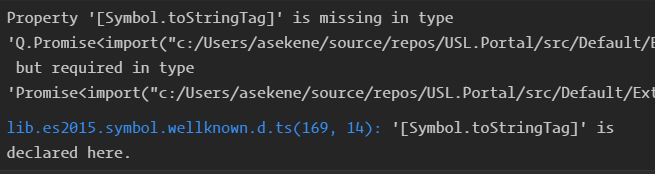
Also, we use Q.Promise which is compatible with Promise from lib.es5.d.ts, but importing AppConfiguration loads from lib.es2015.iterable.d.ts which throws this error
ashinzekene
on 17 Jul 2020
Thank you for providing the gist! It looks like you're having a few problems so let's see if we can work through them one at a time:
Your questions
(original issue): I want to know if its possible/any security implications using the package on the browser, especially with a read-only connection string
Any time that you expose credentials in the browser you run the risk that the user will extract that credential and use it. The data you expose might not be valuable and, as you said, you are using a read-only connection string so modification might not be an issue. However, unscrupulous users could also abuse the service in other ways - for instance, by doing excess requests, for which you would be billed.
Tagging @zhenlan who might have more insight on this use case (publicly exposing an AppConfiguration instance).
setTimeout()'s type is taking on the node.js type (nodeJs.Timeout)
You actually have the proper solution (as far as I can tell) in the tsconfig.json that you sent me. The only issue (when I loaded it) is that the
unrealted-file.tsisn't included in your tsconfig.json's fileincludefile (so the types:[]) that you have in there to exclude @types/node isn't taking effect. Expanding that (or moving the file into a subfolderClient) causes the type signature to match the browser's definition of setTimeout instead.The various compile issues you mentioned in this comment: https://github.com/Azure/azure-sdk-for-js/issues/10091#issuecomment-659353495
Using the test project you uploaded I'm not seeing these problems. If you can include a repro for that I'm more than happy to look at it.
Also, we use Q.Promise which is compatible with Promise from lib.es5.d.ts, but importing AppConfiguration loads from lib.es2015.iterable.d.ts which throws this error
Since we have the gist to work with do you mind adding in this case as well?
Modifications to your gist that I made locally:
BTW, these are the modifications I've made to the gist so far:
AppConfiguration.ts: added these to the top just to silence some unrelated compiler errors.
interface FeatureContext { }
type FeatureName = string;
interface IAppConfiguration { }
tsconfig.json: modified include to allow files from the root, since that's where our two .ts files are located.
"include": [
    "*",
  ]
Next steps
- Can you upload a package.json (truncated for any privacy concerns you might have) to the gist so I can make sure I'm matching your configuration. It might be irrelevant but anything we can do to sync will help.
- Can you add in files that demonstrate points #3 and #4 that you've posted about above?
richardpark-msft
on 17 Jul 2020
Thanks a lot @richardpark-msft for this detailed response.
unrelated-file is actually in the Client folder.
I was able to partially recreate the issue on codesandbox. You might have to clone the project locally and run npm install.
https://codesandbox.io/s/musing-cartwright-m2v1v
Instructions:
- After running
npm installcheck the return type of thesetTimeoutcall in thesrc/index.tsfile - Comment out the
src/AppConfigurationimport insrc/AppConfiguration.ts - Go back to
src/index.tsand check the return type ofsetTimeout
ashinzekene
on 17 Jul 2020
@ashinzekene to your original questions
- When a connection string is included in a browser app, you basically granted anonymous access to your App Configuration store. One could exhaust the quota of your store and cause disruption of your legit usage. As @richardpark-msft mentioned, the store will be billed for any overage too.
- Each standard tier App Configuration store has a limit of 20,000 requests per hour, which is sufficient for server/services scenarios in most cases. You may want to evaluate whether it's sufficient in your case as the magnitude of the number of clients can be on a much higher scale.
My recommendation will be using App Configuration on your server-side and let your service cache and pass configuration to your clients. This avoids both issues above.
 zhenlan
on 17 Jul 2020
zhenlan
on 17 Jul 2020
@ashinzekene - just wanted to update.
Based on @zhenlan's feedback it sounds like it would be the more secure option to make these requests on the backend (ie, server-side), rather than the frontend.
With that said - I've looked more into what is going on with the type definitions. The problem is that one of our libraries (core-http) is referencing types from node. What you have in your tsconfig.json (types: []) should have excluded that. However, that doesn't appear to be happening (thanks, btw, for your very detailed repro on that!). I am still chasing that particular aspect down.
Internally we need to discuss how to fix that particular issue long-term - it's a package used by many other packages so we need to plan it out.
In the short-term, one workaround you can try is to store it as type 'any' instead. This isn't a great practice but, if your code treats the timer as an opaque value, the scope of it will hopefully be constrained enough to make it acceptable.
I will continue to look at this but I just wanted to report back some status and ideas.
richardpark-msft
on 21 Jul 2020
Yeah @richardpark-msft, I'd be moving forward with the more secure option.
Also, another workaround would be using window.setTimeout
ashinzekene
on 21 Jul 2020
@HarshaNalluru Can you see if this is still an issue and if there is anything for us to do here? If not, lets close this issue
ramya-rao-a
on 12 Apr 2021
Looks like the problems are addressed, App Config has browser tests too which makes sure that the SDK works in the browser. Closing this issue.
Though not relevant, just mentioning here that App Config has some new features, for which we have published a preview version of the SDK.
Package - https://www.npmjs.com/package/@azure/app-configuration/v/1.2.0-beta.1
Changelog - https://github.com/Azure/azure-sdk-for-js/blob/master/sdk/appconfiguration/app-configuration/CHANGELOG.md#120-beta1-2021-04-06
@ashinzekene feel free to open new issues if you face any problems!
 HarshaNalluru
on 13 Apr 2021
HarshaNalluru
on 13 Apr 2021
Related issues
 Ward6548
·
3Comments
Ward6548
·
3Comments
 avieru
·
4Comments
avieru
·
4Comments
 nguerrera
·
3Comments
nguerrera
·
3Comments
 dgellow
·
4Comments
dgellow
·
4Comments
 pjblakey
·
3Comments
pjblakey
·
3Comments