Azure-sdk-for-js: Does the package support user-assigned managed identity?
Tried the sample code
// The default credential first checks environment variables for configuration as described above.
// If environment configuration is incomplete, it will try managed identity.
const { KeyClient } = require("@azure/keyvault-keys");
const { DefaultAzureCredential } = require("@azure/identity");

// Azure SDK clients accept the credential as a parameter
const credential = new DefaultAzureCredential();
const client = new KeyClient(vaultUrl, credential);
const getResult = await client.getKey("MyKeyName");
It is working for system managed identity. When using user-assigned managed identity, it doesn't work when deploy to Azure Web App.
Also when deploy to Azure Web App container, the managed identity seems not working when used to access key vaults. Is it true or I did something wrong?
 ricklang
All 5 comments
@ricklang Hello 👋 I'll be doing my best effort to help you.
I've been trying to reproduce what you're mentioning, but I haven't been successful. I am going to try to be as detailed as possible, so that you can help us see if we did something differently.
My plan is to:
- Create the resources
We will create one KeyVault, one user managed identity and one Web App,
we will configure them appropriately to work together. - Write, upload and run the code
We will crate a simple NodeJS project with TypeScript, our KeyVault client and our identity client,
then we will make three scripts, one using DefaultAzureCredential, another one using ManagedIdentityCredential without parameters (trusting on the environment variables), and another one using ManagedIdentityCredential with the client ID of our user managed identity.
Creating the resources
First, we'll create the user managed identity, then the Web App, then the KeyVault.
Creating a user managed identity
Using the search bar at the top of https://portal.azure.com/, I searched for "Managed Identity". Two results will work for us (I did test with both): "Managed Identities" on the Services section, and "User Assigned Managed Identity" on the Marketplace section.

Either if you picked "User Assigned Managed Identity", or if you pick "Managed Identities" and then pressed the + Add button, you will see the following form:
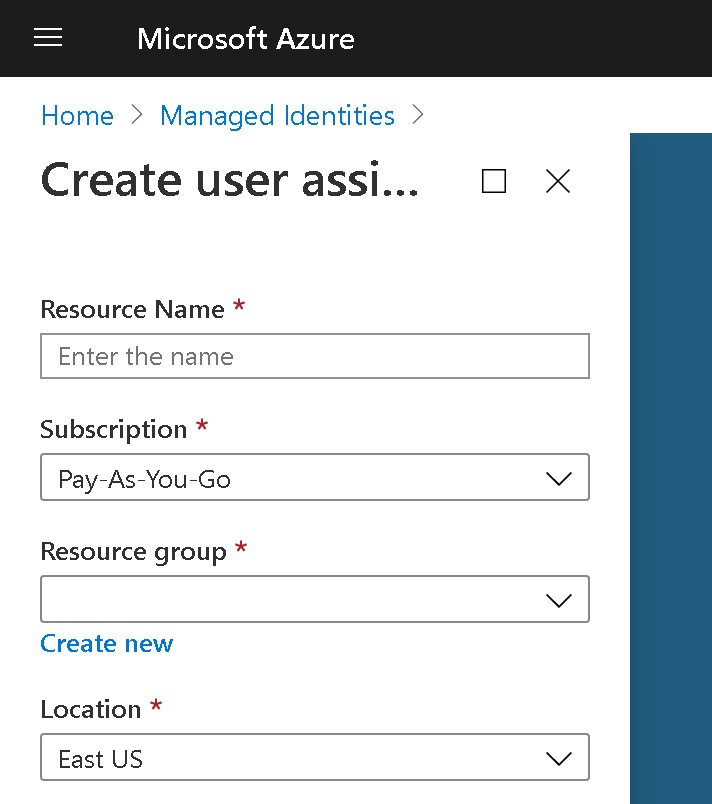
For this exercise, we will be using 9174-managed-identity for the name of the identity. Once you fill all of the form fields, press the "Create" button at the bottom. The build will be triggered, and once it finishes, you will be able to go to that resource and see a Client ID in the Overview section of the resource. We will be copying that ID, and moving forward in this exercise we will be referring to it as <managed-identity-id>.
Creating an Azure Web App
Using the search bar at the top of https://portal.azure.com/, I searched for "Web App". On the Marketplace section, I clicked to the "Web App" result.

I filled the Subscription field, the Resource Group field, then the Name field with 9174-web-app, then specified that I would Publish with the Code option, selected Node 12 TLS as my Runtime Stack, selected Windows as my Operative System, then East US as the region, and then moved through the following pages without changes, and created the resource.
Once the build was completed, I went to my App Service resource (the just created Web App), then went to the Identity tab, and then enabled the System assigned identity. Then I went to the User assigned tab, clicked + Add and searched for 9174-managed-identity, clicked it and finished by clicking Add at the bottom.
Creating a Key Vault
Now I searched for Key Vault at the top bar. Clicked the Key vault result on the Services section, then clicked the + Add button, then went through the form as normal. The main value we care from this form is the name, so I picked KeyVault9174.
I finished creating the Azure Key Vault, and once the build was green, I went to my new Key Vault resource, went to the Access control (IAM) section, and pressed the + Add button to add two new roles:
- I selected
Contributoras the "Role" that would "Assign access to" my "User assigned managed identity", picked my subscription and searched for9174-managed-identity, then pressedSave, and then - I selected
Contributoras the "Role" that would "Assign access to" my "App Service", picked my subscription and searched for9174-web-app, then pressedSave.
Then I went to the Access policies section on the left, then clicked the + Add Access Policy link, in which I saw this form:
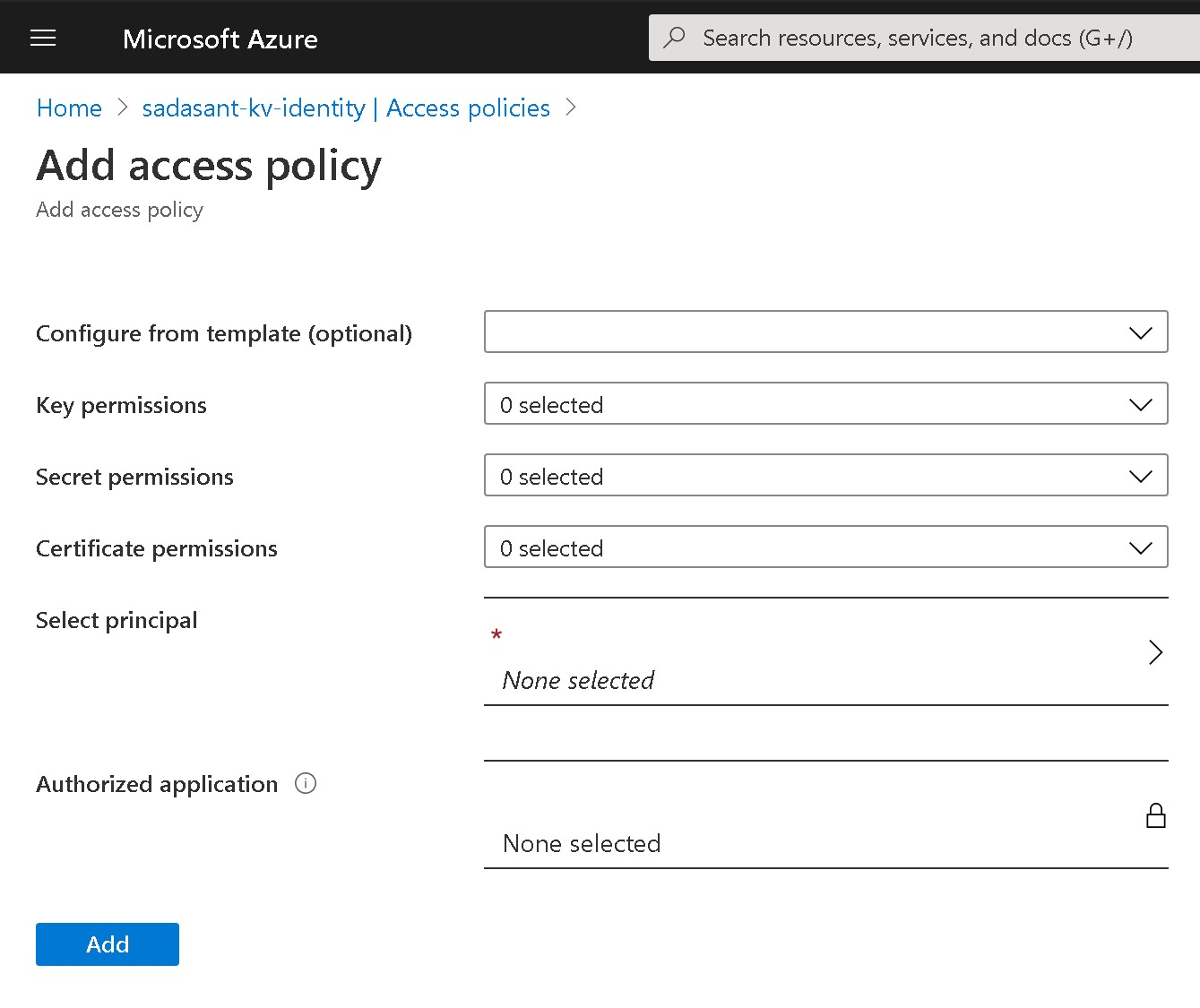
I filled this form two times, in both cases I picked the template Keys, Secrets and Certificate Management, then clicked on the Select principal field, then picked first 9174-managed-identity, then the Select button at the bottom right, then Add at the bottom left to go back and fill the form again for the Web App, with the same template, but with 9174-web-app as the principal (then again Select at the bottom right, then Add at the bottom left). Finally, I pressed the Save button to assign these two access policies.
Writing, uploading and running the code
After that, I opened my local Visual Studio Code, went to the Extensions section, searched for and installed the Azure App Service extension.
Then I opened a local folder. I decided to create a new folder named 9174. Once in that folder, I opened the editor's terminal and I executed the following commands:
npm init

npm i --save typescript @azure/identity @azure/keyvault-keys
Then I created three new files in that same folder: index-default.ts, index-managed.ts and index-user-managed.ts, with the following contents:
index-default.ts had:
import { KeyClient } from "@azure/keyvault-keys";
import { DefaultAzureCredential } from "@azure/identity";

const credential = new DefaultAzureCredential();
const keyVaultUrl = `https://KeyVault9174.vault.azure.net`;
const client = new KeyClient(keyVaultUrl, credential);

async function test() {
  try {
    await client.createEcKey("MyKeyName");
  } catch (e) {}
  const getResult = await client.getKey("MyKeyName");
  console.log({ getResult });
}

test();
index-managed.ts had:
import { KeyClient } from "@azure/keyvault-keys";
import { ManagedIdentityCredential } from "@azure/identity";

const credential = new ManagedIdentityCredential();
const keyVaultUrl = `https://KeyVault9174.vault.azure.net`;
const client = new KeyClient(keyVaultUrl, credential);

async function test() {
  try {
    await client.createEcKey("MyKeyName");
  } catch (e) {}
  const getResult = await client.getKey("MyKeyName");
  console.log({ getResult });
}

test();
And index-user-managed.ts had (remember that <managed-identity-id> is the Client ID of our just created user managed identity):
import { KeyClient } from "@azure/keyvault-keys";
import { ManagedIdentityCredential } from "@azure/identity";

const credential = new ManagedIdentityCredential("<managed-identity-id>");
const keyVaultUrl = `https://KeyVault9174.vault.azure.net`;
const client = new KeyClient(keyVaultUrl, credential);

async function test() {
  try {
    await client.createEcKey("MyKeyName");
  } catch (e) {}
  const getResult = await client.getKey("MyKeyName");
  console.log({ getResult });
}

test();
Once I saved those files, I went to the Azure section on the left of Visual Studio Code, then clicked on the Deploy to web app... button at the top of it:
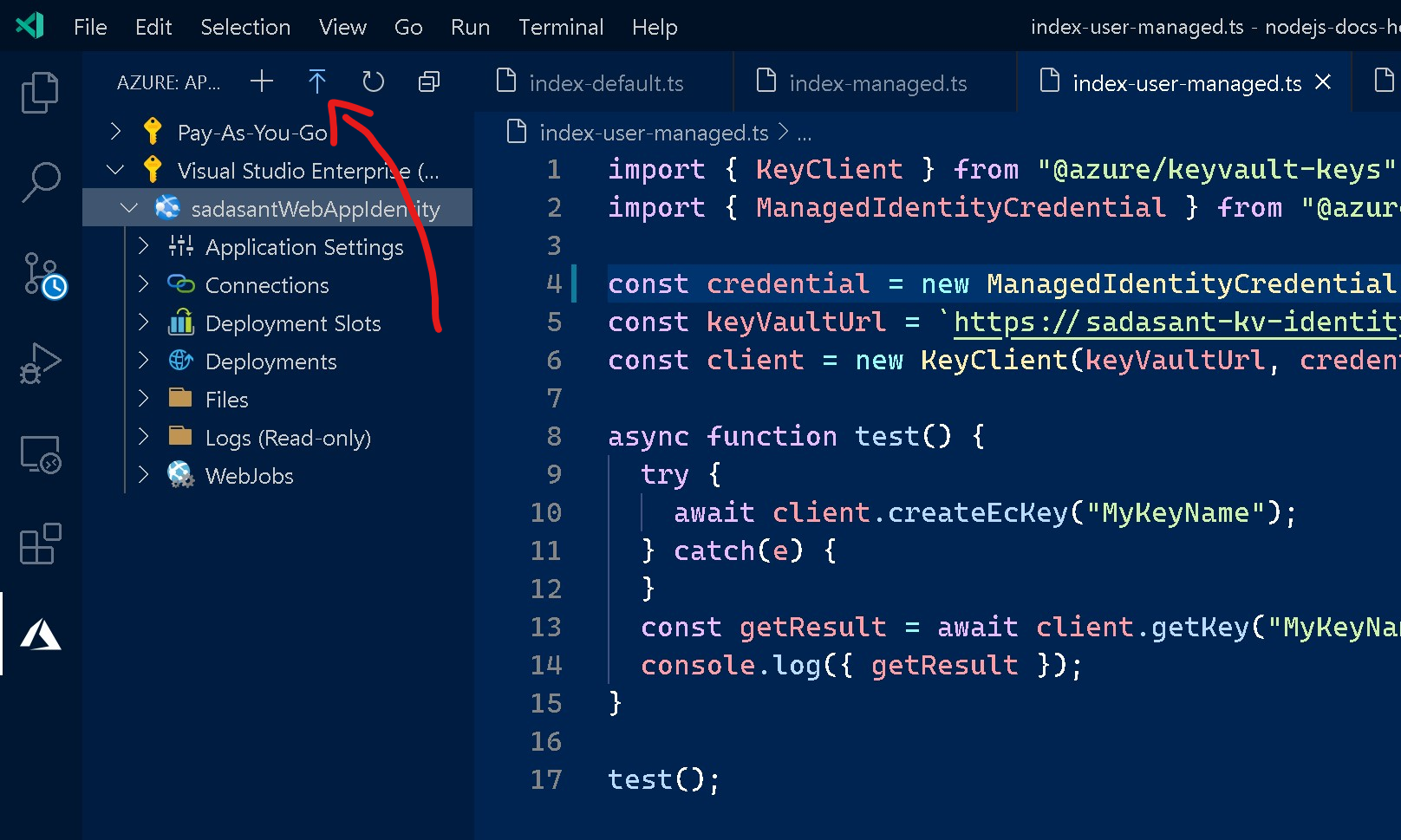
Then picked my folder name 9174, then picked my subscription, then my Web App 9174-web-app. It showed a warning, saying that the files of the Web App would be replaced, on which I clicked Deploy.
Then I went to my Web App resource on the Azure portal, then clicked on the Console page of the Development Tools section, then in the console I proceeded to install ts-node with npm install -g ts-node, and finally execute my three TypeScript scripts, one by one, with:
ts-node index-default.ts

ts-node index-managed.ts

ts-node index-user-managed.ts
In all of the three cases, the script returned the contents of the key in green. Similar to the following screenshot:
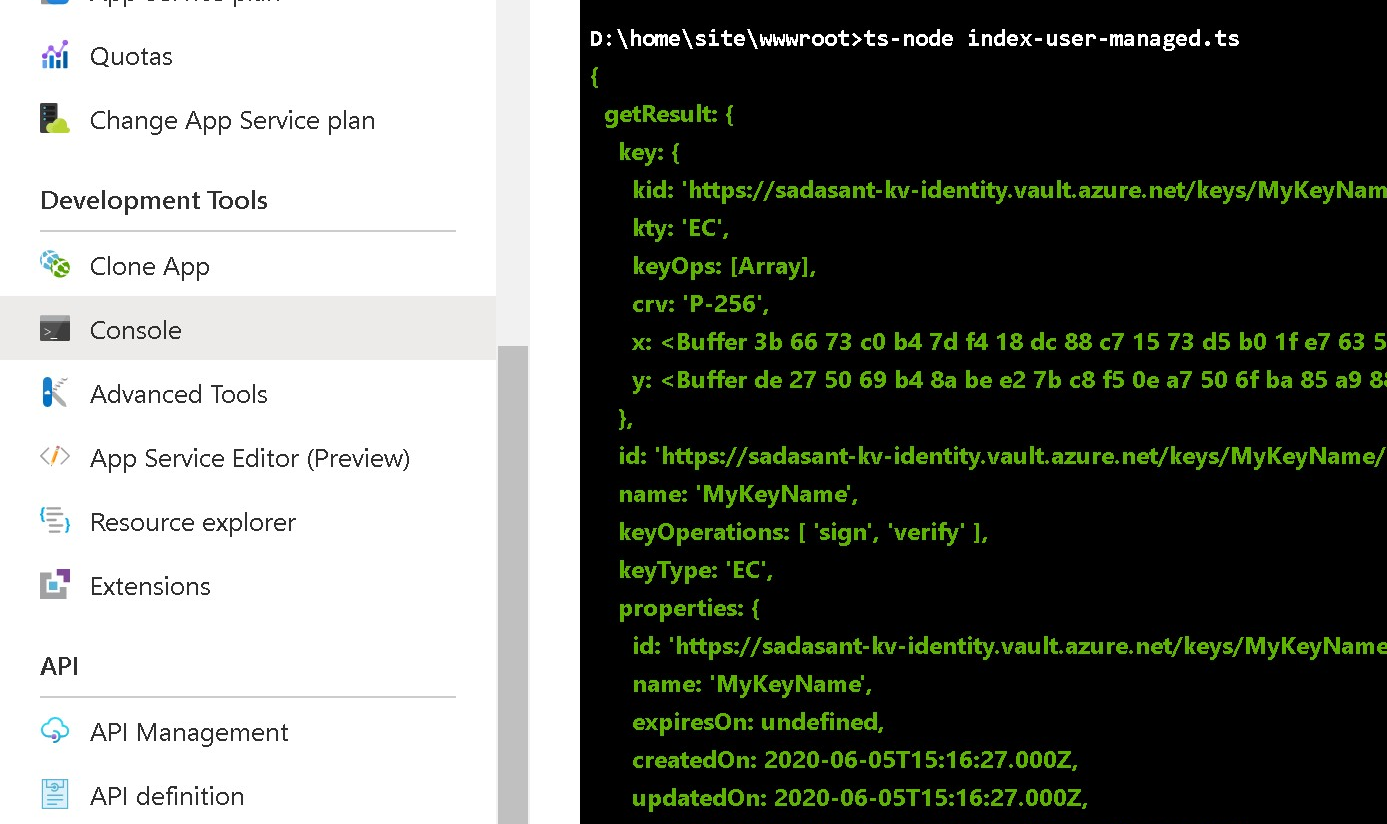
I am still trying to reproduce these steps with a containerized Web App. I decided to post this with the non-containerized version in case it helps.
Please let us know:
- If you follow those steps, does it work for you?
- Besides the fact that you tried with a containerized Web App, did you follow a different approach?
I will be ready to respond!
In any case, take care and good luck!
 sadasant
on 6 Jun 2020
sadasant
on 6 Jun 2020
Just to report back with something I've been doing in parallel:
I have tried a very similar workflow as the one mentioned, but against Azure Functions instead of Azure App Services, and I can't reproduce the bug in Azure Functions. Azure App Services might take me some time.
If you're interested in my App Functions workflow, please let me know and I will share it too.
sadasant
on 8 Jun 2020
Ok so far I have been able to run some things in containers. Though I wonder: @ricklang what errors are you getting? More information would be appreciated.
sadasant
on 10 Jun 2020
This was a really helpful thread to tie all the pieces together that azure is doing in the managed identity app service scenario. Is this all documented cleanly somewhere that I just missed?
EDIT: fwiw - I used the steps above + the DefaultCredential example in index-default.ts AND I have a containerized nodejs app running in an app service and it worked perfectly.
 wolfejw86
on 16 Jun 2020
wolfejw86
on 16 Jun 2020
@wolfejw86 Hi! That's awesome! We will be improving our documentation based on your feedback here. Thank you very much! Please let us know if anything else comes up.
sadasant
on 17 Jun 2020
Related issues
 dgellow
·
4Comments
dgellow
·
4Comments
 pjblakey
·
3Comments
pjblakey
·
3Comments
 SlothFriend
·
3Comments
SlothFriend
·
3Comments
 et13
·
3Comments
et13
·
3Comments
 tomi
·
4Comments
tomi
·
4Comments
Most helpful comment
@wolfejw86 Hi! That's awesome! We will be improving our documentation based on your feedback here. Thank you very much! Please let us know if anything else comes up.