Azure-sdk-for-js: [Service Bus] Missing 'endpoint' error when endpoint has been provided
- Package Name: @azure/service-bus
- Package Version: 1.1.6
- Operating system: Windows
- nodejs
- version: 13.9.0
- The bug is related to documentation in
- source code documentation
- SDK API docs on https://docs.microsoft.com
Describe the bug
The docs for creating the servicebus client with a token provider on microsoft.com seem to be out to date after looking in this repository. However, I followed the code in this repository and am still getting an error. I am trying to consume messages from a servicebus topic and this is the error:
TypeError: Missing 'endpoint' in configuration
After looking this error in the code in this repo I can't see why my code is giving this so I would appreciate some help. I am not sure if I have defined the token credential correctly but followed the code in this repo.
To Reproduce
Steps to reproduce the behavior:
- Get your token you need to create the custom token credential.
- Add it into the code below:
import * as azServiceBus from "@azure/service-bus";

var ServiceBusClient = azServiceBus.ServiceBusClient;

class CustomTokenCredential {
    getToken(scopes, options) {
      return new Promise(function (resolve, reject) {

          let accessToken = {
             token: <token>
             expiresOnTimestamp: <timestamp>
          }
          if (accessToken) {
              resolve(accessToken);
          }
          else {
              reject(Error("accessToken could not be resolved."));
          }
      });
  }
}

const topicName = <topicname>;
const subscriptionName = <subscriptionname>;
const host = "<namespace>.servicebus.windows.net";

async function main(){

  let customTokenProvider = new CustomTokenCredential();

  const sbClient = new ServiceBusClient(host, customTokenProvider);
  const receiver = sbClient.createReceiver(topicName, subscriptionName, "receiveAndDelete");

  try {
    const messages = await receiver.receiveBatch(10);
    console.log("Received messages:");
    console.log(messages.map(message => message.body));

    await receiver.close();
  } finally {
    await sbClient.close();
  }
}

main().catch((err) => {
  console.log("Error occurred: ", err);
});
Expected behavior
Expect to connect to servicebus and be able to receive messages. As I said above, the docs online do not seem to match with the code in this repo so it would be good to get some guidance on whether this is a bug or that my code is wrong.
 sydneyvert
All 12 comments
Thanks for reporting @sydneyvert
The docs for creating the servicebus client with a token provider on microsoft.com seem to be out to date after looking in this repository.
Can you share a link to the docs you are referring to here?
They shouldnt be out of date and should match the 1.1.6 version of the @azure/service-bus package.
The master branch in this repository reflects the next version of @azure/service-bus package that we are working on and is still in preview.
We have tried to call this out in the our readme
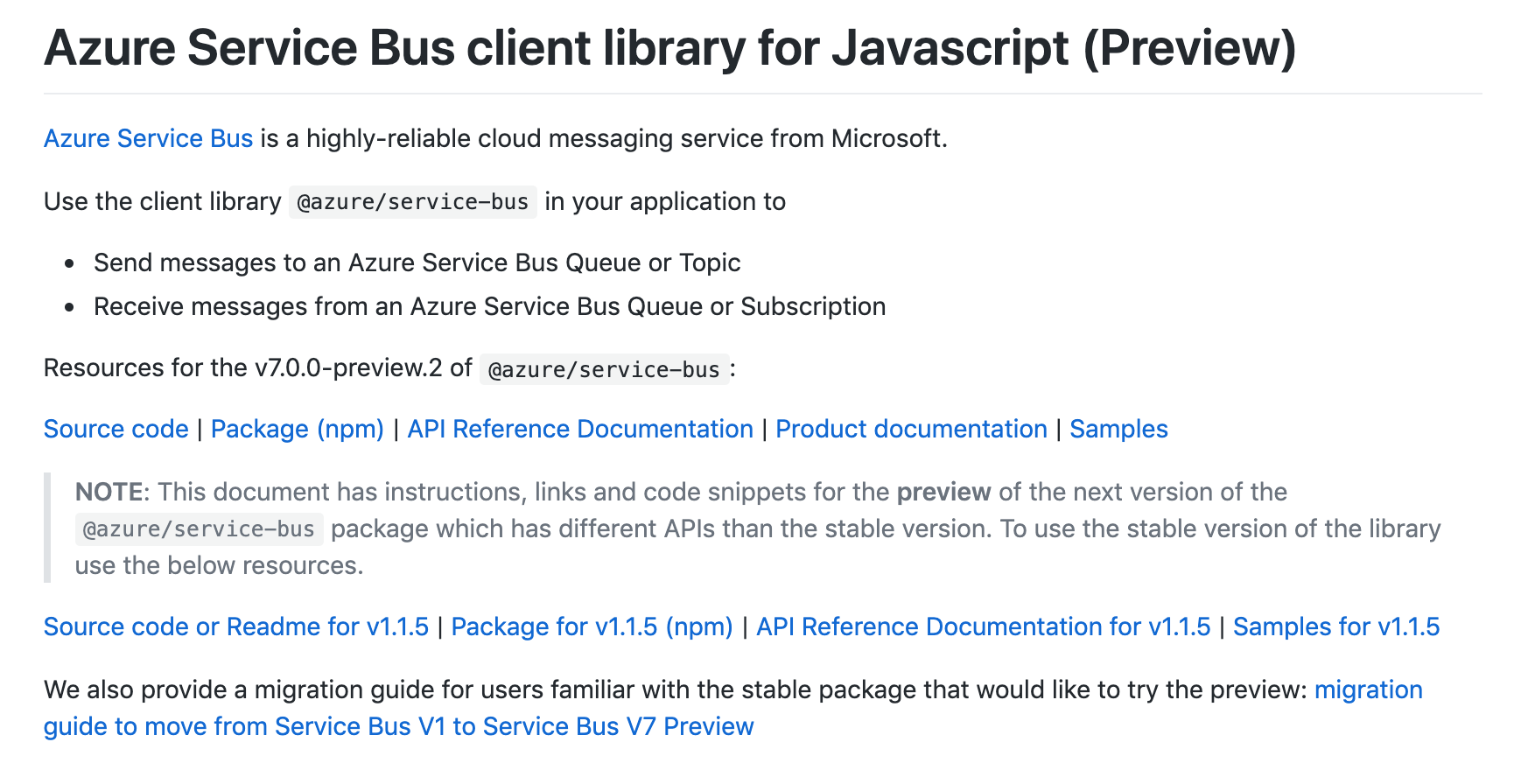
Looking at the code you shared, you are using the sample code for the preview version in a project that is using the 1.1.6 version of the package.
 ramya-rao-a
on 5 May 2020
ramya-rao-a
on 5 May 2020
Sorry my fault! I was originally following the createFromTokenProvider section here: https://docs.microsoft.com/en-us/javascript/api/@azure/service-bus/servicebusclient?view=azure-node-latest#createfromtokenprovider-string--tokenprovider--servicebusclientoptions-
Can you confirm if the above is what I should be following?
But that didn't seem to work either. Hence why I followed the code on here.
sydneyvert
on 5 May 2020
Here is my previous code, following the docs:
import * as azServiceBus from "@azure/service-bus";

var ServiceBusClient = azServiceBus.ServiceBusClient;
var ReceiveMode = azServiceBus.ReceiveMode;

class CustomTokenProvider {
    constructor(margin, valid) {
        this.tokenRenewalMarginInSeconds = margin;
        this.tokenValidTimeInSeconds = valid;
    }

    getToken(audience) {
        return new Promise(function (resolve, reject) {
            let tokenInfo = {
                tokenType: "jwt",
                token: "<token>",
                expiry: 3600
            };
            if (tokenInfo) {
                resolve(tokenInfo);
            } else {
                reject(Error("accessToken could not be resolved."));
            }
        });
    }
}

const topicName = "<topicname>";
const subscriptionName = "<subscriptionname>";
const host = "<namespace>.servicebus.windows.net";
const options = {};

async function main(){

    let customTokenProvider = new CustomTokenProvider(900, 3600);

    const sbClient = ServiceBusClient.createFromTokenProvider(host, customTokenProvider);
    const subscriptionClient = sbClient.createSubscriptionClient(topicName, subscriptionName);
    const receiver = subscriptionClient.createReceiver(ReceiveMode.receiveAndDelete);

    try {
        const messages = await receiver.receiveMessages(10);
        console.log("Received messages:");
        console.log(messages.map(message => message.body));

        await subscriptionClient.close();
    } finally {
        await sbClient.close();
    }
}

main().catch((err) => {
    console.log("Error occurred: ", err);
});
I get the error:
(node:16140) ExperimentalWarning: The ESM module loader is experimental.
Error occurred:  Error: connect ETIMEDOUT
    at TCPConnectWrap.afterConnect [as oncomplete] {
  name: 'ServiceUnavailableError',
  translated: true,
  retryable: true
}
I have doubled checked my proxy setting are correct. Please can you confirm if I am following the docs correctly? Thanks for your help.
sydneyvert
on 5 May 2020
Hey @sydneyvert,
Thanks for the sample code.
Please enable logs so that we can comprehend better about what's affecting
- Preferably, set
DEBUGenvironment variable toazure:service-busto enable the logs at service-bus level. - If you're on windows, the command would be
set DEBUG=azure:service-bus
- Preferably, set
Can you verify if the same sample code works fine if you use createFromConnectionString with the connection-string provided in the portal?
What was your motivation to use a custom token provider instead of using the login methods from
@azure/ms-rest-nodeauth?
[ Examples that leverage@azure/ms-rest-nodeauthfor authentication - [Azure account](https://github.com/Azure/azure-sdk-for-js/blob/%40azure/service-bus_1.0.0/sdk/servicebus/service-bus/samples/javascript/gettingStarted/loginWithAzureAccount.js), [interactive login](https://github.com/Azure/azure-sdk-for-js/blob/%40azure/service-bus_1.1.5/sdk/servicebus/service-bus/samples/javascript/interactiveLogin.js) or [service principal](https://github.com/Azure/azure-sdk-for-js/blob/%40azure/service-bus_1.1.5/sdk/servicebus/service-bus/samples/javascript/servicePrincipalLogin.js) ]Regarding
createFromTokenProvider- You're supposed to get the token by giving some sort of credentials in order to contact the service-bus namespace. I don't see that in your sample, would you let us know how you're getting the token.
 HarshaNalluru
on 6 May 2020
HarshaNalluru
on 6 May 2020
My company have not permitted the use of SAS tokens and have blocked the connection string option so unfortunately this seems the only way.
I currently get the token using the msal package as this was recommended to my colleague by our microsoft contact.
The code below shows how I obtain the token using this method (this code runs in a browser):
 import * as Msal from "msal";

function loggerCallback(logLevel, message, containsPii) {
    console.log(message);
}

const config = {
    auth: {
        clientId: "<clientId>",
        authority: "https://login.windows.net/<tenantId>"
    },
    system: {
        logger: new Msal.Logger(
                           loggerCallback ,{
                                level: Msal.LogLevel.Verbose,
                                piiLoggingEnabled: false,
                                correlationId: '1234'
                           }
                   )
}
}

function authCallback(error, response) {
    console.log(error)
}

msalInstance.handleRedirectCallback(authCallback)

var scopes = ["https://servicebus.azure.net/.default"];

msalInstance.loginPopup(scopes).then(function (loginResponse) {
    //login success
    var idToken = loginResponse.idToken;
    console.log(idToken);
}).catch(function (error) {
    //login failure
    console.log(error);
});

if (msalInstance.getAccount()) {
    var tokenRequest = {
        scopes: ["https://servicebus.azure.net/.default"]
    };
    msalInstance.acquireTokenSilent(tokenRequest).then(response => {
        // Acquire token silent success
        // Call API with token
        var accessToken = response.accessToken;
        console.log(accessToken);
    }).catch(error => {
        //Acquire token silent failure, and send an interactive request
        if (error.name === "InteractionRequiredAuthError") {
            return msalInstance.acquireTokenPopup(tokenRequest)
                .then(response => {
                    var accessToken = response.accessToken;
                    console.log(accessToken);
                }).catch(function(error) {
                // Acquire token interactive failure
                console.log(error);
            });
        }
        console.log(error);
    })
I followed set DEBUG=azure-servicebus and got nothing further. Just the same timeout error. Is the AMQP web socket set by default?
sydneyvert
on 6 May 2020
I followed set DEBUG=azure-servicebus and got nothing further.
Our apologies @sydneyvert
The DEBUG env variables should be set to azure:service-bus not azure-servicebus. Can you try again with the new value?
Is the AMQP web socket set by default
Web sockets are not enabled by default. I see that you mentioned proxy in one of your comments above. You can refer to the useProxy.ts sample to see how to use web sockets.
Are you running your application in the browser or node? If you are using the browser, then you can use the built-in WebSocket instead of depending on the ws package.
ramya-rao-a
on 6 May 2020
I missed your earlier statement that your code runs in the browser.
In that case, yes, web sockets are used by default.
But if you are behind a proxy, then you need to use the sample I linked above to pass in the proxy settings. Since the code runs in the browser, you can use window.WebSocket instead of the WebSocket from the ws package.
Please do try with the above and share the logs if you still have issues
ramya-rao-a
on 7 May 2020
Hello @sydneyvert,
At first glance, a couple of updates to the msal-sample-code that you've provided.
- You're passing the
scopesarray to the.loginPopup()method directly which is invalid since the method expects a bag of options(AuthenticationParameters) among which thescopesin one of the attributes.
type AuthenticationParameters = {
    scopes?: Array<string>;
    extraScopesToConsent?: Array<string>;
    prompt?: string;
    extraQueryParameters?: StringDict;
    .
    .
    .
}
So, please update that .loginPopup(scopes) call appropriately.
For example - .loginPopup( { scopes: scopes } ).
- Update the scope for service-bus to
https://servicebus.azure.net//user_impersonation
HarshaNalluru
on 9 May 2020
Thanks @HarshaNalluru, I have made those changes.
@ramya-rao-a thanks for your quick replies. The login script runs in the browser, however the service bus part actually runs in node. Can I still use the example above to allow the use of AMQP web socket?
I have set DEBUG=azure:service-bus and am not getting any more information from my logs apart from the ServiceUnavailableError
sydneyvert
on 12 May 2020
@ramya-rao-a used the web socket example you suggested and it all works perfectly now. Thanks so much for all of your help.
sydneyvert
on 12 May 2020
That is great to hear @sydneyvert
@HarshaNalluru, At the very least we should make the below changes:
- Update jsdocs for
createFromTokenProviderto mention that if one is using their own token provider against AAD, then what should be the "scopes" value to use. - Do the same in the readme under the "Authenticate the client" section
- Update useProxy sample files that if in browser one does not need to pass in a WebSocket from the
wspackage
ramya-rao-a
on 12 May 2020
The latest update to the @azure/service-bus package with version 1.1.7 has the above doc changes
ramya-rao-a
on 13 May 2020
Related issues
 pjblakey
·
3Comments
pjblakey
·
3Comments
 karthikm249
·
3Comments
karthikm249
·
3Comments
 gmantri
·
3Comments
gmantri
·
3Comments
 mitchdenny
·
4Comments
mitchdenny
·
4Comments
 avieru
·
4Comments
avieru
·
4Comments