Azure-sdk-for-js: No error, empty result when using endpoint URL from azure portal incorrectly
- Package Name:
@azure/cognitiveservices-translatortext - Package Version:
1.0.0 - Operating system:
Windows 10 2004 OS Build 19041.207 - [ ] nodejs
- version:
- [x] browser
- name/version:
Edge Chromium Dev: Mozilla/5.0 (Windows NT 10.0; Win64; x64) AppleWebKit/537.36 (KHTML, like Gecko) Chrome/83.0.4103.3 Safari/537.36 Edg/83.0.478.5
- name/version:
- [x] typescript
- version:
3.8.3
- version:
- Is the bug related to documentation in
- [ ] README.md
- [ ] source code documentation
- [ ] SDK API docs on https://docs.microsoft.com
This was the configuration where I encountered it, but I imagine it generalizes to other environments and packages.
Describe the bug
I'm not sure if this would be considered a bug or not. It is just some feedback about behavior that tripped me up. I'm still a beginner at all things TypeScript, JavaScript, Azure, REST. Maybe others in the same position would make the same mistake, and maybe the SDK can make it easier somehow to diagnose the mistake?
Making my first ever Azure service call, I got to the point where I needed to pass an endpoint. It seemed logical to me that the endpoint would be what the Azure portal showed me along with the key:

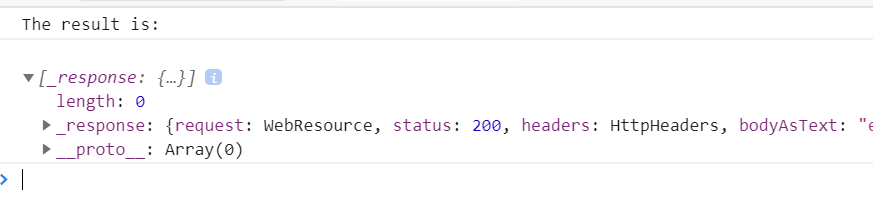
However, this was not correct. I needed to use https://api.cognitive.microsofttranslator.com instead, which I eventually found in Azure docs, but it took me quite a while to spot it. It would have been nice if the SDK pointed out my mistake by throwing an error, but instead I got a successful yet empty result from my API call, leading me to believe that my mistake must have been elsewhere.
To Reproduce
Steps to reproduce the behavior:
- Create a CognitiveServices TranslatorText resource in the azure portal
- Use the sample code here, using the endpoint (incorrectly) and key from azure portal
Expected behavior
An error is reported.
Acutal behavior
The code succeeds but returns an empty result.
Screenshots
This is what you get: 200 OK with an empty result.
Additional context
N/A
 nguerrera
All 6 comments
(You can remove the "customer-reported" tag. I work at Microsoft, just joined the team, and found this while experimenting as a ramping up exercise.)
nguerrera
on 22 Apr 2020
Thanks for the feedback! We are routing this to the appropriate team for follow-up. cc @dfulcer.
![msftbot[bot] picture](https://avatars.githubusercontent.com/in/26612?v=4&s=40) msftbot[bot]
on 23 Apr 2020
msftbot[bot]
on 23 Apr 2020
Thanks for reporting @nguerrera
This is an auto generated library based on the swagger specification from the service team.
From what I know, in this scenario, the client cannot make any validations on the provided endpoint and it is up to the service to throw an error.
@sarangan12, Please correct me if my understanding above is wrong
 ramya-rao-a
on 24 Apr 2020
ramya-rao-a
on 24 Apr 2020
@ramya-rao-a The (incorrect)endpoint is configured in such a manner that it returns empty result which is acceptable to our SDK. From SDK side we cannot do much here.
On a side note, this was my experience too when I tried building samples a while back. The correct fix would be to fix the portal and display the correct endpoint. Else, all new devs would face this experience. Should be reported to the portal team
 sarangan12
on 24 Apr 2020
sarangan12
on 24 Apr 2020
Thanks for the explanation. That makes sense. Is there someone we can tag into the conversation from the portal team?
nguerrera
on 24 Apr 2020
@nguerrera, I believe each Azure service team has their own contacts for their parts of the portal. Please reach out to @dfulcer or @ChrisHMSFT to get more details. Also, I believe this problem is common to almost all Cognitive Services, not just translator text, something to keep in mind when we design a solution for this.
ramya-rao-a
on 24 Apr 2020
Related issues
 DerKobe
·
3Comments
DerKobe
·
3Comments
 ahmedspiir
·
3Comments
ahmedspiir
·
3Comments
 dgellow
·
4Comments
dgellow
·
4Comments
 SlothFriend
·
3Comments
SlothFriend
·
3Comments
 AElharouny
·
4Comments
AElharouny
·
4Comments