Azure-pipelines-tasks: Build fails because of incorrect Build.SourceBranch variable value
Type: Bug
Enter Task Name: any task with condition using the Build.SourceBranch variable
Environment
- Server - Azure Pipelines (agent version: '2.174.2', image version: '20200827.1')
Issue Description
The variable Build.SourceBranch is documented to have this format for Git repositories: Git repo branch: refs/heads/master. This format was changed in the latest Azure Pipeline build agent so our builds are failing now.
See documentation: https://docs.microsoft.com/en-us/azure/devops/pipelines/build/variables?view=azure-devops&tabs=yaml
Task logs
This is the condition we use in the S3Upload@1 task:
- task: S3Upload@1
  condition: and(succeeded(), eq(variables['Build.SourceBranch'], 'refs/heads/development'))
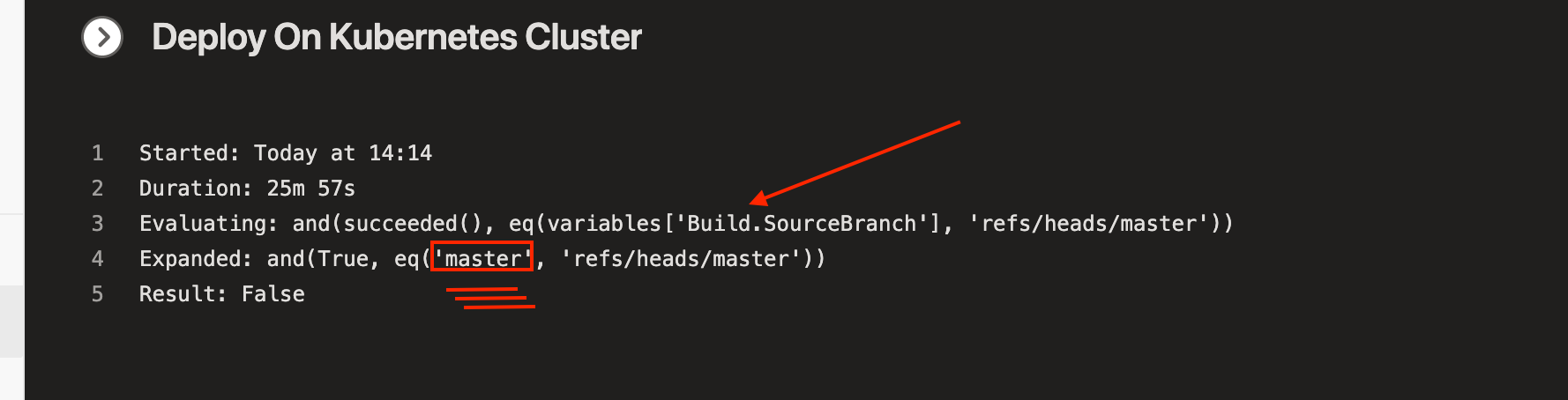
Here is the log from the S3Upload@1 task which shows the format has changed:
Evaluating: and(succeeded(), eq(variables['Build.SourceBranch'], 'refs/heads/development'))
Expanded: and(True, eq('development', 'refs/heads/development'))
Result: False
Second task:
Evaluating: and(succeeded(), eq(variables['Build.SourceBranch'], 'refs/heads/master'))
Expanded: and(True, eq('development', 'refs/heads/master'))
Result: False
Troubleshooting
This was working with agent version: '2.174.1', image version: '20200827.1'.
Builds from such agents show successful S3Upload@1 and so the check was working correctly:
Starting: S3Upload
==============================================================================
Task         : Amazon S3 Upload
Description  : Upload file and folder content to an Amazon Simple Storage Service (S3) Bucket on AWS
Version      : 1.7.0
...
All uploads to S3 completed
Finishing: S3Upload
This log confirms the format of the Build.SourceBranch variable:
Evaluating: and(succeeded(), eq(variables['Build.SourceBranch'], 'refs/heads/master'))
Expanded: and(True, eq('refs/heads/development', 'refs/heads/master'))
Result: False
 jozefizso
All 8 comments
Yes, this is affecting me as well.. You can't change this without further notice.. All my company pipelines logic relies on this..
 hdiass
on 22 Sep 2020
hdiass
on 22 Sep 2020
Same here!
everything is broken now!
 kumarunster
on 23 Sep 2020
kumarunster
on 23 Sep 2020
@jozefizso @hdiass did anyone filled an issue for MS Support? Any outcome? I'm currently in contact with one of the support engineers, our case is 120092321004222, if any reference required.
In my observation, if the build is triggered manually again and debug.output set to true, the build is running well and condition is working as expected.
kumarunster
on 24 Sep 2020
@jozefizso @hdiass did anyone filled an issue for MS Support? Any outcome? I'm currently in contact with one of the support engineers, our case is 120092321004222, if any reference required.
In my observation, if the build is triggered manually again and debug.output set to true, the build is running well and condition is working as expected.
I have a case open for this as well. 120091824006486
 vpetersen
on 24 Sep 2020
vpetersen
on 24 Sep 2020
raised here too: https://developercommunity.visualstudio.com/content/problem/1192275/buildsourcebranch-no-longer-contains-git-reference.html
 artazar
on 25 Sep 2020
artazar
on 25 Sep 2020
My agent version: '2.174.3'. I have the same condition in my pipeline:
condition: and(succeeded(), eq(variables['Build.SourceBranch'], 'refs/heads/development'))
When the branch triggers the Azure Pipeline (in a CI manner) to build, the Build.SourceBranch would not have the refs/heads. Afterwards, I manually re-run the Azure Pipeline on the same branch, the Build.SourceBranch has the refs/heads prefix and satisfied the condition and built successfully.
I'm not sure if it's the manual trigger working or because I re-run build on the same branch for the second time. I repeated the same procedure twice, it seems to be consistent.
 exglade
on 25 Sep 2020
exglade
on 25 Sep 2020
Hey folks - we are actively investigating this one. Since this isn't really a task-specific issue, I'm going to close here and we'll use https://developercommunity.visualstudio.com/content/problem/1192275/buildsourcebranch-no-longer-contains-git-reference.html for public tracking.
If you're being impacted, I'd recommend upvoting that thread. That will help it get the attention it needs (though to be clear, the product team is already looking into it)
 damccorm
on 28 Sep 2020
damccorm
on 28 Sep 2020
@damccorm That will help it get the attention it needs
This is more then urgent priority issue now. We have issue with deployments for a week now and it disrupts our build pipeline.
jozefizso
on 28 Sep 2020
Related issues
 pharring
·
3Comments
pharring
·
3Comments
 MarkIannucci
·
3Comments
MarkIannucci
·
3Comments
 montebhoover
·
3Comments
montebhoover
·
3Comments
 NatMarchand
·
3Comments
NatMarchand
·
3Comments
 ThomasBarnekow
·
3Comments
ThomasBarnekow
·
3Comments
Most helpful comment
Yes, this is affecting me as well.. You can't change this without further notice.. All my company pipelines logic relies on this..