Azure-pipelines-tasks: Azure Function App reports "Deployed Successfully to production" but app content shows old version of artifact.
Required Information
Entering this information will route you directly to the right team and expedite traction.
Question, Bug, or Feature?
Type: Bug
Enter Task Name: AzureFunctionApp@1
Environment
- Server - Azure Pipelines
Account name: escbvba
Team project name: Liefkenshoektunnel
.net version: .NET CORE 3.0
- Agent - Private
Agent.OS | Windows_NT | Agent.OSArchitecture | X64 | Agent.OSVersion | 10.0.14393
Agent version: 2.165.0
Issue Description
First deployment of a function app always succeeds. Consecutive deployments succeed, but the app contents are not updated.
Manually deleting functions and redeploying leads to a zip with only web.config and FAILED TO INITIALIZE RUN FROM PACKAGE.txt Contents: Run From Package Initialization failed.
The old version of the code keeps on running in the function app.
Restarting the function does not help.
Waiting a couple of minutes after deployment does not help.
Editing hosts.json helps. this seems to trigger something.
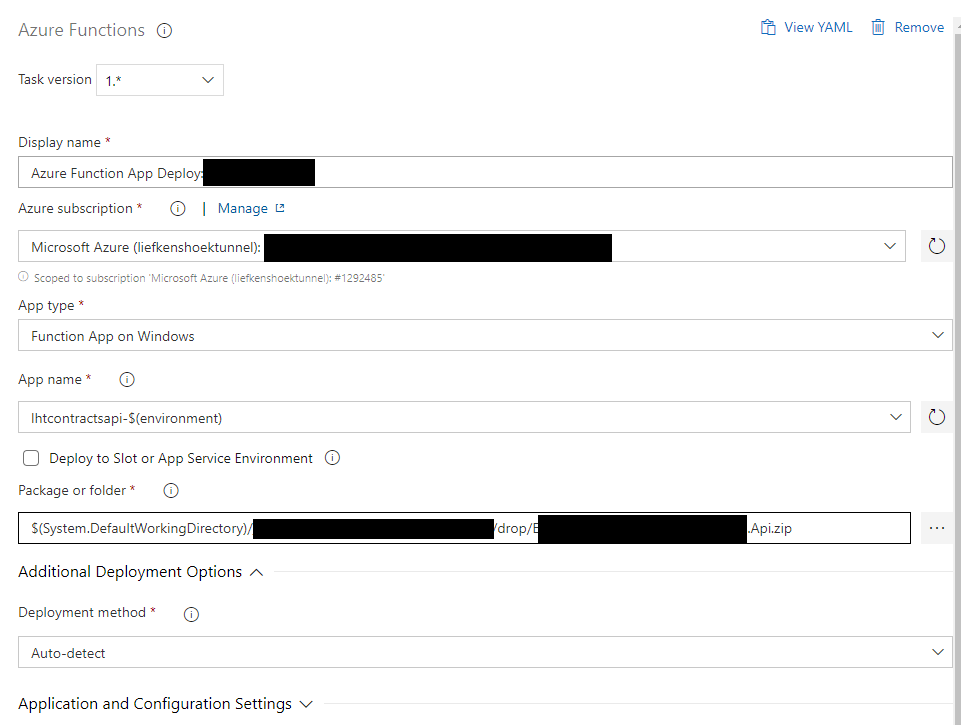
This is the task configuration in DevOps:
 MichielCornilleESC
All 8 comments
@MichielCornilleESC Can you try deploying it using ZipDeploy?
In the task, please go to Additional Deployment Options -> Deployment Method -> Zip Deploy.
This seemed to work for me. Waiting for your response.
 eaarora-ms
on 6 May 2020
eaarora-ms
on 6 May 2020
@eaarora-ms
The switch from runFromPackage to zipDeploy worked for me. This replaces the existing files. But there is one issue: It leaves behind files that are no longer relevant to the deployment rather than deleting them. For example: If your deployment included a DLL before but no longer does, it will remain in the FunctionApps folder, even though it is no longer used by the app.
 romandres
on 6 May 2020
romandres
on 6 May 2020
@romandres If you read the document here: https://docs.microsoft.com/en-us/azure/azure-functions/deployment-zip-push, the zip deploy will only delete files that were part of a previous deployment and are not in the deployment artifact.
eaarora-ms
on 6 May 2020
@eaarora-ms Maybe I'm missing something, but that page says:
When you use .zip deployment, any files from an existing deployment that aren't found in the .zip file are deleted from your function app.
This .zip file deployment uses the same Kudu service that powers continuous integration-based deployments, including: Deletion of files that were left over from earlier deployments.
romandres
on 6 May 2020
I think I get it now, sorry 🙈 So this will only delete files from previous ZIP deployments. If the files got there any other way, they will be left there. I think in my case, the files that are left behind are from App Service Deployment tasks. We used those tasks before the Azure Function Deployment tasks were available.
Thank you so much @eaarora-ms!
romandres
on 6 May 2020
@romandres Glad to help!
@MichielCornilleESC Waiting for your comments.
eaarora-ms
on 6 May 2020
@eaarora-ms Is there a known issue with run from package related to mine?
I'd prefer using run from package.
I remember that during our tests we tried auto-detect, zip deploy and run from package, with the same results.
Since this issue was created a month ago, we migrated our function app to 3.1 and made several other changes. I have yet to see the issue happen since these changes. (We are not pushing frequent updates to it at the moment).
MichielCornilleESC
on 6 May 2020
@MichielCornilleESC No there are no issues wrt RunFromPackage. It is mostly due to some app service settings that were set in other operations that you might see Function App not getting updated after deploying. In fact RunFromPackage is the preferred deployment method and hence is selected in Auto-Detect logic too.
If you are not facing this issue anymore I will be closing the issue and I apologize for the delay in reply. Please feel free to comment to re-open the issue. Thanks!
eaarora-ms
on 6 May 2020
Related issues
 MichaelWhiteCodingForFun
·
3Comments
MichaelWhiteCodingForFun
·
3Comments
 MikahB
·
3Comments
MikahB
·
3Comments
 divyesh-parikh
·
3Comments
divyesh-parikh
·
3Comments
 pharring
·
3Comments
pharring
·
3Comments
 HenrikStanley
·
3Comments
HenrikStanley
·
3Comments