Azure-pipelines-tasks: NuGetCommand@2 2.167.4 Failing with ##[error]Invalid Version: null
Question, Bug, or Feature?
Type: Bug
Enter Task Name: NuGetCommand
Environment
Server - Azure Pipelines
- If using Azure Pipelines, provide the account name, team project name, build definition name/build number:
https://dev.azure.com/PODS-LLC/SWE/_build/results?buildId=1115&view=logs&j=06b09b7f-cda8-59d3-666e-99401b0cb6ad&t=a0898f81-5753-5970-ef6e-4fd837b2651a
Organization (account name?): PODS-LLC
Team project name: SWE
Build definition name: Services\DistanceCalculatorService
Build number: 20200407.3
Build id: 1114
Was passing on build number: 1.0.0.1108
Build id: 1108
- If using Azure Pipelines, provide the account name, team project name, build definition name/build number:
Agent - Private:
- If using private agent, provide the OS of the machine running the agent and the agent version:
OS: Windows Server 2016
Agent version: 2.165.2
Issue Description
- If using private agent, provide the OS of the machine running the agent and the agent version:
It appears that NuGetCommand version 2.167.2 was working for me around 7:14 PM (2020-04-07T19:14:00-04:00) and stopped working with NuGetCommand version 2.167.4 around 7:55 PM (2020-04-07T19:55:00-04:00)

Task logs
raw_logs_from_build_id_1114_logs_48.zip
Troubleshooting
Checkout how to troubleshoot failures and collect debug logs: https://docs.microsoft.com/en-us/vsts/build-release/actions/troubleshooting
Yes, I troubleshooted (troubleshot?, troubleshotted?) and collected diagnostic logs.
Error logs
##[error]Invalid Version: null
 benrobot
All 10 comments
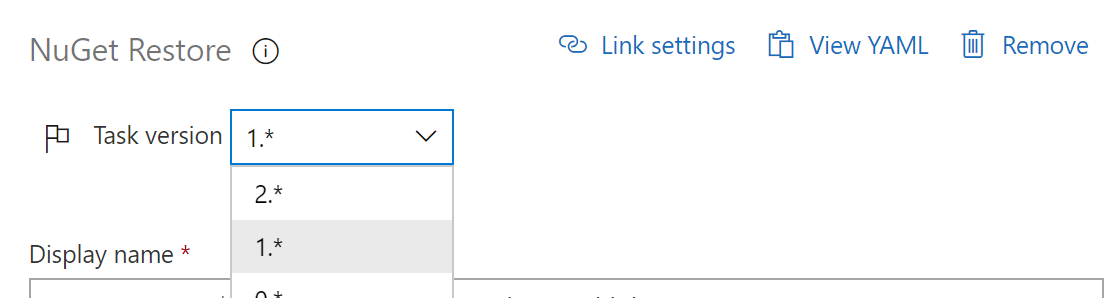
Seeing the same. I downgraded our Nuget task to Version 1* as we weren't using anything fancy in version 2* and it's back to working.
 garrettloy
on 8 Apr 2020
garrettloy
on 8 Apr 2020
Also seeing the same issue with the same temporary resolution working for us.
In our pipeline we were also running NuGetToolInstaller@1 and found we needed to disable this task completely as even with NuGetRestore@1 downgraded to 1.* we continued to receive the same error.
 hewittj
on 8 Apr 2020
hewittj
on 8 Apr 2020
We have seen the same issue, that is ##[error]Invalid Version: null
in yaml pipeline using nugetcommand@2 , change task version to nugetcommand@1 has resolved the issue.
 sl-NZ
on 8 Apr 2020
sl-NZ
on 8 Apr 2020
also having this issue, had to disable the "Use Nuget" step altogether to get things to build and deploy properly. Judging by the activity here i'm guessing MS must have introduced some sort of breaking change involving nuget?
 tfsmag
on 8 Apr 2020
tfsmag
on 8 Apr 2020
Looks like a rollback is about to occur
https://status.dev.azure.com/_event/183168284
 nikki-amiefong
on 8 Apr 2020
nikki-amiefong
on 8 Apr 2020
Apologies for this disruption. This change has been rolled back.
 johnterickson
on 8 Apr 2020
johnterickson
on 8 Apr 2020
@sl-NZ and @garrettloy - I totally understand why you downgraded to 1.* (good find!), but I would recommend you take your build back up to 2.*.
The reason 1.* was unaffected is that we didn't bother trying to fix it for the Visual Studio breaking change because usage was so low.
johnterickson
on 8 Apr 2020
@johnterickson thank you for replying, have just done the same 👍 , it would be good to have visibility on recent changes to specific task via the link on the task from azure devops
sl-NZ
on 8 Apr 2020
@johnterickson Would be fascinating to hear an RCA on this. Do you guys utilize ringed deployments? Just curious how something like this made it into production.
 im2cre8iv
on 8 Apr 2020
im2cre8iv
on 8 Apr 2020
@im2cre8iv I believe we will have a public RCA on this, but the short version is that we had to rush through normal gates because of https://status.dev.azure.com/_event/182998791 and the manual testing we had done that we thought would cover this did not (still unsure why). Needless to say, this was a mistake.
johnterickson
on 8 Apr 2020
Related issues
 NatMarchand
·
3Comments
NatMarchand
·
3Comments
 montebhoover
·
3Comments
montebhoover
·
3Comments
 TheRealEdwardCullen
·
3Comments
TheRealEdwardCullen
·
3Comments
 alexszilagyi
·
3Comments
alexszilagyi
·
3Comments
 timfish
·
3Comments
timfish
·
3Comments