Azure-pipelines-tasks: Use .Net Core task V0 does not work anymore
Required Information
Type: Bug
Enter Task Name: DotNetCoreInstallerV0 / Use .Net Core task (V0)
Environment
Azure DevOps Server (On-Premise)
Version: 17.143.28912.1
Issue Description
The task does not work since a few weeks. I understand that the task is deprecated (announcement) but because this task is embeded in Azure DevOps Server itselft - it's not updable with the Marketplace. So, on-premise environment is impacted by this.
Note 1: I have not the last version of Azure DevOps Server, but on-premise environments have some constraints and often not up-to-date.
Note 2: I know I can install manually the .NET Core SDKs on build agents, but it's a regression for users and not optimal to manage.
Requested: If you can not fix (make available again the releases.json file with updated information), can you provide a method to update the task on Azure DevOps Server without need to do a full update? Release theses tasks on the Marketplace would be nice ;)
Task logs
==============================================================================
Task : .NET Core SDK Installer
Version : 0.2.0
Author : Microsoft Corporation
==============================================================================
Tool to install: .NET Core sdk version 3.1.101.
[command]C:\Windows\System32\WindowsPowerShell\v1.0\powershell.exe -NoLogo -Sta -NoProfile -NonInteractive -ExecutionPolicy Unrestricted -Command "& 'E:\TFSAgents\Build-SVB1171-01\_work\_tasks\DotNetCoreInstaller_b0ce7256-7898-45d3-9cb5-176b752bfea6\0.2.0\externals\get-os-platform.ps1'"
Primary:win-x64
Detected platform (Primary): win-x64
Checking if a cached copy exists for this version...
The cache does not contain the requested version of .NET Core. Downloading and installing it now.
Getting URL to download .NET Core sdk version: 3.1.101.
##[error]Unexpected token : in JSON at position 3
Troubleshooting
In the version 0.2.0 of the task, in releasesfetcher.js:
const DotNetCoreReleasesUrl = "https://raw.githubusercontent.com/dotnet/core/master/release-notes/releases.json";
This file is no more available.
Thanks!
 ChristopheLav
All 15 comments
Thanks @ChristopheLav for reporting the issue. We will have a look at it soon.
 vineetmimrot
on 20 Mar 2020
vineetmimrot
on 20 Mar 2020
@ChristopheLav Isn't UseDotNet@2 task not available on On-premise version??
vineetmimrot
on 23 Mar 2020
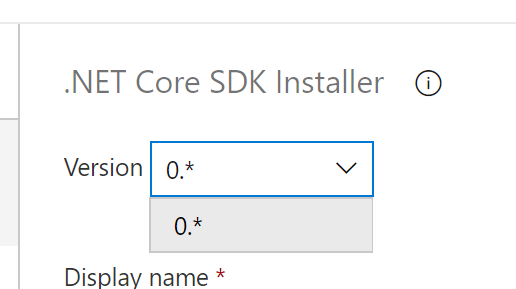
@vineetmimrot Nope, only UseDotNet@0 is available in Azure DevOps Server 2019.0.1 (17.143.28912.1).
ChristopheLav
on 23 Mar 2020
Hey @ChristopheLav ,
PFA updated dotnetcore installer task.
UseDotNetV2.zip
Instructions for installing it.
- Install tfx-cli npm tool using
npm install -g tfx-cli - run
tfx loginon cli
ForService URL:Pass your<on-prem url>/DefaultCollection
Personal access token: Pass your PAT token.
For any troubleshooting, you can use this doc
on failure of service url, you can try passing:<on-prem url>/tfs/DefaultCollection - After successful login, unzip the above package to some directory
PATH_TO_DIR - run
tfx build tasks upload --task-path PATH_TO_DIR
The new task will be available on your on-premise server with the name .Net Core Installer (with fix). Let me know if you have any issues.
vineetmimrot
on 24 Mar 2020
Thanks @vineetmimrot, I will try tomorrow the fix.
If I understand correctly, a new task will be added. It is possible to update the current task or it will be an unsupported state?
ChristopheLav
on 24 Mar 2020
@vineetmimrot I have tested the fix and it's work flawless. Thanks!
About new guid and new name: is it possible to update the current official task or it will be an unsupported state? I preferer to update the official task to prevent future needed user actions when we will moved to another version.
Before going ahead with your fix, I just want to be sure this possibility doesn't exist. Thanks!
ChristopheLav
on 25 Mar 2020
To prevent any side-affect, I have given the package with different guid and name. In the next on-prem release upgrade, you may officially get an upgraded version of the task.
Though you can change the task name now by modifying the task.json file.
vineetmimrot
on 25 Mar 2020
Excellent. I have test on a lab to change the guid/name, and the new version was added successfully. So the issue is now closed for me. Thank you so much for your quick assistance! I appreciate.

ChristopheLav
on 25 Mar 2020
I think this fix is not of a standard you expect from Microsoft. The DotNetCoreInstaller@0 is broken on every Azure DevOps Server (on-premise). The moment you install a new agent, builds using the DotNetCoreInstaller@0 no longer work.
As far as I've seen there is no fix/alternative for the on-premise Azure DevOps, because UseDotNet@2 is not available (yet). And installing a patched DotNetCoreInstaller@2 manually will not work for everyone. Maybe this DotNetCoreInstaller@2 should be made available via the Marketplace.
Fix:
I was able to fix it by copying the content of the {AgentWorkingDir}_tool\dncs from a working agent to the new agent.
 jochenjonc
on 26 Mar 2020
jochenjonc
on 26 Mar 2020
@jochenjonc After installing the UseDotNet@2 task, you need to modify your build definition to either use this task or use version 2 of the task if you have modified the task.json as done by @ChristopheLav. Other than that copying the agent directory content is not needed. When the build definition runs on any agent, the task will be downloaded from the on-prem server to the agent and it will run.
vineetmimrot
on 26 Mar 2020
@jochenjonc Also UseDotNet@2 task is available on the latest on-prem version. Which version of on-prem are you using?
vineetmimrot
on 26 Mar 2020
@vineetmimrot I'm on version 17.143.28912.1
jochenjonc
on 26 Mar 2020
@jochenjonc Why you can’t install the patched task? Any administrator can do that. It’s a supported and officially documented action when you develop a custom task. Or do you encounter an error?
But I'm agree with you, it would be nice if the native tasks will be published on the Marketplace and updated through the Marketplace. It would be very valuable for On-Premise installations 🙂
ChristopheLav
on 26 Mar 2020
@ChristopheLav I don't encounter an error, I haven't tried also. I just thought there should be a less complex way to fix it.
But if what @vineetmimrot says that the UseDotNet@2 is part of a recent patch of Azure DevOps Server then the best way to solve it is to install the patch, I can live with that.
jochenjonc
on 26 Mar 2020
Today I updated to the latest patch of Azure DevOps, I now have version Dev17.M153.5, and UseDotNet@2 is available!
jochenjonc
on 31 Mar 2020
Related issues
 ThomasBarnekow
·
3Comments
ThomasBarnekow
·
3Comments
 MichaelWhiteCodingForFun
·
3Comments
MichaelWhiteCodingForFun
·
3Comments
 pharring
·
3Comments
pharring
·
3Comments
 jared-hexagon
·
3Comments
jared-hexagon
·
3Comments
 montebhoover
·
3Comments
montebhoover
·
3Comments