Azure-pipelines-tasks: BashV3 doesn't check script executable permissions correctly
Required Information
Question, Bug, or Feature?
Type: bug
Enter Task Name: BashV3
Environment
- Server - Azure Pipelines
- Agent - Private
- Linux with Agent 2.164.3
Issue Description
BashV3 was changed to produce a warning when it detects that the script to be executed does not have the "executable bit" set.
The problem is that in UNIX permissions there are three executable bits (owner, group, other) and BashV3 only checks the "other" one. This means that even if a script has some executable bits set (e.g. owner, or owner+group) it will be considered not executable by the BashV3 task unless it also has the "other" executable bit set. Setting the "other" executable bit is unnecessary and undesirable from a security standpoint.
Expected behavior
BashV3 should check to see if the script is executable by the agent, instead of only checking to see if it's executable by all users. It should not produce this warning when the script has permissions that allow it to be executed by the agent.
Repro
Instead of running chmod +x on the script to be executed, run chmod u+x or chmod ug+x on it while running as the user the agent runs as. The script will be executable, but BashV3 will produce a warning saying it is not.
Workarounds
- set the "other" executable bit on the script as suggested by the warning
- ignore the warning
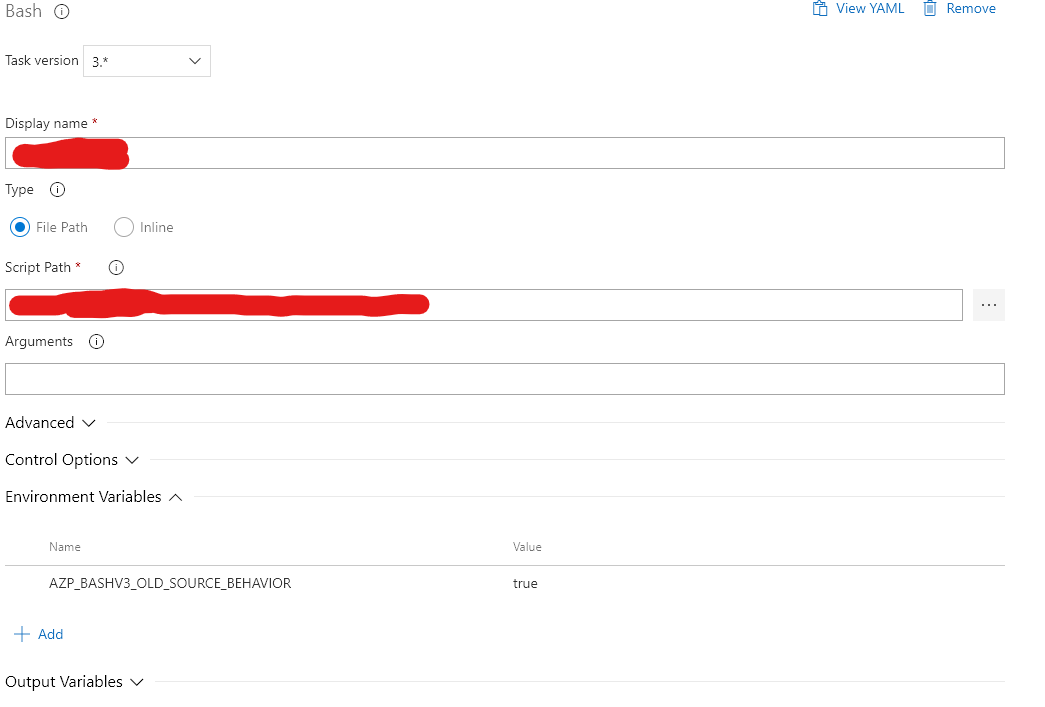
- set the AZP_BASHV3_OLD_SOURCE_BEHAVIOR pipeline variable
Task logs
2020-02-04T15:21:34.6092247Z ##[section]Starting: Deploy Script
2020-02-04T15:21:34.6100574Z ==============================================================================
2020-02-04T15:21:34.6100637Z Task         : Bash
2020-02-04T15:21:34.6100708Z Description  : Run a Bash script on macOS, Linux, or Windows
2020-02-04T15:21:34.6100748Z Version      : 3.163.1
2020-02-04T15:21:34.6100782Z Author       : Microsoft Corporation
2020-02-04T15:21:34.6100851Z Help         : https://docs.microsoft.com/azure/devops/pipelines/tasks/utility/bash
2020-02-04T15:21:34.6100893Z ==============================================================================
2020-02-04T15:21:35.3725810Z Generating script.
2020-02-04T15:21:35.3827218Z ##[warning]Executable bit is not set on target script, sourcing instead of executing. More info at https://github.com/Microsoft/azure-pipelines-tasks/blob/master/docs/bashnote.md
 tgrandgent
All 11 comments
I've also run into this bug. The following line of code is the issue.
https://github.com/microsoft/azure-pipelines-tasks/blob/dd1f9312df9f797995cce73d8fa87795f99d85ee/Tasks/BashV3/bash.ts#L81
The correct implementation might look something like this:
if (
((stats.mode >> 6) & 1) > 0 ||           // owner has exec
(((stats.mode << 3) >> 6) & 1) > 0 ||    // group has exec
(((stats.mode << 6) >> 6) & 1) > 0       // others has exec
{
 ShawnMcGough
on 11 Feb 2020
ShawnMcGough
on 11 Feb 2020
All bash scripts which get chmod +x are not detected as executable as stated early. I would rather not allow "other" permissions to bash scripts...
 mattnidz
on 13 Feb 2020
mattnidz
on 13 Feb 2020
I think it should not be checked. I tried to set it but I cannot set it anyway on Windows ...
And I (and many of my friends) usually execute the file with bash path-to-script instead of path-to-script directly.
I tried to set the executable bit, but it does not work.
https://dev.azure.com/cosmiafu/gugugu/_build/results?buildId=230&view=results
 Cosmius
on 16 Feb 2020
Cosmius
on 16 Feb 2020
Required Information
Question, Bug, or Feature?
_Type_: bugEnter Task Name: BashV3
Environment
- Server - Azure Pipelines
Agent - Private
- Linux with Agent 2.164.3
Issue Description
BashV3 was changed to produce a warning when it detects that the script to be executed does not have the "executable bit" set.
The problem is that in UNIX permissions there are three executable bits (owner, group, other) and BashV3 only checks the "other" one. This means that even if a script has some executable bits set (e.g. owner, or owner+group) it will be considered not executable by the BashV3 task unless it also has the "other" executable bit set. Setting the "other" executable bit is unnecessary and undesirable from a security standpoint.
Expected behavior
BashV3 should check to see if the script is executable by the agent, instead of only checking to see if it's executable by all users. It should not produce this warning when the script has permissions that allow it to be executed by the agent.
Repro
Instead of running
chmod +xon the script to be executed, runchmod u+xorchmod ug+xon it while running as the user the agent runs as. The script will be executable, but BashV3 will produce a warning saying it is not.Workarounds
- set the "other" executable bit on the script as suggested by the warning
- ignore the warning
- set the AZP_BASHV3_OLD_SOURCE_BEHAVIOR pipeline variable
Task logs
2020-02-04T15:21:34.6092247Z ##[section]Starting: Deploy Script
2020-02-04T15:21:34.6100574Z ==============================================================================
2020-02-04T15:21:34.6100637Z Task         : Bash
2020-02-04T15:21:34.6100708Z Description  : Run a Bash script on macOS, Linux, or Windows
2020-02-04T15:21:34.6100748Z Version      : 3.163.1
2020-02-04T15:21:34.6100782Z Author       : Microsoft Corporation
2020-02-04T15:21:34.6100851Z Help         : https://docs.microsoft.com/azure/devops/pipelines/tasks/utility/bash
2020-02-04T15:21:34.6100893Z ==============================================================================
2020-02-04T15:21:35.3725810Z Generating script.
2020-02-04T15:21:35.3827218Z ##[warning]Executable bit is not set on target script, sourcing instead of executing. More info at https://github.com/Microsoft/azure-pipelines-tasks/blob/master/docs/bashnote.md
Even setting executable bit for "other" it still throws out the warning. It is so frustrating.
 gfoligna
on 6 Mar 2020
gfoligna
on 6 Mar 2020
To get rid of the warning I set environment variable AZP_BASHV3_OLD_SOURCE_BEHAVIOR to true (https://github.com/Microsoft/azure-pipelines-tasks/blob/master/docs/bashnote.md) just for that particular task, not entire pipeline. It worked, but I admit I don't know the consequences, nor why that behavior was introduced in the first place.
Does azure pipeline really expect two tasks to run a bash script. First set permission on script then execute the script. Seems so silly.
 lucasmaj
on 10 Mar 2020
lucasmaj
on 10 Mar 2020
... actually I am not sure if setting env variable like that makes it effective only for this task or it stays effective after the task completes.
lucasmaj
on 10 Mar 2020
@lucasmaj tried adding AZP_BASHV3_OLD_SOURCE_BEHAVIOR variable with value: true to Bash script task and created a release failed miserably. I tried adding the key value pair in pipeline settings too, no luck.
 mramswaroop
on 1 Apr 2020
mramswaroop
on 1 Apr 2020
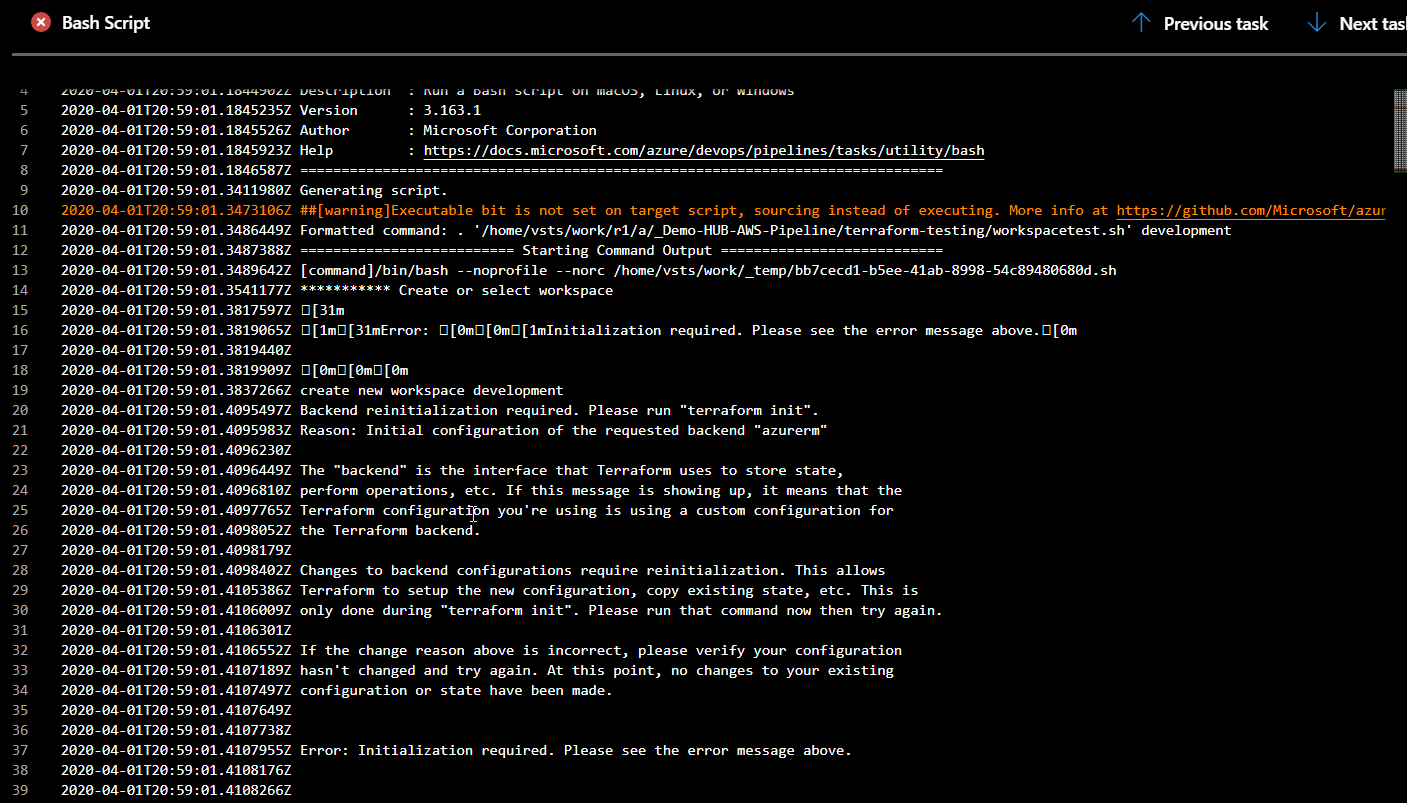
My terraform init in a task above was succesfuls and created a backend for my state files as well. but still faced same error in executing my bash script and after some it indeed becomes frustrating.
mramswaroop
on 1 Apr 2020
Should I expect this issue to be resolved?
I'm still seeing this warning in my azure pipeline runs
 igal1c0de4n
on 3 Jun 2020
igal1c0de4n
on 3 Jun 2020
@igal1c0de4n it could take some time to deploy these changes, I'll let you know once it is deployed.
 egor-bryzgalov
on 3 Jun 2020
egor-bryzgalov
on 3 Jun 2020
@igal1c0de4n these changes are deployed. Please, feel free to reopen the issue.
egor-bryzgalov
on 3 Jul 2020
Related issues
 richard-ob
·
3Comments
richard-ob
·
3Comments
 montebhoover
·
3Comments
montebhoover
·
3Comments
 timfish
·
3Comments
timfish
·
3Comments
 jared-hexagon
·
3Comments
jared-hexagon
·
3Comments
 MarkIannucci
·
3Comments
MarkIannucci
·
3Comments
Most helpful comment
To get rid of the warning I set environment variable AZP_BASHV3_OLD_SOURCE_BEHAVIOR to true (https://github.com/Microsoft/azure-pipelines-tasks/blob/master/docs/bashnote.md) just for that particular task, not entire pipeline. It worked, but I admit I don't know the consequences, nor why that behavior was introduced in the first place.
Does azure pipeline really expect two tasks to run a bash script. First set permission on script then execute the script. Seems so silly.