Azure-pipelines-tasks: Azure App Service deploy to Linux missing .NET Core 3.1 Runtime Stack when available
Feature
Type: Dropdown values for Runtime Stack
Enter Task Name: AzureRmWebAppDeploymentV4
Environment
- Server - Azure Pipelines (public)
- Agent - Hosted: Windows-2019
- See "Deploy API" task in example release log
Issue Description
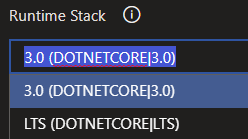
Linux Azure App Services now supports .NET Core 3.1; however, this task does not have that target framework available in the Runtime Stack dropdown; also when selecting LTS, it uses an older version. I also tried manually typing in 3.1 (DOTNETCORE|3.1) and that also did not work.
Workaround
My current workaround is to deploy with 3.0 (DOTNETCORE|3.0), then manually change the target framework in the Azure App Service settings post-deploy, to v3.1.
Log
2020-01-19T17:13:16.2251585Z ==============================================================================
2020-01-19T17:13:16.2251736Z Task         : Azure App Service deploy
2020-01-19T17:13:16.2251866Z Description  : Deploy to Azure App Service a web, mobile, or API app using Docker, Java, .NET, .NET Core, Node.js, PHP, Python, or Ruby
2020-01-19T17:13:16.2251970Z Version      : 4.160.3
2020-01-19T17:13:16.2252063Z Author       : Microsoft Corporation
2020-01-19T17:13:16.2252184Z Help         : https://docs.microsoft.com/azure/devops/pipelines/tasks/deploy/azure-rm-web-app-deployment
2020-01-19T17:13:16.2252321Z ==============================================================================
2020-01-19T17:13:17.4900633Z Got service connection details for Azure App Service:'stock-charts-api'
2020-01-19T17:13:34.5483610Z Package deployment using ZIP Deploy initiated.
2020-01-19T17:13:42.0543612Z Deploy logs can be viewed at https://stock-charts-api.scm.azurewebsites.net/api/deployments/7f38acf9336941b98b9cc7915af453e4/log
2020-01-19T17:13:42.0544075Z Successfully deployed web package to App Service.
2020-01-19T17:13:42.1770493Z Updating App Service Configuration settings. Data: {"linuxFxVersion":"DOTNETCORE|3.0","appCommandLine":"dotnet WebApi.dll"}
2020-01-19T17:13:42.9146980Z Updated App Service Configuration settings.
2020-01-19T17:13:43.5696419Z Successfully updated deployment History at https://stock-charts-api.scm.azurewebsites.net/api/deployments/351579454023298
2020-01-19T17:13:43.7592422Z App Service Application URL: http://stock-charts-api.azurewebsites.net
2020-01-19T17:13:43.9736968Z ##[section]Finishing: Deploy API - needs manual fix on Azure Portal to set .NET Core 3.1 target
 DaveSkender
All 6 comments
You can try using the value DOTNETCORE|3.1, not 3.1 (DOTNETCORE|3.1).

 gimdongwoo
on 22 Jan 2020
gimdongwoo
on 22 Jan 2020
Yes, manually typing in the value DOTNETCORE|3.1 works when the dropdown value is missing. Looks like my attempt to manually override did not consider that label != value.
DaveSkender
on 22 Jan 2020
Is there any update on when the missing drop down value will be added? 3.1 has been available for a quite a while and it is terribly confusing trying to debug deployments.
 JosKrause
on 7 Mar 2020
JosKrause
on 7 Mar 2020
@JosKrause can't you make do with DOTNETCORE|Latest?
 javissimo
on 21 Apr 2020
javissimo
on 21 Apr 2020
@JosKrause can't you make do with
DOTNETCORE|Latest?
On our side, selecting DOTNETCORE|Latest results in runtime stack of .NET Core 2.2.7 on a West Europe instance, so that doesn't seem to do the trick.
 Strandfelt
on 8 Jun 2020
Strandfelt
on 8 Jun 2020
So, I noticed this just showed up in my tenant.
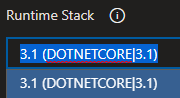
The prior values I'd entered manually seemed to have disappeared, requiring a reset/re-save on my Release pipeline.
DaveSkender
on 27 Jun 2020
Related issues
 jabbera
·
3Comments
jabbera
·
3Comments
 yaananth
·
3Comments
yaananth
·
3Comments
 timfish
·
3Comments
timfish
·
3Comments
 TheRealEdwardCullen
·
3Comments
TheRealEdwardCullen
·
3Comments
 syltaxue
·
3Comments
syltaxue
·
3Comments
Most helpful comment
You can try using the value
DOTNETCORE|3.1, not3.1 (DOTNETCORE|3.1).