Azure-pipelines-tasks: Azure SQL DacPac deployment failing when trying to drop a column even though /p:BlockOnPossibleDataLoss=false is set for SqlPackage.exe
Hi, my release in Azure DevOps fails when trying to deploy a dacpac saying:
"The column [dbo].[table_Name].[bRowVersion] is being dropped, data loss could occur."
I have already set the parameter to SqlPackage.exe to ignore this behavior. Also, why is this showing up as a warning and still being treated like an error, blocking the deployment.

 usmanibnesadiq
All 67 comments
Knowing that my changes would not break anything on target database, I could set /p:TreatVerificationErrorsAsWarnings=true and the deployment works. But this is a dangerous thing to do. There should be a proper workaround. This SOF thread has some answers but not convinced fully
https://stackoverflow.com/questions/28618386/ssdt-publish-errors-on-creating-publish-preview
usmanibnesadiq
on 23 Aug 2019
There is any progress with this issue?
 caphuevo
on 9 Sep 2019
caphuevo
on 9 Sep 2019
Setting /p:BlockOnPossibleDataLoss=true worked for me. I can delete columns without the release pipeline failing.
Update: should be false - /p:BlockOnPossibleDataLoss=false
 JosephG3001
on 15 Sep 2019
JosephG3001
on 15 Sep 2019
@JosephG3001 : Did you mean /p:BlockOnPossibleDataLoss=_false_ ?
Setting /p:BlockOnPossibleDataLoss=false worked for me.
Release without flag failed with "The column [xxx] is being dropped, data loss could occur". Updating pipeline adding /p:BlockOnPossibleDataLoss=false and creating new release succeeded.
 larsts
on 20 Sep 2019
larsts
on 20 Sep 2019
@larsts Yes sorry: /p:BlockOnPossibleDataLoss=false
JosephG3001
on 20 Sep 2019
@usmanibnesadiq
Ideally /p:BlockOnPossibleDataLoss=false should work. Are you still facing the issue?
If it is so, we can ask the SQL team to take a look into it.
 20shivangi
on 14 Oct 2019
20shivangi
on 14 Oct 2019
Feel free to reopen the issue, if you face any.
20shivangi
on 16 Oct 2019
Still got this issue when using it in the Deploy Azure Data Warehouse Publish (which is just new) don't think it should matter anything since it is using SQLPackage underneath but hope you can help out:
Settings used:
/p:GenerateSmartDefaults=True /p:TreatVerificationErrorsAsWarnings=False /p:BlockOnPossibleDataLoss=False /p:AllowDropBlockingAssemblies=True /p:DropObjectsNotInSource=True /p:DoNotDropObjectTypes=Users,Logins,RoleMembership,ExternalDataSources,DatabaseScopedCredentials /p:ExcludeObjectTypes=Users;Logins;RoleMembership;ExternalDataSources;DatabaseScopedCredentials
Error:
2019-10-24T10:37:10.8080874Z ##[error]* Could not deploy package.
2019-10-24T10:37:10.8121669Z ##[error]Warning SQL72015: The type for column ID in table [DM].[DimConcurrent] is currently NVARCHAR (255) NOT NULL but is being changed to NVARCHAR (50) NOT NULL. Data loss could occur.
 jeroenski74
on 24 Oct 2019
jeroenski74
on 24 Oct 2019
Feel free to reopen the issue, if you face any.
Can you reopen this issue?
jeroenski74
on 25 Oct 2019
Hi,
I have forwarded the issue to the SQL team. We will let you know when we get an update from them.
 eaarora-ms
on 4 Dec 2019
eaarora-ms
on 4 Dec 2019
@usmanibnesadiq Are you still experiencing this issue, where /p:BlockOnPossibleDataLoss=false isn't being respected?
 Benjin
on 5 Dec 2019
Benjin
on 5 Dec 2019
@jeroenski74 Can you please confirm if you are still facing the issue? Thanks!
eaarora-ms
on 5 Dec 2019
I can confirm that the flag /p:BlockOnPossibleDataLoss=false is absolutely not honored. I have been facing similar issues. i can provide any further evidences you might need


 sankara-narayanan
on 8 Dec 2019
sankara-narayanan
on 8 Dec 2019
I have the same issue, it seems that neither of the arguments specified in either the publish profile.xml, or the additional arguments is honored. I've tested with
/p:BlockOnPossibleDataLoss=false /p:DropObjectsNotInSource=true /p:TreatVerificationErrorsAsWarnings=true
 philiphoyos
on 10 Dec 2019
philiphoyos
on 10 Dec 2019
Hi,
I have changed is to true because we want people to think about it, I have not tested it again after. Should there be something changed?
Verzonden vanuit Mailhttps://go.microsoft.com/fwlink/?LinkId=550986 voor Windows 10
Van: Eavanshi Aroranotifications@github.com
Verzonden: donderdag 5 december 2019 06:19
Aan: microsoft/azure-pipelines-tasksazure-pipelines-tasks@noreply.github.com
CC: jeroenski74jeroenski74@hotmail.com; Mentionmention@noreply.github.com
Onderwerp: Re: [microsoft/azure-pipelines-tasks] Azure SQL DacPac deployment failing when trying to drop a column even though /p:BlockOnPossibleDataLoss=false is set for SqlPackage.exe (#11191)
@jeroenski74https://github.com/jeroenski74 Can you please confirm if you are still facing the issue? Thanks!
—
You are receiving this because you were mentioned.
Reply to this email directly, view it on GitHubhttps://github.com/microsoft/azure-pipelines-tasks/issues/11191?email_source=notifications&email_token=AAQ6LP3Y2QEIBHRKASBY3ADQXCFN3A5CNFSM4IO2FQQ2YY3PNVWWK3TUL52HS4DFVREXG43VMVBW63LNMVXHJKTDN5WW2ZLOORPWSZGOEF7QTRY#issuecomment-561973703, or unsubscribehttps://github.com/notifications/unsubscribe-auth/AAQ6LP5QPR6HNHRHFU35UNLQXCFN3ANCNFSM4IO2FQQQ.
jeroenski74
on 11 Dec 2019
@Benjin Can you please look into it?
eaarora-ms
on 16 Dec 2019
Experiencing the same issue. /p:BlockOnPossibleDataLoss=false was not honored when trying to drop a column, but adding /p:TreatVerificationErrorsAsWarnings=true allowed the release to continue for one database, but not another. Looks like there is a major issue with it honoring parameters for these releases.
UPDATE
Removed all of the /p's from the release and created a publish profile XML file for the release to use instead. This worked as expected.
 ronbuchanan
on 17 Dec 2019
ronbuchanan
on 17 Dec 2019
Hi,
We are looking for a repro to see if this issue is in DacFx layer for investigation, but not able to repro this using latest SqlPackage.
I understand that the deploy is failing when there is possible data loss as part of Azure DevOps pipeline even with /p:BlockOnPossibleDataLoss=false. Can someone please confirm that if latest SqlPackage.exe is used directly from command line for dacpac deployment with same /p:BlockOnPossibleDataLoss=false option - the same behavior still shows?
Please find the latest SqlPackage at https://docs.microsoft.com/en-us/sql/tools/sqlpackage-download?view=sql-server-ver15
Thanks for your help.
 udeeshagautam
on 19 Dec 2019
udeeshagautam
on 19 Dec 2019
@udeeshagautam I updated to the latest SqlPackage on our deploy agents and the error is still occurring. Unfortunately, my workaround using an XML profile file now breaks, too. I have no way to deploy a database now without manually deploying.
ronbuchanan
on 6 Jan 2020
Thanks @ronbuchanan for trying with latest bits. Can you please confirm once that you are trying directly deploying via SqlPackage.exe from the command line OR through deploy agents. Requesting this clarification to understand if the paramter is reaching sqlpackage.exe and the result is passed as is or not. Please note that using sqlpackage directly from commandline is the key thing here to investigate if the issue is in SqlPackage.exe. Thanks again for the help!
udeeshagautam
on 6 Jan 2020
@udeeshagautam to clarify...
- manually running SqlPackage.exe from the agent CLI deploys successfully using the publish profile file (copied and pasted what Azure DevOps executed)
"C:\Program Files\Microsoft SQL Server\150\DAC\bin\SqlPackage.exe" /Action:Publish /SourceFile:"source.dacpac" /TargetServerName:"target_srvr" /TargetDatabaseName:"target_db" /TargetUser:"target_user" /TargetPassword:"********" /Profile:"source.publish.xml" /TargetTimeout:120
- running our pipeline in Azure DevOps fails, regardless of using arguments or a publish profile
It appears that the Pipeline is treating the warnings as errors and so fails the deploy.
ronbuchanan
on 6 Jan 2020
Thanks for the Clarification. Will follow up on the same. Thanks again!
udeeshagautam
on 6 Jan 2020
Not able to reproduce in our local . This is passing for me
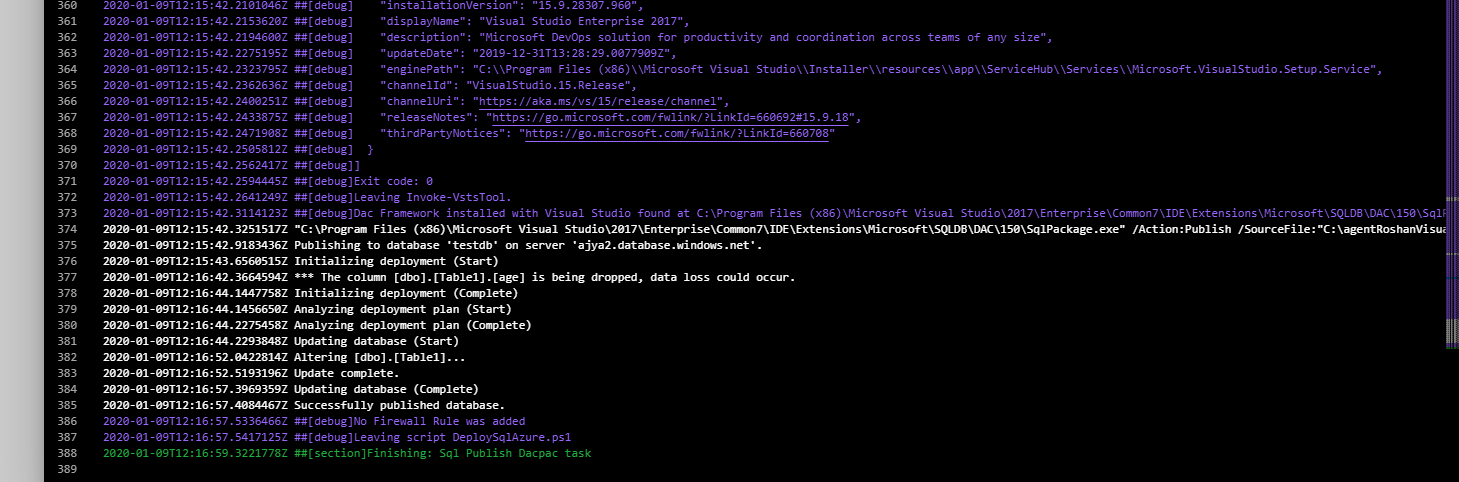
Can you please send me details where we can reproduce this issue ?
 Roshan-Kumar-Microsoft
on 13 Jan 2020
Roshan-Kumar-Microsoft
on 13 Jan 2020
Hi,
We don't use it anymore and take care of the data upfront to prevent the error. Can't check it easily anymore.
Maybe in the future we will, but checking upfront is also more save so probably we will stick to it.
With kind regards,
Jeroen
Outlook voor Android downloadenhttps://aka.ms/ghei36
From: Roshan-Kumar-Microsoft notifications@github.com
Sent: Monday, January 13, 2020 9:50:38 AM
To: microsoft/azure-pipelines-tasks azure-pipelines-tasks@noreply.github.com
Cc: jeroenski74 jeroenski74@hotmail.com; Mention mention@noreply.github.com
Subject: Re: [microsoft/azure-pipelines-tasks] Azure SQL DacPac deployment failing when trying to drop a column even though /p:BlockOnPossibleDataLoss=false is set for SqlPackage.exe (#11191)
Not able to reproduce in our local . This is passing for me
[SqlDacpacDeployWorkingFine]https://user-images.githubusercontent.com/57892372/72242559-c5d98e00-360f-11ea-9984-f49986b63ac7.PNG
Can you please send me where we can reproduce this issue ?
—
You are receiving this because you were mentioned.
Reply to this email directly, view it on GitHubhttps://github.com/microsoft/azure-pipelines-tasks/issues/11191?email_source=notifications&email_token=AAQ6LP27ESK5MSUNFLBZFOTQ5QTN3A5CNFSM4IO2FQQ2YY3PNVWWK3TUL52HS4DFVREXG43VMVBW63LNMVXHJKTDN5WW2ZLOORPWSZGOEIX52GY#issuecomment-573562139, or unsubscribehttps://github.com/notifications/unsubscribe-auth/AAQ6LP4TUXPTZ3WHNAIHZ63Q5QTN3ANCNFSM4IO2FQQQ.
jeroenski74
on 13 Jan 2020
I am also getting the same issue that /p:BlockOnPossibleDataLoss=False is not honored when running through Azure DevOps CI/CD, however, publishing from local works after explicitly unchecking the setting in Advanced.
Any ETA on this fix..?
 koder101
on 13 Jan 2020
koder101
on 13 Jan 2020
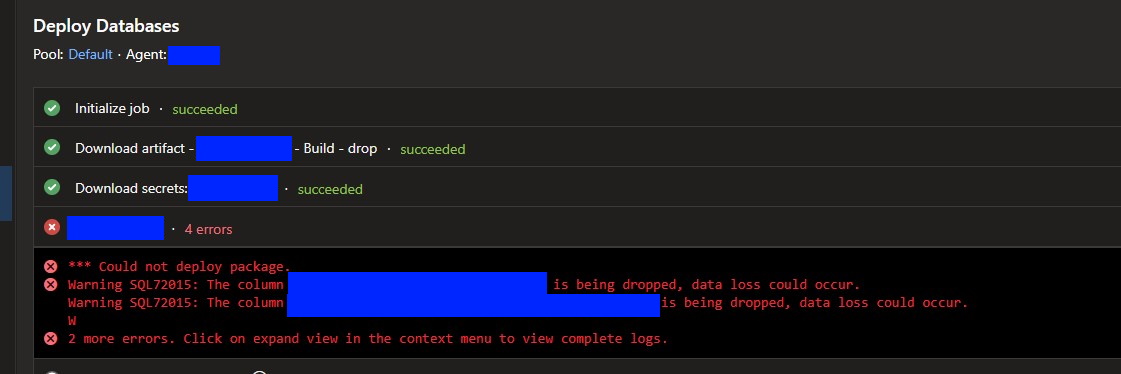
@Roshan-Kumar-Microsoft I am not sure what other details you want for reproducing. This is the error I see, even with the proper parameters set in Azure DevOps and/or an XML deploy profile. I can run it from CLI using SqlPackage, but not from within a Pipeline.
UPDATE:
For now I have written a PowerShell to handle the deploy manually.
ronbuchanan
on 16 Jan 2020
@ronbuchanan can you try to run the sqlpackage command manually from a powershell prompt. You should get a similar warning. After running the command, print the value of the variable $LASTEXITCODE. If it is non zero, then that means sqlpackage is executing with non zero exit code and we fail the task if sqlpackage exits with non zero exit code. Please let us know the results.
 arjgupta
on 3 Feb 2020
arjgupta
on 3 Feb 2020
We are having the same issue
 GryphonsClaw
on 7 Feb 2020
GryphonsClaw
on 7 Feb 2020
Closing this issue. If you still see the issue please provide above information necessary to debug further and re-open the ticket.
 SumiranAgg
on 9 Mar 2020
SumiranAgg
on 9 Mar 2020
Sorry, but I don't think this should be closed. It's still an issue for me on the SqlAzureDacpacDeployment task. I have the following:
- task: SqlAzureDacpacDeployment@1
            displayName: 'deploy warehouse database changes'
            inputs:
              azureSubscription: '<snipped>'
              serverName: '$(AnalyticsWarehouseSqlServer)'
              databaseName: '$(AnalyticsWarehouseDbName)'
              sqlUsername: '$(AnalyticsWarehouseDbLogin)'
              sqlPassword: '$(AnalyticsWarehouseDbPassword)'
              dacpacFile: '$(system.artifactsDirectory)/data-warehouse-dacpac/CollectivWorks.DataWarehouse.dacpac'
              additionalArguments: >-
                /p:CommandTimeout="1200"
                /p:BlockOnPossibleDataLoss=False
                /v:PresenceFeedEnabled='0'
                /TargetTimeout:"1200"
My pipeline fails with:
##[error]*** Could not deploy package.
##[error]Warning SQL72015: The column [dbo].[CalendarDim].[MonYear] is being dropped, data loss could occur.
Warning SQL72015: The column [dbo].[CalendarDim].[YYYYMM] is being dropped, data loss could occur.
Warning SQL72015: The ty
##[error]pe for column MonthYear in table [dbo].[CalendarDim] is currently  VARCHAR (14) NULL but is being changed to  CHAR (7) NULL. Data loss could occur.
 jacderida
on 10 Mar 2020
jacderida
on 10 Mar 2020
I am still facing the same issue. I have tried overriding dacpac settings with a publish profile pre-configured to allow data loss and also tried passing /p:BlockOnPossibleDataLoss=false parameter to SQLPackage.exe in my release pipeline. However, the issue persists
I've done further testing to see if the issue is with Azure SQL Database deployment task or something else, it seems like these affects Azure SQL database in general as the issue also appears in Visual Studio 2017 and 2019 publish feature
 ntiyiso
on 16 Mar 2020
ntiyiso
on 16 Mar 2020
Yeah im getting this too
2020-03-18T11:58:18.6603675Z Warning SQL72015: The type for column in_or_out in table [dbo].[txhr0config_ach_round] is currently  CHAR (1) NULL but is being changed to  BIT NULL. Data loss could occur.
2020-03-18T11:58:18.6603762Z Warning SQL72015: The column [dbo].[txhr0Visa].[Restricted] is being dropped, data loss could occur.
2020-03-18T11:58:18.6605681Z Error SQL72014: .Net SqlClient Data Provider: Msg 245, Level 16, State 1, Line 1 Conversion failed when converting the varchar value 'Y' to data type bit.
2020-03-18T11:58:18.6605808Z Error SQL72045: Script execution error.  The executed script:
2020-03-18T11:58:18.6605891Z ALTER TABLE [dbo].[txhr0config_ach_round] ALTER COLUMN [in_or_out] BIT NULL;
I dont care about the data in the table, so not sure why its erroring
 Jetski5822
on 18 Mar 2020
Jetski5822
on 18 Mar 2020
I see the same issue.
We are using Azure Data Warehouse.
Not reproducible with Azure Sql Database.
Update: tried both options /p:BlockOnPossibleDataLoss=False and publish profile.
Manual deployment from Visual Studio works fine
 sachenko-igor
on 6 Apr 2020
sachenko-igor
on 6 Apr 2020
@SumiranAgg I am experiencing the exact same issue.
Why is it blocking if I have <BlockOnPossibleDataLoss>False</BlockOnPossibleDataLoss> set to false in my publish profile? I am altering a column and it makes releases fail.
Please update this.
2020-04-07T11:09:35.2859817Z Starting rebuilding table [dbo].[Image]...
2020-04-07T11:09:38.7465816Z An error occurred while the batch was being executed.
2020-04-07T11:09:38.7552992Z Updating database (Failed)
2020-04-07T11:09:38.7812264Z * Could not deploy package.
2020-04-07T11:09:38.7812927Z Warning SQL72015: The type for column KeyName in table [dbo].[Image] is currently VARCHAR (250) NULL but is being changed to VARCHAR (100) NULL. Data loss could occur.
2020-04-07T11:09:38.7813452Z Warning SQL72015: The type for column Name in table [dbo].[Image] is currently VARCHAR (250) NULL but is being changed to VARCHAR (100) NULL. Data loss could occur.
2020-04-07T11:09:38.7813869Z Error SQL72014: .Net SqlClient Data Provider: Msg 8152, Level 16, State 30, Line 36 String or binary data would be truncated.
2020-04-07T11:09:38.7816280Z Error SQL72045: Script execution error. The executed script:
2020-04-07T11:09:38.7816541Z BEGIN TRANSACTION;
2020-04-07T11:09:38.7816677Z
2020-04-07T11:09:38.7816961Z SET TRANSACTION ISOLATION LEVEL SERIALIZABLE;
2020-04-07T11:09:38.7817124Z
2020-04-07T11:09:38.7817319Z SET XACT_ABORT ON;
2020-04-07T11:09:38.7817450Z
2020-04-07T11:09:38.7817693Z CREATE TABLE [dbo].[tmp_ms_xx_Image] (
2020-04-07T11:09:38.7817947Z [ImageId] INT IDENTITY (1, 1) NOT NULL,
2020-04-07T11:09:38.7818205Z [Name] VARCHAR (100) NULL,
2020-04-07T11:09:38.7818492Z [Description] VARCHAR (255) NULL,
2020-04-07T11:09:38.7818747Z [Tags] VARCHAR (100) NULL,
2020-04-07T11:09:38.7818993Z [Location] VARCHAR (255) NULL,
2020-04-07T11:09:38.7819268Z [CreatedBy] INT NOT NULL,
2020-04-07T11:09:38.7819552Z [CreatedOn] DATETIME NOT NULL,
2020-04-07T11:09:38.7819801Z [UpdatedBy] INT NULL,
2020-04-07T11:09:38.7820091Z [UpdatedOn] DATETIME NULL,
2020-04-07T11:09:38.7820343Z [Version] INT NOT NULL,
2020-04-07T11:09:38.7820624Z [KeyName] VARCHAR (100) NULL,
2020-04-07T11:09:38.7820906Z [ConvertToJpg] BIT NULL,
2020-04-07T11:09:38.7821152Z [Width] INT NULL,
2020-04-07T11:09:38.7821400Z [Height] INT NULL,
2020-04-07T11:09:38.7821670Z [Resolution] FLOAT (53) NULL,
2020-04-07T11:09:38.7821919Z [Timestamp] ROWVERSION NOT NULL,
2020-04-07T11:09:38.7822167Z [CoordinateX] FLOAT (53) NULL,
2020-04-07T11:09:38.7822431Z [CoordinateY] FLOAT (53) NULL,
2020-04-07T11:09:38.7822695Z [CoordinateS] FLOAT (53) NULL,
2020-04-07T11:09:38.7822914Z [fkTriggerState
2020-04-07T11:09:38.7823023Z
2020-04-07T11:09:38.8381179Z ==============================================================================
2020-04-07T11:09:39.1417148Z ##[error]Error: Error executing C:\Program Files (x86)\Microsoft Visual Studio\2017\BuildTools\Common7\IDE\Extensions\Microsoft\SQLDB\DAC\150\sqlpackage.exe
`
 atmalone
on 7 Apr 2020
atmalone
on 7 Apr 2020
Same Issue here with yaml sqldacpactask
[error]is being dropped, data loss could occur.
 motorreiziger
on 11 May 2020
motorreiziger
on 11 May 2020
Apologies for the long wait for my reply, but I have not changed our DevOps pipeline back to the DACPAC deploy. I am still using a Powershell script to execute SqlPackage.exe with all of the correct parameters.
I will try to get to this test today and post the $LASTEXITCODE.
Example CLI:
"C:\Program` Files\Microsoft SQL Server\150\DAC\bin\SqlPackage.exe" `
    /Action:Publish `
    /SourceFile:"source.dacpac" `
    /TargetServerName:"target_srvr" `
    /TargetDatabaseName:"target_db" `
    /TargetUser:"target_user" `
    /TargetPassword:"********" `
    /Profile:"source.publish.xml" `
    /TargetTimeout:120
Is there any update on this. I am getting the same behaviour when using DevOps Release Pipelines
 mez12345
on 11 May 2020
mez12345
on 11 May 2020
Here are the results after printing the value for $LASTEXITCODE, as requested.
NOTES:
***is a redacted value, not wildcards
2020-05-11T18:06:10.4438119Z ##[section]Starting: Deploy databases
2020-05-11T18:06:10.4544547Z ==============================================================================
2020-05-11T18:06:10.4545025Z Task         : PowerShell
2020-05-11T18:06:10.4545461Z Description  : Run a PowerShell script on Linux, macOS, or Windows
2020-05-11T18:06:10.4545862Z Version      : 2.165.0
2020-05-11T18:06:10.4546214Z Author       : Microsoft Corporation
2020-05-11T18:06:10.4546710Z Help         : https://docs.microsoft.com/azure/devops/pipelines/tasks/utility/powershell
2020-05-11T18:06:10.4547249Z ==============================================================================
2020-05-11T18:06:11.5858313Z Generating script.
2020-05-11T18:06:11.5869121Z Formatted command: . 'c:\agent\temp\***.ps1' "***" "***" "***" "c:\agent\temp\***.dacpac" "c:\agent\temp\***.publish.xml"
2020-05-11T18:06:11.6273227Z ========================== Starting Command Output ===========================
2020-05-11T18:06:11.6532883Z ##[command]"pwsh.exe" -NoLogo -NoProfile -NonInteractive -ExecutionPolicy Unrestricted -Command ". 'C:\agent\_work\_temp\***.ps1'"
2020-05-11T18:06:12.1745257Z ~ ~ ~ ~ ~ ~ ~ ~ ~ ~ ~ ~ ~ ~ ~ ~ ~ ~ ~ ~ ~ ~ ~ ~ ~ ~ ~ ~ ~ ~ ~ ~ ~ ~ ~ ~ ~ ~ ~ ~
2020-05-11T18:06:12.1753838Z Database Deployment
2020-05-11T18:06:12.1758993Z
2020-05-11T18:06:12.1766940Z Parameters
2020-05-11T18:06:12.1774715Z ----------
2020-05-11T18:06:12.1782293Z Server:  ***
2020-05-11T18:06:12.1790239Z DACPAC:  c:\agent\temp\***.dacpac
2020-05-11T18:06:12.1797063Z Profile: c:\agent\temp\***.publish.xml
2020-05-11T18:06:12.1803281Z . . . . . . . . . . . . . . . . . . . . . . . . . . . . . . . . . . . . . . . .
2020-05-11T18:06:12.1807101Z
2020-05-11T18:06:12.3779685Z Started deploying database Database1 ...
2020-05-11T18:06:12.3805277Z Started deploying database Database2 ...
2020-05-11T18:06:12.3814978Z Started deploying database Database3 ...
2020-05-11T18:06:48.5256348Z Finished deploying database Database2 with exit code (0)
2020-05-11T18:06:51.0101914Z Finished deploying database Database3 with exit code (0)
2020-05-11T18:07:36.2344296Z Finished deploying database Database1 with exit code (0)
2020-05-11T18:07:36.2350332Z
2020-05-11T18:07:36.2360433Z Database deployment completed
2020-05-11T18:07:36.2369694Z ~ ~ ~ ~ ~ ~ ~ ~ ~ ~ ~ ~ ~ ~ ~ ~ ~ ~ ~ ~ ~ ~ ~ ~ ~ ~ ~ ~ ~ ~ ~ ~ ~ ~ ~ ~ ~ ~ ~ ~
2020-05-11T18:07:36.3296778Z ##[section]Finishing: Deploy databases
I will most likely continue to use my PS script because it allows me to deploy all of my databases in parallel.
ronbuchanan
on 11 May 2020
Yes, SQLPackage.exe should have ignored the warning when /BlockOnPossibleDataLoss is being set to false. I will check it.
Meanwhile, can you please check in your DB project properties ( project > properties > debug) that checkbox for "Block on incremental deployment if data loss occurs" is disabled.
Screenshot
https://user-images.githubusercontent.com/16772764/41333279-e0828ede-6efe-11e8-9a8b-f761cf4ec9b4.png
eaarora-ms
on 13 May 2020
@eaarora-ms Is there an ETA for a fix?
 joeyeng
on 4 Jun 2020
joeyeng
on 4 Jun 2020
@udeeshagautam We are able to reproduce this outside of Azure DevOps as well. Using /BlockOnPossibleDataLoss=false argument doesn't ignore the error. Can we have someone from the SqlPackage team help us with the issue.
 asranja
on 15 Jun 2020
asranja
on 15 Jun 2020
Same error here, not honoring the /p:BlockOnPossibleDataLoss=false inside of the pipeline. Besides the CLI task to deploy directly through command line, are there any workarounds for this issue?
 kincho-guerrero
on 18 Jun 2020
kincho-guerrero
on 18 Jun 2020
@kincho-guerrero We are just running a Powershell task that runs sqlpackage.exe with the right parameters. This works for us using our own build agents. Look above in my comments for more details.
ronbuchanan
on 19 Jun 2020
@ronbuchanan,
Can you please share us the PS script sample?
 itzkumar
on 22 Jun 2020
itzkumar
on 22 Jun 2020
@itzkumar Here's the gist. The parameters are provided by the AzDO release. We also run this on our build agents, which are Windows VMs. This will require you install the correct tools.
https://gist.github.com/ronbuchanan/459dd77faa486a02520af4ef50d3c9e6
Hope it helps.
P.S. This script is a little more complicated since we do parallel deploys to all of our single-tenant databases.
ronbuchanan
on 22 Jun 2020
We were able to reproduce the issue by changing the data type of a column. Deployment fails when the underlying data cannot be directly mapped to the new data type, regardless of what BlockOnPossibleDataLoss is set to.
We are working on a fix for the next SqlPackage release.
 zijchen
on 23 Jun 2020
zijchen
on 23 Jun 2020
@ronbuchanan Can you confirm what version of sqlpackage.exe (ie the executable File/Product Version) your build agents are running?
 MichaelHolmesWP
on 23 Jun 2020
MichaelHolmesWP
on 23 Jun 2020
@MichaelHolmesWP
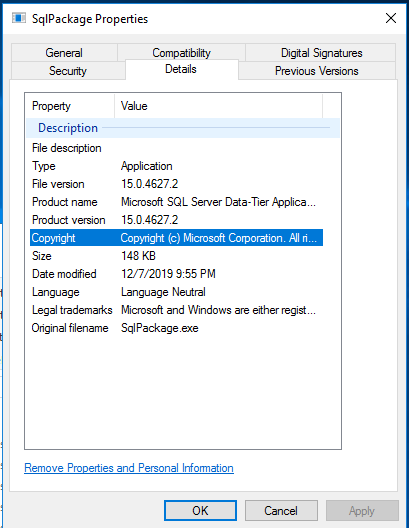
ronbuchanan
on 24 Jun 2020
Hello,
After further investigation, the errors we were able to reproduce are actually thrown by the SQL engine and not by SqlPackage itself. Currently SqlPackage only supports implicit conversion between data types. The BlockOnPossibleDataLoss option is honored when the deployment plan generates in the background, but when it executes it could still fail if the underlying data cannot be directly mapped to the new data type (hence errors like "String or binary data would be truncated" or "Arithmetic overflow error for data type").
For this we plan on updating the warning messages to be clearer that even though possible data loss is treated as a warning, any data requiring explicit conversion could still cause deployment to fail.
zijchen
on 26 Jun 2020
We are still not able to reproduce the issue with dropping columns though. Column is dropped successfully with BlockOnPossibleDataLoss=False regardless if there's data or not. Any pointers on this would be greatly appreciated!
zijchen
on 26 Jun 2020
I have resolved both of these issues with the creation of pre-deployment sql scripts.
For columns getting dropped - check for existence of the column then if present issue the alter table drop column command.
For columns changing from null to not null - check for the existence of the table (so new environments won't fail on the update) then if present issue an update command to change any null values to a default value.
After putting these in I was able to get deployments working, though it's a bit of extra scripting and totally a work around since really I think the system should do these things itself (it just doesn't work correctly).
 tcunbeliever
on 10 Jul 2020
tcunbeliever
on 10 Jul 2020
Hi @tcunbeliever please can you share your pre-deployment sql scripts?
 oscarelo
on 15 Jul 2020
oscarelo
on 15 Jul 2020
Seems like it doesn't work from Publish
Go to DB project -- properties ( project > properties > debug) uncheck "Block on incremental deployment if data loss occurs" this will work.
I am getting timeout error below, i have increased the timeout time but no luck. ( I am deploying it through PS)
+ CategoryInfo          : InvalidOperation: (:) [Invoke-Sqlcmd], PipelineStoppedException
+ FullyQualifiedErrorId : SqlExectionError,Microsoft.SqlServer.Management.PowerShell.GetScriptCommand
Invoke-Sqlcmd : Execution Timeout Expired. The timeout period elapsed prior to completion of the operation or the server is not responding.
 bmvij
on 17 Jul 2020
bmvij
on 17 Jul 2020
Is there any update on this. I am getting the same behavior when using DevOps Release Pipelines with an azure sql database.
 adamsclark
on 11 Aug 2020
adamsclark
on 11 Aug 2020
After many tries, I was able to make it work!
In the Additional Arguments for the Release Pipeline put:
/p:BlockOnPossibleDataLoss=false /p:DropObjectsNotInSource=true

If you still are getting the error, you need to be sure that all the referenced databases, tables, columns, etc, exists in the target.
For example, if you have a store procedure with a reference to a table or column from a different database and the column is not there you will have this problem and you will get a lot of error messages for other things not directly related with the specific problem, so this can be very confusing. Sometimes you don't need to pay to much attention to the firsts errors in the list and just check the one that you have at the end and fix it adding the missing things in the target server.
On the other hand, if you have views with references to other tables or columns from different databases, in this case (Views) you will need to add the datapac as a reference in the project, to do this you need to create a Database project for the other referenced database, do build and rebuilt so you can generate the dacpac file in the repo folder C:\Users\userLogin\source\repos\Solution\Project\bin\Debug, then you can use the generated dacpac to add it in the Visual Studio project as a reference.

I hope this helps somebody.
Good luck!
oscarelo
on 12 Aug 2020
Hi,
Could you please look into the below issue:
Facing the below issue in Release pipeline (it is defined for Azure SQL DB):
_Warning SQL72012: The object [data_0] exists in the target, but it will not be dropped even though you selected the 'Generate drop statements for objects that are in the target database but that are not in the source' check box_
Please help me to fix it.
Thanks
 VeerabhadramRagi
on 13 Aug 2020
VeerabhadramRagi
on 13 Aug 2020
Is the issue still occuring with /p:BlockOnPossibleDataLoss=false ?
Or should we ask sql team to take a look into it
20shivangi
on 10 Sep 2020
Yes
On Thu, Sep 10, 2020, 2:10 PM 20shivangi notifications@github.com wrote:
Is the issue still occuring with /p:BlockOnPossibleDataLoss=false ?
Or should we ask sql team to take a look into it—
You are receiving this because you commented.
Reply to this email directly, view it on GitHub
https://github.com/microsoft/azure-pipelines-tasks/issues/11191#issuecomment-690085360,
or unsubscribe
https://github.com/notifications/unsubscribe-auth/AOCKLBUA2QO7TF2QAU4FRKLSFCGGRANCNFSM4IO2FQQQ
.
bmvij
on 10 Sep 2020
yes issue is still there
 sven73a
on 10 Sep 2020
sven73a
on 10 Sep 2020
Issue still happens for me as well with /p:BlockOnPossibleDataLoss=false
adamsclark
on 10 Sep 2020
Is this issue also occuring when you are using hosted agents ? Please share the full debug logs with variable system.debug to true in your pipeline/release.
I tried to repro the issue but was unable to do the same
20shivangi
on 11 Sep 2020
yes issue is still there
/p:BlockOnPossibleDataLoss=false is not honored.
Some logs:
##[error]Warning SQL72015: The column [XXX].[YYYYYYY].[ZZZZZZZZ] is being dropped, data loss could occur.
##[error]ableId] is being dropped, data loss could occur.
 ankitsatapara07
on 17 Sep 2020
ankitsatapara07
on 17 Sep 2020
Finally Figure it out what causing the issues.
Actually problem is not with /p:BlockOnPossibleDataLoss=false , It is being honored but the Drop Blocking Assemblies are not allowed to drop the column(s)/table(s).
To work it perfectly as you want use this flag : /p:AllowDropBlockingAssemblies=true and will work as expected.
I don't think so issue is within the azure pipeline.
JFYI - I am using the hosted agent vs2017.
ankitsatapara07
on 27 Sep 2020
I can approve the issue is not fixed
/p:IncludeCompositeObjects=True /p:ScriptDatabaseOptions=False /p:BlockOnPossibleDataLoss=False /p:AllowDropBlockingAssemblies=true /p:DisableAndReenableDdlTriggers=False /p:DoNotAlterReplicatedObjects=False /p:DoNotAlterChangeDataCaptureObjects=False /p:DropConstraintsNotInSource=False /p:DropIndexesNotInSource=False /p:DropExtendedPropertiesNotInSource=False /p:DropDmlTriggersNotInSource=False /p:ExcludeObjectTypes=ExternalDataSources;Users;UserDefinedTableTypes;UserDefinedDataTypes;Credentials;DatabaseScopedCredentials /p:CommandTimeout=3600 /p:IgnoreColumnOrder=True
error:
*** Verification of the deployment plan failed.
Warning SQL72015: The column [dbo].[virtinv_Invoice].[CreatedBy] is being dropped, data loss could occur.
Warning SQL72015: The column [dbo].[virtinv_Invoice].[CreatedOn] is being dropped,
2 more errors. Click on expand view in the context menu to view complete logs.
I have included both:
/p:BlockOnPossibleDataLoss=false and /p:AllowDropBlockingAssemblies=true
Update:
works with these three parameters:
/p:BlockOnPossibleDataLoss=false, /p:AllowDropBlockingAssemblies=true, /p:TreatVerificationErrorsAsWarnings=true
 denis-peshkov
on 30 Sep 2020
denis-peshkov
on 30 Sep 2020
We had this same issue and thank you @denis-peshkov for your update - it helped! The deployment still failed, however, it actually performed what we needed it to do - and thinking about it, there are a couple of things we could have done to help things along more smoothly.
In our particular situation, we had a few contributing factors that may have led to this dilemma.
a column that was actually being REMOVED from a table that had foreign key constraints as well as object inter-dependencies, however, those objects were actually being dropped from the database as well as part of the release.
In addition we dropped a few tables and views in our code as they were no longer needed, however, I think the way they were dropped was partly at issue (dropped in a dev database and re-synced to the project rather than dropped out of the project itself to allow the refactor log to be properly updated).
We had several tables marked as temporal tables that were being changed as part of the deployment. My observation on dacpacs with temporal tables is that its a bit "brittle" and probably requires handling before-hand in a pre-deployment script.
My main takeaway here is that if you're dropping objects from your schema with dependencies and existing data, you're definitely going to want to handle that in a pre-deployment script. Likely what you're going to have to do is script out disabling any temporal properties on tables you're altering (which you should be able to script out using visual studio), and use the schema compare to handle any changes to tables for which you're dropping any columns (or at least handle the data conversion/DML). Then if you use /p:BlockOnPossibleDataLoss=false /p:AllowDropBlockingAssemblies=true /p:TreatVerificationErrorsAsWarnings=true you should be good to go, just be aware that you're ok with losing data in the objects you're dropping (backup always).
 jtbrown52
on 29 Oct 2020
jtbrown52
on 29 Oct 2020
My release failed even with these three parameters:
/p:BlockOnPossibleDataLoss=false, /p:AllowDropBlockingAssemblies=true , /p:TreatVerificationErrorsAsWarnings=true
BUT I resolved the issue by manually updating the Azure SQL within SSMS with the updated database first.
- Right click the local database table > Tasks > Export Data-tier Application (save in a local folder)
- Make a connection to Azure SQL using your server name
.database.windows.net - Delete the original table, right click the Databases folder > Tasks > Import Data-tier Application
- Run the pipeline again
Hope that helped.
 davidhwang-ij
on 6 Nov 2020
davidhwang-ij
on 6 Nov 2020
I am using the same parameters in at least 10 database project and it is working fine for me. I am using DevOps pipeline for deploying my database on On-Prem as well Azure.
Can anybody please specify what steps I can take to replicate the issue?
An easy way to debug your issue is to use Publish and Generate script option and you will be able to see what script it is actually deploying in backend.
I tried the changes on VS 2017 and VS2019. SSDT version is 16.0.62010.06180
 Anunaya02
on 13 Jan 2021
Anunaya02
on 13 Jan 2021
Related issues
 pharring
·
3Comments
pharring
·
3Comments
 montebhoover
·
3Comments
montebhoover
·
3Comments
 jabbera
·
3Comments
jabbera
·
3Comments
 timfish
·
3Comments
timfish
·
3Comments
 yaananth
·
3Comments
yaananth
·
3Comments
Most helpful comment
Sorry, but I don't think this should be closed. It's still an issue for me on the
SqlAzureDacpacDeploymenttask. I have the following:My pipeline fails with: