Azure-pipelines-tasks: Add SkipDuplicate as option to NuGet publish
Question, Bug, or Feature?
Type: Feature
Enter Task Name: NugetCommand
Issue Description
NuGet 5.1 adds support for -SkipDuplicate in the push command. In Azure DevOps this would be a helpful control option to just check off rather than have to change to a custom task and duplicate all the source information for external feeds.
Adding SkipDuplicate to the NuGet Task is the request and to pass that along in the args for when using the push command
 timheuer
All 23 comments
Hey thanks for the enhancement idea. Our stance with respect to tasks is moving more where we invest less in the client wrapping tasks and more in the authenticate tasks (à la Twine Authenticate but for nuget.exe). Customers would then own calling the clients in their yml pipelines which would allow for this level of flexibility. We are actively working on nuget.exe authenticate task.
As a result, it is unlikely we will get to feature enhancements for existing tasks.
 tkrick
on 9 Jul 2019
tkrick
on 9 Jul 2019
@tkrick I'm confused how this enables me better than exposing a simple property? Sounds like you are about to make a flag for me much more complex and require me to make two tasks? I just want the NuGet task to skip duplicates on push.
timheuer
on 9 Jul 2019
adding @elbatk to clarify the task investment stance if he wants to add anything here.
Also, now that I look at our task i think this capability is already there.
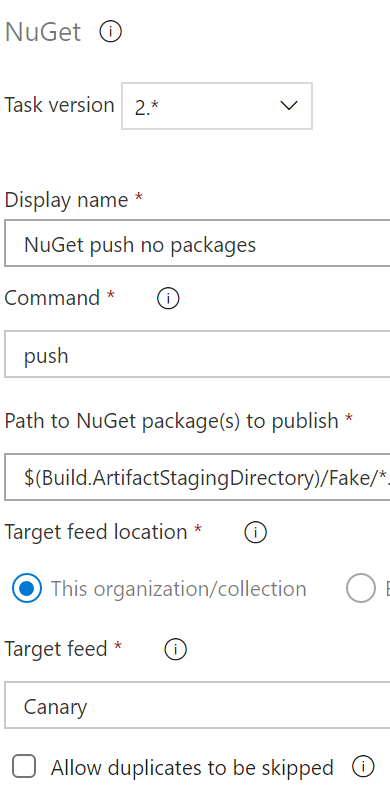
notice the "Allow duplicates to be skipped" option at the bottom of the image. Is that functionality not sufficient for you?
tkrick
on 9 Jul 2019
@tkrick that option is only enabled for "This organization/collection" -- change to External feed and it no longer exists.
timheuer
on 9 Jul 2019
Hey @timheuer , Artifacts PM here, and we certainly understand the ask. This quarter we have allocated significant dev bandwidth to shift towards a more light-weight, auth-first task model that Travis mentioned; one where we auth and then get out of your way and let you use your tools (in this case, NuGet) as you would from any command line without relying on our tasks that, as you have pointed out, may or may not be up-to-date with the latest and greatest functionality from tools like NuGet or dotnet.
With that said, we don't have any bandwidth among other priorities to implement updates to current tasks. I know that's not the answer you want to hear, but the sooner and more narrow we can focus on these new tasks and guidance, the sooner they will arrive and make for a better experience. I hope you can understand the move here.
 elbatk
on 9 Jul 2019
elbatk
on 9 Jul 2019
@elbatk -- not really, I'm hearing 'auth' talked about but I'm not seeing why that applies to this option. Aside from that what I think you are saying is that "hey we're not going to change the NuGetCommandv2 any further than it is"
I'm just not drawing the connection to how auth plays a roll in SkipDuplicate.
I understand you are making a priority decision, but given the project is open source here, would you also NOT accept a PR to make the change?
timheuer
on 9 Jul 2019
@timheuer yep your understanding is correct in that this is a priority call, I was just trying to explain a bit of the priority.
I'll chat with the dev team tomorrow and see if checking and approving PRs is something we're okay with. My assumption is the answer will be 'yes' but I don't want to tell you to spin up a PR that won't get looked at. I'll drop back in tomorrow afternoon on this.
elbatk
on 9 Jul 2019
@timheuer With respect to the PR, there is significant special casing for the collection level skip duplicates option, in certain cases like for linux it does a try/catch and looks at output (which is very brittle and should probably not have been done or relied upon). Also, keep in mind that whatever solution needs to work for all agent platforms and nuget versions (as well as VssNuGetPush.exe) that could have been installed by the nuget installer or sitting there as default, not just 5.1+. So it is not as simple as a passthrough. This is because at task configuration time, we don't know what nuget version is there on the agent.
Perhaps the option name and behavior could be changed to "Pass through -SkipDuplicates if available in the client", but that seems a bad user experience when a configuration is conditional. That will probably invite more user questions and error.
I would therefore suggest not moving forward with a PR in this case due to the support risk from the complexity mentioned above.
_"I'm just not drawing the connection to how auth plays a roll in SkipDuplicate."_
Let me try to clarify: We will shortly be making nuget client authenticate tasks available like we did for other protocols. Instead of using the NuGetCommand task, you will 1. put the nuget client authenticate task in your pipeline (adding whatever external service connections you need) and 2. use plain command line tasks to invoke nuget.exe and send in whatever flags or rely on whatever new features in the nuget clients that you want to use. Due to the authenticate tasks running beforehand and the credential provider plugin model that nuget 4.9+ supports, your commands will also work with Azure DevOps enterprise auth. This scenario will be more reliable for users and reduce the high support load from issues with the current tasks, especially around supporting legacy versions of nuget.
tkrick
on 9 Jul 2019
@timheuer The NuGetAuthenticate task is now publicly available, if you'd like to try using it and invoking nuget push ... -SkipDuplicate directly.
If for some reason this doesn't work for your scenario or you encounter issues, we're eager to help.
As @tkrick mentioned, implementing this change in the existing NuGetCommand task in a way that supports all nuget versions and platforms would likely be difficult and require significant testing.
 zarenner
on 19 Aug 2019
zarenner
on 19 Aug 2019
How does NuGetAuthenticate task work? It requires a service connection and when I create one with an API key that task fails with The service connection for 'https://api.nuget.org/v3/index.json' is not valid. ApiKey service connections are not supported in this task. error. The other option is to create a service connection with a username and password but there is no option to authenticate with Microsoft account.
 TheBlueSky
on 1 Sep 2019
TheBlueSky
on 1 Sep 2019
What repository are you trying to connect to? NuGet.org?
elbatk
on 1 Sep 2019
Yes, it's NuGet.org
TheBlueSky
on 1 Sep 2019
NuGet.org is public, you shouldn't need to authenticate at all. You should just be able to call your nuget.exe or dotnet scripts without having to auth. Right @zarenner , maybe we should add an example in the doc that says "restore or push directly from or to NuGet.org"?
elbatk
on 1 Sep 2019
I'm trying to authenticate because I want to push to NuGet.org feed.
TheBlueSky
on 1 Sep 2019
@TheBlueSky the NugetAuthenticate task is meant for authenticating with Azure Artifacts as well as other private package sources that use username/password or (username/password based) token authentication. It is not intended for NuGet ApiKey authentication. If you're only pushing to NuGet.org, you don't need it. Please see https://docs.microsoft.com/en-us/azure/devops/pipelines/tasks/package/nuget-authenticate?view=azure-devops#how-do-i-configure-a-nuget-package-source-that-uses-apikey-nuget-api-keys
If using Azure Artifacts, specifying service connections is optional; it will automatically set up authentication for your Azure DevOps organization.
zarenner
on 1 Sep 2019
@elbatk I can clarify that doc section I linked to indicate that it's applicable to nuget.org.
zarenner
on 1 Sep 2019
@elbatk I can clarify that doc section I linked to indicate that it's applicable to nuget.org.
I think that would be great, especially since I went to the doc and just ctrl + f searched for "NuGet.org"
elbatk
on 1 Sep 2019
I'm kinda confused now. I opened an issue (https://github.com/microsoft/azure-pipelines-tasks/issues/11017) and the response was "wait until we release NugetAuthenticate task" and now you're telling me that this is not meant for my case :(
Anyway, I tried nuget push MyProject.*.nupkg -Source https://api.nuget.org/v3/index.json -ApiKey $(nuget.apikey) -SkipDuplicate, but that also failed with "File does not exist (MyProject.*.nupkg)" error.
Where is the *.nupkg file located and how to specify it without the need to mention the version number?
TheBlueSky
on 1 Sep 2019
Sorry for the confusion / past incorrect guidance. If using only nuget.org, waiting for the auth task was not necessary and using nuget/dotnet directly is recommended. If nuget allowed providing ApiKey via a credential provider, we could have built that support into the NuGetAuthenticate task instead of the approach recommended in that link, but nuget does not. Using the command line ApiKey argument as you'd do on a Dev machine (or alternatively, setting the ApiKey in a non-checked-in nuget.config) are the options there.
Per https://docs.microsoft.com/en-us/nuget/reference/cli-reference/cli-ref-push, *.nupkg should work. I'm not sure that more complex wildcard expressions are supported in nuget. Using the shell (e.g. powershell on Windows) to evaluate the nupkgs you want and then piping them to nuget may also be an alternative if you need something more complex. https://github.com/NuGet/Home/issues/4393 also looks relevant.
The location of the nupkg depends on where/how it was packed - I believe that our pack task defaults to the artifacts staging directory, but could be wrong. I'm not at a computer right now but can check it out in a bit if you can't find it (also, the pack logs should say, at least with raised verbosity).
zarenner
on 1 Sep 2019
Thanks, @zarenner.
Yes, the packed file is in Build.ArtifactStagingDirectory. Now when I try nuget push $(Build.ArtifactStagingDirectory)\MyProject.*.nupkg -Source https://api.nuget.org/v3/index.json -ApiKey $(nuget.apikey) -SkipDuplicate, I get the same error, "File does not exist (D:\a\1\a\MyProject.*.snupkg)" but notice that it says snupkg instead of nupkg, and when I try to specify the version number (instead of the wildcard), all goes well!
By the way, the error happens after trying to push to NuGet.org
Pushing MyProject.1.0.1.nupkg to 'https://www.nuget.org/api/v2/package'...
  PUT https://www.nuget.org/api/v2/package/
  Conflict https://www.nuget.org/api/v2/package/ 284ms
Package 'D:\a\1\a\MyProject.1.0.1.nupkg' already exists at feed 'https://www.nuget.org/api/v2/package'.
File does not exist (D:\a\1\a\MyProject.*.snupkg).
A couple nuget issues that look relevant:
https://github.com/NuGet/Home/issues/8148
https://github.com/NuGet/Home/issues/4393
While it looks like it might be an actual nuget bug, the latter issue has a suggestion that (assuming you don't care to push symbol packages) specifying -n true might avoid that warning/error.
edit: that's for dotnet nuget push actually, -NoSymbols looks like the nuget equivalent.
zarenner
on 1 Sep 2019
Thanks a lot. I can confirm that -NoSymbols flag worked in my case.
TheBlueSky
on 1 Sep 2019
The docs here call out this not working for apikey based scenarios (like uploading to nuget.org).
Is there any step-by-step guide to migrate from an existing NuGetCommand pipeline task uploading to nuget.org to this new pattern? Not having access to the SkipDuplicate parameter is a big thorn.
As @timheuer pointed out:
I just want the NuGet task to skip duplicates on push.
This is really frustrating for basic functionality of this pipeline task as if there's a problem with one single package half-way through the upload, you get hosed and can never at least upload the other packages to try and just resolve the single one with a problem later.
 michael-hawker
on 13 Oct 2020
michael-hawker
on 13 Oct 2020
Related issues
 Mardoxx
·
3Comments
Mardoxx
·
3Comments
 HenrikStanley
·
3Comments
HenrikStanley
·
3Comments
 yaananth
·
3Comments
yaananth
·
3Comments
 divyesh-parikh
·
3Comments
divyesh-parikh
·
3Comments
 ThomasBarnekow
·
3Comments
ThomasBarnekow
·
3Comments