Azure-pipelines-tasks: VS2019- Unable to locate master.dacpac during build
Required Information
Question, Bug, or Feature?
Bug
Enter Task Name
MSBuildV1
Environment
Server
Azure Pipeline
- Account Name: tesgcloud
- Team Project Name: Accelerator
- Build Definition Name: DB - tmsa Build
- Build Number: #4491
Agent
Hosted
- Agent Queue Name: Agent-01
- Agent Host OS: Windows Server 2016 Standard
- Agent Version: vsts-agent-win-x64-2.150.3
Build Tools
- Name: Visual Studio Build Tools 2019
- Version: 16.0.4
- Workloads
- C++ build tools
- .NET desktop build tools
- Universal Windows Platform build tools
- Web development build tools
- Azure development build tools
- Office/SharePoint build tools
- _Data storage and processing build tools_
- Mobile Development with .NET
- Node.js build tools
- .NET Core build tools
- Visual Studio extension development
Issue Description
The build phase is failing at the point where the master.dacpac reference is being resolved, with the following error message:
Error SQL72027: File "C:\Program Files (x86)\Microsoft Visual Studio\2019\BuildTools\Common7\IDE\Extensions\Microsoft\SQLDB\Extensions\SqlServer\AzureV12\SqlSchemas\master.dacpac" does not exist.
I have searched the server with the following PS script, and it appears that the master.dacpac does not exist on the server in any location, including the location attempted by the build:
Get-ChildItem -Path c:\ -Recurse -Include *.dacpac -Name -Directory
In the VS SQL Project file, the master.dacpac is referenced with the following setting:
<ArtifactReference Include="$(DacPacRootPath)\Extensions\Microsoft\SQLDB\Extensions\SqlServer\AzureV12\SqlSchemas\master.dacpac">
      <HintPath>$(DacPacRootPath)\Extensions\Microsoft\SQLDB\Extensions\SqlServer\AzureV12\SqlSchemas\master.dacpac</HintPath>
      <SuppressMissingDependenciesErrors>False</SuppressMissingDependenciesErrors>
      <DatabaseVariableLiteralValue>master</DatabaseVariableLiteralValue>
</ArtifactReference>
Task logs
Error logs
(see: Task logs)
 KaineVarley
All 24 comments
The file master.dacpac is not found under path C:\Program Files (x86)\Microsoft Visual Studio\2019\BuildTools.
Rather, it is under path C:\Program Files (x86)\Microsoft Visual Studio\2019\Enterprise\Common7\IDE\Extensions\Microsoft\SQLDB\Extensions\SqlServer\AzureV12\SQLSchemasmaster.dacpac
So, instead of using $(DacpacRootPath) variable try with the complete path as mentioned and check if the task is working properly.
 20shivangi
on 3 Jun 2019
20shivangi
on 3 Jun 2019
@20shivangi ,
Thank you for your suggestion. The build tools have been installed on an on-premises build server hosting the agent. I can confirm that, with a clean build and install of both the agent and the VS2019 Build Tools, containing the "_Data storage and processing build tools_" workload, no instance of the master.dacpac schema file exists in any location on the server.
Obviously, I can manually add the master.dacpac schema file to any location I wish, but this doesn't change the fact that the schema file isn't added during the VS2019 Build Tools installation.
Kaine
KaineVarley
on 3 Jun 2019
@KaineVarley
I tried downloading the VS2019 build tools and was unable to find the master.dacpac file. The same issue has been reported to the Visual Studio team.
Meanwhile, could you check with the path that I mentioned in earlier comment :
C:\Program Files (x86)\Microsoft Visual Studio\2019\Enterprise\Common7\IDE\Extensions\Microsoft\SQLDB\Extensions\SqlServer\AzureV12\SQLSchemasmaster.dacpac
20shivangi
on 4 Jun 2019
@20shivangi ,
Thanks again for responding. I am pleased that the issue has been observed by the VS team.
With regards to your request to check the path, I'm a little confused since at no point did I mention the path in your initial response:
The file master.dacpac is not found under path C:\Program Files (x86)\Microsoft Visual Studio\2019\BuildTools.
In fact, the path in the VS SQL Project file containing the $(DacPacRootPath) variable:
$(DacPacRootPath)\Extensions\Microsoft\SQLDB\Extensions\SqlServer\AzureV12\SqlSchemas\master.dacpac
Resolves correctly to the expected location path:
C:\Program Files (x86)\Microsoft Visual Studio\2019\BuildTools\Common7\IDE\Extensions\Microsoft\SQLDB\Extensions\SqlServer\AzureV12\SqlSchemas\master.dacpac
In addition, I have placed a copy of the master.dacpac in this folder location and confirm that the build is successful.
Perhaps I have misunderstood your request?
Kind regards,
Kaine
KaineVarley
on 4 Jun 2019
@KaineVarley
Currently $(DacpacRootPath) is resolving to the C:\Program Files (x86)\Microsoft Visual Studio\2019\BuildTools
Here @20shivangi ask is that in VS SQL Project file instead of specifying $(DacPacRootPath) replace its value with C:\Program Files (x86)\Microsoft Visual Studio\2019\Enterprise .
In that case it would be able to figure out the master.dacpac file.
Can you please give a try to this scenario.
 Ajay-MS
on 7 Jun 2019
Ajay-MS
on 7 Jun 2019
@KaineVarley
Any update on this ?
20shivangi
on 7 Jun 2019
@Ajay-MS / @20shivangi ,
Please accept my apologies, but I still don't understand.
Are you suggesting that replacing the $(DacPacRootPath) with C:\Program Files (x86)\Microsoft Visual Studio\2019\BuildTools in the project file will locate the master.dacpac file, even though _no instance of the file exists anywhere on the server_? If that is the case, then I'll give it a go.
Kaine
KaineVarley
on 7 Jun 2019
@KaineVarley
Path that I suggested you ends with Enterprise instead of BuildTools.
On remote server master.dacpac exists at path
C:\Program Files (x86)\Microsoft Visual Studio\2019\Enterprise
@Ajay-MS ,
OK (my mistake), but that still doesn't change the fact that the file doesn't exist at any location on the server, including the following (Enterprise) location:
C:\Program Files (x86)\Microsoft Visual Studio\2019\Enterprise\Common7\IDE\Extensions\Microsoft\SQLDB\Extensions\SqlServer\AzureV12\SQLSchemas\
Kaine
KaineVarley
on 7 Jun 2019
@KaineVarley
Actually I found it on my machine so I shared path with you. As it doesn't exists on your machine will check with the VSTS team.
Ajay-MS
on 8 Jun 2019
Thank you @Ajay-MS
KaineVarley
on 11 Jun 2019
Adding @dhruvanmurthy for awareness
So for VS 2017 it seems they put out the fix as per 15.9.13.
As for VS 2019, the release is expected sometime early July.
Hope this helps.
Thank you.
 markingmyname
on 21 Jun 2019
markingmyname
on 21 Jun 2019
Thanks @markingmyname for the update.
Kaine
KaineVarley
on 21 Jun 2019
@markingmyname
Thanks for the update thereby closing this issue
20shivangi
on 24 Jun 2019
I am just now running into this. After researching I learned about the "HintPath" swap solution... then I learned about the update in 15.9.13 that uses the $(DacPacRootPath) variable, but that isn't working either because, I think, I have VS 2017 installed on the D:\ drive, and that variable is resolving the c:\ drive where nothing exists. I'm giving up on all of this and just putting the dacpac files directly into the project for now
 NickFranceschina
on 1 Jul 2019
NickFranceschina
on 1 Jul 2019
For people like me that have this problem after removing vs 2017, just unload your project and edit it, find the path mentioned in the error, change ../2017/.. to ../2019/.. , then reload the project
 mohas
on 1 Nov 2019
mohas
on 1 Nov 2019
Has this problem been solved? This is still an issue with MS Build Tools 2019: https://stackoverflow.com/questions/58998783/where-does-master-dacpac-come-from-in-vs-2019?noredirect=1#comment104249977_58998783
 rdelgado-incomm
on 25 Nov 2019
rdelgado-incomm
on 25 Nov 2019
A fix for this issue is being reviewed. We will update this thread once the fix is available for download.
 dhruvanmurthy
on 25 Nov 2019
dhruvanmurthy
on 25 Nov 2019
A fix for this was released in 16.4.1 version of Visual Studio Build Tools.
dhruvanmurthy
on 11 Dec 2019
I think the actual issue here is that the DACPAC tools aren't included with Visual Studio Build Tools. They are only included with versions of Visual Studio that include the full IDE such as the Enterprise version as far as i know.
Question is, should be be included as part of Visual Studio Build Tools?
 andyfisher100
on 2 Jan 2020
andyfisher100
on 2 Jan 2020
It should be part of Build Tools now. I just realized that my previous comment was ambiguous and corrected it (link was pointing to build tools though).
Let me know if you are not seeing the master.dacpac installed in latest version of Build Tools.
dhruvanmurthy
on 2 Jan 2020
It should be part of Build Tools now. I just realized that my previous comment was ambiguous and corrected it (link was pointing to build tools though).
Let me know if you are not seeing the master.dacpac installed in latest version of Build Tools.
You are correct, it looks like it is now part of the VS2019 build tools install. However still not included with the latest VS2017 build tools :(
andyfisher100
on 2 Jan 2020
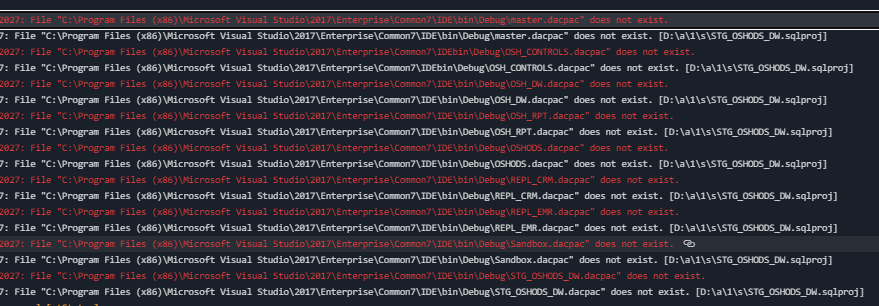
so I know this might be closed but I do not get this error in VS 2019 in a local build however I get this error in Azure builds
<ArtifactReference Include="$(DacPacRootPath)\bin\Debug\master.dacpac">
      <HintPath>$(DacPacRootPath)\bin\Debug\master.dacpac</HintPath>
      <SuppressMissingDependenciesErrors>True</SuppressMissingDependenciesErrors>
      <DatabaseVariableLiteralValue>master</DatabaseVariableLiteralValue>
    </ArtifactReference>
 twahl0630
on 15 Jan 2021
twahl0630
on 15 Jan 2021
@nadesu , @chshrikh for follow up
 kmkumaran
on 31 Jan 2021
kmkumaran
on 31 Jan 2021
Related issues
 NatMarchand
·
3Comments
NatMarchand
·
3Comments
 ThomasBarnekow
·
3Comments
ThomasBarnekow
·
3Comments
 montebhoover
·
3Comments
montebhoover
·
3Comments
 MikahB
·
3Comments
MikahB
·
3Comments
 fedemkr
·
3Comments
fedemkr
·
3Comments