Azure-pipelines-tasks: Azure Devops - Key Vault task - Specified service connection needs to have x y z
Required Information
Entering this information will route you directly to the right team and expedite traction.
Question, Bug, or Feature?
Type: Bug
Enter Task Name: Azure Key Vault
list here (V# not needed):
https://github.com/Microsoft/azure-pipelines-tasks/tree/master/Tasks
Environment
Server - Azure Pipelines or TFS on-premises?
Azure Pipelines- If using Azure Pipelines, provide the account name, team project name, build definition name/build number:
account: darrell.[email protected]
project: lab
release info: releaseId=389&environmentId=646&deploymentGroupPhaseId=567&agentName=COVD01
- Agent - Hosted or Private:
- If using Hosted agent, provide agent queue name:

- If using private agent, provide the OS of the machine running the agent and the agent version:
OS Name Microsoft Windows Server 2016 Datacenter
Version 10.0.14393 Build 14393
(This is a VM hosted on Azure)
Issue Description
We have an azure subscription.
I created a new Key Vault within that subscription.
I used the following powershell script to create a service principal and get all the details I needed to create a new service connection in Azure DevOps:
I have a release pipeline on Azure Devops.
I added an "Azure Key Vault" task to this pipeline.
I was able to select my subscription, and select my keyvault from the drop downs within the task:

However when I create a release, and this step is executed, it fails with the following error message written to the release log:
QlikClient: "Access denied. The specified Azure service connection needs to have Get, List secret management permissions on the selected key vault. To set these permissions, download the ProvisionKeyVaultPermissions.ps1 script from build/release logs and execute it, or set them from the Azure portal."
The thing is, when I set up the new service connection, I used a service principal that has full access. So I have no idea why access is denied.
Note: Our Azure Devops Organisation is under a different subscription from our Azure Key vault - ot sure if that makes any different.
Happy to provide any other details required. Note, the task log below says there is a ps1 script somewhere I can run, but i'm not sure where I have to navigate to in Azure Devops in order to download it.
Task logs
2019-04-30T16:54:59.3448695Z ##[section]Starting: Get QlikClient PFX From KeyVault
2019-04-30T16:54:59.3453310Z ==============================================================================
2019-04-30T16:54:59.3453421Z Task : Azure Key Vault
2019-04-30T16:54:59.3453507Z Description : Download Azure Key Vault Secrets
2019-04-30T16:54:59.3453581Z Version : 1.0.32
2019-04-30T16:54:59.3453657Z Author : Microsoft Corporation
2019-04-30T16:54:59.3453742Z Help : More Information
2019-04-30T16:54:59.3453842Z ==============================================================================
2019-04-30T16:55:00.2810600Z SubscriptionId: 5adb7e7f-fe52-4809-b539-2e6bbdbaf890.
2019-04-30T16:55:00.2817095Z Key vault name: Hub-Dev.
2019-04-30T16:55:00.2842285Z Downloading secret value for: QlikClient.
2019-04-30T16:55:00.6533488Z ##[error]
QlikClient: "Access denied. The specified Azure service connection needs to have Get, List secret management permissions on the selected key vault. To set these permissions, download the ProvisionKeyVaultPermissions.ps1 script from build/release logs and execute it, or set them from the Azure portal."
2019-04-30T16:55:00.6534149Z Uploading C:\azagent\A1_work\r2\a\ProvisionKeyVaultPermissions.ps1 as attachment
2019-04-30T16:55:00.6580465Z ##[section]Finishing: Get QlikClient PFX From KeyVault
Troubleshooting
Checkout how to troubleshoot failures and collect debug logs: https://docs.microsoft.com/en-us/vsts/build-release/actions/troubleshooting
Error logs
 dazinator
All 14 comments
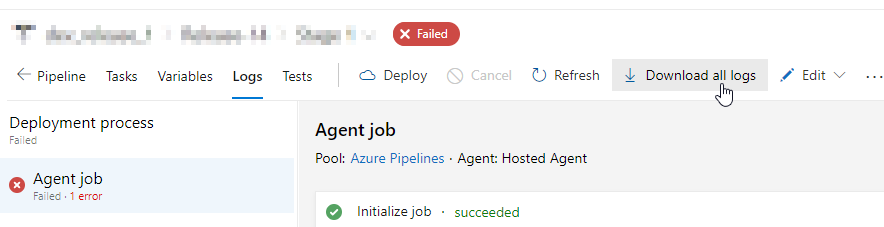
Ah so I found the generated powershell script that the task was mentioning, in devops:
I needed to click on "Download all logs":

Then the file is:

I'll try running that powershell script and trying again
dazinator
on 1 May 2019
Yep.. running that powershell script fixed it. It would be good if someone can clarify why this is necessary though - given the previous powershell script that was run I thought the service connection used should have full access required..?
dazinator
on 1 May 2019
@dazinator Good to see that you were able to resolve it yourself.
The azure service connection does not have permission on the key-vault and users need to explicitly give permissions to access the keyvault.
When we create keyvault backed variable groups, we take the users via the assignment of permissions flow but when the key vault task gets used directly, then users should run the power shell script to assign the permissions.
 bansalaseem
on 23 May 2019
bansalaseem
on 23 May 2019
@dazinator
Yep.. running that powershell script fixed it. It would be good if someone can clarify why this is necessary though - given the previous powershell script that was run I thought the service connection used should have full access required..?
I have tried executing PowerShell script before accessing Key vault. Unfortunately I am getting same error before this task.
Please let me know where to execute this PS Script.
I have also checked all permissions on azure portal, service principal have full access.
 Rahul43nit
on 25 Jun 2019
Rahul43nit
on 25 Jun 2019
@dazinator Where do you run the script? Do you run it before the azureKeyVault task or after when it fails? Could you please help with this one?
 vsarunov
on 26 Jun 2019
vsarunov
on 26 Jun 2019
I'm running into the same issue except that my dev machine is a Mac and the build agent is Linux, so I don't have anywhere to run this .ps1. Is there an az CLI script equivalent?
Also it's not clear to me: is this script a run-once thing or does it need to be part of the pipeline tasks?
Any help much appreciated.
 darzu
on 6 Aug 2019
darzu
on 6 Aug 2019
@darzu, you can run the following command for updating the key vault access policies for secrets
az keyvault set-policy --name "keyVaultName" --spn servicePrincipalId --secret-permissions get list
In case you want to know more on setting access policies for key vault, refer to
https://docs.microsoft.com/en-us/azure/key-vault/key-vault-manage-with-cli2#authorizing-an-application-to-use-a-key-or-secret
You have to run this script/command only once for every keyvault that you want to retrieve secrets for
 Anumita
on 7 Aug 2019
Anumita
on 7 Aug 2019
@darzu , is this working for you?
Anumita
on 10 Sep 2019
Closing this issue. @darzu please reopen if you are still facing any issues
Anumita
on 11 Oct 2019
The specified Azure service connection needs to have "Get, List" secret management permissions on the selected key vault. Click "Authorize" to enable Azure Pipelines to set these permissions or manage secret permissions in the Azure portal.
Getting the same error for service connection "Free Trial".
Can some one help with resolution, please provide the url of the script, it's hard time getting the script mentioned in the above comment.
 santosh4227
on 28 Mar 2020
santosh4227
on 28 Mar 2020
The specified Azure service connection needs to have "Get, List" secret management permissions on the selected key vault. Click "Authorize" to enable Azure Pipelines to set these permissions or manage secret permissions in the Azure portal.
Getting the same error for service connection "Free Trial".
Can some one help with resolution, please provide the url of the script, it's hard time getting the script mentioned in the above comment.
@santosh4227 If you don't know the ID of the Service Principal you should download it by going to the log page and downloading all logs, because the downloaded script will contain the ID.
Otherwise, here is the content of the script:
$ErrorActionPreference="Stop";
            Login-AzureRmAccount -SubscriptionId XXXXXXXX-XXXX-XXXX-XXXX-XXXXXXXXXXXX;
            $spn=(Get-AzureRmADServicePrincipal -SPN XXXXXXXX-XXXX-XXXX-XXXX-XXXXXXXXXXXX);
            $spnObjectId=$spn.Id;
            Set-AzureRmKeyVaultAccessPolicy -VaultName yourVaultName -ObjectId $spnObjectId -PermissionsToSecrets get,list;
 siljemda
on 20 Apr 2020
siljemda
on 20 Apr 2020
Stumbled upon this by accident, but thought I'd chip in some background knowledge for anyone else who finds themselves here, as there's a fundamental bit of knowledge not being explicitly stated.
There are two types of access being conflated in the initial question: Azure Resource role permissions and KeyVault Access Policies. These are referred to here as the Management Plane and the Data Plane. I've not spotted any other resource type that carries two types of permission sets like this.
The service principal in @dazinator 's example has full access on the Management Plane, but no access on the Data Plane*, hence why his deployment failed. This can be fixed in the portal by going to the KeyVault resource and, in the Access Policies blade, adding an access policy granting the service principal permission to the Data Plane. This is what the ProvisonKeyVaultPermissions script is doing: creating an access policy.
*It's worth noting that full permissions in the Management Plane includes the ability to create Access Policies, and thus control permissions on the Data Plane.
 BobTheMadCow
on 29 May 2020
BobTheMadCow
on 29 May 2020
why i am getting this mail?
On Fri, May 29, 2020 at 3:35 PM BobTheMadCow notifications@github.com
wrote:
Stumbled upon this by accident, but thought I'd chip in some background
knowledge for anyone else who finds themselves here, as there's a
fundamental bit of knowledge not being explicitly stated.There are two types of access being conflated in the initial question:
Azure Resource role permissions and KeyVault Access Policies. These are
referred to here
https://docs.microsoft.com/en-us/azure/key-vault/general/secure-your-key-vault
as the Management Plane and the Data Plane. I've not spotted any
other resource type that carries two types of permission sets like this.The service principal in @dazinator https://github.com/dazinator 's
example has full access on the Management Plane, but no access on the Data
Plane*, hence why his deployment failed. This can be fixed in the portal
by going to the KeyVault resource and, in the Access Policies blade, adding
an access policy granting the service principal permission to the Data
Plane. This is what the ProvisonKeyVaultPermissions script is doing:
creating an access policy.*It's worth noting that full permissions in the Management Plane includes
the ability to create Access Policies, and thus control permissions on the
Data Plane.—
You are receiving this because you commented.
Reply to this email directly, view it on GitHub
https://github.com/microsoft/azure-pipelines-tasks/issues/10274#issuecomment-635889652,
or unsubscribe
https://github.com/notifications/unsubscribe-auth/AJSPRVKYOHCUBE26XS3G2GDRT6CFTANCNFSM4HJOS4QA
.
Rahul43nit
on 4 Jun 2020
This seems somewhat less than automated. How do I capture the Service Connection's object id so that I can apply the access policy _in the pipeline_?
 GrimGadget
on 28 Jul 2020
GrimGadget
on 28 Jul 2020
Related issues
 MichaelWhiteCodingForFun
·
3Comments
MichaelWhiteCodingForFun
·
3Comments
 gregpakes
·
3Comments
gregpakes
·
3Comments
 montebhoover
·
3Comments
montebhoover
·
3Comments
 alexszilagyi
·
3Comments
alexszilagyi
·
3Comments
 MarkIannucci
·
3Comments
MarkIannucci
·
3Comments
Most helpful comment
Stumbled upon this by accident, but thought I'd chip in some background knowledge for anyone else who finds themselves here, as there's a fundamental bit of knowledge not being explicitly stated.
There are two types of access being conflated in the initial question: Azure Resource role permissions and KeyVault Access Policies. These are referred to here as the Management Plane and the Data Plane. I've not spotted any other resource type that carries two types of permission sets like this.
The service principal in @dazinator 's example has full access on the Management Plane, but no access on the Data Plane*, hence why his deployment failed. This can be fixed in the portal by going to the KeyVault resource and, in the Access Policies blade, adding an access policy granting the service principal permission to the Data Plane. This is what the ProvisonKeyVaultPermissions script is doing: creating an access policy.
*It's worth noting that full permissions in the Management Plane includes the ability to create Access Policies, and thus control permissions on the Data Plane.