Azure-pipelines-tasks: Add an Upload Secure File task
As a VSTS user, it would be immensely helpful to be able to upload/update secure files from a build task. For example, LetsEncrypt certs that expire every 90 days. The renewal task could be automated and moved to a build task to eliminate the need for specific hardware running that job outside of control.
In the meantime, is there an API endpoint for managing secure files?
 viertaxa
All 11 comments
@viertaxa - we have APIs that allow uploading new secure files. They are not on our docs page, that is a gap which we will look into. We don't allow updating the contents of an existing secure file, you have to currently delete and create new one which will create a new unique ID for the file.
POST https://dev.azure.com/{organization}/{project}/_apis/distributedtask/securefiles?api-version=5.0-preview.1&name={fileName}
Content-Type=application/octet-stream
Thanks,
Madhuri
 madhurig
on 21 Feb 2019
madhurig
on 21 Feb 2019
@viertaxa - we have APIs that allow uploading new secure files. They are not on our docs page, that is a gap which we will look into. We don't allow updating the contents of an existing secure file, you have to currently delete and create new one which will create a new unique ID for the file.
POST https://dev.azure.com/{organization}/{project}/_apis/distributedtask/securefiles?api-version=5.0-preview.1&name={fileName} Content-Type=application/octet-streamThanks,
Madhuri
@madhurig What is the API call to delete the existing securefile? Tried the following
DELETE https://dev.azure.com/{organization}/{project}/_apis/distributedtask/securefiles?api-version=5.0-preview.1&name={fileName}
but got the following message "HTTP Error 405: Method Not Allowed".
We need the API call to delete the securefile to create the new one with updated data.
Thanks,
Dina.
 dinaharan
on 11 Jul 2019
dinaharan
on 11 Jul 2019
@madhurig or anyone who might came across this,
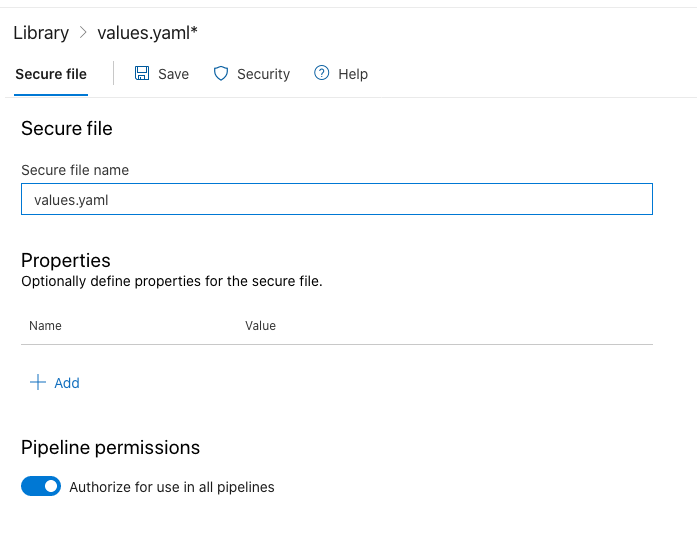
Is there any way to enable "Authorize for use in all pipelines" for any file uploaded via above POST method? is there any additional parameter or something?
 bondarewicz
on 2 Mar 2020
bondarewicz
on 2 Mar 2020
additionally how do can you download the previously uploaded file?
GET https://dev.azure.com/{organization}/{project}/_apis/distributedtask/securefiles/{fileGuid}?download=true does not seem to work...
bondarewicz
on 2 Mar 2020
@madhurig or anyone who might came across this,
Is there any way to enable "Authorize for use in all pipelines" for any file uploaded via abovePOSTmethod? is there any additional parameter or something?
hey @bondarewicz, did u find the solution?
 fortunacio
on 13 Mar 2020
fortunacio
on 13 Mar 2020
Hi, has anyone in this thread used the API mentioned by Madhurig? I am talking about
POST
https://dev.azure.com/{organization}/{project}/_apis/distributedtask/securefiles?api-version=5.0-preview.1&name={fileName}
Content-Type=application/octet-stream
 wahmed23
on 27 Mar 2020
wahmed23
on 27 Mar 2020
@wahmed23 Yes, i was able to test it out:
test.ps1:
(
    [Parameter(Mandatory=$true)] [string] $PAT,
    [Parameter(Mandatory=$True)][ValidateNotNullOrEmpty()]$AzureDevOpsOrg,
    [Parameter(Mandatory=$True)][ValidateNotNullOrEmpty()]$AzureDevOpsProjectID,
    [Parameter(Mandatory=$true)] [string] $SecureNameFile2Upload,
    [Parameter(Mandatory=$true)] [string] $SecureNameFilePath2Upload
)

try{
    $base64AuthInfo=[Convert]::ToBase64String([Text.Encoding]::ASCII.GetBytes(("{0}:{1}" -f "",$PAT)))
    $uploadSecureFileURI="https://dev.azure.com/$AzureDevOpsOrg/$AzureDevOpsProjectID/_apis/distributedtask/securefiles?api-version=5.0-preview.1&name=$SecureNameFile2Upload"
    $headers = @{
        Authorization=("Basic {0}" -f $base64AuthInfo)
    }
    Invoke-RestMethod -Uri $uploadSecureFileURI -Method Post -ContentType "application/octet-stream" -Headers $headers -InFile "$SecureNameFilePath2Upload"
}
catch
{
    write-host -f Red "Error upload client certificate file [$SecureNameFilePath2Upload] to AzureDevOps secure file!" $_.Exception.Message
    throw "Error occors -> $_.Exception.Message"
}
 GeromeRen
on 11 May 2020
GeromeRen
on 11 May 2020
_This comment was originally me having problems with the rest-call. As I solved the problem, I changed it to instead include my solution for future reference_
I got it to work! I originally used curl for the call, but as I had syntax issues I switched to powershell.
Below is a step to upload a secure file directly from an azure pipeline. You will have to utilize the accesstoken available for the pipeline.
NOTE: The build service must have the role of Creator for secure files to be able to upload them from a pipeline.
        ### The variables secureFileFolder & secureFileName references variables I have defined higher up in the pipeline.
        - task: PowerShell@2
          enabled: true
          displayName: 'Upload Secure File'
          inputs:
            targetType: 'inline'
            script: |
              $header = @{ Authorization = "Bearer $env:ACCESSTOKEN" }
              $infile = "$(secureFileFolder)/$(secureFileName)"
              $organization = (Split-Path $(System.CollectionUri) -leaf)
              $uri = "https://dev.azure.com/$organization/$(System.TeamProject)/_apis/distributedtask/securefiles?api-version=5.0-preview.1&name=$(secureFileName)"

              Invoke-RestMethod -Uri $uri -Method Post -ContentType "application/octet-stream" -Headers $header -InFile "$infile"
          env:
            ACCESSTOKEN: $(System.AccessToken)
 CptSandblaster
on 8 Jul 2020
CptSandblaster
on 8 Jul 2020
For secure file delete use PUT API https://dev.azure.com/{organization}/{project}/_apis/distributedtask/securefiles/{secureFileID}?api-version=5.0-preview.1
And for secure file upload use POST API https://dev.azure.com/{organization}/{project}/_apis/distributedtask/securefiles?name={fileName}&api-version=5.0-preview.1
Content-Type=application/octet-stream
 Gupta-Amrit
on 21 Jul 2020
Gupta-Amrit
on 21 Jul 2020
I'm going to close this issue since we are not planning on adding a task for this and I believe all questions have been answered. If there are any further issues with these APIs, please open a ticket at https://developercommunity.visualstudio.com/spaces/21/index.html or open a docs bug at https://github.com/MicrosoftDocs/azure-devops-docs/issues/new
 damccorm
on 25 Nov 2020
damccorm
on 25 Nov 2020
Any ideas why this fails:
$ curl --trace-ascii /tmp/dump.txt  -v -H 'Content-Length: 1634' -L -X POST -H 'Content-Type: application/octet-stream' --data-binary keys.tgz 'https://dev.azure.com/YY/XX/_apis/distributedtask/securefiles?name=foo_test.tgz&api-version=5.0-preview.1'
Warning: -v, --verbose overrides an earlier trace/verbose option
* About to connect() to dev.azure.com port 443 (#0)
*   Trying 13.107.42.20...
* Connected to dev.azure.com (13.107.42.20) port 443 (#0)
* Initializing NSS with certpath: sql:/etc/pki/nssdb
*   CAfile: /etc/pki/tls/certs/ca-bundle.crt
  CApath: none
* SSL connection using TLS_ECDHE_RSA_WITH_AES_256_GCM_SHA384
* Server certificate:
*       subject: CN=dev.azure.com
*       start date: Nov 18 13:11:54 2020 GMT
*       expire date: Nov 18 13:11:54 2021 GMT
*       common name: dev.azure.com
*       issuer: CN=Microsoft RSA TLS CA 01,O=Microsoft Corporation,C=US
> POST /YY/XX/_apis/distributedtask/securefiles?name=foo_test.tgz&api-version=5.0-preview.1 HTTP/1.1
> User-Agent: curl/7.29.0
> Host: dev.azure.com
> Accept: */*
> Content-Length: 1634
> Content-Type: application/octet-stream
>
* upload completely sent off: 45 out of 45 bytes
* SSL read: errno -5961 (PR_CONNECT_RESET_ERROR)
* TCP connection reset by peer
* Closing connection 0
curl: (56) TCP connection reset by peer
 adrianblakey
on 8 Dec 2020
adrianblakey
on 8 Dec 2020
Related issues
 timfish
·
3Comments
timfish
·
3Comments
 MikahB
·
3Comments
MikahB
·
3Comments
 MichaelWhiteCodingForFun
·
3Comments
MichaelWhiteCodingForFun
·
3Comments
 richard-ob
·
3Comments
richard-ob
·
3Comments
 MarkIannucci
·
3Comments
MarkIannucci
·
3Comments
Most helpful comment
@wahmed23 Yes, i was able to test it out:
test.ps1: